
1. Úvod
This manual provides detailed instructions for the Delton 10X Bluetooth Computer Headset. This wireless headset is designed for clear communication and extended use, featuring Bluetooth 5.0 connectivity, a noise-canceling microphone, and a USB dongle for versatile compatibility. Please read this manual thoroughly to ensure proper setup and operation of your device.

Obrázek 1.1: The Delton 10X Bluetooth Computer Headset and its accompanying USB dongle. This image displays the headset's over-the-head design, single ear cup, adjustable microphone boom, and the compact USB dongle.
2. Obsah balení
Ověřte, zda jsou v balení přítomny všechny položky:
- Delton 10X Bluetooth Headset
- USB dongle
- Nabíjecí kabel
- Uživatelská příručka (tento dokument)
3. Vlastnosti produktu
The Delton 10X headset offers a range of features designed for optimal performance and user comfort:
- Připojení Bluetooth 5.0: Ensures stable and efficient wireless connection up to 30 feet.
- Mikrofon s potlačením šumu: Reduces background noise for clear voice transmission.
- Otočný mikrofon o 270°: Allows for flexible positioning and use on either ear.
- Prodloužená životnost baterie: Up to 15 hours talk time, 18 hours play time, and 160 hours standby time.
- Rychlé nabíjení: Plně se nabije přibližně za 1.5 hodiny.
- Adjustable Headband & Plush Ear Cushion: Poskytuje pohodlí při delším nošení.
- Ear Gripper T-Pad: Ensures secure fit during movement.
- Univerzální kompatibilita: Works with smartphones, tablets, desktop PCs, laptops, and supports iOS and Windows platforms.

Obrázek 3.1: A visual summary of the Delton 10X headset's key features, including 15 hours talk time, Bluetooth 5.0, adjustable headband, high fidelity sound, noise-canceling mic, rotatable mic, long battery backup, voice assistant support, and plush cushions.
3.1 Výkon baterie
The Delton 10X headset is equipped with a long-lasting battery to support your daily communication needs.
- Doba hovoru: Až 15 hodin
- Doba hraní: Až 18 hodin
- Pohotovostní doba: Až 160 hodin
- Doba nabíjení: Přibližně 1.5 hodiny
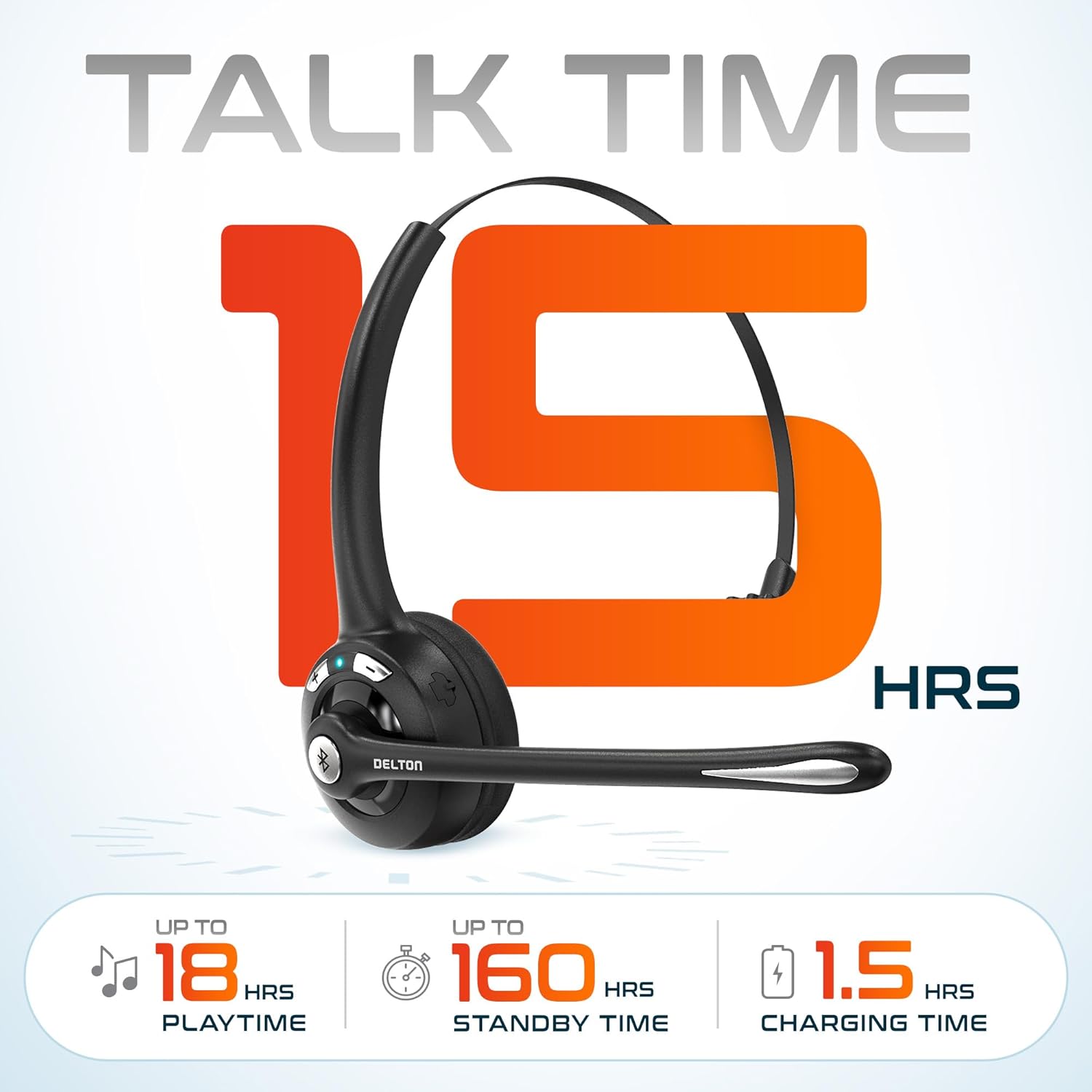
Obrázek 3.2: An infographic detailing the battery performance of the Delton 10X headset, highlighting 15 hours of talk time, 18 hours of play time, 160 hours of standby time, and a 1.5-hour charging time.
3.2 Pokročilá technologie
The headset incorporates an advanced chipset for seamless connectivity and improved power efficiency.

Obrázek 3.3: Detailní záběr view of the headset's internal components, illustrating the advanced Bluetooth 5.0 chipset. This image emphasizes the technology that reduces outside noise, improves power efficiency, and provides seamless connectivity up to 30 feet.
4. Nastavení
4.1 Nabíjení headsetu
- Připojte dodaný nabíjecí kabel k nabíjecímu portu na sluchátkách.
- Plug the other end of the cable into a USB power source (e.g., computer USB port, wall adapter).
- LED indikátor bude zobrazovat stav nabíjení. Plné nabití trvá přibližně 1.5 hodiny.
4.2 Zapnutí/vypnutí
- Zapnutí: Press and hold the Multi-Function Button (MFB) until the LED indicator flashes blue.
- Vypnutí: Press and hold the MFB until the LED indicator flashes red and then turns off.
4.3 Bluetooth Pairing (Direct)
To connect the headset directly to a Bluetooth-enabled device (e.g., smartphone, tablet):
- Zkontrolujte, zda je náhlavní souprava vypnutá.
- Press and hold the MFB for approximately 5-7 seconds until the LED indicator flashes red and blue alternately, indicating pairing mode.
- Na svém zařízení povolte Bluetooth a vyhledejte dostupná zařízení.
- Select "Delton 10X" from the list of found devices.
- Po připojení bude LED indikátor na headsetu pomalu modře blikat.
4.4 USB Dongle Connection
For computers without native Bluetooth or for a more stable connection, use the included USB dongle. The dongle provides instant auto-pairing.
- Plug the USB dongle into an available USB port on your computer. The dongle's LED will blink.
- Power on your Delton 10X headset.
- The headset and dongle will automatically pair. The dongle's LED will turn solid blue, and the headset's LED will flash blue slowly once connected.
- Ensure the Delton 10X is selected as the audio input and output device in your computer's sound settings.

Obrázek 4.1: A visual representation of the USB dongle being inserted into a laptop's USB port. The image highlights the 'Auto-Pair USB Dongle' feature and 'Plug & Play' functionality, indicating no driver installation is required.
4.5 Kompatibilita
The Delton 10X headset is designed for broad compatibility:
- Zařízení: Smartphones, Tablets, Desktop PCs, Laptops.
- Operační systémy: iOS, Windows, Linux, Mac.
- Aplikace: MS Teams, Zoom, Google Meet, Slack, Skype.

Obrázek 4.2: Ilustrační výstavaasing the wide compatibility of the Delton 10X headset with various devices, including phones, tablets, iOS & Windows laptops, and desktop computers/iMacs. This emphasizes its versatility across different platforms.
5. Návod k obsluze
5.1 Ovládání náhlavní soupravy
Sluchátka se vyznačují intuitivním ovládáním pro správu hovorů a přehrávání zvuku:
- Multifunkční tlačítko (MFB):
- Press once to Answer/End Call.
- Press and hold for 2 seconds to Redial.
- Jedním stisknutím přehrajete/pozastavíte hudbu.
- Tlačítko pro zvýšení hlasitosti (+):
- Jedním stisknutím zvýšíte hlasitost.
- Press and hold for 2 seconds for Next Track.
- Tlačítko pro snížení hlasitosti (-):
- Jedním stisknutím snížíte hlasitost.
- Press and hold for 2 seconds for Previous Track.

Obrázek 5.1: A detailed diagram of the Delton 10X headset's controls, showing the Volume Down (-), Volume Up (+), and Multi-Function Button (MFB) with their respective functions for call management, track control, and power.
5.2 Použití mikrofonu
The microphone is designed for clear voice pickup and can be adjusted for optimal positioning.
- Nastavení mikrofonu: The microphone boom can rotate 270 degrees. Position the microphone approximately 1-2 inches from your mouth for best voice clarity.
- Potlačení hluku: The integrated noise-canceling technology helps filter out ambient sounds, ensuring your voice is heard clearly by others.
5.3 Nošení headsetu
The Delton 10X headset is designed for comfort and can be worn on either ear.
- Nastavitelná čelenka: Extend or retract the headband to fit your head size comfortably.
- Ear Gripper T-Pad: This feature helps secure the headset in place.
- Left or Right Ear: Rotate the microphone boom to position the ear cup on your preferred ear.

Obrázek 5.2: An image illustrating the comfort and adjustability features of the Delton 10X headset. It shows the adjustable headband, the Ear Gripper T-Pad, the plush ear cushion, and the 270° rotation of the flexible microphone, demonstrating its usability on both left and right ears.
6. Údržba
Správná údržba zajistí dlouhou životnost a optimální výkon vaší sluchátkové soupravy.
- Čištění: K čištění sluchátek používejte měkký, suchý hadřík. U náušníků použijte mírněamp Lze použít hadřík, ale před použitím se ujistěte, že je zcela suchý. Nepoužívejte agresivní chemikálie ani abrazivní materiály.
- Skladování: Sluchátka skladujte na chladném a suchém místě mimo dosah přímého slunečního záření a extrémních teplot.
- Péče o baterie: Chcete-li prodloužit životnost baterie, vyvarujte se častého úplného vybíjení sluchátek. Pravidelně je nabíjejte, i když je delší dobu nepoužíváte.
- Vyhněte se vodě: Sluchátka nejsou voděodolná. Zabraňte kontaktu s tekutinami.
7. Řešení problémů
If you encounter issues with your Delton 10X headset, refer to the following common solutions:
| Problém | Možná příčina | Řešení |
|---|---|---|
| Sluchátka se nezapínají. | Nízká nebo žádná baterie. | Nabíjejte sluchátka alespoň 1.5 hodiny. |
| Nelze spárovat se zařízením. | Sluchátka nejsou v režimu párování; Bluetooth na zařízení vypnutý; zařízení je příliš daleko. | Ensure headset is in pairing mode (flashing red/blue). Turn on device Bluetooth. Move headset closer to device (within 30 feet). Try using the USB dongle. |
| Poor microphone audio quality (others cannot hear me clearly). | Microphone position; computer audio settings; environmental noise. | Adjust the microphone closer to your mouth (1-2 inches). Check your computer's sound settings to ensure the Delton 10X is selected as the input device and microphone volume is adequate. Ensure the noise-canceling mic is facing the correct direction. |
| No sound or low sound from headset. | Headset volume too low; device volume too low; incorrect audio output device. | Increase headset volume using the '+' button. Increase volume on your connected device. Verify that the Delton 10X is selected as the audio output device in your computer's sound settings. |
| Spojení se často přerušuje. | Mimo dosah; rušení. | Ensure you are within 30 feet of the connected device or USB dongle. Minimize obstacles between the headset and device. |
8. Specifikace
Detailed technical specifications for the Delton 10X Bluetooth Computer Headset:
| Funkce | Specifikace |
|---|---|
| Název modelu | 10X Monoaural Headset + Dongle |
| Technologie připojení | Bezdrátové připojení (Bluetooth 5.0) |
| Dosah Bluetooth | Až 30 stop |
| Kontrola hluku | Sound Isolation (Noise-Canceling Mic) |
| Frekvenční odezva | 20 Hz - 20,000 XNUMX Hz |
| Výdrž baterie (doba hovoru) | Až 15 hodin |
| Výdrž baterie (doba přehrávání) | Až 18 hodin |
| Životnost baterie (pohotovostní režim) | Až 160 hodin |
| Doba nabíjení | 1.5 hodiny |
| Jack pro sluchátka | USB (pro nabíjení) |
| Typ ovládání | Call Control, Volume Control, Track Control |
| Hmotnost položky | 1.5 unce |
| Rozměry produktu | 6 x 6 x 2 palce |
| Materiál | Plast |
| Umístění uší | Over Ear (Monoaural) |
9. Záruka a podpora
For warranty information or technical assistance, please contact Delton customer support. Details can typically be found on the official Delton website or through your purchase documentation. Please retain your proof of purchase for warranty claims.