
Tengsen M1P
Uživatelská příručka k MP3 přehrávači Tengsen M1P
Zavedení
This manual provides comprehensive instructions for the operation and maintenance of your Tengsen M1P MP3 Player. Please read this manual carefully before using the device to ensure proper function and longevity. This device combines a portable music player with a touch screen interface, Bluetooth connectivity, and various multimedia functions.
Obsah balení
Ověřte prosím, zda jsou ve vašem balení obsaženy všechny níže uvedené položky:
- Tengsen M1P MP3 Player
- Micro USB nabíjecí kabel
- Kabelová sluchátka
- Transparent Protective Case
- Uživatelská příručka (tento dokument)

Image: The Tengsen M1P MP3 Player displayed with its standard accessories, including wired earphones, a transparent protective case, and two USB cables, highlighting its 4.0-inch full screen and Bluetooth 5.0 capabilities.
Zařízení skončiloview
Přední View

Obrázek: Jasný view of the Tengsen M1P MP3 Player's 4.0-inch touch screen, displaying its main menu with icons for Music, E-book, Video, Radio, Picture, Stopwatch, Record, Calculator, Calendar, Theme, Folder, and Settings.
Boční a spodní strana Views

Image: A close-up of the bottom of the Tengsen M1P MP3 Player, showcasing the built-in speaker grille, Micro USB charging port, and 3.5mm headphone jack, emphasizing its integrated audio capabilities.
- 4.0palcová plně dotyková obrazovka: Primary interface for navigation and control.
- Vypínač: Nachází se na boku, slouží k zapnutí/vypnutí zařízení a zamykání/odemykání obrazovky.
- Tlačítka hlasitosti: Nachází se na boku, slouží k nastavení hlasitosti zvuku.
- Micro USB port: Pro nabíjení a přenos dat.
- 3.5mm konektor pro sluchátka: For connecting wired earphones.
- Vestavěný reproduktor: Pro přehrávání zvuku bez sluchátek.
- Slot pro microSD kartu: Pro rozšíření úložné kapacity (podporuje až 128 GB).
Nastavení
Nabíjení zařízení
Before first use, fully charge your MP3 player. Connect the provided Micro USB cable to the player's Micro USB port and the other end to a USB power adapter (not included) or a computer's USB port. The battery indicator on the screen will show charging status. A full charge typically takes approximately 2-3 hours.

Image: The Tengsen M1P MP3 Player with a visual representation of its 1400mAh battery, indicating extended usage times of 8+ hours for video playback and 20+ hours for music playback with wired earphones.
Zapnutí/vypnutí
Zapnutí: Press and hold the Power button on the side until the screen lights up.
Vypnutí: Stiskněte a podržte tlačítko napájení a poté na obrazovce vyberte možnost „Vypnout“.
Vložení karty MicroSD
Locate the MicroSD card slot on the side of the device. Gently insert a MicroSD card (up to 128GB, not included) into the slot until it clicks into place. Ensure the card is inserted correctly to avoid damage. To remove, gently push the card in until it springs out.
Návod k obsluze
Základní navigace
The device features a 4.0-inch full touch screen. Swipe left/right or up/down to navigate through menus and applications. Tap an icon to open an application or select an option. Use the back arrow icon on the top left of the screen to return to the previous menu.

Image: A hand demonstrating interaction with the 4.0-inch full touch screen of the Tengsen M1P MP3 Player, showing a video playing, emphasizing its smartphone-like ease of operation and durable metal body.
Přehrávání hudby
Tap the "Music" icon on the home screen. You can browse music by Artist, Album, Songs, or Playlists. The player supports various audio formats including MP3, WMA, OGG, APE, and FLAC.
Vytváření seznamů skladeb: While playing a song, you can add it to a playlist. Refer to the on-screen prompts for detailed steps. You can also organize music into folders via a computer and access them through the "Folder" application on the device.
přehrávání videa
Tap the "Video" icon. The player supports HD 1080P video playback and various formats such as AVI, RMVB, MOV, MPEG, VOB, MKV, H.264, XVID, MPEG2, and MP4.
For best performance, ensure video files are optimized for mobile playback. The 4-inch screen provides a comfortable viewzkušenosti.

Image: The Tengsen M1P MP3 Player showcasing its ability to play HD 1080P videos, with a clear image of a video playing on its screen and a list of supported video formats below.
Bluetooth připojení
Go to "Settings" and select "Bluetooth". Turn Bluetooth ON. The device will scan for available Bluetooth devices. Select your desired device (e.g., headphones, speaker) from the list to pair. Once paired, you can stream audio wirelessly.
The device features upgraded Bluetooth 5.0 for a more stable and efficient connection with your Bluetooth headsets and speakers.
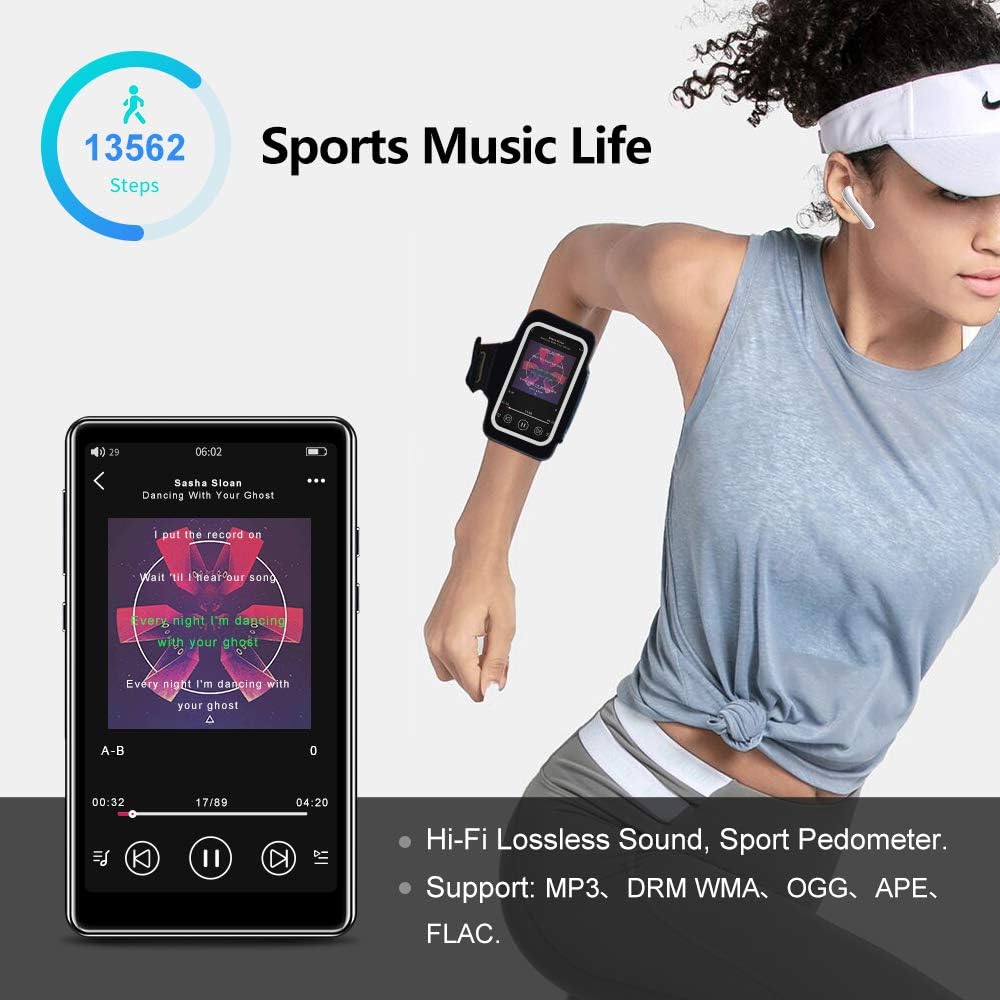
Image: The Tengsen M1P MP3 Player displaying music playback, with text indicating "UPGRADE BLUETOOTH 5.0" and highlighting its stable connection capabilities with Bluetooth headsets and speakers, which are also shown.
FM rádio
Connect wired earphones to the 3.5mm headphone jack; they act as the antenna. Tap the "Radio" icon. You can auto-scan for stations or manually tune to your preferred frequencies.
Hlasový záznamník
Tap the "Record" icon to access the voice recorder function. You can start, pause, and save recordings. The built-in microphone is suitable for general voice recording and note-taking.
E-book Reader
Tap the "E-book" icon. The player supports various text formats. You can browse and read e-books stored on the device or MicroSD card. While basic, it provides a convenient way to read on the go.
Pedometer (Sports Mode)
Tap the "Pedometer" or "Sports" icon. This feature tracks your steps, distance, and calories burned during physical activity. Ensure the device is carried securely, for example, in an armband, for accurate tracking.
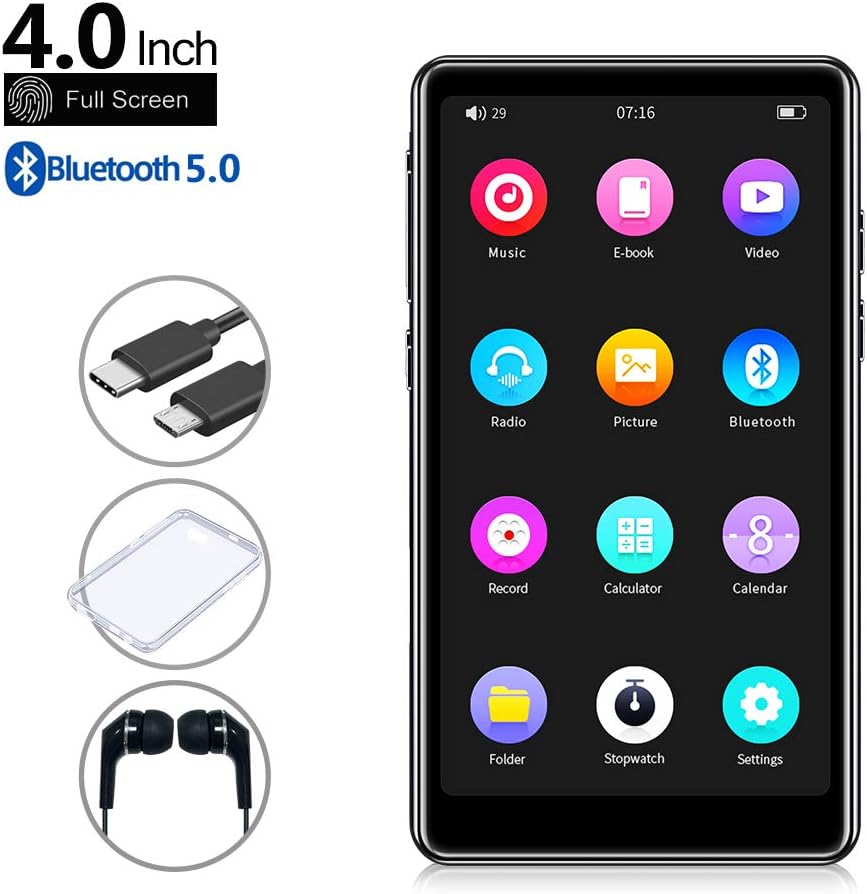
Image: The Tengsen M1P MP3 Player displaying music playback with a pedometer icon and step count, illustrating its "Sports Music Life" feature. The image also highlights Hi-Fi Lossless Sound and supported audio formats like MP3, WMA, OGG, APE, and FLAC.
Nastavení
Tap the "Settings" icon to customize various device parameters, including display brightness, date and time, language, system information, and more. Explore the settings menu to personalize your experience.
Údržba a péče
- Keep the device dry. Avoid exposure to moisture or liquids, as this can cause damage to internal components.
- Clean the screen and body with a soft, dry, lint-free cloth. Do not use abrasive cleaners, alcohol, or chemical solvents.
- Avoid extreme temperatures. Do not expose the device to direct sunlight for prolonged periods or to very cold environments.
- Protect the screen from scratches. Use the provided transparent protective case and consider a screen protector for added durability.
- Regularly back up important data (music, videos, documents) from your device to a computer to prevent data loss.
- Do not attempt to disassemble or repair the device yourself, as this will void the warranty and may cause further damage.
Odstraňování problémů
If you encounter any issues with your Tengsen M1P MP3 Player, please refer to the following common problems and solutions:
| Problém | Možné řešení |
|---|---|
| Zařízení se nezapne. | Ensure the battery is charged. Connect to a power source and try again. If unresponsive, press and hold the power button for 10-15 seconds for a hard reset. |
| Nelze se připojit k zařízení Bluetooth. | Ensure Bluetooth is enabled on both devices. Make sure the devices are within range (typically 10 meters). Try unpairing and re-pairing the devices. |
| No sound from speaker/earphones. | Check the volume level on the device. Ensure earphones are properly plugged into the 3.5mm jack. If using Bluetooth, check the connection status and volume on the connected device. |
| Karta MicroSD nebyla rozpoznána. | Ensure the card is inserted correctly and fully. Try reinserting the card. If it's a new card or has been used in other devices, try formatting the card (this will erase all data) on a computer or through the device's settings if available. |
| Obrazovka nereaguje nebo zamrzá. | Perform a soft reset by pressing and holding the power button until the device restarts. If the issue persists, ensure the screen is clean and free of debris. |
Specifikace
| Funkce | Detail |
|---|---|
| Model | Tengsen M1P |
| Velikost obrazovky | 4.0 palců |
| Technologie displeje | LCD |
| Interní úložiště | 16 GB |
| Rozšiřitelné úložiště | Až 128 GB přes kartu MicroSD |
| Verze Bluetooth | 5.0 |
| Typ baterie | Lithium-polymer (1400mAh built-in) |
| Podporované zvukové formáty | MP3, WMA, OGG, APE, FLAC |
| Podporované formáty videa | AVI, RMVB, MOV, MPEG, VOB, MKV, H.264, XVID, MPEG2, MP4 (Supports 1080P) |
| Vestavěné komponenty | Speaker, Voice Recorder, FM Radio, Pedometer |
| UPC | 729993998032 |
Záruka a podpora
For warranty information and technical support, please refer to the warranty card included with your purchase or visit the official Tengsen website. Keep your purchase receipt as proof of purchase for any warranty claims. For further assistance, please contact Tengsen customer service through the contact details provided on their official support channels.
Ask a question about this manual
Ask about setup, troubleshooting, compatibility, parts, safety, or missing instructions. Manuals+ will review the question and use this page’s manual context to help answer it.