
1. Úvod
The Logitech K295OW Silent Wireless Keyboard is designed for quiet and efficient typing. Featuring Logitech's exclusive SilentTouch technology, it reduces typing noise by over 90% compared to traditional keyboards, while maintaining a familiar typing feel. This full-size keyboard includes a numeric keypad and 8 convenient shortcut keys, enhancing productivity.
Its durable, spill-resistant design provides protection against accidental liquid spills, and the robust key switches ensure long-lasting performance. The keyboard connects wirelessly via a Unifying USB receiver, offering a stable 2.4GHz connection with a range of up to 10 meters. Enjoy extended use with a battery life of up to 24 months.
This keyboard is compatible with Windows 7 or later and Chrome OS.
Video: Konecview of the Logitech K295OW Silent Wireless Keyboard features, including SilentTouch technology and full-size layout.
2. Obsah balení
Ověřte, zda jsou v balení přítomny všechny položky:
- Logitech K295OW Silent Wireless Keyboard
- Logitech Unifying USB Receiver
- 2 baterie AAA (předinstalované nebo dodávané samostatně)
- Uživatelská dokumentace
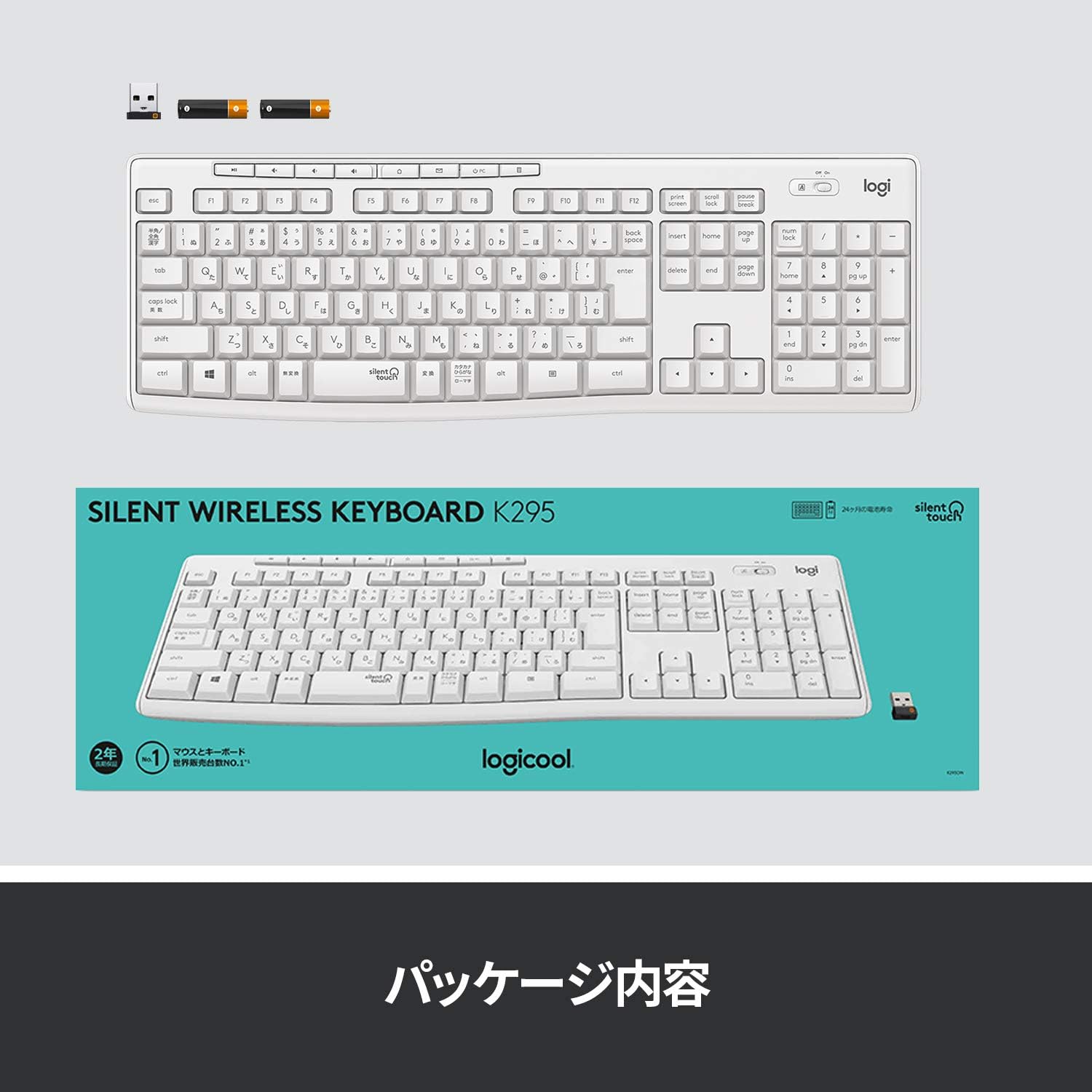
Image: The Logitech K295OW keyboard and its Unifying USB receiver, illustrating the typical package contents.
3. Nastavení
3.1. Instalace baterií
- Vyhledejte přihrádku na baterie na spodní straně klávesnice.
- Otevřete kryt bateriového prostoru.
- Vložte dvě baterie typu AAA a dbejte na správnou polaritu (+/-).
- Zavřete kryt prostoru pro baterie.
3.2. Connecting the Unifying USB Receiver
- Zapojte USB přijímač Logitech Unifying do volného USB portu v počítači.
- Turn on the keyboard using the On/Off switch located above the numeric keypad.
- Váš počítač by měl automaticky detekovat a nainstalovat potřebné ovladače. Může to chvíli trvat.
- Once installed, the keyboard is ready for use.

Image: Close-up of the Logitech K295OW keyboard showing the Unifying receiver and the power switch, indicating wireless connectivity.
4. Návod k obsluze
4.1. Základy psaní
The K295OW keyboard features a standard full-size Japanese layout. Simply begin typing as you would with any conventional keyboard.
4.2. Klávesové zkratky
The keyboard includes 8 dedicated shortcut keys for quick access to common functions. These keys are located above the function keys (F1-F12) and provide functions such as media control, volume adjustment, and application shortcuts.
- Ovládání médií: Přehrát/Pozastavit, Zastavit, Předchozí skladba, Další skladba.
- Ovládání hlasitosti: Ztlumit, Snížit hlasitost, Zvýšit hlasitost.
- Application Shortcut: Home (browser).

Image: The full-size layout of the Logitech K295OW keyboard, highlighting the numeric keypad and the row of 8 shortcut keys.
4.3. Nastavitelné sklopné nohy
For improved typing comfort, the keyboard is equipped with adjustable tilt legs on the underside. These legs allow you to set the keyboard at an 8-degree angle.
- Flip the keyboard over to access the underside.
- Gently pull out the two tilt legs until they click into place.
- To return to a flat position, push the legs back in.
5. Údržba
5.1. Čištění
The K295OW keyboard features a spill-resistant design. In case of accidental spills, gently wipe the surface with a damp cloth. Avoid submerging the keyboard in water or using harsh chemical cleaners.
5.2. Výměna baterie
The keyboard has a battery life of up to 24 months. When the battery indicator light (if present) signals low power, or if the keyboard becomes unresponsive, replace the AAA batteries.
- Vypněte klávesnici pomocí vypínače.
- Otevřete přihrádku na baterie na spodní straně.
- Remove the old batteries and insert new AAA batteries, observing polarity.
- Close the compartment and turn the keyboard back on.
6. Řešení problémů
6.1. Klávesnice nereaguje
- Zkontrolujte napájení: Ensure the keyboard is turned on and the batteries are correctly installed and charged. Replace batteries if necessary.
- Zkontrolujte přijímač: Make sure the Unifying USB receiver is securely plugged into a working USB port on your computer. Try a different USB port.
- Vzdálenost: Ensure the keyboard is within the 10-meter operating range of the receiver and there are no large metallic objects obstructing the signal.
- Opravit: If issues persist, you may need to re-pair the keyboard with the Unifying receiver using the Logitech Unifying Software (available for download from the Logitech webstránky).
6.2. Lag or Intermittent Connection
- Rušení: Move the keyboard and receiver away from other wireless devices (e.g., Wi-Fi routers, cordless phones) that might cause interference.
- USB port: Try plugging the Unifying receiver into a different USB port, preferably one directly on the computer rather than a USB hub.
7. Specifikace
| Funkce | Popis |
|---|---|
| Značka | Logitech |
| Číslo modelu | K295OW |
| Konektivita | 2.4GHz Wireless (Unifying USB Receiver) |
| Bezdrátové Dosah | Až 10 metrů (33 stop) |
| Typ klávesnice | Membrane, Full-size with Numeric Keypad |
| Klíčové spínače | Durable Membrane |
| Redukce šumu | SilentTouch Technology (90% noise reduction) |
| Speciální funkce | Spill-resistant design, 8 Shortcut Keys, Adjustable Tilt Legs (8-degree) |
| Kompatibilní OS | Windows 7 or later, Chrome OS |
| Zdroj napájení | 2 x AAA baterie |
| Životnost baterie | Až 24 měsíců |
| Rozměry (D x Š x V) | 44.1 cm x 14.9 cm x 1.8 cm (17.36 palce x 5.87 palce x 0.71 palce) |
| Hmotnost | 498 gramů (1.1 lb) |
| Barva | Nebílá |
| Rozložení klávesnice | Japanese QWERTY (116 keys) |
8. Záruka a podpora
8.1. Informace o záruce
This Logitech K295OW Silent Wireless Keyboard comes with a 2-year manufacturer's warranty. Please retain your proof of purchase for warranty claims. The warranty covers defects in materials and workmanship under normal use.

Image: A user typing on the Logitech K295OW keyboard, emphasizing comfort and the included 2-year warranty.
8.2. Zákaznická podpora
Pro technickou pomoc, řešení problémů nebo dotazy ohledně záruky navštivte oficiální podporu Logitech. website or contact their customer service. You can find contact information and support resources on the Logitech webmísto.
Podpora Logitech Webmísto: www.logitech.com/support