
1. Úvod
The Walfront HT107D Digital LCD Socket Tester is an advanced electrical testing device designed for quick and accurate detection of correct wiring connections in electrical sockets. It features a clear LCD display for voltage and frequency readings, and multiple LED indicators to identify various wiring faults. This manual provides essential information for safe and effective use of the device.
2. Bezpečnostní informace
Před použitím tohoto zařízení si prosím přečtěte a pochopte všechna bezpečnostní varování a provozní pokyny. Nedodržení těchto pokynů může vést k úrazu elektrickým proudem, požáru nebo vážnému zranění.
- Před použitím se vždy ujistěte, že je zařízení v dobrém provozním stavu.
- Do not use the tester if it appears damaged or if the casing je otevřené.
- Do not use the tester in wet conditions or with wet hands.
- This device is designed for testing standard electrical sockets within its specified voltage range (90-250V). Do not use it for voltagmimo tento rozsah.
- The RCD test function should only be performed on circuits protected by a Residual Current Device (RCD) or Ground Fault Circuit Interrupter (GFCI). This test will trip the RCD/GFCI, cutting power to the circuit.
- Always consult a qualified electrician if you detect any wiring faults or are unsure about electrical safety.
- Uchovávejte mimo dosah dětí.
3. Konec produktuview
The Walfront HT107D Socket Tester is a compact and portable tool for electrical safety.
Klíčové vlastnosti:
- Advanced socket tester for quick detection of correct wiring.
- Integrated RCD/GFCI test button for safety system verification.
- 7 LED indicator modes to clearly display wiring status.
- LCD display with backlight for frequency, phase voltage (L-N), and leakage voltage (N-E) readings.
- Compact, lightweight, and easy-to-use design.
Komponenty:
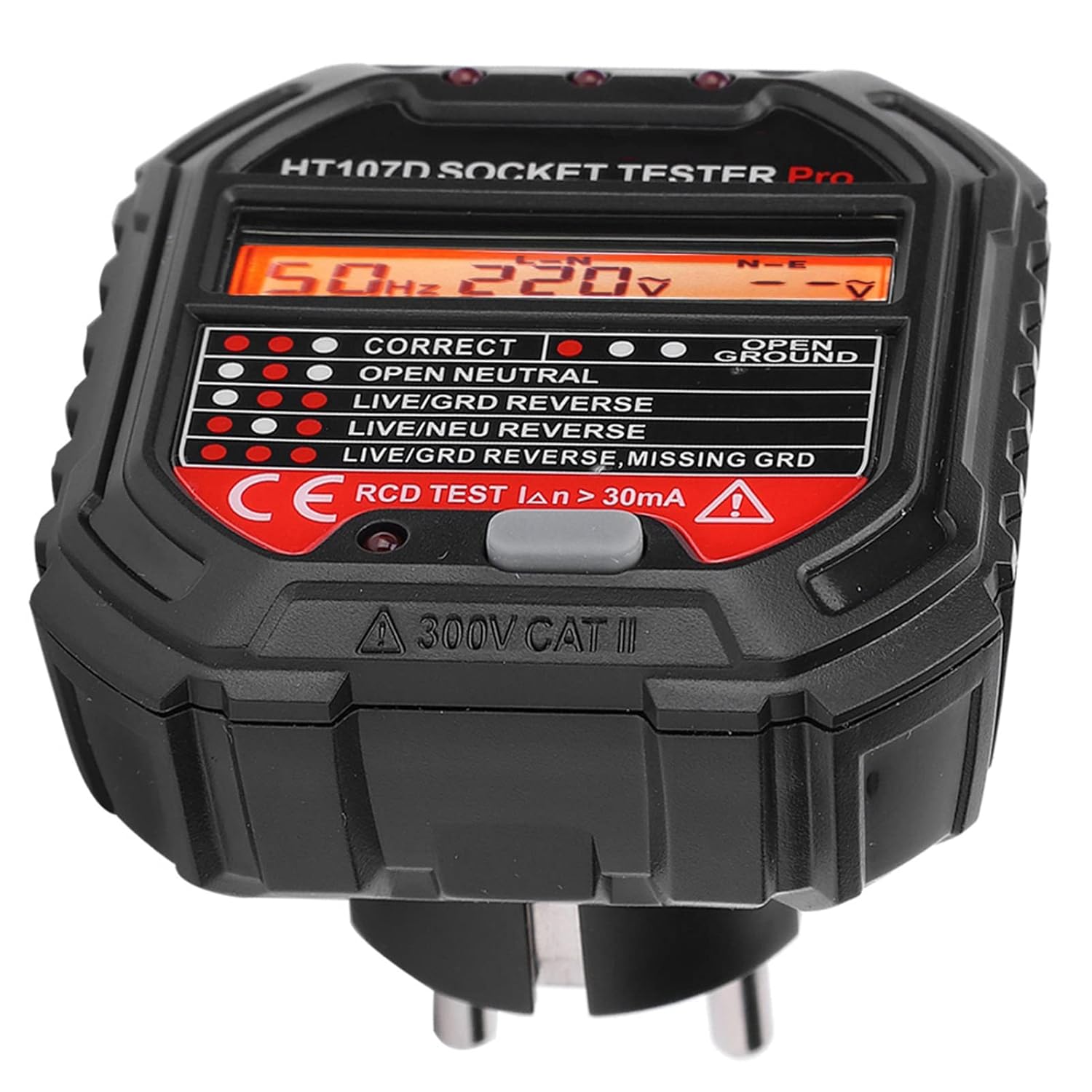
- LCD displej: Ukazuje svtage (L-N, N-E) and frequency.
- LED indikátory: Three lights at the top that illuminate in various patterns to indicate wiring status.
- Testovací tlačítko proudového chrániče: Red button used to test Residual Current Devices.
- EU zástrčka: For insertion into standard European sockets.
4. Nastavení
The Walfront HT107D Socket Tester requires no complex setup. It is ready for use directly out of the packaging.
- Ensure the socket tester is clean and free from any visible damage.
- Locate the electrical socket you wish to test.
- Carefully insert the Walfront HT107D Socket Tester into the socket.

5. Návod k obsluze
Once the Walfront HT107D Socket Tester is plugged into a live socket, it will automatically begin testing and display the results.
- Počáteční test: Plug the tester into the socket. The LCD screen will light up, displaying the frequency (Hz), phase voltage (L-N), and leakage voltage (N-E). The LED indicators will also illuminate according to the detected wiring status.
- Čtení LCD displeje:
- Hz: Indicates the frequency of the AC power supply.
- LN: Zobrazuje objemtagmezi fázovým a nulovým vodičem.
- SV: Zobrazuje objemtage between the Neutral and Earth (Ground) wires.
- Interpreting LED Indicators: Refer to Section 6, "Understanding the Indicators," for a detailed explanation of the LED patterns and their corresponding wiring conditions.

6. Understanding the Indicators
The Walfront HT107D Socket Tester uses three LED indicator lights to quickly communicate the wiring status of the socket. Observe the pattern of the lights and compare it to the table below.

| Vzor indikátoru | Stav elektroinstalace |
|---|---|
| ● ● ● (Left, Middle, Right ON) | Správné připojení |
| ● ● ○ (Left, Middle ON, Right OFF) | Otevřená půda (Unconnected ground wire) |
| ● ○ ● (Left, Right ON, Middle OFF) | Otevřít Neutrální (Unconnected neutral wire) |
| ○ ● ● (Middle, Right ON, Left OFF) | Otevřete Živě (Unconnected live wire) |
| ● ○ ○ (Left ON, Middle, Right OFF) | Reverzace živého/uzemněného signálu (Live wire and ground wire reversed) |
| ○ ● ○ (Middle ON, Left, Right OFF) | Živý/Neutrální reverzní (Live wire and neutral wire reversed) |
| ○ ○ ● (Right ON, Left, Middle OFF) | Reverzní uzemnění/fáze, chybějící uzemnění (Live wire and ground wire reversed, and ground wire is missing) |
Důležité: If any fault condition is indicated, do not use the socket and consult a qualified electrician immediately.
7. RCD Test Function
The RCD (Residual Current Device) test function is designed to verify the proper operation of RCDs or GFCIs in the electrical circuit. This test simulates a fault condition to ensure the RCD trips and cuts power, preventing electric shock.
- Ensure the socket tester is plugged into a socket that is part of an RCD/GFCI protected circuit.
- After the initial wiring test shows a "Correct Connection" (all three LEDs ON), press the red "RCD TEST" button on the tester.
- Observe the RCD/GFCI. A properly functioning RCD/GFCI should trip, cutting power to the circuit and turning off the tester's display and lights.
- If the RCD/GFCI does not trip, it indicates a potential fault with the RCD/GFCI itself or the wiring. Do not use the circuit and consult a qualified electrician.
- To restore power, reset the RCD/GFCI at your consumer unit/fuse box.
Pozor: Performing the RCD test will temporarily cut power to the tested circuit. Ensure all sensitive equipment is safely shut down or disconnected before performing this test.
8. Údržba
The Walfront HT107D Socket Tester requires minimal maintenance.
- Čištění: Otřete zařízení měkkým, suchým hadříkem. Nepoužívejte abrazivní čisticí prostředky ani rozpouštědla. Zajistěte, aby se do zařízení nedostaly žádné kapaliny.
- Skladování: Tester skladujte na chladném a suchém místě mimo dosah přímého slunečního záření a extrémních teplot. Pokud jej nepoužíváte, uchovávejte jej v originálním obalu nebo ochranném pouzdře.
- Inspekce: Pravidelně kontrolujte zařízení, zda nevykazuje známky poškození, například praskliny vasing or bent pins. If damage is found, discontinue use and replace the device.
9. Řešení problémů
If you encounter issues with your Walfront HT107D Socket Tester, refer to the following common problems and solutions:
| Problém | Možná příčina | Řešení |
|---|---|---|
| Tester does not light up or display anything. | No power to the socket, or the socket is faulty. | Test another known working socket. Check the circuit breaker or fuse for the circuit. If other sockets work, the original socket may be dead or faulty. |
| LED indicators show a fault, but the socket appears to work. | Hidden wiring fault. | The tester is designed to detect faults that may not be immediately obvious. Do not ignore fault indications. Consult a qualified electrician. |
| RCD test button does not trip the RCD/GFCI. | Faulty RCD/GFCI, or the circuit is not protected by an RCD/GFCI. | Ensure the circuit is indeed RCD/GFCI protected. If it is, the RCD/GFCI may be faulty and requires inspection by a qualified electrician. Do not use the circuit until it is verified safe. |
| Nekonzistentní hodnoty nebo blikání displeje. | Loose connection, unstable power supply, or device malfunction. | Ensure the tester is firmly plugged into the socket. Test in another socket. If the problem persists, the device may be faulty and should be replaced. |
For issues not covered here, please contact Walfront customer support or a qualified electrician.
10. Specifikace
| Parametr | Hodnota |
|---|---|
| Název produktu | Zkoušečka zásuvek |
| Model | HT107D |
| Značka | Walfront |
| Provozní svtage | 90-250V AC |
| Frekvenční rozsah | 45-65Hz |
| Zkušební proud proudového chrániče | > 30mA |
| Materiál | Samozhášecí ABS |
| Barva | Černý |
| Styl | svtage Tester |
| Dodržování | CE |
| Maximální provozní teplota | 40 stupňů Celsia |
| Země původu | Čína |
11. Záruka a podpora
For warranty information, please refer to the documentation provided at the time of purchase or contact your retailer. Walfront products typically come with a standard manufacturer's warranty against defects in materials and workmanship.
For technical support, product inquiries, or assistance with troubleshooting, please visit the official Walfront webnebo kontaktujte jejich zákaznický servis. Kontaktní údaje obvykle naleznete na obalu produktu nebo na webových stránkách výrobce. webmísto.
Poznámka: Vždy si uschovejte doklad o koupi pro případ reklamace.