
Kingslim D1 Pro
Uživatelská příručka k palubní kamerě Kingslim D1 Pro 2K
Model: D1 Pro
Brand: Kingslim
Zavedení
Thank you for choosing the Kingslim D1 Pro 2K Dash Cam. This device is designed to provide comprehensive recording of your driving environment, both front and inside the cabin, ensuring enhanced safety and evidence collection. Featuring dual Sony sensors for clear night vision, it is an ideal solution for various users, including professional drivers and families.

Figure 1: Kingslim D1 Pro Dash Cam with its mobile application interface and GPS tracking capabilities.
Zahrnuté komponenty
Zkontrolujte prosím, zda jsou v balení přítomny všechny komponenty:
- Konzola
- Camera Body (Kingslim D1 Pro Dash Cam)
- Instalační nástroj
- Interní baterie (předinstalovaná)
- Rychlý průvodce

Figure 2: Detailed diagram of the Kingslim D1 Pro Dash Cam highlighting its key components and features.
Průvodce nastavením
1. Montáž Dash Cam
- Vyčistěte oblast čelního skla, kam chcete namontovat palubní kameru.
- Připevněte přísavný držák k palubní kameře.
- Pevně přitlačte přísavku k čelnímu sklu a zajistěte ji přepnutím páčky. Ujistěte se, že kamera má volný výhled. view of the road and the cabin.
2. Instalace SD karty
- The Kingslim D1 Pro supports up to 128GB SD cards. A Class 10 or higher speed rating is recommended.
- Insert the SD card into the designated slot on the dash cam until it clicks into place.
- Format the SD card via the dash cam's settings menu before first use to ensure optimal performance.

Figure 3: Illustration of SD card insertion into the Kingslim D1 Pro Dash Cam, highlighting its storage capacity.
3. Připojení napájení
- Connect the provided car charger to the dash cam's mini-USB power port.
- Zapojte druhý konec autonabíječky do zásuvky zapalovače cigaret ve vozidle.
- Palubní kamera se automaticky zapne a začne nahrávat po zapnutí zapalování vozidla.
4. Wi-Fi & App Control Setup
- Download the free Kingslim app from the App Store (iOS) or Google Play Store (Android).
- On the dash cam, enable Wi-Fi from the settings menu.
- Na smartphonu se připojte k Wi-Fi síti palubní kamery (SSID a heslo se zobrazí na obrazovce palubní kamery).
- Open the Kingslim app to view živé footage, přehrávání nahrávek, stahování files a upravte nastavení.

Figure 4: The Kingslim D1 Pro's built-in Wi-Fi and GPS features, enabling app control and easy sharing of recordings.
Obsluha Dash Cam
1. Dual Recording Capabilities
- The D1 Pro captures crystal-clear footage with a 4K front-facing camera and a 1080p cabin-facing camera.
- Both cameras feature a 170-degree wide angle, ensuring comprehensive coverage.
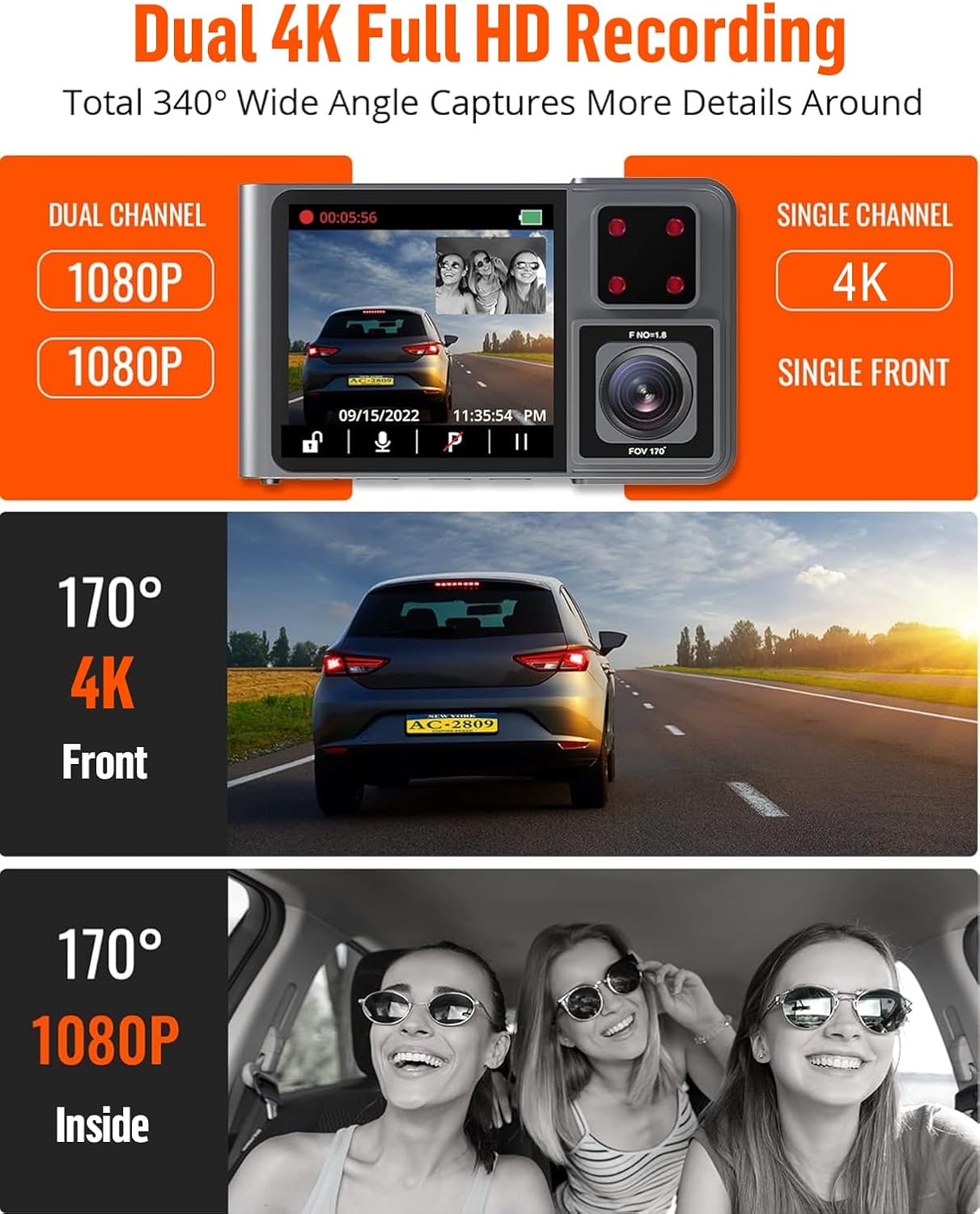
Figure 5: The Kingslim D1 Pro offers dual 1080p recording for front and interior, or single 4K recording for the front, with wide-angle views.
2. Nahrávání ve smyčce
- The dash cam records video in continuous loops. When the SD card is full, the oldest unlocked files will be automatically overwritten.
- This ensures continuous recording without manual intervention.
3. G-Sensor (Emergency Video Lock)
- The built-in G-sensor automatically detects sudden shakes or collisions.
- Upon detection, the current video footage is automatically locked and saved to prevent it from being overwritten by loop recording. This preserves crucial evidence.

Figure 6: The Kingslim D1 Pro's G-sensor automatically locks emergency video footage, and its 24-hour parking monitor provides continuous security.
4. 24hodinový parkovací monitor
- With the parking monitor feature enabled, the dash cam will automatically record a 20-second video if any collision or impact is detected while the vehicle is parked.
- This feature requires a continuous power supply or the dash cam's internal battery.

Figure 7: The 24-hour parking monitor provides continuous surveillance, recording incidents like impacts or theft attempts while parked.
5. Super noční vidění
- Equipped with advanced firmware and dual Sony sensors, the D1 Pro captures detailed footage i za špatných světelných podmínek.
- This ensures reliable evidence during nighttime drives.

Figure 8: The Kingslim D1 Pro's Super Night Vision, powered by dual Sony sensors, ensures clear recordings in low-light and backlit environments.
6. GPS sledování
- The included GPS module records accurate driving location, speed, and route.
- Tyto údaje mohou být viewed directly on Google Maps via the Kingslim app or dedicated PC player, aiding in journey analysis.
Údržba
- Čištění: Use a soft, dry cloth to clean the dash cam lens and body. Avoid using abrasive cleaners or solvents.
- Péče o SD kartu: Regularly format the SD card (once a month is recommended) to maintain optimal performance and prevent data corruption. Back up any important videos before formatting.
- Teplota: Avoid exposing the dash cam to extreme temperatures for prolonged periods, as this can affect battery life and component integrity.
Odstraňování problémů
| Problém | Možné řešení |
|---|---|
| Palubní kamera se nezapne. |
|
| Nahrávání se neočekávaně zastaví. |
|
| Problémy s připojením k Wi-Fi. |
|
| Špatná kvalita videa v noci. |
|
Specifikace
| Funkce | Detail |
|---|---|
| Rozměry produktu | 6.85 x 5.16 x 2.6 palce |
| Hmotnost položky | 14 unce |
| Název modelu | D1 Pro |
| Baterie | Jsou vyžadovány 1 lithium-iontové baterie (součástí balení) |
| Technologie připojení | Wi-Fi |
| Speciální funkce | 2K dash cam front and inside, Built-In GPS, Loop Recording, Parking Monitor, Wi-Fi APP Control |
| Rozlišení záznamu videa | 2K (Front), 1080P (Inside) |
| Typ montáže | Sací držák |
| Barva | Šedá |
| Maximální kapacita SD karty | 128 GB |
Informace o záruce
The Kingslim D1 Pro Dash Cam comes with a 2-letá záruka from the date of purchase. This warranty covers manufacturing defects and malfunctions under normal use. Please retain your proof of purchase for warranty claims. For detailed terms and conditions, refer to the official Kingslim webwebu nebo kontaktujte zákaznickou podporu.
Zákaznická podpora
For any questions, technical assistance, or warranty claims, please contact Kingslim customer support through the following channels:
- Oficiální Webmísto: Visit the Kingslim official website for FAQs, software updates, and contact forms.
- E-mailová podpora: Refer to your Quick Guide or the Kingslim webweb s vyhrazenou e-mailovou adresou podpory.
We are committed to providing excellent service and support for your Kingslim product.
Ask a question about this manual
Ask about setup, troubleshooting, compatibility, parts, safety, or missing instructions. Manuals+ will review the question and use this page’s manual context to help answer it.