
1. Úvod
This user manual provides detailed instructions for the Sensio SE770390 RGB CCT Remote Control. Please read this manual thoroughly before using the product to ensure proper operation and to maximize its lifespan. Keep this manual for future reference.
2. Konec produktuview
The Sensio SE770390 is a versatile 3-in-1 remote control designed to manage various lighting types. It supports single-color lighting (dimming), CCT (tunable white), and RGB (color-changing) lighting systems. Its modern aesthetic and multi-functional capabilities allow for comprehensive control, including setting up multiple channels and zone lighting.
Obrázek 1: Shora dolů view of the Sensio SE770390 RGB CCT Remote Control. This image displays the main control dial, numbered zone buttons (1-4), dimming buttons, CCT and RGB mode buttons, and two memory preset buttons (S1, S2).

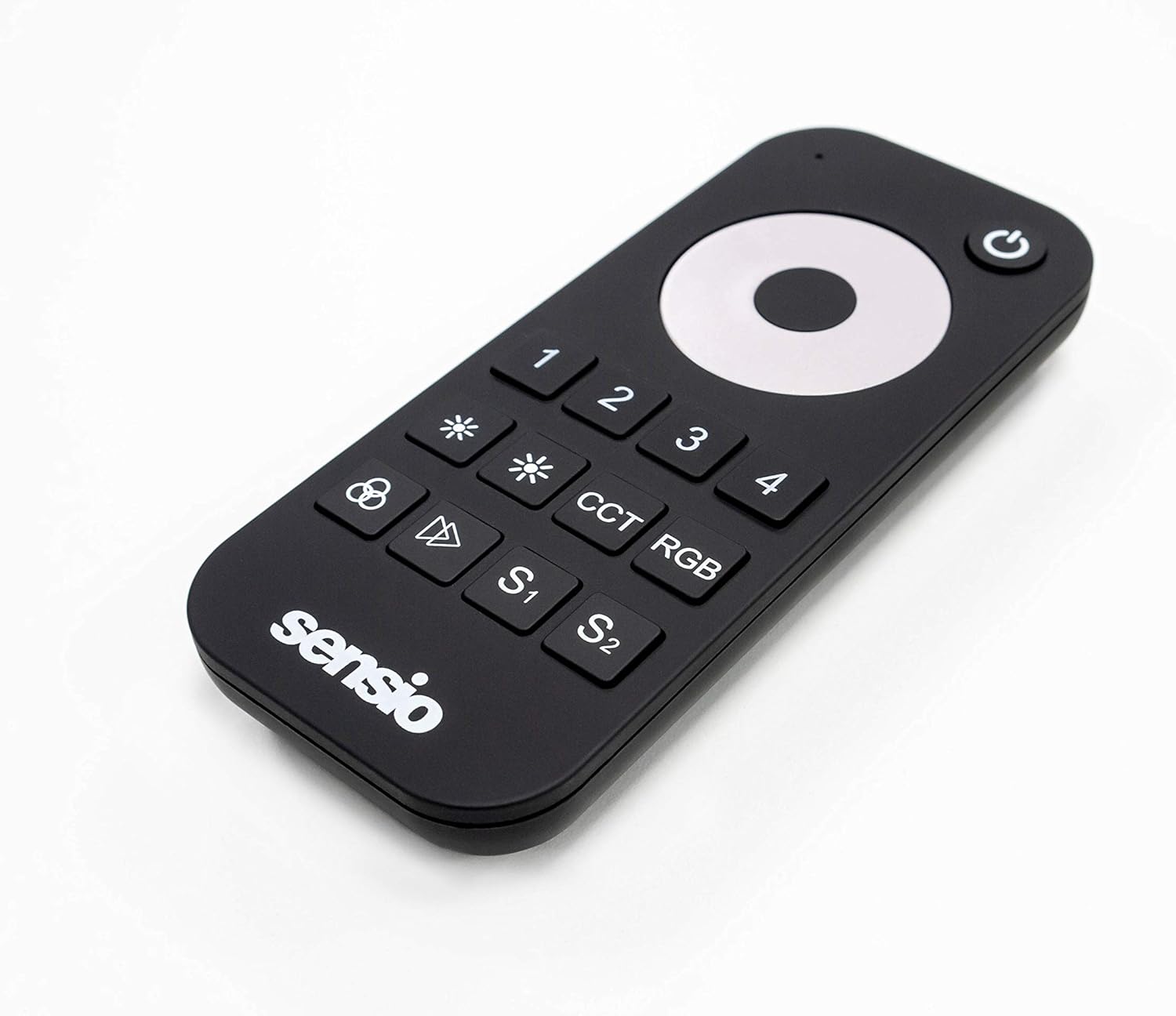
Obrázek 2: Zkosená přední strana view of the Sensio SE770390 RGB CCT Remote Control. This perspective highlights the slim profile and the arrangement of the control buttons, including the power button and the Sensio logo.
3. Nastavení
3.1. Instalace baterie
- Najděte kryt prostoru pro baterie na zadní straně dálkového ovladače.
- Posuňte nebo odepněte kryt pro otevření přihrádky.
- Vložte dvě (2) baterie typu AAA a dbejte na správnou polaritu (+/-) vyznačenou uvnitř přihrádky.
- Bezpečně nasaďte kryt prostoru pro baterie.
Poznámka: Vždy používejte nové baterie a staré baterie zlikvidujte zodpovědně.
3.2. Pairing with Lighting System
The Sensio SE770390 remote control needs to be paired with your compatible Sensio lighting system. The exact pairing procedure may vary slightly depending on your specific lighting receiver or controller. Generally, the steps involve:
- Ensure your lighting system is powered off.
- Power on your lighting system. Within a few seconds of powering on, press and hold the desired zone button (1, 2, 3, or 4) on the remote control.
- The lights should flash or change color to indicate successful pairing.
- Repeat this process for each zone you wish to control with the remote.
Tip: Refer to your Sensio lighting system's manual for specific pairing instructions if you encounter difficulties.
4. Návod k obsluze
The remote control features an intuitive layout for easy management of your lighting. Below is a guide to its main functions:
- Tlačítko napájení (⏻): Located at the top right. Press to turn the selected zone(s) on or off.
- Tlačítka pro výběr zóny (1, 2, 3, 4): Select the specific lighting zone you wish to control. You can control multiple zones simultaneously by pressing their respective buttons.
- Ovládání jasu (✱ / ✱): Use the two asterisk-like buttons to increase or decrease the brightness of the selected lights.
- Main Control Dial: The large circular dial in the center.
- Color Selection (RGB Mode): Rotate the dial to cycle through various RGB colors when in RGB mode.
- Nastavení teploty barev (režim CCT): Rotate the dial to adjust the white light from warm white to cool white when in CCT mode.
- Dimming (Single Color Mode): Rotate the dial to fine-tune brightness when controlling single-color lights.
- Tlačítko CCT: Press to switch the remote into CCT (Correlated Color Temperature) mode, allowing adjustment of white light temperature.
- Tlačítko RGB: Press to switch the remote into RGB mode, allowing selection of various colors.
- Memory Presets (S1, S2): These buttons allow you to save and recall your favorite lighting settings (color, brightness, CCT).
- Zachránit: Set your desired lighting, then press and hold S1 or S2 until the lights flash.
- Připomeňme: Briefly press S1 or S2 to activate the saved setting.
5. Údržba
5.1. Čištění
Chcete-li dálkový ovladač vyčistit, jemně otřete jeho povrch měkkým, suchým nebo lehce navlhčeným hadříkem.amp cloth. Do not use abrasive cleaners, solvents, or harsh chemicals, as these can damage the finish and internal components.
5.2. Výměna baterie
When the remote control's range decreases or it becomes unresponsive, it's likely time to replace the batteries. Follow the battery installation steps outlined in Section 3.1. Always replace both AAA batteries simultaneously.
6. Řešení problémů
- Dálkové ovládání nereaguje:
- Zkontrolujte, zda jsou baterie správně vloženy a nejsou vybité. V případě potřeby je vyměňte.
- Ensure the remote is within range of the lighting receiver.
- Verify that the remote is paired with the correct lighting zone (see Section 3.2).
- Lights not changing color/temperature:
- Confirm that you are in the correct mode (RGB for color, CCT for white temperature).
- Ensure your lighting fixture supports RGB and/or CCT functionality.
- Přerušovaná regulace:
- Zkontrolujte, zda nedochází k rušení jinými bezdrátovými zařízeními.
- Ujistěte se, že mezi dálkovým ovladačem a přijímačem nejsou žádné překážky.
7. Specifikace
| Funkce | Detail |
|---|---|
| Značka | Sensio |
| Číslo modelu | SE770390 |
| Barva | Černý |
| Speciální funkce | Color Changing, Tunable White (CCT), Dimming |
| Typ ovladače | Dálkové ovládání |
| Maximální počet podporovaných zařízení | 1 (per remote, controls multiple zones) |
| Jsou vyžadovány baterie | 2 x AAA baterie |
| Hmotnost položky | 47 gramů |
8. Záruka a podpora
Information regarding specific warranty terms for the Sensio SE770390 remote control is not available in this document. For warranty details, product support, or technical assistance, please contact Sensio customer service directly or refer to the official Sensio website. Please have your product model number (SE770390) and proof of purchase ready when contacting support.
You can typically find contact information on the manufacturer's packaging or their official webmísto: www.sensio.co.uk (napřampodkaz, skutečný odkaz se může lišit).