
1. Úvod
This user manual provides comprehensive instructions for the UNIWA E1801 Senior Mobile Phone. Designed with large buttons and a clear display, this phone is ideal for users seeking simplicity and essential communication features. Please read this manual carefully before using your device to ensure proper operation and longevity.
2. Obsah balení
Po otevření balení se prosím ujistěte, že obsahuje všechny následující položky:
- 1 x UNIWA E1801 Mobile Phone
- 1 x BL-5C 800 mAh Battery
- 1x Nabíječka
- 1 x Uživatelská příručka (tento dokument)
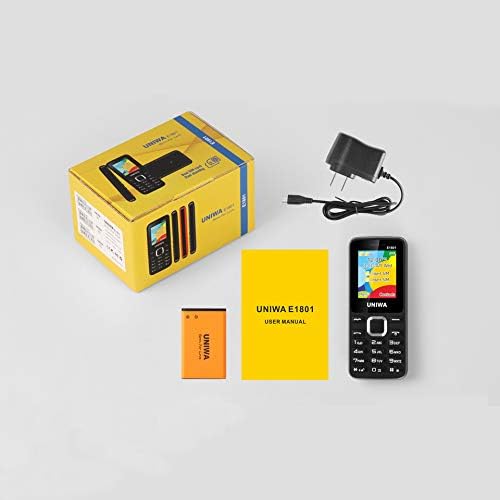
Image: Contents of the UNIWA E1801 package, including the phone, battery, charger, and user manual.
3. Zařízení skončiloview
The UNIWA E1801 features a user-friendly design with large, easy-to-press buttons and a non-slip frame for comfortable handling. It includes an ergonomic keypad with plating navigation keys for intuitive operation.
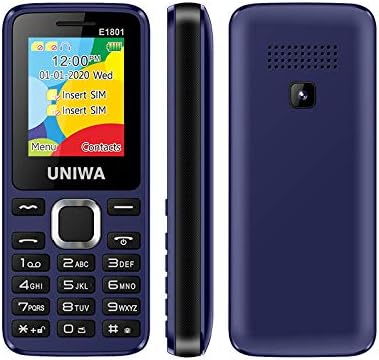
Image: Front, side, and rear views of the UNIWA E1801 phone, highlighting its compact design.

Image: Detail showing the non-slip frame of the UNIWA E1801, designed for secure grip.

Image: Close-up of the ergonomic keypad and plating navigation keys on the UNIWA E1801.
4. Nastavení
4.1. Instalace baterie
- Jemným vypáčením od zářezu sejměte zadní kryt telefonu.
- Align the gold contacts of the BL-5C 800 mAh battery with the contacts in the battery compartment.
- Jemně zatlačte na baterii, dokud nezacvakne na místo.
- Nasaďte zpět zadní kryt a ujistěte se, že bezpečně zacvakne.
4.2. Instalace SIM karty
The UNIWA E1801 supports Dual SIM cards, allowing for two active phone numbers simultaneously.
- With the back cover removed and battery out (if necessary), locate the SIM card slots.
- Insert your SIM card(s) into the designated slot(s) with the gold contacts facing down and the cut corner aligned correctly.
- Jemně zatlačte SIM kartu, dokud zcela nezapadne.
- Znovu nainstalujte baterii a zadní kryt.

Image: The dual SIM card slots of the UNIWA E1801, illustrating how SIM cards are inserted.
4.3. Nabíjení zařízení
Před prvním použitím plně nabijte baterii telefonu.
- Připojte nabíjecí kabel k nabíjecímu portu na telefonu.
- Zapojte nabíječku do standardní zásuvky.
- Indikátor baterie na obrazovce bude zobrazovat stav nabíjení.
- Po úplném nabití odpojte nabíječku.
5. Návod k obsluze
5.1. Zapnutí/vypnutí
- Zapnutí: Stiskněte a podržte tlačítko Napájení/Ukončení hovoru, dokud se obrazovka nerozsvítí.
- Vypnutí: Press and hold the Power/End Call button until the power-off options appear, then confirm.
5.2. Telefonování
- Na nečinné obrazovce zadejte telefonní číslo pomocí klávesnice.
- Stiskněte tlačítko Volat (obvykle zelené) pro zahájení hovoru.
- Chcete-li hovor ukončit, stiskněte tlačítko Ukončit hovor (obvykle červené).
5.3. Odesílání zpráv
- Z hlavní obrazovky přejděte do nabídky „Zprávy“.
- Select 'Write Message' or 'New SMS'.
- Zadejte zprávu pomocí klávesnice.
- Zadejte číslo příjemce nebo jej vyberte z kontaktů.
- Odešlete zprávu.
5.4. Kontakty
Telefonní seznam pojme až 300 kontaktů.
- Přidání kontaktu: Go to 'Contacts' > 'Add New Contact', then enter the name and number.
- Hledání kontaktu: From the 'Contacts' menu, use the navigation keys to scroll or search by name.
5.5. FM rádio
The UNIWA E1801 features a wireless FM radio, allowing you to listen to your favorite stations without needing headphones as an antenna.
- V hlavní nabídce přejděte do aplikace „FM rádio“.
- Use the navigation keys to scan for available stations or manually tune to a frequency.
- Adjust the volume using the side keys (if available) or navigation keys.

Image: The UNIWA E1801 showcasing its wireless FM radio feature.
5.6. Multimedia (MP3/MP4)
The phone supports MP3 audio and MP4 video playback.
- Ensure you have a TF card (up to 16GB) inserted with your media files.
- Navigate to the 'Multimedia' or 'File Manager' menu.
- Select 'MP3 Player' or 'Video Player' to browse and play your files.

Image: Illustration of the 2030 Box Speaker on the UNIWA E1801, indicating its audio capabilities.
5.7. Fotoaparát
The phone is equipped with a 0.08 MP rear camera.
- V hlavní nabídce vyberte možnost „Fotoaparát“.
- Komponujte snímek pomocí obrazovky jako viewnálezce.
- Press the designated button (usually the center navigation key) to take a photo.
5.8. Svítilna
The built-in flashlight can be useful in low-light conditions.
- Refer to your phone's specific shortcut key or menu option to activate/deactivate the flashlight. This is often a long press on a specific number key or a dedicated button.

Image: The UNIWA E1801 demonstrating its integrated flashlight function.
5.9. Další funkce
The UNIWA E1801 includes several utility functions:
- Hry: Simple pre-installed games.
- Kalendář: To keep track of dates and events.
- Budík: Nastavte si více budíků.
- Kalkulačka: Základní aritmetické funkce.
- Světové hodiny: View time in different time zones.
- E-kniha: Basic text file čtenář.
- WAP: Basic internet browsing (requires GPRS data plan).
- Zapisovač: Funkce nahrávání hlasu.
6. Údržba
- Čištění: K čištění povrchu telefonu používejte měkký, suchý hadřík. Nepoužívejte tekuté čisticí prostředky ani abrazivní materiály.
- Péče o baterie: To prolong battery life, avoid extreme temperatures. Do not leave the phone charging for excessively long periods after it is full.
- Skladování: If storing the phone for an extended period, ensure the battery is partially charged (around 50%) and store it in a cool, dry place.
7. Řešení problémů
| Problém | Možná příčina / řešení |
|---|---|
| Telefon se nezapne. | Battery is depleted. Charge the phone for at least 30 minutes. Ensure battery is correctly installed. |
| Nelze uskutečňovat ani přijímat hovory. | No network signal. Move to an area with better reception. SIM card not properly inserted. Reinsert SIM card. |
| Baterie se rychle vybíjí. | Background applications running. Close unused applications. Battery may be old and require replacement. |
| Neslyším volajícího / Volající neslyší mě. | Volume too low. Adjust call volume. Microphone/speaker blocked. Ensure no obstructions. |
Pokud problém přetrvává i po vyzkoušení těchto řešení, kontaktujte zákaznickou podporu.
8. Specifikace
| Funkce | Detail |
|---|---|
| Číslo modelu | ECON E1801 |
| Rozměry | 108 x 45 x 14 mm |
| Hmotnost | 68 g |
| CPU | SC6531E |
| Síťová pásma | 2G: GSM850/900/1800/1900 MHz, GPRS |
| SIM karta | Dual-SIM, Dual-Standby |
| Kapacita telefonního seznamu | 300 čísla |
| Vyzváněcí tón | 64 chords, supports MP3, Midi ringtones |
| Reproduktor | 2030 reproduktor |
| FM rádio | Bezdrátové FM rádio |
| Obrazovka | 1.77 inch QQVGA Display, 160 x 128 pixels |
| Fotoaparát | 0.08 MP Rear Camera, 640 x 480 pixels |
| Multimédia | MP3, MP4 |
| Paměť | Supports TF cards up to 16 GB max |
| Bluetooth | V2.1 |
| Vibrátor | Ano |
| Doba hovoru | Až 240 minut |
| Pohotovostní doba | Až 200 hodin |
| Jazyky | English, Russian, Hebrew, Arabic, French, Spanish, Polish, German, Italian, Portuguese, Chinese |
9. Záruka a podpora
For warranty information and technical support, please refer to the warranty card included with your product or contact the retailer where you purchased the UNIWA E1801. You may also visit the official UNIWA website for further assistance and updated support information.