
1. Úvod
The GTMEDIA V7S2X is a high-definition digital satellite TV receiver designed for Free-to-Air (FTA) satellite broadcasts. It supports DVB-S/S2/S2X standards, H.264 video decoding, and delivers full HD 1080p resolution. This receiver offers features such as USB Wi-Fi antenna support for network sharing, PVR readiness, and compatibility with various satellite systems. This manual provides detailed instructions for setting up, operating, and maintaining your device.
2. Obsah balení
Zkontrolujte prosím, zda jsou všechny níže uvedené položky součástí balení. Pokud některé položky chybí nebo jsou poškozené, kontaktujte svého prodejce.
- 1x GTMEDIA V7S2X Satellite Receiver
- 1x USB WiFi Antenna
- 1x IR dálkové ovládání
- 1x HDMI kabel
- 1x napájecí adaptér
- 1x Uživatelská příručka
- 1x Product Warranty Card

Image: Contents of the GTMEDIA V7S2X package, showing the receiver, remote control, USB WiFi antenna, HDMI cable, power adapter, user manual, and warranty card.
3. Konec produktuview
3.1 Přední panel
The front panel features the GTMEDIA logo, the model number V7S2X, a digital display, and a USB port for connecting the USB WiFi antenna or other USB devices.

Obrázek: Přední strana view of the GTMEDIA V7S2X receiver, highlighting the digital display and the front USB port.
3.2 Připojení zadního panelu
The rear panel provides all necessary ports for connecting the receiver to your satellite dish and television.
- LNB IN: Připojuje se k LNB vaší satelitní paraboly.
- HD OUT: HDMI output for connecting to an HD television.
- CVBS (Yellow): Kompozitní video výstup.
- L (White): Levý zvukový výstup.
- R (červená): Pravý zvukový výstup.
- USB: Additional USB port for external storage or USB WiFi antenna.
- DC 12V: Napájecí vstup pro přiložený adaptér.
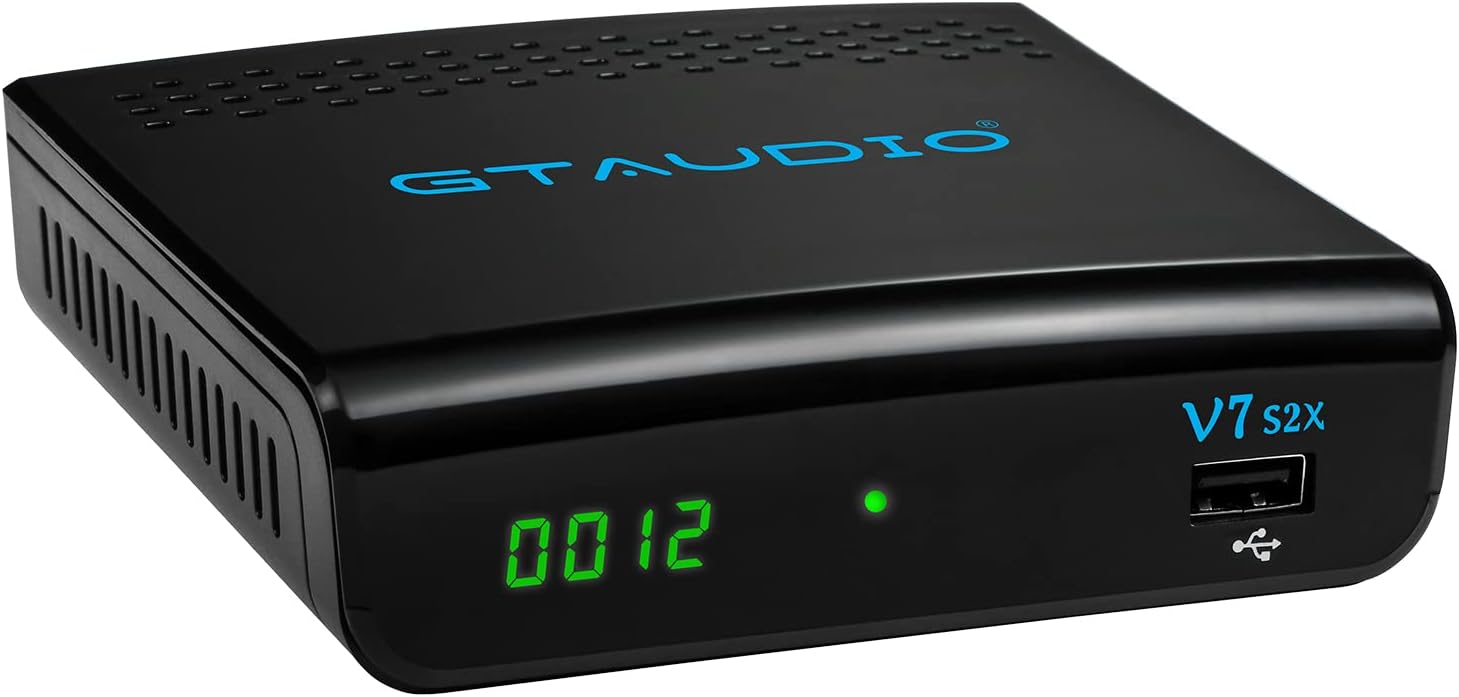
Image: Rear panel of the GTMEDIA V7S2X receiver, detailing all input and output ports for satellite, video, audio, USB, and power connections.
3.3 Dálkové ovládání
The remote control allows full navigation and control of the receiver's functions. Familiarize yourself with the button layout for optimal use.

Image: The remote control for the GTMEDIA V7S2X, showing power, number, navigation, volume, channel, and media control buttons.
4. Průvodce nastavením
Follow these steps for initial setup of your GTMEDIA V7S2X receiver.
- Připojení satelitního kabelu: Connect the LNB cable from your satellite dish to the 'LNB IN' port on the receiver.
- Připojení k televizi: Use the provided HDMI cable to connect the 'HD OUT' port on the receiver to an HDMI input on your television. Alternatively, use AV cables (CVBS, L, R) for older TVs.
- Připojte napájení: Plug the power adapter into the 'DC 12V' port on the receiver, then plug the adapter into a power outlet. The receiver will power on and display 'boot'.
- Počáteční konfigurace:
- Turn on your TV and select the correct HDMI/AV input.
- The receiver will boot up. Use the remote control to navigate the on-screen menu.
- Přejít na INSTALOVAT > Seznam satelitů. Select your satellite (e.g., Galaxy 19, Astra 19.2E).
- Configure LNB Frequency, DiSEqC settings, and LNB Power as required for your satellite setup.
- Proveďte a Skenovat (Blind Scan or Auto Scan) to find available channels.
- Network Setup (Optional): If using the USB WiFi antenna, insert it into a USB port. Go to SÍŤ > Konfigurace sítě > WiFi pro připojení k bezdrátové síti.
Video: A visual guide demonstrating the initial connection of the GTMEDIA V7S2X receiver, including power-on sequence, and basic menu navigation for channel installation and network configuration.
5. Návod k obsluze
5.1 Správa kanálů
- Seznam TV kanálů: Stiskněte tlačítko KANÁL button on the remote to view the list of TV channels.
- Favorite Groups: Organize channels into up to 16 different favorite groups for quick access.
- Úprava kanálu: Access the channel editing function to move, lock, skip, delete, or rename channels. Parental control is also available.
5.2 Program Recording (PVR)
The GTMEDIA V7S2X supports PVR (Personal Video Recorder) functionality when an external USB storage device (FAT/FAT32/NTFS format) is connected.
- Okamžité nahrávání: Stiskněte tlačítko Záznam button on the remote to start recording the current program.
- Plánované nahrávání: Použijte Nastavení časovače feature to schedule recordings for future programs.
- Přehrávání: Access recorded content via the MÉDIA menu.
5.3 Přehrávání multimédií
Connect a USB storage device to play various media files.
- Přejděte na MÉDIA menu.
- Vybrat Hudba, Obrázeknebo Film to browse and play your files.
5.4 Online Features
With a connected USB WiFi antenna and internet access, you can use online applications.
- Přístup Online Movie App (e.g., YouTube) through the SÍŤ menu.
6. Údržba
- Čištění: K čištění přijímače používejte měkký, suchý hadřík. Nepoužívejte tekuté ani aerosolové čisticí prostředky.
- Větrání: Ensure the receiver has adequate ventilation. Do not block ventilation openings.
- Vypnout: Pokud zařízení nebudete delší dobu používat, odpojte napájecí adaptér ze zásuvky.
7. Řešení problémů
- Bez napájení:
- Check if the power adapter is securely connected to the receiver and the power outlet.
- Ujistěte se, že zásuvka je funkční.
- Bez signálu:
- Verify the LNB cable is properly connected to the 'LNB IN' port.
- Check your satellite dish alignment.
- Confirm LNB settings (frequency, DiSEqC) in the INSTALOVAT menu are correct for your satellite.
- Žádný obraz/zvuk na televizoru:
- Ensure the HDMI or AV cables are securely connected to both the receiver and the TV.
- Select the correct input source on your TV (e.g., HDMI 1, AV).
- Check the TV's volume and mute settings.
- Dálkové ovládání nefunguje:
- Vyměňte baterie v dálkovém ovladači.
- Ujistěte se, že mezi dálkovým ovladačem a infračerveným senzorem přijímače nejsou žádné překážky.
8. Specifikace
| Funkce | Specifikace |
|---|---|
| Model | V7S2X |
| CPU | 770MHz Dual Core |
| Flash paměť | 64MB SPI Flash |
| Paměť DDR2 | 512M RAM |
| Standard DVB | DVB-S/S2/S2X, AVS+, VCM/ACM/Multi-stream/T2MI |
| Dekódování videa | 1080P main profile@level 4.1 and main10 profile@L4.1, High tier |
| Audio dekódování | MPEG-1/2 Layer 1/2/3, MPEG-2/4 LC-AAC, MPEG-4 HE-AAC, Dolby AC3/AC3+, DRA CH/5.1CH |
| Poměr stran | Auto, 16:9 Pillar box, 4:3 Pan & Scan, 4:3 Letter Box |
| Kanály | 5000+ TV and Radio programmable |
| Jazyk OSD | Multi-language support (English, Spanish, French, Russian, Portuguese, Polish, Indonesian, Arabic, Turkish, German, Italian, Persian, Thai) |
| Konektivita | HDMI, USB, LNB IN, CVBS, L/R Audio, DC 12V |
| Rozměry | 12 x 10.5 x 3.3 cm |
| Hmotnost | 491 g |
| Vstup napájení | 120 voltů (AC) |
9. Záruka a podpora
The GTMEDIA V7S2X comes with a 1-year warranty. Please refer to the included Product Warranty Card for detailed terms and conditions.
For technical support or further inquiries, please visit the official GTMEDIA website or contact customer service through the channels provided on your warranty card or the product packaging.