
1. Úvod
Děkuji za nákupasing the UNITED LED43DU58 43-inch 4K UHD HDR10 LED Television. This manual provides essential information for setting up, operating, and maintaining your new television. Please read these instructions carefully before use and retain them for future reference.

The UNITED LED43DU58 television features 4K Ultra HD resolution, DVB-T2/C/S2 tuners, Dolby Audio, HDMI, and HDR10 support.
2. Bezpečnostní informace
Vždy dodržujte následující bezpečnostní opatření, abyste předešli úrazu elektrickým proudem, požáru nebo poškození televizoru:
- Nevystavujte televizor dešti ani vlhkosti.
- Do not open the television casing; veškerý servis svěřte kvalifikovanému personálu.
- Zajistěte dostatečné větrání v okolí televizoru.
- Keep the television away from direct sunlight, heat sources, and strong magnetic fields.
- Use only the power cord supplied with the television.
- Během bouřek nebo pokud televizor delší dobu nepoužíváte, odpojte jej ze zásuvky.
3. Obsah balení
Ověřte, zda jsou v balení přítomny všechny položky:
- UNITED LED43DU58 Television
- Dálkové ovládání (vyžaduje 2x AAA baterie, součástí balení)
- Stand (feet)
- Šrouby pro montáž stojanu
- Uživatelská příručka
4. Nastavení
4.1 Připevnění stojanu
- Carefully place the television face down on a soft, flat surface to prevent screen damage.
- Align the stand feet with the corresponding slots on the bottom of the television.
- Secure the stand feet using the provided screws. Do not overtighten.
- Carefully lift the television to an upright position on a stable surface.
4.2 Propojovací kabely
Connect your external devices to the television's rear ports. Refer to the image below for port locations.

Rear panel connections of the UNITED LED43DU58 television.
- Moc: Connect the power cord to the television and then to a wall outlet.
- HDMI: Pro zařízení s vysokým rozlišením, jako jsou přehrávače Blu-ray, herní konzole nebo set-top boxy. Televizor má 3 porty HDMI.
- USB: For connecting USB storage devices for media playback or PVR recording. The TV has 2 USB ports.
- Antenna (DVB-T2/C): Connect an aerial cable for terrestrial digital TV channels.
- Satelit (DVB-S2): Connect a satellite dish cable for satellite digital TV channels.
- Slot CI+: Vložte modul podmíněného přístupu (CAM) a čipovou kartu pro šifrované kanály.
- SCART: Pro starší analogová zařízení.
- VGA: Pro připojení počítače.
4.3 Počáteční zapnutí a vyhledávání kanálů
- Plug in the television and press the power button on the remote control or the TV itself.
- Postupujte podle pokynů na obrazovce a vyberte jazyk a zemi.
- The television will automatically begin scanning for available channels (DVB-T2/C/S2). This process may take several minutes.
- Once the scan is complete, you can begin watching television.
5. Ovládání televizoru
5.1 Funkce dálkového ovládání
The remote control allows you to access all television functions. Familiarize yourself with the buttons for power, volume, channel selection, input source, menu, and navigation.
5.2 Channel Navigation and Input Source
- Použijte CH +/- tlačítka pro změnu kanálů.
- Stiskněte tlačítko ZDROJ button to switch between connected devices (HDMI 1, HDMI 2, HDMI 3, AV, USB, DTV, ATV, etc.).
- Přístup k Elektronický programový průvodce (EPG) na view programy a informace.
- The television supports teletext for text-based information services.
5.3 Nastavení obrazu a zvuku
Your television features 4K Ultra HD resolution and HDR10 support for enhanced picture quality. The Full Matrix LED technology provides exceptional colors, deep blacks, and impressive contrasts.

Experience superior clarity with 4K Ultra HD resolution.

Full Matrix LED technology enhances color and contrast.
Adjust picture modes (e.g., Standard, Dynamic, Movie) and individual settings like brightness, contrast, and color saturation through the TV menu. The integrated Q.BOX sound system with two 8-watt Ultra Stereo RMS speakers delivers clear audio. Sound settings can be adjusted via the audio menu.
5.4 Nahrávání na USB (PVR)
The television supports recording of programs to an external USB drive. Connect a USB drive to one of the USB ports. You can program the television to record at a specified time, allowing you to watch your favorite series at your convenience.

Record programs via USB and access various digital tuners.
6. Údržba
6.1 Čištění obrazovky
Jemně otřete obrazovku měkkým hadříkem, který nepouští vlákna. V případě odolných skvrn lehceampOtřete hadřík vodou nebo specializovaným čističem obrazovek. Nikdy nestříkejte tekutinu přímo na obrazovku.
6.2 Čištění exteriéru
Wipe the television's exterior with a soft, dry cloth. Avoid using abrasive cleaners or solvents.
7. Řešení problémů
Pokud narazíte na problémy s televizorem, podívejte se na následující běžná řešení:
| Problém | Možné řešení |
|---|---|
| Žádná síla | Check if the power cord is securely connected and the wall outlet is functioning. Press the power button on the TV or remote. |
| Žádný obrázek | Ensure the correct input source is selected. Check cable connections to external devices. Perform a channel scan. |
| Žádný zvuk | Zkontrolujte úroveň hlasitosti a ujistěte se, že není aktivováno ztlumení zvuku. Zkontrolujte připojení audio kabelu. |
| Dálkové ovládání nefunguje | Vyměňte baterie (2x AAA). Ujistěte se, že mezi dálkovým ovladačem a infračerveným senzorem televizoru nejsou žádné překážky. |
| Špatná kvalita obrazu | Check antenna/cable connection. Adjust picture settings in the menu. Ensure the source content is high quality. |
For more complex issues, please contact customer support or refer to the full service manual.
8. Specifikace
The following table details the technical specifications of the UNITED LED43DU58 television:

Physical dimensions of the UNITED LED43DU58 television.
| Funkce | Specifikace |
|---|---|
| Název modelu | United 43DU58 |
| Číslo modelu | LED43DU58 |
| Velikost obrazovky | 43 palce (109 cm) |
| Technologie displeje | LED |
| Rezoluce | 4K (3840 x 2160 pixelů) |
| Obnovovací frekvence | 60 Hz |
| Technologie vylepšení obrazu | HDR10 |
| Kontrastní poměr obrazu | 3000:1 |
| Doba odezvy | 8.5 milisekund |
| Technologie tuneru | DVB-T2, DVB-S2, DVB-C |
| Technologie připojení | HDMI, USB |
| Celkový počet portů HDMI | 3 |
| Celkový počet portů USB | 2 2.0 (USB XNUMX) |
| Total VGA Input Ports | 1 |
| Typ konektoru | CI+, HDMI, USB |
| Speciální funkce | 3D (Note: This feature is listed in specifications but may require specific content/glasses not included) |
| Display Language Options | English, German, Italian, French, Turkish, Arabic, Polish, Czech, Slovak, Ukrainian |
| Rozměry produktu (D x Š x V) | 21.5 x 100 x 61 cm |
| Hmotnost položky | 10 kg |
| svtage | 230 voltů |
| Wattage / Spotřeba energie | 55 W / 55 Watts |
| Roční spotřeba energie | 66 kilowatthodin |
| Třída účinnosti | G |
| Kontrolní metoda | Dálkové ovládání |
| Pro dálkové ovládání jsou vyžadovány baterie | 2 AAA (součástí balení) |
| Typ montáže | Stolní držák |
| Modelový rok | 2020 |
8.1 Informace na energetickém štítku
For detailed energy efficiency information, please refer to the energy label below or visit the EU EPREL database.
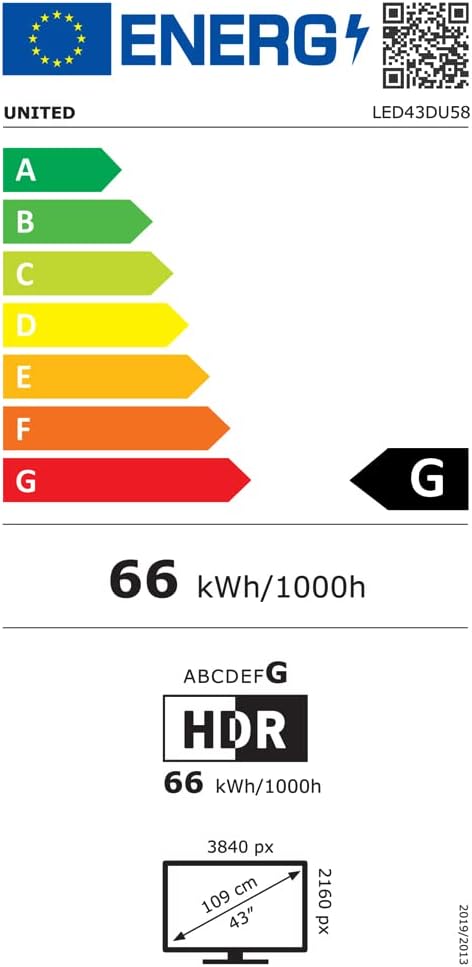
EU Energy Label for UNITED LED43DU58.
Další podrobnosti jsou k dispozici na adrese: https://eprel.ec.europa.eu/qr/498398
9. Záruka a podpora
The manufacturer, DGMC SA, provides a minimum general warranty period. Please refer to your purchase documentation for specific warranty terms and conditions.
- Minimum General Warranty: 2 roky
- Dostupnost náhradních dílů v EU: 5 roky
For technical support or service inquiries, please contact your retailer or the manufacturer's customer service department. Ensure you have your model number (LED43DU58) and purchase details available.