
1. Úvod
This manual provides detailed instructions for the IPEGA PG-SW023 Bluetooth Wireless Game Controller. This versatile controller is designed to enhance your gaming experience across multiple platforms, including N-S consoles, PlayStation 3 (PS3), Android devices, and personal computers running Windows 7, 8, or 10.
Před použitím produktu si prosím pečlivě přečtěte tento návod k obsluze, abyste zajistili jeho správný provoz a maximalizovali jeho funkce.
2. Vlastnosti produktu
- Kompatibilita s více platformami: Suitable for gaming on N-S consoles, PS3, Android devices, and PCs (Windows 7/8/10).
- Vylepšený herní zážitek: Supports vibration feedback and a six-axis gyroscope function for immersive gameplay and precise control.
- Customizable Macro Function: Rear buttons can be configured as common keys or combination keys for simplified actions.
- Continuous TURBO Function: Features a dedicated TURBO button for rapid-fire actions, compatible with N-S Pro gamepads.
- Ergonomický design: Engineered for comfort during extended gaming sessions, fitting securely in the palm.

Image: The IPEGA PG-SW023 Wireless Game Controller highlighting its key features: two vibrating motors, six-axis design, high-sensitive buttons, and Turbo function.
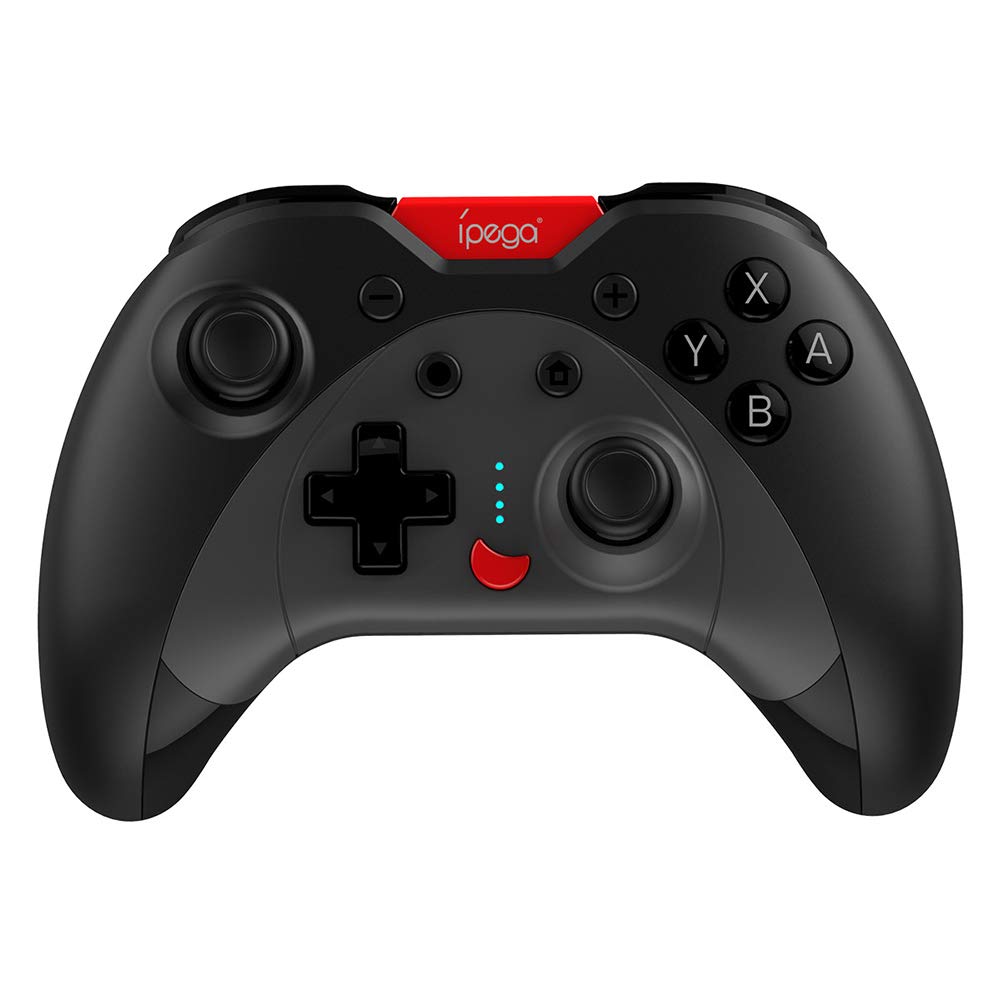
Image: A green IPEGA PG-SW023 controller illustrating its built-in six-axis gyroscope design for improved body feeling and accurate targeting.
3. Obsah balení
Prosím, ověřte, zda jsou v balení přítomny všechny položky:
- 1 x IPEGA PG-SW023 Wireless Game Controller
- 1 x nabíjecí kabel typu C
- 1 x Uživatelská příručka
4. Specifikace
| Funkce | Specifikace |
|---|---|
| Značka | Ipega |
| Model | PG-SW023 |
| Možnosti barev | Black, Green, Blue, Yellow |
| Provozní svtage | DC 3.7V |
| Provozní proud | <30 mA |
| Statický proud | <20uA |
| Nepřetržitá doba přehrávání | Přibl. 15 hodin |
| Vstupní objemtage/Aktuální | DC 5V/500mA |
| Doba nabíjení | Přibl. 2 hodin |
| Verze Bluetooth | 3.0 |
| Přenosová vzdálenost | ≤ 8 metrů |
| Kapacita baterie | 400 XNUMX mAh |
| Rozměry produktu | 15 x 10 x 5.5 cm (5.91 x 3.94 x 2.17 palce) |
| Hmotnost produktu | Přibližně 215 g (7.58 unce) |
| Kompatibilní zařízení | N-S Console, PS3, Android, PC (Win 7/8/10) |
| Konektivita | Bezdrátové (Bluetooth) |
| Zdroj napájení | Napájení z baterie |
5. Nastavení
5.1 Nabíjení ovladače
- Connect the provided Type-C charging cable to the controller's charging port.
- Druhý konec kabelu připojte k USB zdroji napájení (např. k počítači, USB adaptéru do zásuvky).
- The indicator lights on the controller will show charging status. Once fully charged (approx. 2 hours), the lights will indicate completion or turn off.
5.2 Párování se zařízeními
The pairing method varies slightly depending on the device. Ensure the controller is sufficiently charged before attempting to pair.

Image: A blue IPEGA PG-SW023 controller positioned in front of a Nintendo Switch, PlayStation 3, and a laptop, illustrating its multi-platform compatibility.
5.2.1 Pairing with N-S Console
- On your N-S console, go to the HOME Menu.
- Vyberte „Ovládače“ > „Změnit úchop/pořadí“.
- Press and hold the pairing button on the IPEGA controller (refer to controller diagram for exact location) until the indicator lights begin to flash rapidly.
- The console will detect the controller. Once paired, the indicator light will become solid.
5.2.2 Pairing with PS3
- Connect the controller to the PS3 console using the Type-C cable.
- Stiskněte tlačítko HOME na ovladači.
- Once recognized, you can disconnect the cable and the controller should remain paired wirelessly.
5.2.3 Párování se zařízeními Android
- Povolte na svém zařízení Android Bluetooth.
- On the controller, press and hold the Android pairing button combination (refer to controller diagram or quick start guide for specific button combination, usually 'A' + HOME or 'X' + HOME) until the indicator lights flash rapidly.
- On your Android device, search for new Bluetooth devices and select 'IPEGA PG-SW023' (or similar name) from the list.
- Po spárování se kontrolka na ovladači rozsvítí nepřerušovaně.
5.2.4 Pairing with PC (Windows 7/8/10)
- Ujistěte se, že váš počítač má povolenou technologii Bluetooth.
- Go to 'Settings' > 'Devices' > 'Bluetooth & other devices' and click 'Add Bluetooth or other device'.
- Vyberte možnost „Bluetooth“.
- On the controller, press and hold the PC pairing button combination (refer to controller diagram or quick start guide for specific button combination, usually 'L1' + HOME or 'Y' + HOME) until the indicator lights flash rapidly.
- Select 'IPEGA PG-SW023' (or similar name) from the list of available devices on your PC.
- Po spárování se kontrolka na ovladači rozsvítí nepřerušovaně.
6. Návod k obsluze
6.1 Základní funkce tlačítek
The controller features standard gaming buttons including directional pad, analog sticks, action buttons (A, B, X, Y), shoulder buttons (L1, R1), and triggers (L2, R2). Specific button mapping may vary by game and platform.

Image: Hands comfortably gripping a black IPEGA PG-SW023 controller, showcasing its ergonomic design for comfortable and convenient use.
6.2 Funkce TURBO
The TURBO function allows for continuous rapid input of a selected button. This can be useful in games requiring fast, repeated button presses.
- To activate TURBO: Press and hold the desired action button (e.g., A, B, X, Y) and then press the TURBO button simultaneously. The button will now continuously input as long as it's held down.
- To deactivate TURBO: Repeat the same process (press the action button and TURBO button simultaneously).

Image: A yellow IPEGA PG-SW023 controller with its prominent TURBO button, shown with a Nintendo Switch console, illustrating the auto-fire feature.
6.3 Makro funkce
The macro function allows you to assign a sequence of button presses or a single common button to the programmable rear buttons. This can simplify complex in-game actions.
- Refer to the specific instructions provided in the quick start guide or on the manufacturer's website for detailed steps on programming macro buttons, as this process can vary.
6.4 Vibration and Gyroscope
The controller features dual motors for vibration feedback, providing tactile sensations that correspond to in-game events. The built-in six-axis gyroscope allows for motion control in supported games, offering a more immersive and precise aiming experience.

Image: A blue IPEGA PG-SW023 controller in use, with visual cues indicating its double motor vibrating design for immersive feedback during gameplay.
7. Údržba
Proper care will extend the life of your controller:
- Čištění: K čištění ovladače použijte měkký, suchý hadřík. V případě odolných nečistot lehceampOtřete hadřík vodou nebo jemným čisticím roztokem. Vyhněte se agresivním chemikáliím.
- Skladování: Regulátor skladujte na chladném a suchém místě mimo dosah přímého slunečního záření a extrémních teplot.
- Vyhněte se dopadu: Nenechávejte ovladač upustit ani jej nevystavujte silným nárazům, mohlo by dojít k poškození vnitřních součástí.
- Expozice tekutin: Keep the controller away from liquids. If it comes into contact with liquid, power it off immediately and allow it to dry completely before attempting to use it again.
8. Řešení problémů
If you encounter issues with your IPEGA PG-SW023 controller, try the following solutions:
- Ovladač se nepřipojuje:
- Ujistěte se, že je ovladač plně nabitý.
- Ověřte, že je na vašem zařízení povoleno Bluetooth.
- Try re-pairing the controller by following the setup instructions for your specific device.
- Move the controller closer to the device to ensure it is within the 8-meter transmission range.
- Restart both the controller and your gaming device.
- Tlačítka nereagují:
- Check if the controller is properly connected and paired.
- Test the controller with another game or application to rule out software-specific issues.
- Ujistěte se, že se pod tlačítky nezdržují žádné nečistoty.
- Vibrace nefungují:
- Verify that the game or system settings have vibration enabled.
- Některé hry nemusí podporovat vibrační zpětnou vazbu.
- Krátká výdrž baterie:
- Před použitím se ujistěte, že je ovladač plně nabitý.
- Battery life can vary based on usage intensity (e.g., continuous vibration).
- Vyvarujte se nabíjení v extrémně horkém nebo chladném prostředí.
9. Záruka a podpora
For warranty information, technical support, or service inquiries regarding your IPEGA PG-SW023 Bluetooth Wireless Game Controller, please refer to the product packaging or contact the manufacturer directly through their official webnebo kanály zákaznického servisu. Uschovejte si účtenku jako doklad o koupi pro případné reklamace.