
1. Úvod
This manual provides detailed instructions for the installation, operation, and maintenance of the TSL LTS CMIP8342W-M Platinum Network Mini Bullet IP Camera. Please read this manual thoroughly before using the product to ensure proper setup and optimal performance. Keep this manual for future reference.
2. Konec produktuview
The TSL LTS CMIP8342W-M is a 4MP High Definition Network Mini Bullet IP Camera designed for robust surveillance. It offers clear imaging up to 2560x1520 at 30 frames per second with a 4mm fixed lens. Key features include True WDR 120dB for balanced images in varying light conditions, Matrix IR 2.0 for night vision up to 100 feet, and support for H.265/H.264 video compression. The camera is WEATHERPROOF IP67 rated, making it suitable for both indoor and outdoor use, and includes a MicroSD slot for local storage up to 128GB. It supports both DC 12V and Power over Ethernet (PoE) for flexible power options. Advanced Video Content Analytics (VCA) features such as Line Crossing, Intrusion Detection, and Face Detection enhance its surveillance capabilities.
- Rezoluce: 4MP - Image Sensor 1/3” sensor - True WDR 120dB
- Čočka: 4mm @F1.6: horizontal FOV: 83°, vertical FOV: 45°, diagonal FOV: 99°
- Komprese videa: Main stream: H.265/H.264; Sub-stream: H.265/H.264/MJPEG; Third stream: H.265/H.264
- Snímková frekvence: 60Hz: 15fps (2048 x 1536), 30fps (1920 × 1080), 30fps (1280 x 720); 50Hz: 12.5fps (2048 x 1536), 25fps (1920 × 1080), 25fps (1280 x 720)
- Max. Rezoluce: 2688 × 1520 - WEATHERPROOF IP67
3. Bezpečnostní informace
- Zajistěte napájení objtage is correct before connecting the camera.
- Nevystavujte fotoaparát extrémním teplotám, vlhkosti ani korozivnímu prostředí.
- Avoid pointing the camera lens directly at strong light sources for extended periods.
- Handle the camera with care. Do not drop or subject it to strong physical shocks.
- Používejte pouze příslušenství určené výrobcem.
- Instalaci a servis by měl provádět kvalifikovaný personál.
4. Obsah balení
Po otevření balíku ověřte, zda jsou všechny položky přítomny a v dobrém stavu:
- TSL LTS CMIP8342W-M IP Camera
- Montážní šrouby a hmoždinky
- Vodotěsný konektor pro ethernetový kabel
- Rychlý průvodce
- Vrtací šablona (pokud je k dispozici)
Note: A power adapter (DC 12V) may be sold separately or included depending on the specific package. An Ethernet cable is required for network connection.
5. Nastavení
5.1 Fyzická instalace
- Vyberte místo montáže: Vyberte místo, které poskytuje požadované pole view and is within range of power and network connections. Ensure the surface is strong enough to support the camera.
- Montáž kamery: Use the provided drill template to mark and drill holes. Secure the camera base to the wall or ceiling using the mounting screws and wall plugs.
- Upravit úhel kamery: Loosen the adjustment screws on the camera body to position the lens for optimal coverage. Tighten the screws once the desired angle is achieved.
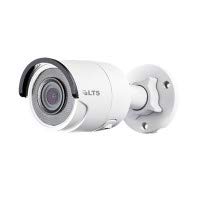
Obrázek 5.1: Přední strana view of the TSL LTS CMIP8342W-M Platinum Network Mini Bullet IP Camera, showing the lens and IR illuminators.
5.2 Napájení a síťové připojení
- Připojení napájení:
- PoE (Power over Ethernet): If using a PoE-enabled switch or NVR, connect an Ethernet cable from the camera's RJ45 port directly to the PoE port. No separate power adapter is needed.
- Napájení 12V stejnosměrného proudu: If not using PoE, connect a 12V DC power adapter (not included) to the camera's power input port.
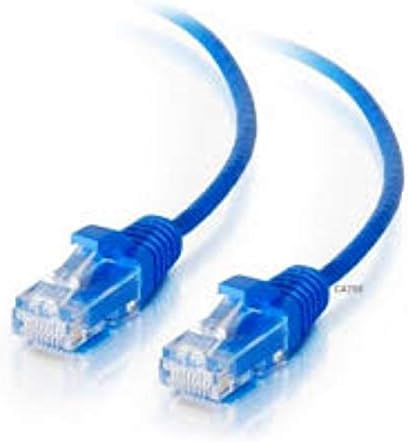
- Internetové připojení: Connect an Ethernet cable from the camera's RJ45 port to your network switch or router. Use the waterproof connector for outdoor installations to protect the RJ45 connection.
- Instalace karty MicroSD (volitelné): If local storage is desired, carefully open the MicroSD card slot cover (refer to the camera diagram in the quick start guide) and insert a MicroSD card (up to 128GB) with the contacts facing down. Close the cover securely.
Obrázek 5.2: Strana view of the TSL LTS CMIP8342W-M Platinum Network Mini Bullet IP Camera, illustrating the mounting bracket and cable connections.
5.3 Počáteční konfigurace
- Objevte fotoaparát: Use the manufacturer's IP camera search tool (e.g., SADP Tool) on a computer connected to the same network to find the camera's IP address.
- Aktivujte kameru: For first-time use, you may need to activate the camera by setting a strong password.
- Přístup Web Rozhraní: Otevřete a web browser and enter the camera's IP address. Log in with the newly set password.
- Nastavení sítě: Configure network settings (e.g., static IP, DHCP) as needed for your network environment.
- Datum a čas: Set the correct date and time, preferably using NTP (Network Time Protocol) for synchronization.
6. Provoz
6.1 Živě View a Nahrávání
Once configured, access the camera's live view prostřednictvím web interface, a compatible NVR, or a mobile application. From the live view, můžete:
- Sledujte video přenos v reálném čase.
- Manually start/stop recordings.
- Pořiďte snímky.
- Adjust image parameters (brightness, contrast, saturation).
6.2 Pokročilé funkce
- True WDR 120dB: Enable Wide Dynamic Range in settings to improve image clarity in scenes with both very bright and very dark areas.
- Matrix IR 2.0: The camera automatically activates its infrared illuminators in low-light conditions for night vision.
- Detekce pohybu: Configure motion detection zones and sensitivity. Set up actions such as recording, sending notifications, or triggering alarms upon detection.
- VCA (Video Content Analytics): Utilize Line Crossing Detection, Intrusion Detection, and Face Detection features by defining specific rules and areas in the camera's settings.
- Záznam na SD kartu: Configure continuous, scheduled, or event-triggered recording to the installed MicroSD card.
7. Údržba
- Čištění: Regularly clean the camera lens with a soft, dry cloth. For stubborn dirt, use a mild lens cleaning solution. Do not use harsh chemicals.
- Aktualizace firmwaru: Zkontrolujte výrobce website periodically for firmware updates. Updating firmware can improve performance, add new features, and fix bugs. Follow the provided instructions carefully during the update process.
- Správa úložiště: If using a MicroSD card, regularly back up important recordings and format the card periodically to maintain optimal performance.
- Kontrola kabelů: Periodically inspect all cables and connections for wear, damage, or corrosion, especially in outdoor installations.
8. Řešení problémů
| Problém | Možná příčina | Řešení |
|---|---|---|
| Není napájení kamery | Loose power connection, faulty power adapter/PoE switch, power outage. | Check all power connections. Verify power adapter/PoE switch is functioning. Restore power. |
| Na obrazovce není žádný obraz | Network connection issue, incorrect IP address, camera not activated, software/browser issue. | Verify network cable is connected. Check camera's IP address. Ensure camera is activated and logged in. Try a different browser or client software. |
| Špatná kvalita obrazu | Dirty lens, incorrect focus, low bandwidth, improper settings (WDR, exposure). | Clean the lens. Adjust focus if applicable. Check network bandwidth. Adjust image settings in the web rozhraní. |
| Nelze se připojit k kameře přes síť | Incorrect IP address, network configuration mismatch, firewall blocking. | Use the discovery tool to find the correct IP. Ensure camera and computer are on the same subnet. Check firewall settings on your computer or router. |
| SD karta nenahrává | SD card full, faulty SD card, incorrect recording schedule, SD card not formatted. | Check SD card status in settings. Replace faulty card. Verify recording schedule. Format the SD card via the camera's web rozhraní. |
9. Specifikace
| Funkce | Specifikace |
|---|---|
| Číslo modelu | CMIP8342W-M |
| Rozlišení záznamu videa | 4 MP |
| Efektivní rozlišení | 4 MP |
| Čočka | 4 mm @ F1.6 |
| Snímková frekvence | 30 fps (max) |
| Rozsah nočního vidění | 100 stop |
| Technologie nízkého osvětlení | Noční barva |
| Skutečné WDR | 120 dB |
| Komprese videa | H.265, H.265+, H.264, H.264+, MJPEG |
| Slot microSD | Až 128 GB |
| Napájení | DC 12V, PoE |
| Hodnocení mezinárodní ochrany | IP67 |
| Typ montáže | Držák na zeď |
| Form Factor | Kulka |
| Technologie připojení | Kabelové (ethernet) |
| Vnitřní/venkovní použití | Uvnitř, venku |
| Typ upozornění | Motion Only (VCA: Line Crossing, Intrusion Detection, Face Detection) |
10. Záruka a podpora
For warranty information and technical support, please refer to the official TSL webnebo se obraťte na autorizovaného prodejce. Uschovejte si účtenku jako doklad o koupi pro případ reklamace.
Výrobce: LTS
Značka: TSL