
EARISE M15
Uživatelská příručka k karaoke zařízení EARISE M15
Model: M15
Zavedení
Děkuji za nákupasing the EARISE M15 Karaoke Machine. This portable PA loudspeaker system is designed to provide high-quality audio for various entertainment and public address needs. Featuring powerful sound output, versatile connectivity options, and vibrant LED lights, the M15 is perfect for parties, gatherings, and karaoke sessions. Please read this manual thoroughly before operating the device to ensure proper use and to maximize its lifespan.
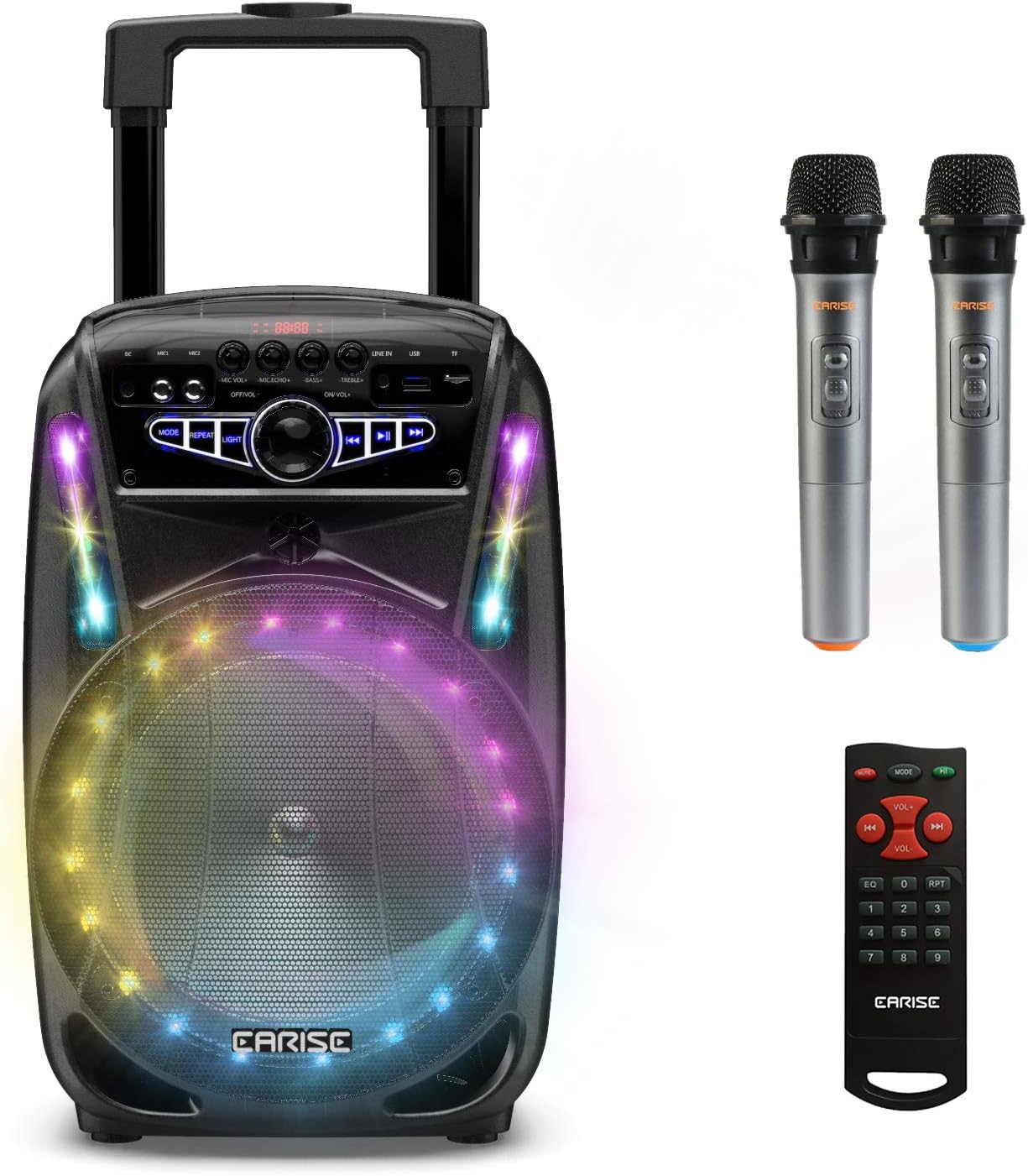
Image: The EARISE M15 Karaoke Machine, a black portable speaker with colorful LED lights on the front, shown with two wireless microphones and a remote control.
Co je v krabici
Zkontrolujte prosím obsah balení, abyste se ujistili, že všechny položky jsou přítomny a v dobrém stavu.
- 1 x M15 vozíkový PA systém
- 2 x bezdrátové mikrofony (baterie nejsou součástí dodávky)
- 1 x Dálkové ovládání
- 1 x Napájecí kabel
- Kabel 1 x AUX
- 1 x Uživatelská příručka (tento dokument)

Image: A visual representation of the package contents, showing the M15 speaker, two wireless microphones, a remote control, an AUX cable, and a charging cable.
Průvodce nastavením
1. Nabíjení jednotky
Before first use, fully charge the M15 Karaoke Machine. The built-in 3600mAh 7.4V Lithium rechargeable battery provides portability. A full recharge takes approximately 3 hours.
- Connect the included power cord to the DC Charging Port (6) on the back of the unit.
- Plug the other end of the power cord into a standard AC 100-240V power outlet.
- The charging indicator light will illuminate. Once fully charged, the light may change color or turn off depending on the unit's design.
2. Instalace baterií do mikrofonu
The wireless microphones require batteries (not included). Open the battery compartment of each microphone and insert the required batteries, ensuring correct polarity.
3. Počáteční zapnutí
Locate the Power On/Off switch (15) on the control panel. Turn the switch to the "ON" position to power on the unit.
Návod k obsluze
Konec ovládacího paneluview
Pro optimální provoz se seznamte s ovládacím panelem.

Image: Close-up of the M15's control panel, highlighting various buttons and ports with corresponding numbers for easy identification.
- Displej: Shows current mode, track number, and other information.
- Hlasitost mikrofonu: Upravuje hlasitost připojených mikrofonů.
- Echo mikrofonu: Ovládá efekt ozvěny pro mikrofony.
- Bas: Upravuje úroveň basů audio výstupu.
- Ztrojnásobit: Upravuje úroveň výšek audio výstupu.
- Nabíjecí port stejnosměrného proudu: For connecting the power adapter to charge the unit.
- Mic 1 Port: Vstup pro kabelový mikrofon.
- Mic 2 Port: Input for a second wired microphone.
- Line In Port (AUX): Pro připojení externích audio zařízení pomocí AUX kabelu.
- Slot pro USB flash disk: Pro přehrávání zvuku filez USB disku.
- Slot pro TF/SD kartu: Pro přehrávání zvuku files from a TF or SD card.
- režim: Switches between Bluetooth, USB, TF, AUX, and FM Radio modes.
- Opakovat: Opakuje aktuální skladbu nebo seznam skladeb.
- Světlo: Toggles or changes the LED light patterns.
- Power On/Off, Master Volume: Turns the unit on/off and adjusts the overall volume.
- Předchozí skladba: Přeskočí na předchozí skladbu.
- Přehrát/pozastavit: Přehraje nebo pozastaví aktuální skladbu.
- Další skladba: Přeskočí na další skladbu.
1. Párování Bluetooth
Connect your smartphone, tablet, or other Bluetooth-enabled device to the M15 for wireless audio streaming.
- Power on the M15 unit.
- Stiskněte tlačítko Režim button (12) until "Bluetooth" or "BT" appears on the Display Screen (1).
- Enable Bluetooth on your device and search for "EARISE M15" in the list of available devices.
- Select "EARISE M15" to pair. A confirmation sound will indicate successful pairing.
- You can now play audio from your device through the M15.

Image: A person sitting outdoors, connecting their smartphone to the EARISE M15 speaker via Bluetooth, indicated by the Bluetooth logo.
2. Přehrávání z USB/TF karty
Přehrát zvuk files directly from a USB flash drive or TF/SD card.
- Insert a USB flash drive into the USB Flash Drive Slot (10) or a TF/SD card into the TF/SD Card Slot (11).
- The unit should automatically switch to USB or TF mode and begin playing compatible audio files. Pokud ne, stiskněte tlačítko Režim button (12) to select the correct mode.
- Použijte Předchozí stopa (16), Přehrát/Pozastavit (17) a Další stopa (18) buttons to control playback.
3. Vstup AUX
Connect external audio devices that do not have Bluetooth capability using the AUX cable.
- Connect one end of the included AUX cable to the Line In Port (9) on the M15.
- Druhý konec AUX kabelu připojte k audio výstupnímu konektoru vašeho externího zařízení (např. MP3 přehrávače, notebooku).
- Stiskněte tlačítko Režim button (12) until "AUX" or "LINE" appears on the Display Screen (1).
- Ovládejte přehrávání z externího zařízení.
4. Použití mikrofonu
The M15 supports up to two wireless microphones and two wired microphones simultaneously for karaoke fun.
- Bezdrátové mikrofony: Turn on the wireless microphones. They should automatically connect to the M15.
- Drátové mikrofony: Plug wired microphones into Mic 1 Port (7) or Mic 2 Port (8).
- Adjust the Microphone Volume (2) and Microphone Echo (3) knobs to achieve desired sound effects.

Image: A group of people enjoying karaoke, with the EARISE M15 speaker providing sound and multiple microphones in use, demonstrating its multi-user capability.
5. LED světla
Enhance your party atmosphere with the M15's colorful LED disco lights.
- Stiskněte tlačítko Světlo button (14) to toggle the LED lights on/off or to cycle through different light patterns.

Image: The EARISE M15 speaker with its front-facing LED lights glowing in multiple colors, creating a vibrant visual effect.
6. Použití dálkového ovládání
Součástí dodávky je dálkové ovládání, které umožňuje pohodlné ovládání na dálku.
- Ujistěte se, že dálkové ovládání má funkční baterie.
- Point the remote control towards the front of the M15 unit.
- Use the buttons on the remote to control volume, mode, track selection, EQ, and other functions.
Údržba
Proper maintenance will ensure the longevity and optimal performance of your EARISE M15 Karaoke Machine.
- Čištění: K otření vnější strany jednotky použijte měkký, suchý hadřík. Nepoužívejte abrazivní čisticí prostředky, vosky ani rozpouštědla, protože by mohly poškodit povrchovou úpravu.
- Péče o baterie: To prolong battery life, avoid fully discharging the battery frequently. If storing the unit for an extended period, charge it to about 50% every few months.
- Skladování: Přístroj skladujte na chladném a suchém místě mimo dosah přímého slunečního záření, extrémních teplot a vysoké vlhkosti.
- Zacházení: While the unit is portable with wheels and a handle, avoid dropping or subjecting it to strong impacts.

Image: A person demonstrating the portability of the EARISE M15 by pulling it with its retractable handle and built-in wheels.
Odstraňování problémů
If you encounter issues with your M15, please refer to the following common problems and solutions.
| Problém | Možná příčina | Řešení |
|---|---|---|
| Žádné napájení / Jednotka se nezapne. | Baterie je vybitá. Napájecí kabel není správně připojen. | Plně nabijte jednotku. Ensure power cord is securely connected to both the unit and the power outlet. |
| Z reproduktoru není slyšet žádný zvuk. | Hlasitost je příliš nízká. Byl vybrán nesprávný režim. Hlasitost externího zařízení je nízká. | Increase the Master Volume (15). Stiskněte tlačítko Režim button (12) to select the correct input source (Bluetooth, USB, AUX). Increase volume on the connected external device. |
| Mikrofon nefunguje. | Microphone batteries are dead or incorrectly inserted. Hlasitost mikrofonu je příliš nízká. Wireless microphone not paired. | Replace microphone batteries, ensuring correct polarity. Increase Microphone Volume (2). Ensure wireless microphones are turned on and within range. |
| Párování Bluetooth se nezdařilo. | M15 is not in Bluetooth mode. Device is too far from M15. Bluetooth na zařízení je vypnutý. | Stiskněte Režim button (12) to select Bluetooth mode. Move your device closer to the M15. Povolte na svém zařízení Bluetooth. |
| USB/TF karta nepřehrává. | Nesprávný file formát. Karta/mechanika není správně vložena. Unit not in USB/TF mode. | Zajistěte zvuk filejsou v kompatibilním formátu (např. MP3). Znovu pevně vložte USB disk nebo TF kartu. Stiskněte Režim button (12) to select USB or TF mode. |
Specifikace
Detailed technical specifications for the EARISE M15 Karaoke Machine.
| Funkce | Specifikace |
|---|---|
| Model | M15 |
| Výkon | 400 W Max. |
| R.Frequency | 90Hz-20KHz |
| Li-ion baterie | 3.7V / 2600mAh (Built-in) |
| Pohonná jednotka | 8" 4Ω*1 + 1" tweeter*1 |
| Poměr S/N | ≥60 dB |
| Napájení | AC 100-240V |
| Rozměry produktu (D x Š x V) | 27.94 x 25.4 x 40.64 cm (11 x 10.4 x 16.3 palce) |
| Hmotnost položky | 4.08 kg |
| Technologie připojení | Bluetooth, USB, AUX |
| Kompatibilní zařízení | Notebook, Smartphone |

Image: A diagram illustrating the physical dimensions of the EARISE M15 speaker, showing its height, width, and depth.
Záruka a podpora
For warranty information or technical support, please refer to the contact details provided with your purchase documentation or visit the official EARISE webUschovejte si účtenku jako doklad o koupi pro případné reklamace.
Ask a question about this manual
Ask about setup, troubleshooting, compatibility, parts, safety, or missing instructions. Manuals+ will review the question and use this page’s manual context to help answer it.