
1. Úvod
This manual provides detailed instructions for the proper use and maintenance of the Walfront FG-100 Function Generator DDS Counter Source Module. The FG-100 is a versatile device utilizing Direct Digital Synthesis (DDS) technology to generate various waveforms, including sine, square, triangle, and sawtooth, across a frequency range of 1Hz to 500KHz. It is designed for applications requiring precise signal generation and frequency counting in educational, hobbyist, and professional settings.
2. Bezpečnostní informace
Před použitím zařízení si prosím přečtěte a pochopte všechny bezpečnostní pokyny. Nedodržení těchto pokynů může vést k úrazu elektrickým proudem, požáru nebo poškození produktu.
- Zdroj napájení: Use only the specified 5V DC power supply. Ensure the power source is stable and within the rated voltage.
- Prostředí: Operate the device in a dry, well-ventilated area. Avoid exposure to moisture, extreme temperatures, or direct sunlight.
- Zacházení: Do not drop or subject the device to strong impacts. Avoid opening the casing, as there are no user-serviceable parts inside.
- Spojení: Ensure all connections are secure before applying power. Disconnect power before making or changing connections.
- Čištění: K čištění používejte měkký, suchý hadřík. Nepoužívejte tekuté čisticí prostředky ani rozpouštědla.
3. Obsah balení
Ověřte, zda jsou v balení přítomny všechny níže uvedené položky:
- 1 x Walfront FG-100 Function Generator DDS Counter Source Module
- 1 x Napájecí kabel USB
4. Konec produktuview
The FG-100 features a compact design with an intuitive control panel and an LCD display for easy operation. Below is an illustration of the device and its main components.

Figure 4.1: Walfront FG-100 Function Generator and included USB power cable.
4.1 Ovládací prvky na předním panelu

Obrázek 4.2: Detail view of the FG-100 front panel.
- LCD displej: Shows current waveform type, frequency, and other settings.
- Tlačítko napájení: Zapíná/vypíná napájení zařízení.
- Tlačítko MODE: Cycles through different waveform types (Sine, Square, Triangle, Sawtooth).
- CURSOR Button: Moves the cursor on the LCD to select digits for frequency adjustment.
- Tlačítka '+' / '-': Adjust the value of the selected digit or parameter.
- Tlačítko SPUSTIT/STOP: Starts or pauses the waveform output.
- Tlačítko FILTR: Toggles the output filter on/off.
- DC OFFSET Switch: Toggles DC offset on/off.
- AMP Knoflík: Upraví ampšířka výstupního signálu.
4.2 Připojení bočního panelu
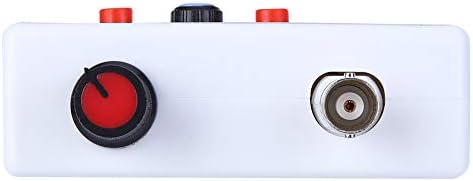
Obrázek 4.3: Strana view showing output and ampovládání nadmořské výšky.
- Vstup DC 5V: Power input port for the USB power cable.
- OUT (BNC Connector): Main signal output port.
5. Nastavení
Follow these steps to set up your FG-100 Function Generator:
- Připojení napájení: Connect the provided USB power cable to the 'DC 5V' input port on the side of the FG-100. Plug the other end of the USB cable into a 5V USB power adapter (not included) or a compatible USB port.
- Výstupní připojení: Connect a BNC cable (not included) to the 'OUT' BNC connector on the side of the FG-100. Connect the other end of the BNC cable to your oscilloscope, frequency counter, or other test equipment.
- Zapnutí: Press the 'POWER' button on the front panel. The LCD display should illuminate and show the default waveform and frequency.
6. Návod k obsluze
6.1 Výběr průběhu
Press the 'MODE' button to cycle through the available waveform types: Sine, Square, Triangle, and Sawtooth. The currently selected waveform will be displayed on the LCD.
6.2 Nastavení frekvence
To adjust the output frequency:
- The frequency value is displayed on the LCD.
- Press the 'CURSOR' button to move the blinking cursor to the digit you wish to change.
- Use the '+' and '-' buttons to increase or decrease the value of the selected digit.
- Repeat steps 2 and 3 until the desired frequency is set.
6.3 DC Offset Control
The 'DC OFFSET' switch allows you to add or remove a DC component to the output signal. Flip the switch to 'ON' to enable DC offset or 'OFF' to disable it.
6.4 Filter Function
Press the 'FILTER' button to toggle the output filter. This filter can be used to smooth the output of sine and pulse waves, which may be beneficial for certain applications.
6.5 Amplitude Adjustment
Rotate the 'AMP' knob on the side of the device to adjust the amplitude (peak-to-peak voltage) of the output signal. Turn clockwise to increase amplitude, counter-clockwise to decrease.
6.6 Run/Stop Output
Press the 'RUN/STOP' button to pause or resume the waveform output. When paused, the output signal will cease, and the display may indicate a stopped state.
7. Údržba
Proper maintenance ensures the longevity and reliable operation of your FG-100.
- Čištění: Regularly wipe the device with a soft, dry, lint-free cloth. Do not use abrasive cleaners, solvents, or chemical agents.
- Skladování: Pokud zařízení nepoužíváte, skladujte jej na chladném a suchém místě, mimo dosah přímého slunečního záření a nadměrného prachu.
- Inspekce: Periodically inspect the power cable and connectors for any signs of damage. If damage is found, discontinue use and contact support.
8. Řešení problémů
If you encounter issues with your FG-100, refer to the following common problems and solutions:
| Problém | Možná příčina | Řešení |
|---|---|---|
| Device does not power on / LCD is blank. | No power, faulty cable, or power adapter issue. | Ensure the USB power cable is securely connected. Try a different USB power adapter or USB port. Verify the 'POWER' button is pressed. |
| No output signal. | Output cable not connected, 'RUN/STOP' is paused, or amplitude is set to minimum. | Check BNC cable connection. Press 'RUN/STOP' to ensure output is active. Rotate the 'AMP' knob clockwise to increase amplituda. |
| Incorrect frequency or waveform. | Settings are not correctly adjusted. | Verify the frequency setting using 'CURSOR' and '+/-' buttons. Press 'MODE' to select the desired waveform. |
9. Specifikace
Technical specifications for the Walfront FG-100 Function Generator:
| Funkce | Specifikace |
|---|---|
| Model | FG-100 |
| Frekvenční rozsah | 1Hz - 500KHz |
| Typy křivek | Sine, Square, Triangle, Sawtooth |
| Technologie | DDS (Direct Digital Synthesis) |
| DC offset | Adjustable On/Off |
| Filtr | Selectable On/Off for sine/pulse waves |
| Napájení | DC 5V (přes USB) |
| Materiál | ABS |
| Hmotnost položky | 9.6 unce |
| Výrobce | Eujgoov |
10. Záruka a podpora
For warranty information, technical support, or service inquiries regarding your Walfront FG-100 Function Generator, please contact the seller or manufacturer directly. Keep your purchase receipt as proof of purchase.