
1. Úvod
This manual provides essential instructions for the safe and efficient operation of your Lenco DIR-250 Internet Radio. Please read this manual thoroughly before using the device and retain it for future reference. The Lenco DIR-250 is a versatile audio system offering Internet Radio, DAB+, FM radio, Bluetooth connectivity, Spotify Connect, and USB playback.
2. Bezpečnostní informace
- Nevystavujte jednotku dešti ani vlhkosti, abyste předešli požáru nebo úrazu elektrickým proudem.
- Zajistěte dostatečné větrání. Neblokujte větrací otvory.
- Používejte pouze napájecí adaptér dodaný s jednotkou.
- Neotevírejte casing. Veškerý servis svěřte kvalifikovanému personálu.
- Chraňte přístroj před přímým slunečním zářením, zdroji tepla a silnými magnetickými poli.
- Nepokládejte těžké předměty na horní část jednotky.
3. Obsah balení
Při vybalení ověřte, zda jsou všechny položky přítomny:
- Lenco DIR-250 Internet Radio Unit
- Napájecí adaptér
- Dálkové ovládání
- Uživatelská příručka (tento dokument)
- Antennas (2 included)
4. Konec produktuview

Obrázek 4.1: Přední view of the Lenco DIR-250 Internet Radio and its remote control.

Obrázek 4.2: Close-up of the right side of the front panel, featuring the TFT LCD display, volume control knob, Dimmer, and Alarm buttons.
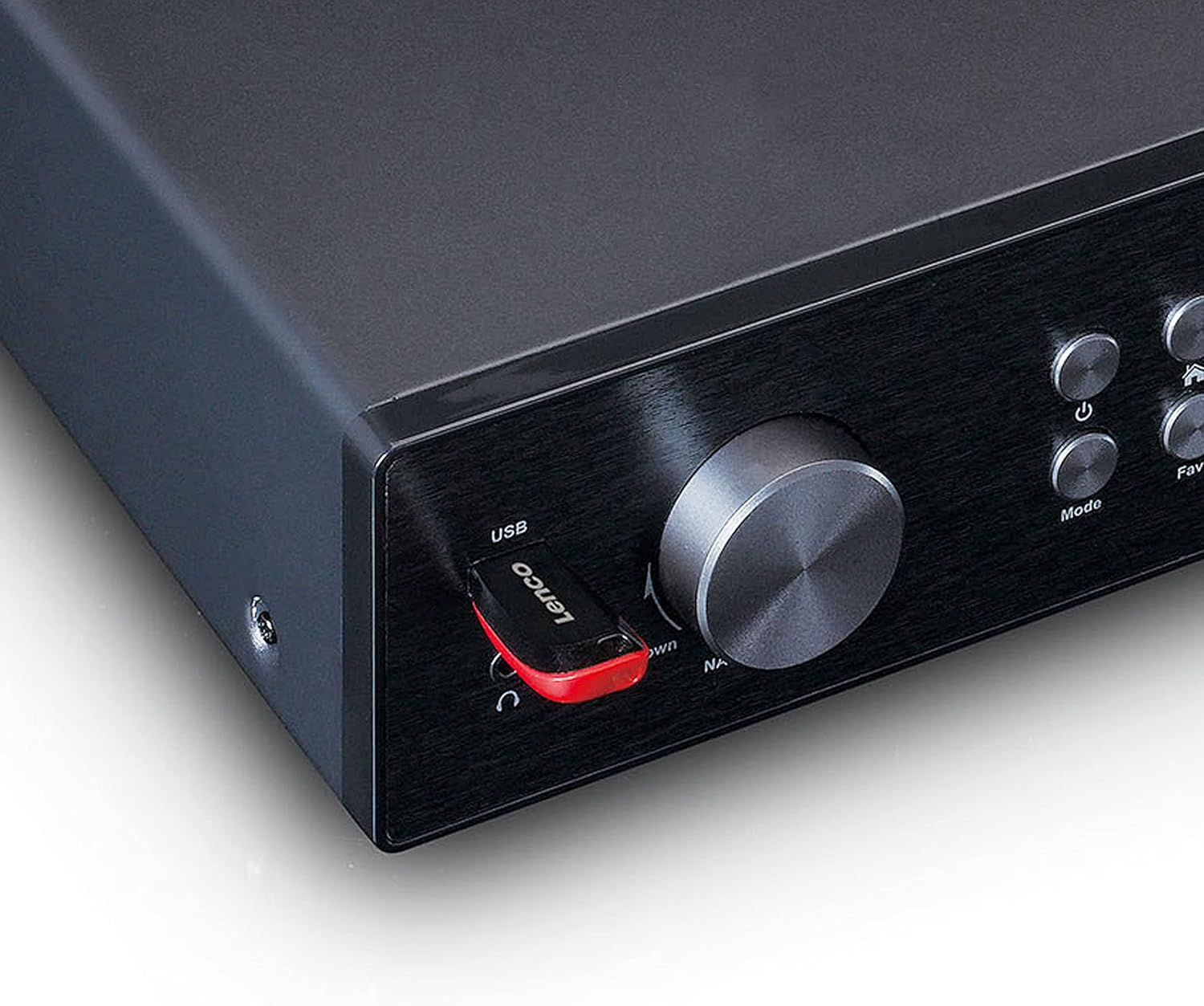
Obrázek 4.3: Close-up of the left side of the front panel, showing the USB port, headphone jack, Navigate/OK knob, Mode, and Favorite buttons.

Obrázek 4.4: Rear panel connections, including DC IN, Audio Output (RCA), Analog Input/Output, Optical Output, Coaxial Output, LAN (RJ45), and Antenna ports.
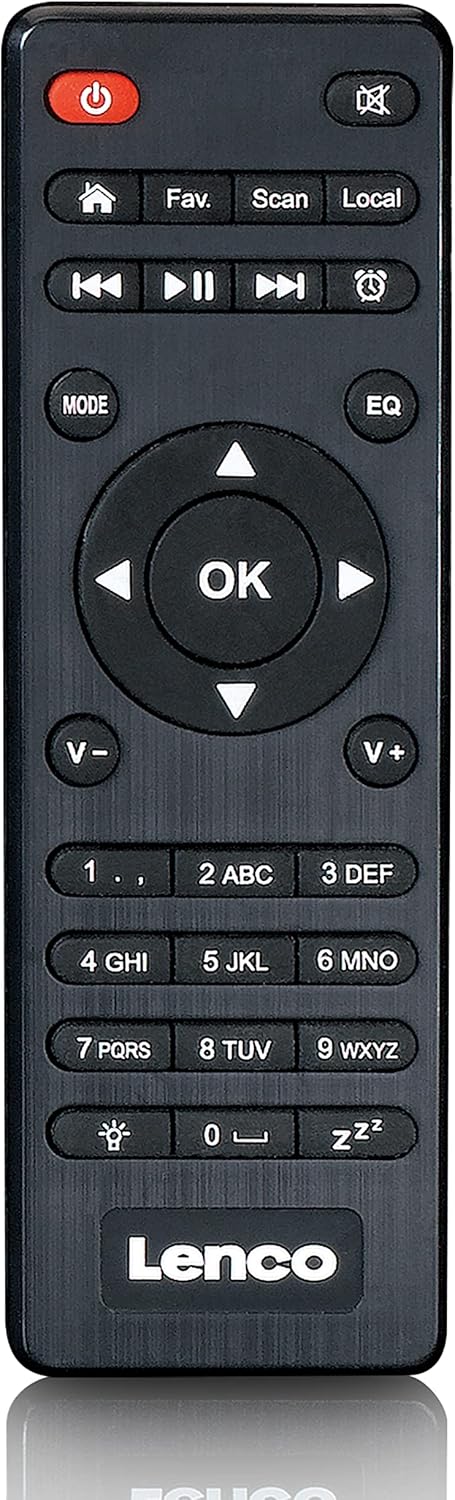
Obrázek 4.5: The included remote control for convenient operation of the Lenco DIR-250.
5. Nastavení
5.1. Připojení napájení
- Connect the supplied power adapter to the DC IN port on the rear of the unit.
- Zapojte napájecí adaptér do elektrické zásuvky.
5.2. Připojení antény
For optimal reception of DAB+ and FM radio, connect the provided antennas to their respective ports on the rear panel. Extend the telescopic antenna fully for best results.
5.3. Síťové připojení
The DIR-250 supports both Wi-Fi and Ethernet connections for Internet Radio and Spotify Connect.
- Wi-Fi: Upon first power-on, the unit will guide you through the Wi-Fi setup. Select your network from the list and enter the password using the navigation knob and OK button, or the remote control.
- Ethernet: Connect an Ethernet cable from your router to the LAN port on the rear of the unit. The device will automatically detect the wired connection.
5.4. Průvodce počátečním nastavením
The first time you power on the DIR-250, an initial setup wizard will appear on the display. Follow the on-screen prompts to configure language, time, date, and network settings. This ensures the device is ready for use.
6. Provoz
6.1. Základní ovládací prvky
The DIR-250 can be operated using the front panel controls or the included remote control.
- Vypínač: Zapíná/vypíná jednotku nebo ji přepíná do pohotovostního režimu.
- Knoflík hlasitosti: Otočením upravíte hlasitost. Stisknutím ztlumíte/zapnete zvuk.
- Knoflík Navigace/OK: Rotate to scroll through menus and options. Press to confirm a selection.
- Tlačítko režimu: Cycles through available modes (Internet Radio, DAB+, FM, Bluetooth, USB, AUX).
- Fav. Button: Accesses your list of favorite stations or saves the current station as a favorite.
- Tlačítko stmívače: Upravuje jas displeje.
- Tlačítko budíku: Sets or manages alarms.
6.2. Internetové rádio
Access thousands of radio stations worldwide via your internet connection.
- Stiskněte tlačítko Režim dokud nevyberete „Internetové rádio“.
- Použijte Navigate/OK knob or remote control to browse stations by location, genre, or search.
- Stiskněte OK vyberte stanici.
- Chcete-li stanici uložit jako oblíbenou, stiskněte a podržte tlačítko oblíbené tlačítko.
6.3. DAB+ rádio
Užijte si vysoce kvalitní digitální rozhlasové vysílání.
- Stiskněte tlačítko Režim button until "DAB+" is selected.
- Rádio automaticky vyhledá dostupné stanice DAB+.
- Použijte Navigate/OK knob or remote to select a station from the list.
6.4. FM rádio
Tune into traditional analog FM radio stations.
- Stiskněte tlačítko Režim tlačítko, dokud nezvolíte „FM“.
- Použijte Skenovat tlačítko na dálkovém ovladači nebo Navigate/OK knob to search for stations.
- Stiskněte OK to listen to a selected station.
6.5. Režim Bluetooth
Stream audio wirelessly from your smartphone, tablet, or other Bluetooth-enabled devices.
- Stiskněte tlačítko Režim button until "Bluetooth" is selected. The display will show "Pairing".
- On your external device, enable Bluetooth and search for "Lenco DIR-250".
- Select the device to pair. Once connected, you can play audio from your device through the radio.
6.6. Spotify Connect
Control your music directly from the Spotify app on your smartphone or tablet.
- Ensure your Lenco DIR-250 and your smartphone/tablet are connected to the same Wi-Fi network.
- Otevřete na svém zařízení aplikaci Spotify.
- Přehrajte skladbu a klepněte na ikonu „Dostupná zařízení“ (obvykle ikona reproduktoru nebo počítače).
- Select "Lenco DIR-250" from the list of available devices.
6.7. Přehrávání z USB
Přehrát zvuk files (MP3, WAV, AAC) from a USB flash drive.
- Vložte USB flash disk do USB portu na předním panelu.
- Stiskněte tlačítko Režim tlačítko, dokud nevyberete „USB“.
- Použijte Navigate/OK knob or remote to browse and select audio files.
6.8. Vstup AUX
Připojte externí zvuková zařízení pomocí 3.5mm audio kabelu.
- Connect your external audio device to the AUX IN port on the rear panel.
- Stiskněte tlačítko Režim button until "AUX" is selected.
- Přehrávejte zvuk z připojeného zařízení.
6.9. Alarm and Sleep Timer
Set alarms to wake up to your favorite radio station or use the sleep timer to automatically turn off the radio.
- Poplach: Stiskněte tlačítko Poplach button on the front panel or remote. Follow the on-screen instructions to set alarm time, source, and volume.
- Časovač vypnutí: Stiskněte tlačítko Spát button on the remote control repeatedly to cycle through available sleep timer durations (e.g., 15, 30, 60 minutes, Off).
7. Údržba
7.1. Čištění
To clean the unit, wipe it with a soft, dry cloth. Do not use abrasive cleaners, waxes, or solvents as these may damage the surface. Ensure the unit is unplugged before cleaning.
7.2. Skladování
Pokud plánujete přístroj delší dobu nepoužívat, odpojte jej ze zásuvky a uložte jej na chladném a suchém místě, mimo dosah přímého slunečního záření a extrémních teplot.
8. Řešení problémů
| Problém | Možná příčina | Řešení |
|---|---|---|
| Žádná síla | Napájecí adaptér není připojen nebo je zásuvka vadná. | Zkontrolujte připojení k napájení. Zkuste jinou zásuvku. |
| Žádný zvuk | Volume too low, muted, or incorrect input selected. | Increase volume. Check if muted. Select correct input mode. |
| Nelze se připojit k Wi-Fi | Nesprávné heslo, mimo dosah nebo problém s routerem. | Ověřte heslo Wi-Fi. Přesuňte zařízení blíže k routeru. Restartujte router. |
| Načítání/odpojení internetového rádia | Slabý signál Wi-Fi nebo pomalé internetové připojení. | Improve Wi-Fi signal strength. Check internet speed. Try wired Ethernet connection. |
| Špatný příjem DAB+/FM | Antenna not properly connected or extended. | Ensure antennas are fully extended and positioned for best reception. |
| Problémy s párováním pomocí rozhraní Bluetooth | Device not in pairing mode, or already paired with another device. | Ensure DIR-250 is in Bluetooth mode. Disconnect from other devices. |
| Jednotka se zasekne nebo přestane reagovat | Dočasná softwarová závada. | Unplug the power adapter, wait 10 seconds, then plug it back in to restart the unit. |
9. Specifikace
| Značka | Lenco |
| Číslo modelu | A004231 |
| Technologie displeje | LCD |
| Konektivita | Bluetooth V5.0, Ethernet (RJ45), Wi-Fi |
| Podporovaná rádiová pásma | Internetové rádio, DAB+, FM |
| Speciální funkce | Spotify Connect, USB Playback, Alarm, Sleep Timer |
| Rozměry (D x Š x V) | 43 x 28.7 x 7.2 cm |
| Hmotnost | 1.5 kilogramu |
| Zdroj napájení | Kabelové (AC adaptér) |
| Kompatibilní zařízení | Tablet, Smartphone, USB storage devices |
10. Záruka
This product comes with a manufacturer's warranty of 24 months from the date of purchase. Please retain your proof of purchase for warranty claims. The warranty covers defects in materials and workmanship under normal use. It does not cover damage caused by misuse, accidents, unauthorized modifications, or normal wear and tear.
11. Podpora
For technical support, service, or further inquiries regarding your Lenco DIR-250 Internet Radio, please visit the official Lenco website or contact their customer service department. Contact information can typically be found on the Lenco webna webu nebo v záruční dokumentaci dodané s vaším produktem.
Lenco Official Webmísto: www.lenco.com