
Zavedení
The EKSA E900 Wired Gaming Headset is designed to provide a high-quality audio experience for gaming, communication, and multimedia. Featuring a detachable noise-canceling microphone, 3D surround sound capabilities, and a comfortable design, this headset is compatible with a wide range of devices including PCs, PlayStation consoles, Xbox consoles, and other devices with a 3.5mm audio jack.
Co je v krabici
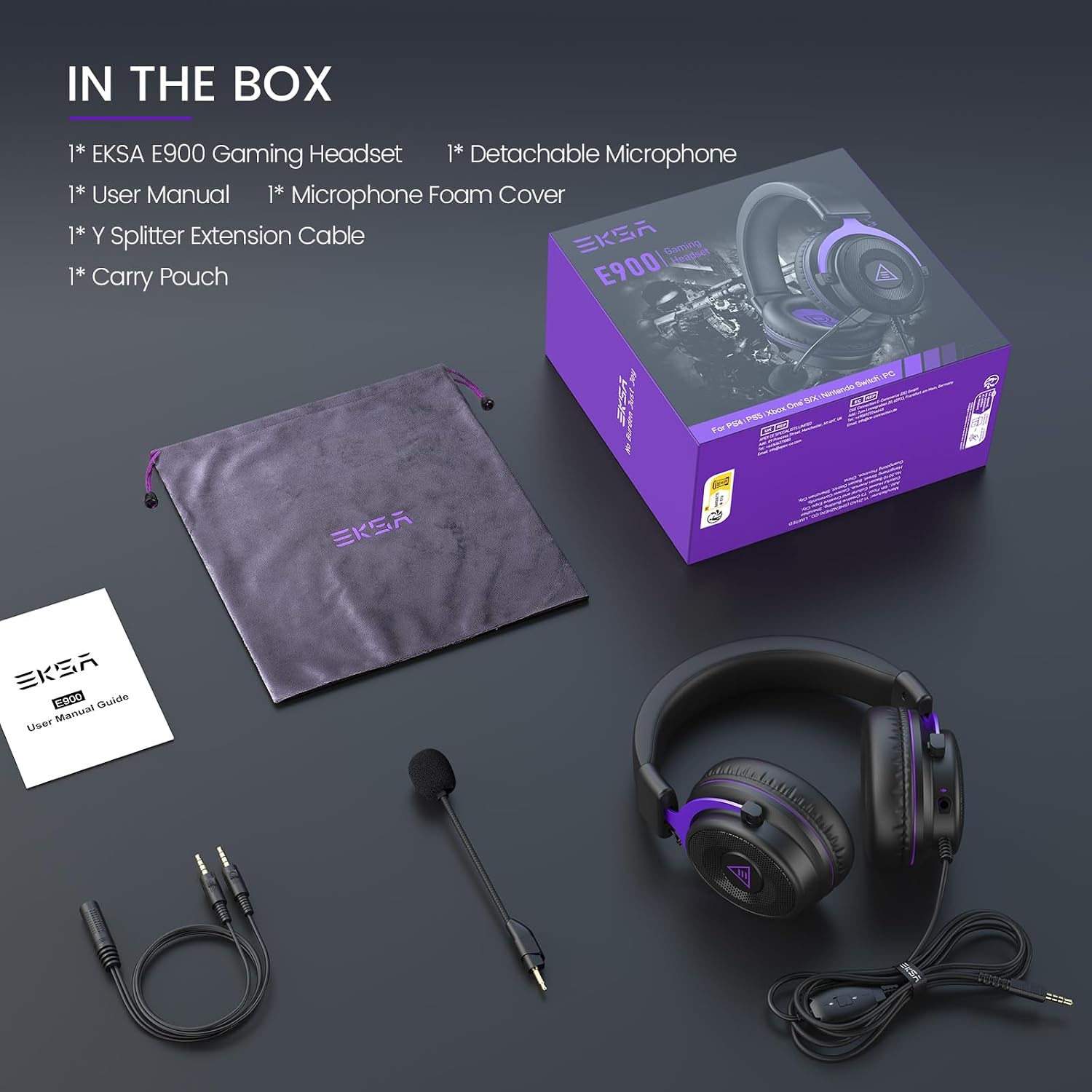
Image: All components included in the EKSA E900 Gaming Headset package.
- Herní sluchátka EKSA E900
- Odnímatelný mikrofon
- Pěnový kryt mikrofonu
- Y Splitter prodlužovací kabel
- Ochranné pouzdro
Konec produktuview
Design a pohodlí

Image: The adjustable metal headband of the EKSA E900 headset, designed for durability and a customized fit.
The E900 headset features thick memory foam cushion pads and soft, large earmuffs for optimized comfort during extended use. The adjustable metal headband ensures a perfect fit for various head sizes, providing both durability and flexibility.
Zvukové funkce

Image: Visual representation of the 3D surround sound experience provided by the headset's 50mm drivers.
Equipped with upgraded 50mm large-size driver units and OFC copper voice coils, the E900 delivers a wide dynamic range of sound. This design enhances spatial awareness and positioning, contributing to an immersive audio experience.
Detachable Noise-Canceling Microphone

Image: The detachable, omnidirectional noise-canceling microphone, designed for clear voice transmission.
The E900 features a highly sensitive, omnidirectional noise-reduction microphone. This technology minimizes background noise, ensuring clear and high-quality voice transmissions during gaming or chats. The microphone is detachable for convenience when not needed.
Setup & Compatibility

Image: The EKSA E900 headset demonstrating its multi-platform compatibility with consoles, PCs, and mobile devices.
Connecting to Devices (3.5mm Jack)
The E900 headset connects via a standard 3.5mm audio jack. Simply plug the headset's 3.5mm connector into the corresponding port on your device. This method is compatible with:
- PC (using the Y Splitter for separate mic/audio ports if needed)
- PlayStation 4/5 controllers
- Xbox One/Series X/S controllers
- Nintendo Switch
- Notebooky
- Mobile devices (smartphones, tablets)
PC Setup for 3D Surround Sound
For optimal 3D surround sound on PC, it is recommended to install the dedicated 7.1 virtual surround sound driver from the official EKSA website. This driver enhances the audio experience for gaming and multimedia on Windows systems.
Návod k obsluze
Nastavení hlasitosti
The headset features an in-line volume control for easy audio level adjustments during use. Locate the volume wheel on the cable and rotate it to increase or decrease the sound output.
Ztlumení mikrofonu
A one-key mic mute switch is integrated into the headset's controls, allowing for quick and convenient muting of the microphone during gameplay or calls.
Detaching/Attaching the Microphone
The microphone is detachable. To attach, align the microphone's 3.5mm jack with the port on the left ear cup and push firmly until it clicks into place. To detach, gently pull the microphone away from the ear cup. This allows for versatile use, whether for gaming communication or simply listening to audio without the microphone.
Údržba
To ensure the longevity of your EKSA E900 headset:
- Clean the soft protein leather ear cups and headband with a damp hadříkem podle potřeby.
- Store the headset in its protective case when not in use to prevent dust accumulation and physical damage.
- Nevystavujte sluchátka extrémním teplotám nebo přímému slunečnímu záření.
- Handle cables gently to prevent fraying or damage to connectors.
Odstraňování problémů
Žádný zvuk/nízká hlasitost
- Ujistěte se, že je 3.5mm jack zcela zasunut do zařízení.
- Check the in-line volume control on the headset and adjust it.
- Verify the audio output settings on your connected device (PC, console, phone).
- If on PC, ensure the correct audio device is selected in your sound settings.
Mikrofon nefunguje
- Ujistěte se, že je mikrofon bezpečně připojen k headsetu.
- Check if the mic mute switch on the cable is in the 'unmute' position.
- Verify microphone input settings on your connected device.
- If on PC, ensure the correct microphone device is selected and its volume is not muted in sound settings.
- If using the Y Splitter, ensure it is correctly connected to both mic and audio ports on your PC.
Specifikace
| Funkce | Detail |
|---|---|
| Název modelu | E900 |
| Technologie připojení | Drátové (3.5mm jack) |
| Velikost zvukového ovladače | 50 milimetrů |
| Impedance | 32 ohmů |
| Umístění uší | Přes ucho |
| Mikrofon | Detachable, Noise-Canceling |
| Typ ovládání | Volume Control, Mic Mute |
| Hmotnost položky | 13.7 unce |
| Rozměry produktu | 7.08 x 3.93 x 6.88 palce |
Záruka a podpora
EKSA gaming headsets are produced under strict quality inspection. The EKSA E900 comes with a Záruka 24 měsíců. Customer service is available 24/7 to answer questions and provide any required assistance. For support, please refer to the contact information provided in your product packaging or visit the official EKSA webmísto.
Oficiální video produktu
Video: Úředník u konceview of the EKSA Gaming Headset with microphone, showcasinjeho vlastnosti a design.