
GOKOO B08FMBHSWD
GOKOO Smart Watch B08FMBHSWD User Manual
Zavedení
This manual provides essential information for the proper setup, operation, and maintenance of your GOKOO Smart Watch B08FMBHSWD. Please read it thoroughly before using the device to ensure optimal performance and longevity.
The GOKOO Smart Watch is a versatile fitness tracker and smartwatch designed to monitor various health metrics and assist with daily activities. It features a full touch screen, heart rate and blood oxygen monitoring, sleep tracking, multiple sports modes, and notification capabilities.
Konec produktuview
The GOKOO Smart Watch B08FMBHSWD is equipped with advanced features to support your active lifestyle and health monitoring needs.
- All-day Activity Tracking: Records steps, calories, and mileage. Supports 10 sports modes including walking, running, yoga, and swimming.
- Komplexní sledování zdraví: Continuously monitors heart rate and blood oxygen levels. Features automatic sleep tracking, breathing training, and sedentary reminders.
- Odolný a vodotěsný design: IP68 waterproof rating suitable for daily use and swimming.
- Přizpůsobitelný displej: 1.3-inch round high-definition screen with personalized UI interfaces.
- Chytrá upozornění: Synchronizes messages and allows management of incoming calls.
- Dlouhá výdrž baterie: Up to 10 days of usage on a single charge (200MA battery).
- Široká kompatibilita: Works with Android 5.0+ and iOS 9.0+ devices.

Figure 1: GOKOO Smart Watch highlighting its design and core functionalities.
Nastavení
1. Nabíjení zařízení
Before initial use, fully charge your GOKOO Smart Watch. Connect the magnetic charging cable to the charging contacts on the back of the watch and plug the USB end into a power adapter (not included) or a computer's USB port. The watch display will indicate charging status.
A full charge typically takes approximately 2 hours and provides up to 10 days of usage, depending on individual use patterns.

Figure 2: Illustration of the watch's IP68 waterproof capability and its extended battery life.
2. Instalace a párování aplikace
- Stáhněte si aplikaci: Hledat the official GOKOO companion app in your smartphone's app store (Apple App Store for iOS, Google Play Store for Android).
- Instalace a registrace: Nainstalujte si aplikaci a postupujte podle pokynů na obrazovce k vytvoření účtu nebo přihlášení.
- Povolit Bluetooth: Ujistěte se, že je na vašem smartphonu povoleno Bluetooth.
- Spárování hodinek: Open the GOKOO app, navigate to the device pairing section, and select your GOKOO Smart Watch from the list of available devices. Confirm the pairing request on both your phone and the watch if prompted.
- Udělení oprávnění: Povolte potřebná oprávnění (např. oznámení, polohu, zdravotní údaje), aby aplikace fungovala správně.
The watch will synchronize its language with your phone upon successful connection.
Návod k obsluze
1. Základní navigace
- Dotyková obrazovka: The watch features a full touch screen for interaction.
- Přejetí nahoru/dolů: Procházení nabídek a oznámení.
- Přejetí doleva/doprava: Přístup k různým widgetům nebo rychlým funkcím.
- Klepněte na: Vyberte položku nebo potvrďte akci.
- Boční tlačítko: Typically used to return to the home screen or activate/deactivate the display.

Figure 3: The watch interface displaying multiple functions and touch screen interaction methods.
2. Sledování aktivity
The watch automatically tracks your daily steps, calories burned, and distance traveled. For specific activities, you can select from 10 sports modes:
- Chůze
- Běh
- Jóga
- Plavání
- Cyklistika
- Lezení
- Basketball
- Fotbal
- Badminton
- Skákání
To start a workout, navigate to the 'Sports' menu on your watch, select the desired activity, and tap to begin. The watch will record your exercise data, which can be reviewv doprovodné aplikaci.

Figure 4: The watch interface showing available sports monitoring modes.

Figure 5: The watch tracking an outdoor run, displaying distance, calories, and a trajectory map.
3. Monitorování zdraví
- Srdeční frekvence: Hodinky nepřetržitě sledují váš tep. View real-time data on the watch or detailed historical data in the app.
- Kyslík v krvi (SpO2): Monitor your blood oxygen levels throughout the day.
- Sledování spánku: The watch automatically records your sleep quality, including deep sleep, light sleep, and wake times. Review sleep patterns in the app to help adjust your habits.
- Dechový trénink: Access guided breathing exercises on the watch to help reduce stress and improve relaxation.
- Upomínky na sedavý způsob života: Nastavte si v aplikaci připomenutí, která vás po obdobích nečinnosti vyzvou k pohybu.

Figure 6: The watch displaying real-time heart rate and blood oxygen data during exercise.
4. Oznámení a chytré funkce
Once paired with your smartphone, the GOKOO Smart Watch can display notifications for incoming calls, messages, and various app alerts. You can read messages directly on your wrist and manage incoming calls (answer/reject) without reaching for your phone.
- Správa hovorů: Swipe on the watch screen to accept or reject incoming calls.
- Zobrazení zprávy: View text messages and app notifications.
- Předpověď počasí: Access current weather information.
- Ovládání hudby: Ovládejte přehrávání hudby na svém smartphonu.
- Dálkové ovládání fotoaparátu: Používejte hodinky jako dálkové ovládání fotoaparátu telefonu.
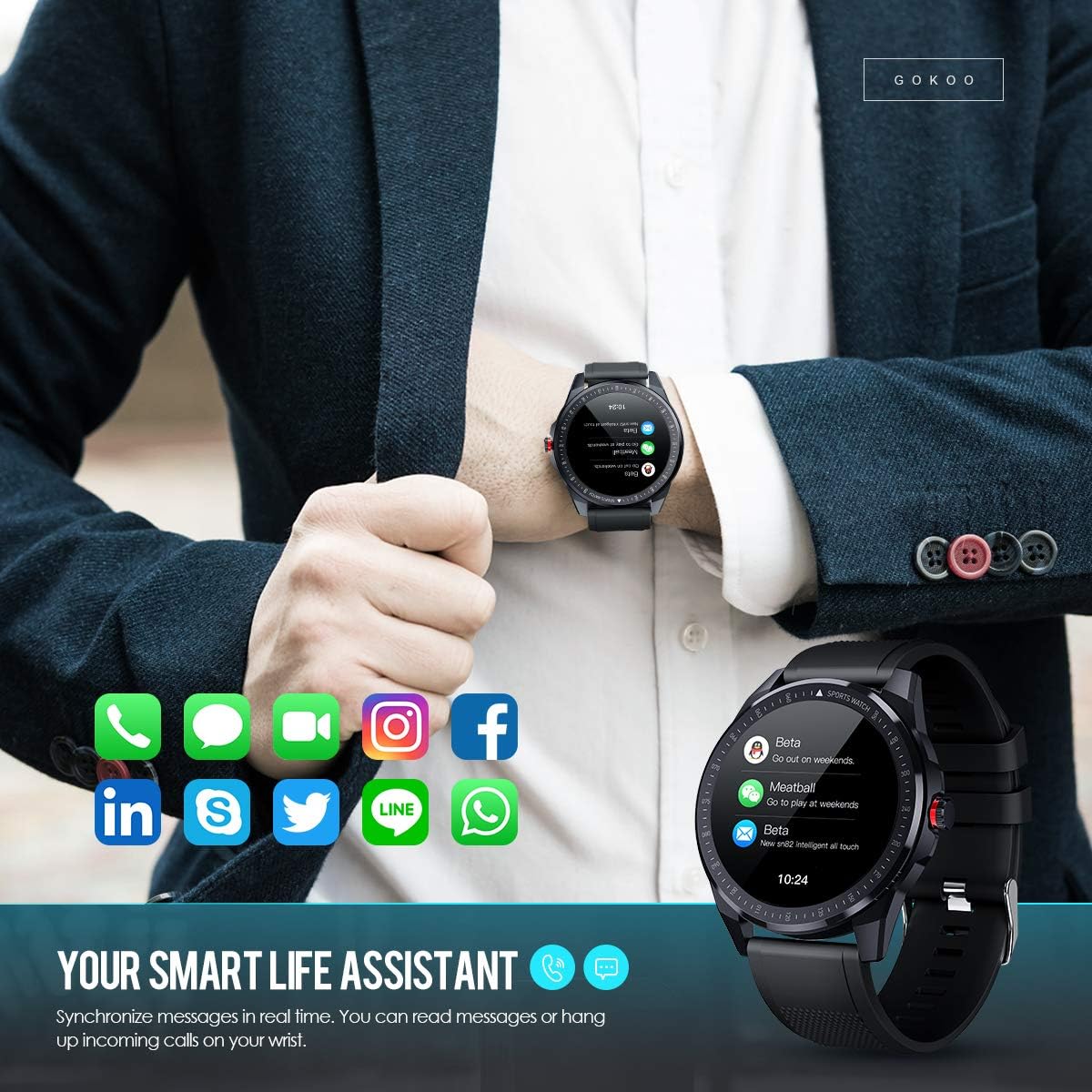
Figure 7: The watch showing synchronized notifications from a smartphone.
5. Přizpůsobení
The GOKOO Smart Watch allows for personalization of its interface. You can select from various pre-installed watch faces or download additional styles through the companion app to match your preference.
Údržba
1. Čištění
Pravidelně čistěte hodinky a řemínek, abyste předešli podráždění pokožky a udrželi hygienu zařízení. Používejte měkký hadřík, který nepouští vlákna. V případě potřeby lehceamphadřík omyjte vodou. Nepoužívejte agresivní chemikálie, abrazivní čisticí prostředky ani aerosolové spreje.
2. Pokyny pro odolnost vůči vodě
The GOKOO Smart Watch has an IP68 waterproof rating, meaning it is resistant to dust and can withstand immersion in water up to 1.5 meters for 30 minutes. It is suitable for daily use, hand washing, rain, and swimming.
Důležité: Do not use the watch in hot water baths, saunas, or during diving. High temperatures and high pressure can compromise the waterproof seals and cause damage.
3. Péče o baterie
- Vyhněte se častému úplnému vybíjení baterie.
- Nabijte hodinky pomocí dodaného magnetického nabíjecího kabelu.
- Pokud hodinky delší dobu nepoužíváte, skladujte je na chladném a suchém místě.
Odstraňování problémů
- Hodinky se nezapínají: Ujistěte se, že jsou hodinky plně nabité. Připojte je k nabíječce alespoň na 30 minut.
- Nelze spárovat s telefonem:
- Ujistěte se, že je v telefonu povoleno Bluetooth.
- Ujistěte se, že jsou hodinky v dosahu Bluetooth vašeho telefonu.
- Restartujte telefon i hodinky.
- Zkontrolujte, zda má aplikace potřebná oprávnění.
- Nepřesné zdravotní údaje: Ujistěte se, že hodinky máte pevně nasazené na zápěstí, asi na šířku jednoho prstu nad zápěstní kostí. Vyčistěte senzor na zadní straně hodinek.
- Nezobrazují se oznámení:
- Verify that notification permissions are granted in the app and your phone's settings.
- Ujistěte se, že jsou hodinky připojeny přes Bluetooth.
- Zkontrolujte, zda je na hodinkách nebo telefonu aktivní režim „Nerušit“.
- Krátká výdrž baterie: Reduce screen brightness, disable continuous heart rate monitoring if not needed, and limit the number of active notifications.
Specifikace
| Funkce | Detail |
|---|---|
| Značka | GOKOO |
| Model | B08FMBHSWD |
| Velikost obrazovky | 1.3 palce |
| Operační systém | Android 5.0 nebo vyšší, iOS 9.0 nebo vyšší |
| Kompatibilní zařízení | Smartphone |
| Životnost baterie | Až 10 dní (v závislosti na používání) |
| Typ baterie | Lithium Polymer |
| Voděodolnost | IP68 |
| Bezdrátové připojení | Bluetooth |
| Vstup lidského rozhraní | Dotyková obrazovka |
| Rozměry produktu | 27 x 5 x 1.08 cm; 168 g |

Figure 8: Detailed product dimensions of the GOKOO Smart Watch.
Záruka a podpora
For warranty information or technical support, please refer to the contact details provided with your purchase or visit the official GOKOO website. If you require a copy of this manual or have any questions regarding your GOKOO Smart Watch B08FMBHSWD, please contact customer service.
Ask a question about this manual
Ask about setup, troubleshooting, compatibility, parts, safety, or missing instructions. Manuals+ will review the question and use this page’s manual context to help answer it.