
1. Úvod
This manual provides detailed instructions for the setup, operation, maintenance, and troubleshooting of your Sceptre Curved 27" FHD 1080p Gaming Monitor. Please read this manual thoroughly before using your monitor to ensure proper functionality and safety.

Image: Sceptre Curved 27" FHD 1080p Gaming Monitor in a typical desk setup.
2. Obsah balení
Verify that all items listed below are included in your package. If any items are missing or damaged, please contact Sceptre customer support.
- Sceptre Curved 27" FHD 1080p Gaming Monitor
- Stojan na monitor (základna a rameno)
- HDMI kabel
- Power Supply and Adapter
- Hlavový šroubovák Philips
- Screws and Hardware Kit
- Uživatelská příručka
- Warranty Information and Customer Service Card

Obrázek: Overview of all items included in the Sceptre monitor package, including the monitor, stand components, cables, tools, and documentation.
3. Montáž
Pro sestavení stojanu monitoru postupujte takto:
- Attach the metal stand arm to the plastic base. Align the tabs and gently twist until secure.
- Use the provided Philips head screwdriver and the designated base screw to fasten the stand arm to the base.
- Zarovnejte sestavený stojan s montážními body na zadní straně monitoru.
- Insert the two remaining Philips head screws into the designated holes on the monitor's back and tighten them securely.
- Place the plastic cover over the screws on the stand arm.

Image: The Sceptre Curved 27" monitor with its dimensions labeled, showing the curved screen and the stand.
4. Připojení
The monitor features various ports for connectivity. Ensure proper connection for optimal performance.
- DC IN: Zde připojte napájecí adaptér.
- Audio výstup: Připojte externí reproduktory nebo sluchátka.
- Audio vstup: Connect an audio source for the built-in speakers.
- VGA: Connect to a computer's VGA port. Supports up to 75Hz refresh rate.
- HDMI 1.4 (x2): Connect to devices with HDMI output. Supports up to 75Hz refresh rate.
- Kensington Security Lock: Pro upevnění monitoru.
Obrázek: Podrobný view of the monitor's rear panel, highlighting the DC IN, Audio In/Out, VGA, and two HDMI 1.4 ports.
5. Návod k obsluze
The On-Screen Display (OSD) menu allows you to adjust various monitor settings. Use the buttons on the back of the monitor to navigate.
Navigace v nabídce OSD
- Rychlý start: Adjust basic settings like preset modes, aspect ratio, source, volume, Blue Light Shift, and Adaptive Sync.
- Obrázek: Fine-tune image settings including brightness, contrast, DCR, aspect ratio, and sharpness.
- Barva: Adjust color temperature, gamma, tint, saturation, and Blue Light Shift.
- Systém: Configure overdrive, Adaptive Sync, sleep mode, language, OSD position, timer, transparency, mute, and factory reset.
Video: A user demonstrates the Sceptre monitor's OSD menu, showing navigation through settings like volume and input source while displaying gameplay.
6. Funkce displeje
- Zakřivený displej 1500R: The 1500R curvature immerses you into the content, providing a comfortable viewzkušenosti.
- Obnovovací frekvence 100Hz: Experience smoother visuals with a refresh rate of up to 100Hz, reducing screen tearing.
- 98% sRGB: Offers a wider color gamut for deeper and more accurate colors.
- Posun modrého světla: Reduces blue light emission to protect your eyes from fatigue and strain during extended use.
- Adaptivní synchronizace: Synchronizuje obnovovací frekvenci monitoru s frekvencí snímků grafické karty, aby se eliminovalo trhání a zasekávání obrazu.
- FPS-RTS Game Modes: Pre-set display modes optimized for First Person Shooter (FPS) and Real-Time Strategy (RTS) games.
- Vestavěné reproduktory: Integrated speakers provide audio without needing external devices.

Image: Visual representation of the 1500R curvature, highlighting its immersive design.

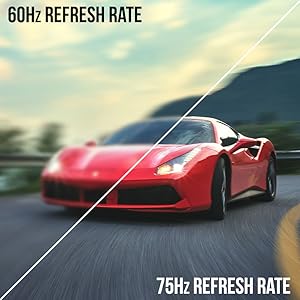
Image: A side-by-side comparison demonstrating the visual smoothness of 75Hz refresh rate versus 60Hz.

Image: A visual comparison highlighting the enhanced color accuracy of 98% sRGB compared to a conventional display.

Image: Split-screen view demonstrating the visual enhancements provided by FPS and RTS game modes.
7. Údržba
Pro zajištění dlouhé životnosti a optimálního výkonu monitoru dodržujte tyto pokyny pro čištění:
- Před čištěním vždy odpojte napájecí kabel.
- Použijte měkký hadřík, který nepouští vlákna dampvodou nebo jemným, neabrazivním čisticím prostředkem.
- Nepoužívejte alkohol, amoniak ani abrazivní čisticí prostředky, protože by mohly poškodit povrch obrazovky.
- Gently wipe the screen and exterior surfaces. Do not spray cleaner directly onto the screen.
8. Řešení problémů
If you encounter any issues with your monitor, refer to the following common solutions:
- Bez napájení: Ensure the power cable is securely connected to both the monitor and a working power outlet. Check the power adapter and outlet.
- Bez obrázku: Verify that the video cable (HDMI or VGA) is securely connected to both the monitor and your computer/device. Ensure the correct input source is selected in the OSD menu.
- Blikající/zkreslený obraz: Check the video cable for damage. Try a different cable or port. Ensure your graphics card drivers are up to date. Adjust refresh rate settings in your device's display settings.
- Žádný zvuk: Check the volume settings in the OSD menu and on your connected device. Ensure external speakers are properly connected if used.
- Tlačítka nereagují: Perform a factory reset through the OSD menu if accessible.
For further assistance, please refer to the full user manual or contact Sceptre customer support.
9. Specifikace
| Funkce | Specifikace |
|---|---|
| Velikost obrazovky | 27 palce |
| Rezoluce | 1920 × 1080 (FHD 1080p) |
| Obnovovací frekvence | Up to 100Hz (75Hz via HDMI/VGA) |
| Zakřivení | 1500R |
| Doba odezvy | 3 ms (GtG) |
| Typ panelu | VA |
| Jas | 280 nitů |
| Barevný gamut | 98% sRGB |
| Video vstupy | 2x HDMI 1.4, 1x VGA |
| Audio porty | Audio In, Audio Out |
| Reproduktory | Vestavěný |
| VESA Mount | Rozměr 100 mm x 100 mm |
| Rozměry (DxŠxV) | 15.09 x 19.97 x 7.02 palce |
| Hmotnost | 5.5 libry |
10. Herní zážitek
The Sceptre Curved 27" monitor is designed to enhance your gaming experience with its high refresh rate, low response time, and immersive curvature.
Video: An official Sceptre video showcasing various gaming monitors, including the Curved 27" model, highlighting their features and performance in gaming scenarios.
For optimal gaming performance, ensure your device's display settings match the monitor's capabilities (e.g., 1920x1080 resolution at 75Hz).
11. Záruka a podpora
Your Sceptre monitor comes with a 1letá omezená záruka na produkt. For detailed terms and conditions, please refer to the included warranty information card in your package.
For technical support, troubleshooting, or warranty claims, please contact Sceptre Customer Service. Contact information is provided on the customer service card included with your monitor.