
1. Konec produktuview
The Victrix Gambit Gaming Headset offers both wireless and wired connectivity for versatile use with Xbox One, Xbox Series X|S, and PC. Designed for competitive gaming, it features Dolby Atmos surround sound, 50mm HD speaker drivers, and a bi-directional noise-canceling microphone.

Image 1.1: The Victrix Gambit Gaming Headset, showcasing its sleek black design and over-ear cups.

Image 1.2: The Victrix Gambit headset highlighting its dual wireless and wired modes for home and tournament play.
2. Pokyny k nastavení
2.1 Obsah balení
- Victrix Gambit Gaming Headset
- Bezdrátový USB klíč
- 3.5mm Audio Cable with In-line Controls
- USB nabíjecí kabel
- Uživatelská příručka (tento dokument)
2.2 Nabíjení headsetu
Before initial use, fully charge the headset. Connect the USB charging cable to the headset's charging port and to a powered USB port (e.g., console, PC, or USB wall adapter). The LED indicator will show charging status.
2.3 Wireless Connection (Xbox/PC)
- Insert the wireless USB dongle into an available USB port on your Xbox console or PC.
- Power on the headset by pressing and holding the Power button until the LED indicator illuminates.
- Sluchátka a adaptér by se měly automaticky spárovat. Stále svítící LED na obou signalizuje úspěšné připojení.
- If pairing does not occur automatically, press the pairing button on the USB dongle, then press and hold the Power/Pairing button on the headset until the LED flashes rapidly, then becomes solid.
2.4 Wired Connection (3.5mm)
For wired use or tournament play, connect the supplied 3.5mm audio cable from the headset's 3.5mm port to your controller or device's audio jack. The headset will automatically switch to wired mode.
3. Ovládání náhlavní soupravy
3.1 Zapnutí/vypnutí
- Zapnutí: Press and hold the Power button on the headset until the LED illuminates.
- Vypnout: Stiskněte a podržte tlačítko napájení, dokud LED nezhasne.
3.2 Volume and Audio Controls
The headset features on-ear controls for convenient audio adjustments.

Image 3.1: Close-up of the headset's right earcup, showing the power button, mode switch, and game/chat balance dial.
- Hlavní hlasitost: Use the volume dial on the earcup to adjust the overall audio level.
- Zůstatek ve hře/chatu: Use the dedicated dial to balance game audio and chat volume.
- Přepínač režimu: Toggle between different audio modes or profiles if available (refer to specific software for customization).
3.3 Použití mikrofonu
The bi-directional noise-canceling microphone ensures clear communication.

Image 3.2: The flexible boom microphone of the Victrix Gambit headset, designed for clear voice capture.
- Ztlumení přepnutím: Flip the microphone boom arm upwards to mute the microphone. Flip it down to unmute.
- Microphone Monitoring: The headset may offer a three-stage mic monitor. Adjust this feature through the headset's companion software on PC or console settings to hear your own voice feedback.
3.4 Dolby Atmos Integration
The headset includes integrated Dolby Atmos for immersive surround sound. A lifetime subscription is included. Ensure Dolby Atmos is enabled in your console or PC audio settings for the best experience.
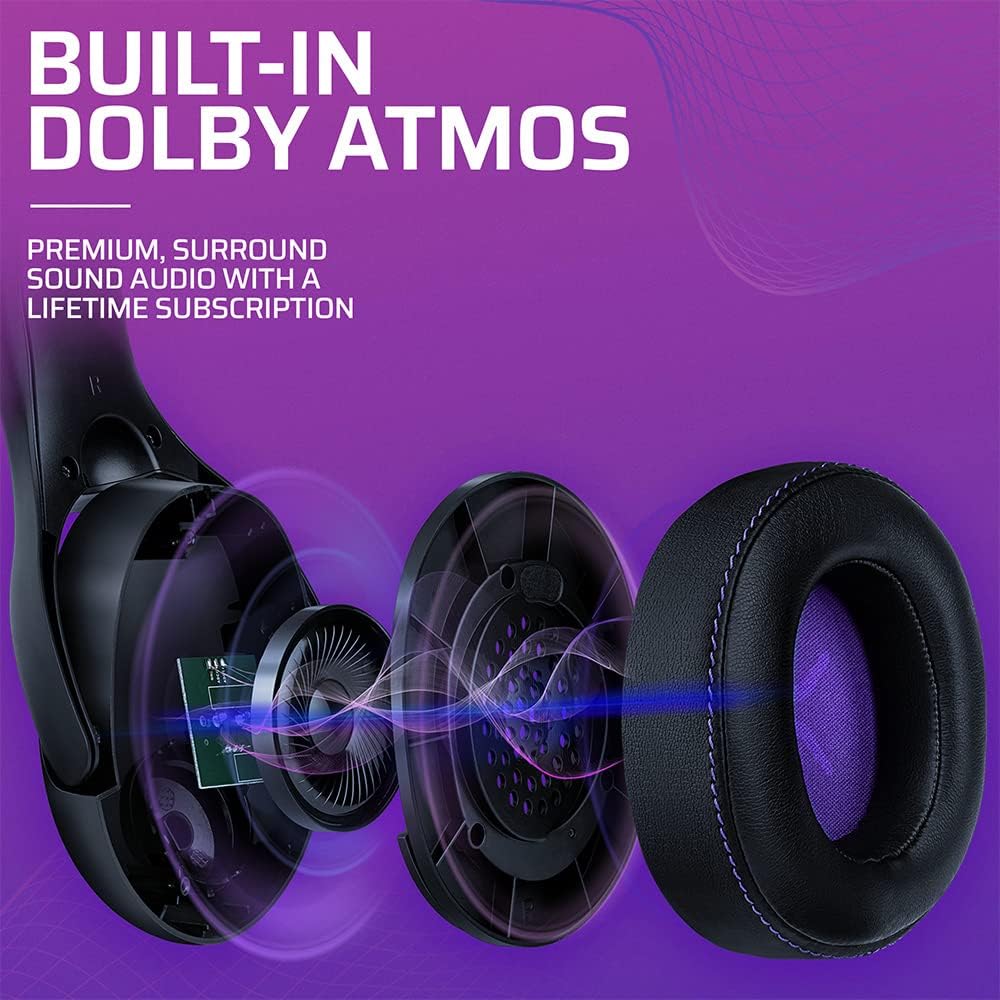
Obrázek 3.3: Rozložený view of the Victrix Gambit earcup, illustrating the 50mm speaker drivers and the audio waves representing Dolby Atmos sound.
4. Údržba
4.1 Čištění
- K čištění povrchů sluchátek s mikrofonem použijte měkký, suchý hadřík.
- Náušníky jemně otřete čisticím prostředkem.amp hadříkem a v případě potřeby jemným mýdlovým roztokem, poté důkladně osušte. Zabraňte nadměrné vlhkosti.
- Nepoužívejte drsné chemikálie ani abrazivní čisticí prostředky.
4.2 Skladování
Sluchátka skladujte na chladném a suchém místě mimo dosah přímého slunečního záření a extrémních teplot. Abyste předešli poškození, neumísťujte na ně těžké předměty.
4.3 Péče o baterii
Chcete-li prodloužit životnost baterie, vyvarujte se častého úplného vybíjení sluchátek. Sluchátka pravidelně nabíjejte, i když je delší dobu nepoužíváte.
5. Řešení problémů
5.1 Bez zvuku
- Ensure the headset is powered on and properly paired (for wireless) or connected (for wired).
- Check the volume levels on the headset, your console/PC, and the game/application.
- Ověřte, zda je v nastavení systému vybráno správné výstupní zvukové zařízení.
- For wireless, try re-pairing the headset with the USB dongle.
5.2 Mikrofon nefunguje
- Ujistěte se, že je mikrofon sklopený dolů (neztlumený).
- Check microphone input settings on your console/PC and in-game chat settings.
- Verify that the correct microphone input device is selected in your system settings.
- Pokud je to možné, otestujte mikrofon s jinou aplikací nebo zařízením.
5.3 Problémy s připojením
- Bezdrátový: Ensure the USB dongle is securely plugged in. Try a different USB port. Move closer to the dongle to rule out range issues.
- Kabelové: Ensure the 3.5mm cable is fully inserted into both the headset and the device. Try a different 3.5mm cable if available.
5.4 Sluchátka se nenabíjejí
- Ensure the USB charging cable is securely connected to both the headset and a powered USB port.
- Zkuste jiný USB port nebo nabíjecí kabel.
- Ověřte, zda je zdroj napájení aktivní.
6. Specifikace
| Číslo modelu | 049-003-NA |
| Konektivita | Wireless (USB Dongle, up to 12.19 meters range), Wired (3.5mm audio cable) |
| Ovladače reproduktorů | 50mm HD |
| Audio technologie | Dolby Atmos (lifetime subscription included) |
| Mikrofon | Bi-directional, Noise-Canceling, Flip-to-Mute |
| Baterie | 1 lithium-iontová (součástí balení) |
| Rozměry (D x Š x V) | 1 x 260.4 x 215.9 cm |
| Hmotnost | 610 gramů |
| Kompatibilita | Microsoft Xbox One, Xbox Series X|S, PC |
7. Informace o záruce
For detailed warranty information, please refer to the official PDP website or the warranty card included with your product packaging. Warranty terms and conditions may vary by region.
8. Zákaznická podpora
If you encounter any issues or have questions not covered in this manual, please contact PDP customer support. Visit the official PDP website for support contact details, FAQs, and additional resources.