
PowerPac PPFS212B 2-in-1 Dual-Usage Stand Fan Instruction Manual
Model: PPFS212B
1. Důležité bezpečnostní informace
Před použitím tohoto spotřebiče si pečlivě přečtěte všechny pokyny a uschovejte si je pro budoucí použití. Nedodržení těchto pokynů může vést k úrazu elektrickým proudem, požáru nebo vážnému zranění.
- Zajistěte zvtagNapětí uvedené na štítku s výkonem odpovídá napětí vaší elektrické sítě.tage.
- Neponořujte ventilátor, zástrčku ani kabel do vody ani jiných kapalin.
- Unplug the fan from the power outlet before cleaning, assembling, or disassembling parts.
- Keep fingers, pencils, or any other objects out of the fan grille when it is running.
- Neprovozujte ventilátor s poškozeným kabelem nebo zástrčkou. Pro opravu se obraťte na kvalifikovaný servisní personál.
- This appliance is equipped with thermal fuse protection against overheating. If the fan stops working unexpectedly, unplug it and allow it to cool before attempting to restart.
- Tento spotřebič není určen k tomu, aby ho používaly osoby (včetně dětí) se sníženými fyzickými, smyslovými nebo duševními schopnostmi nebo nedostatkem zkušeností a znalostí, pokud na ně nebude dohlíženo nebo na ně nebude dohlížet osoba odpovědná za jejich bezpečnost nebo je poučit o používání spotřebiče. .
2. Konec produktuview
The PowerPac PPFS212B is a versatile 2-in-1 dual-usage stand fan designed for efficient cooling in indoor environments. It features 7 blades for maximum airflow, 3-speed settings, and an oscillation function for wider air distribution. The fan is equipped with thermal fuse protection for enhanced safety.
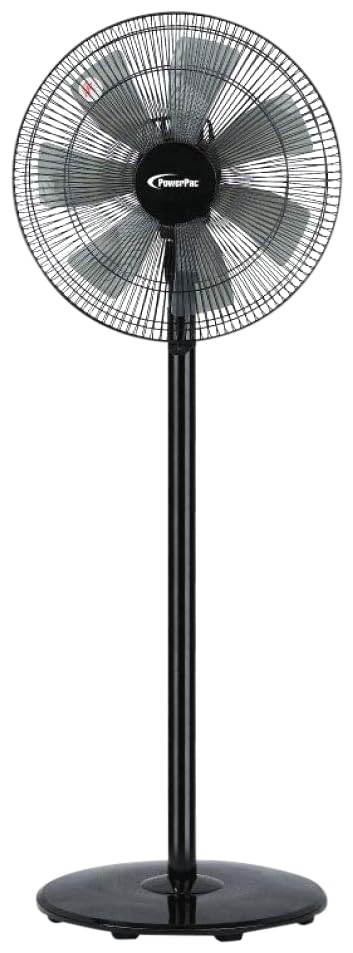
Image: PowerPac PPFS212B 2-in-1 Dual-Usage Stand Fan, showcasing its black finish and stand configuration.
3. Obsah balení
Po otevření zkontrolujte obsah balení, abyste se ujistili, že jsou všechny díly přítomny a nepoškozené:
- 1 x PowerPac PPFS212B Stand Fan (includes fan head, stand pole, and base)
4. Montážní návod
Follow these steps to assemble your PowerPac PPFS212B fan:
- Opatrně vybalte všechny součásti z obalu.
- Attach the stand pole to the fan base. Ensure it is securely fastened according to the markings or locking mechanism.
- Mount the fan head assembly onto the top of the stand pole. Align the connection points and secure it firmly.
- Ensure all screws and fasteners are tightened to prevent wobbling during operation.
- Sestavený ventilátor umístěte na stabilní, rovný povrch.
Image: Illustrative diagram of the PowerPac PPFS212B fan assembly, showing the base, stand, and fan head components.
5. Návod k obsluze
To operate your PowerPac PPFS212B fan:
- Zapojte napájecí kabel do vhodné elektrické zásuvky.
- Zapnutí/vypnutí: Press the 'ON/OFF' button (or corresponding button) on the control panel to turn the fan on or off.
- Nastavení rychlosti: Press the 'SPEED' button repeatedly to cycle through the 3 available speed settings (Low, Medium, High).
- Funkce oscilace: Press the 'OSC' button (or corresponding button) to activate or deactivate the oscillation feature, which allows the fan head to sweep from side to side.
- When finished, press the 'ON/OFF' button to turn off the fan and unplug it from the power outlet.
6. Údržba a čištění
Regular cleaning and maintenance will help ensure optimal performance and longevity of your fan:
- Před čištěním vždy odpojte ventilátor od zdroje napájení.
- Použijte měkký, damp cloth to wipe the exterior surfaces of the fan. Do not use abrasive cleaners, solvents, or harsh chemicals.
- To clean the fan blades, carefully remove the front grille (if detachable) according to the product design. Wipe the blades with a soft cloth. Ensure all parts are dry before reassembling.
- Nedovolte, aby voda kapala do krytu motoru.
- Pokud ventilátor delší dobu nepoužíváte, skladujte jej na chladném a suchém místě.
7. Řešení problémů
Pokud narazíte na problémy s ventilátorem, podívejte se do následující tabulky, kde najdete běžné problémy a jejich řešení:
| Problém | Možná příčina | Řešení |
|---|---|---|
| Ventilátor se nezapne. | Žádné napájení. Thermal fuse activated. | Zkontrolujte, zda je zástrčka pevně zasunuta do zásuvky. Ujistěte se, že zásuvka je funkční. Unplug and allow the fan to cool down for 30 minutes before restarting. |
| Slabé nebo žádné proudění vzduchu. | Otáčky ventilátoru nastaveny příliš nízko. Lopatky ventilátoru jsou znečištěné. | Zvyšte nastavení otáček ventilátoru. Unplug the fan and clean the blades as per maintenance instructions. |
| Ventilátor nekmitá. | Funkce oscilace je vypnutá. | Press the 'OSC' button to activate oscillation. |
| Neobvyklý hluk během provozu. | Volné části. Obstrukce. | Unplug the fan and check for any loose components or obstructions around the blades or motor. Tighten any loose parts. |
Pokud problém přetrvává i po vyzkoušení těchto řešení, kontaktujte zákaznickou podporu.
8. Specifikace
| Funkce | Specifikace |
|---|---|
| Značka | PowerPac |
| Číslo modelu | PPFS212B |
| Typ | 2-in-1 Dual-Usage Stand Fan |
| Počet čepelí | 7 |
| Počet rychlostí | 3 |
| Zdroj napájení | Elektrický kabel |
| Wattage | 50 wattů |
| Kontrolní metoda | Stiskněte tlačítko |
| Speciální funkce | Oscillating, Thermal Fuse Protection |
| Materiál | Plast |
| Vnitřní/venkovní použití | Krytý |
| Barva | Černý |
9. Záruka a podpora
This PowerPac PPFS212B fan comes with a 2-letá záruka od data nákupu. Tato záruka se vztahuje na výrobní vady vzniklé za běžných podmínek používání.
For warranty claims, technical support, or any inquiries regarding your product, please contact PowerPac customer service. Keep your proof of purchase for warranty validation.