
Zavedení
Thank you for choosing the MEGATEK T8 Bluetooth Portable Speaker. This manual provides essential information for the proper setup, operation, and maintenance of your new speakers. The MEGATEK T8 speakers feature True Wireless Stereo (TWS) technology for an immersive audio experience, vibrant LED lighting, and a durable, waterproof design, making them ideal for various environments.
Obsah balení
Zkontrolujte prosím balení, zda neobsahuje následující položky:
- 2 x MEGATEK T8 Bluetooth Portable Speakers
- 1 x USB Charging Cable (designed to charge both speakers simultaneously)
- 1 x Uživatelská příručka
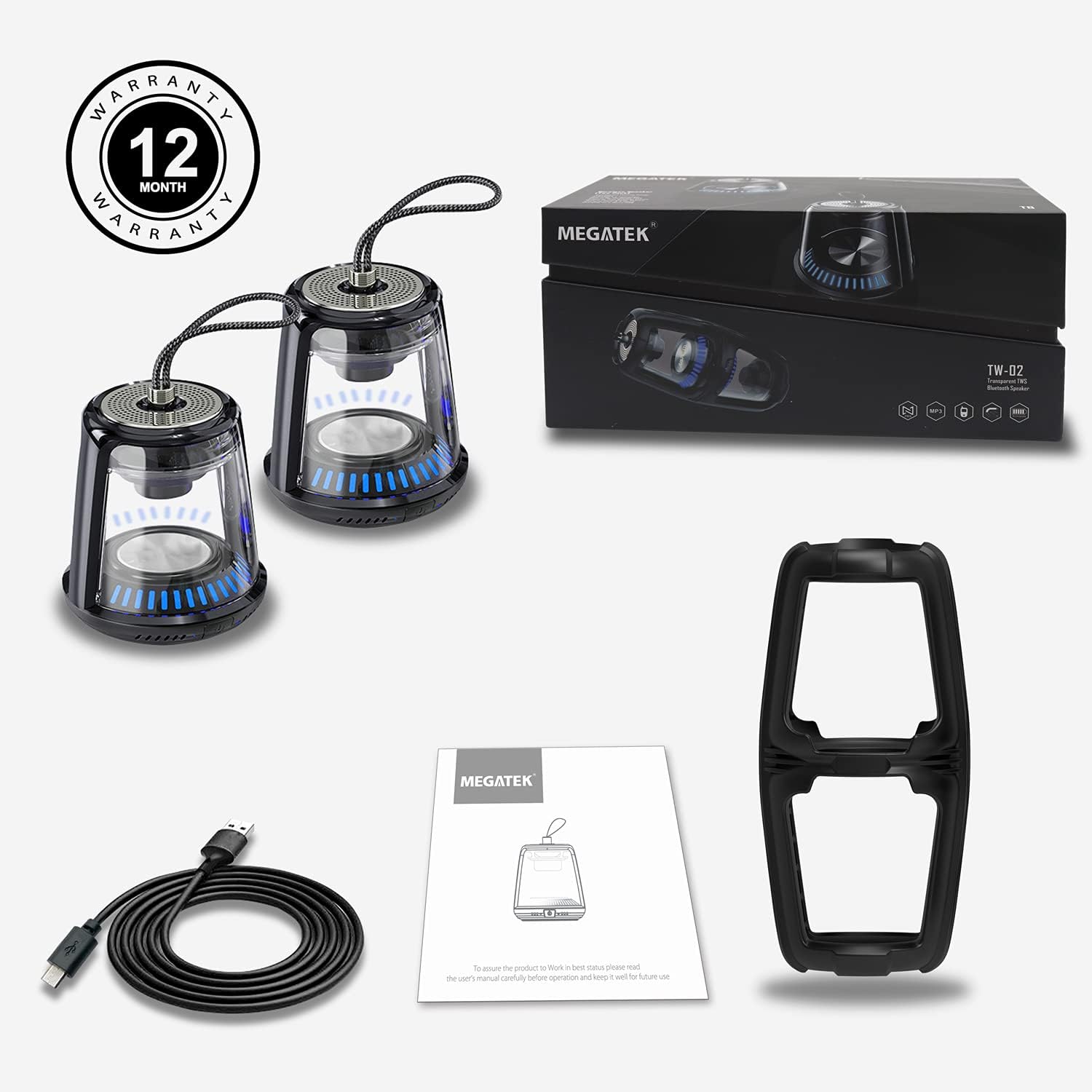
The package includes two MEGATEK T8 speakers, a USB charging cable for simultaneous charging, and this instruction manual.
Vlastnosti produktu
- Bluetooth připojení: Bezproblémové bezdrátové připojení k vašim zařízením.
- Skutečné bezdrátové stereo (TWS): Pair two speakers for a synchronized stereo sound experience.
- LED světelné režimy: Dynamic LED lighting to enhance ambiance.
- Vestavěný mikrofon: Podporuje handsfree volání.
- Vodotěsnost IPX5: Protected against water splashes and light rain.
- Magnetická základna: Umožňuje pohodlné připevnění na kovové povrchy.
- Kompaktní a přenosný design: Easy to carry and place anywhere.
- Dobíjecí baterie: Provides portable power for on-the-go use.
Nastavení
1. Nabíjení reproduktorů
Before initial use, fully charge both speakers. Connect the provided USB charging cable to the charging port on each speaker and then to a USB power adapter (not included) or a computer's USB port. The LED indicator will show charging status and turn off when fully charged.
2. Zapnutí/vypnutí
To power on the speaker, press and hold the power button for approximately 3 seconds until you hear an audible prompt and the LED lights illuminate. To power off, press and hold the power button again for 3 seconds until you hear a power-off prompt and the LED lights turn off.
3. Párování Bluetooth (jeden reproduktor)
- Ujistěte se, že je reproduktor nabitý a zapnutý.
- Aktivujte Bluetooth na svém smartphonu, tabletu nebo jiném zařízení s podporou Bluetooth.
- Hledat available devices and select "MEGATEK T8" from the list.
- Po připojení uslyšíte z reproduktoru potvrzovací zvuk.

The speaker connects easily to your device via Bluetooth for wireless music streaming.
4. Párování True Wireless Stereo (TWS) (dva reproduktory)
To enjoy true stereo sound, you can pair two MEGATEK T8 speakers together:
- Ujistěte se, že jsou oba reproduktory plně nabité a vypnuté.
- Power on both speakers simultaneously.
- On jeden of the speakers (this will become the primary speaker), quickly double-press the power button. The speakers will begin searching for each other.
- Po úspěšném spárování uslyšíte potvrzovací zvuk a LED indikátory na obou reproduktorech se synchronizují.
- Now, connect your Bluetooth device to the primary speaker (the one you double-pressed the button on) as described in the "Bluetooth Pairing (Single Speaker)" section.

This image illustrates the True Wireless Stereo (TWS) functionality, allowing two speakers to connect for an enhanced stereo sound experience.
Provozní
1. Přehrávání hudby
After successful Bluetooth pairing, you can play music from your connected device. Control playback (play/pause, next/previous track, volume) directly from your device.
2. Hands-free volání
When connected to a smartphone, the built-in microphone allows for hands-free calling. Press the power button once to answer an incoming call, and press it again to end the call. Press and hold the power button to reject an incoming call.
3. Režimy LED osvětlení
The speakers feature integrated LED lights. To cycle through different light modes or turn them off, short press the LED light button (if available, otherwise refer to the power button for multi-functionality). The lights can create a dynamic visual experience.

The speaker features multiple LED light modes to enhance your listening experience with visual effects.
4. Magnetická montáž
The base of the speaker is magnetic, allowing it to be securely attached to compatible metal surfaces. This provides versatile placement options.

The magnetic base allows for convenient placement on metal surfaces, such as a refrigerator.
Údržba
1. Čištění
Wipe the speakers with a soft, dry cloth. Do not use abrasive cleaners, alcohol, or chemical solvents, as these may damage the surface or internal components.
2. Voděodolnost (IPX5)
The MEGATEK T8 speakers are IPX5 waterproof, meaning they are protected against low-pressure water jets from any direction. They are suitable for use in environments where they might encounter splashes, such as by a pool or in a bathroom. Neponořujte reproduktory do vody. Ujistěte se, že je kryt nabíjecího portu bezpečně uzavřen, aby byla zachována vodotěsnost.

With an IPX5 waterproof rating, the speakers are protected against splashes, making them suitable for poolside or bathroom use.
3. Skladování
When not in use for extended periods, store the speakers in a cool, dry place away from direct sunlight and extreme temperatures. It is recommended to charge the speakers periodically to maintain battery health.
Odstraňování problémů
- Speaker will not turn on: Ensure the battery is charged. Connect the speaker to the charging cable and allow it to charge for at least 30 minutes before attempting to power on again.
- Nelze spárovat přes Bluetooth:
- Ujistěte se, že je na vašem zařízení povoleno Bluetooth.
- Make sure the speaker is in pairing mode (LED indicator blinking).
- Ensure your device is within the Bluetooth range (approximately 33 feet or 10 meters).
- Zkuste zrušit párování a znovu spárovat reproduktor v nastavení Bluetooth vašeho zařízení.
- Žádný zvuk nebo nízká hlasitost:
- Zkontrolujte úroveň hlasitosti na reproduktoru i na připojeném zařízení.
- Ujistěte se, že je reproduktor správně připojen přes Bluetooth.
- Párování TWS selhalo:
- Ensure both speakers are powered off before initiating TWS pairing.
- Make sure both speakers are within close proximity to each other (within a few feet).
- Pečlivě opakujte kroky párování TWS.
Specifikace
| Číslo modelu | T8 |
| Počet jednotek | 2 reproduktorů |
| Barva | Černý |
| Rozměry produktu | 4"H x 4.7"Š x 8.7"V |
| Hmotnost položky | 0.6 liber (na reproduktor) |
| Úroveň odolnosti proti vodě | IPX5 Vodotěsný |
| Technologie připojení | Bluetooth, USB |
| Režim zvukového výstupu | Stereo, prostorový zvuk |
| Typ montáže | Freestanding, Magnetic |
| Speciální funkce | Stereo Pairing (TWS), Auto EQ, Auto Speaker Setup, LED Light |
| Výrobce | Megatek Electronics |
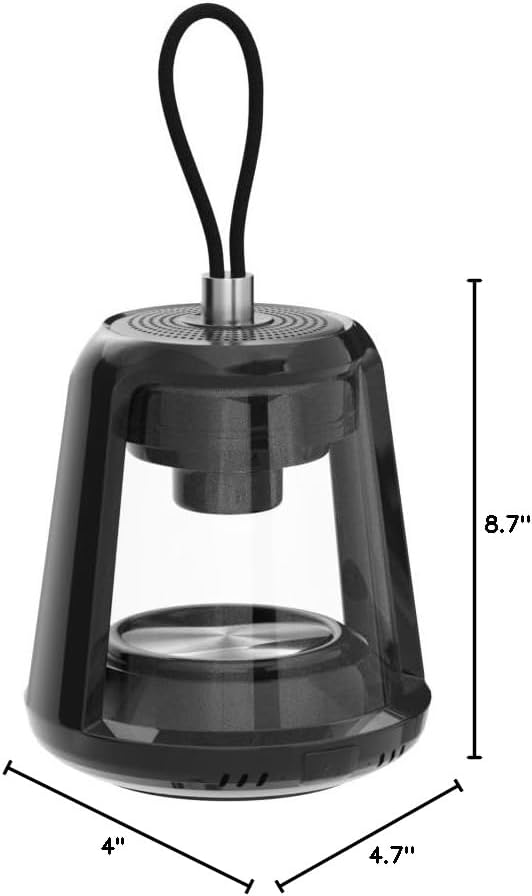
This image provides the physical dimensions of the MEGATEK T8 speaker: 4"D x 4.7"W x 8.7"H.
Záruka a podpora
1. Informace o záruce
The MEGATEK T8 Bluetooth Portable Speakers come with a Záruka 12 měsíců od data nákupu. Tato záruka se vztahuje na výrobní vady a zajišťuje, že výrobek je při běžném používání bez vad materiálu a zpracování.
2. Zákaznická podpora
For any questions, technical assistance, or warranty claims, please contact MEGATEK customer support through the retailer where you purchased the product or visit the official MEGATEK website for contact information. Please have your purchase receipt and product model number (T8) ready when contacting support.