
1. Úvod
The AODELAN E2 Wireless Flash Trigger is a versatile transceiver designed for wirelessly synchronizing and remotely controlling flash units. It is compatible with the AODELAN radio system and can control Profoto lights with built-in Air systems. This manual provides detailed instructions for setup, operation, and maintenance of your E2 flash trigger.
2. Obsah balení
- 1 x AODELAN E2 Wireless Flash Trigger
- 1 x 3.5mm to 3.5mm Sync Cable
- 1 x šňůrka
- 1 x Uživatelská příručka
3. Konec produktuview
The AODELAN E2 features a user-friendly interface with clearly labeled buttons for channel selection, group control, and flash power adjustments. It is designed to be compact and easily mountable on most camera hot shoes.
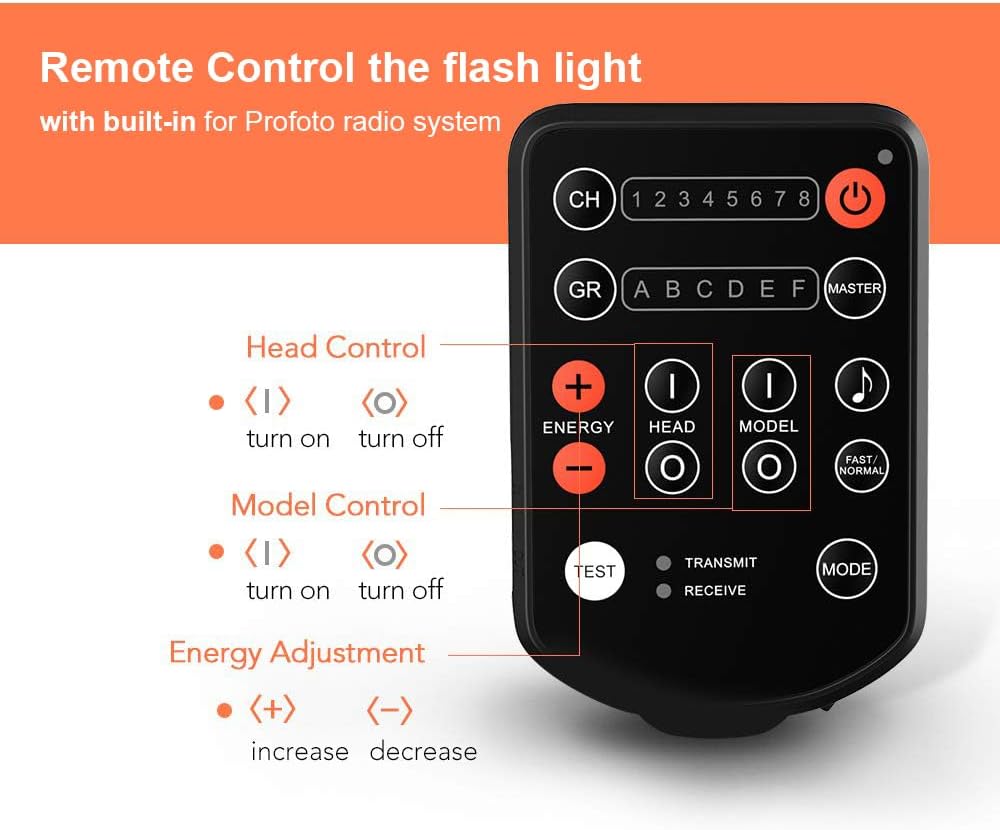
Obrázek 3.1: This diagram labels the various buttons and indicators on the AODELAN E2 Wireless Flash Trigger, including Channel (CH), Group (GR), Power, Energy Adjustment (+/-), Head Control, Model Control, Test, Transmit/Receive indicators, and Mode button.
Obrázek 3.2: This image illustrates the universal hot shoe design of the AODELAN E2 Wireless Flash Trigger, compatible with standard single-pin contact hot shoe mounts found on Canon, Nikon, Sony, Olympus, Fujifilm, Panasonic, Pentax, and Samsung cameras.

Obrázek 3.3: This image provides the physical dimensions of the AODELAN E2 Wireless Flash Trigger (approximately 3.6 inches height, 2.2 inches width, 1.2 inches depth) and shows the included 3.5mm to 3.5mm flash sync cable.
4. Specifikace
| Funkce | Specifikace |
|---|---|
| Značka | AODELAN |
| Číslo modelu | E2-Flash |
| Technologie připojení | Radio Frequency (2.4 GHz) |
| Maximální dosah | Up to 650' / 200m |
| Kanály | 8 |
| Skupiny | 6 (AF) |
| Max Flash Sync Speed | 1/250 |
| Typ baterie | 2 x AAA baterie (nejsou součástí balení) |
| Hmotnost položky | 0.14 kg |
| Kompatibilní zařízení | Cameras with standard single pin hot shoe (Canon, Nikon, Sony, Olympus, Fujifilm, Panasonic, Pentax, Samsung) |
| Profoto Compatibility | Profoto A1, A1X, B2, B10, B1X, D1, D2, Pro-10 (manual control only, no TTL/HSS) |
5. Nastavení
- Nainstalujte baterie: Otevřete přihrádku na baterie a vložte dvě baterie AAA, dbejte na správnou polaritu.
- Montáž na kameru: Slide the E2 trigger onto your camera's hot shoe. Secure it by rotating the locking lever or wheel until it is firmly attached. Ensure the trigger is properly aligned and locked to prevent accidental detachment or damage.
- Connect Sync Cable (Optional): If using the co-channel relay function or triggering a remote camera, connect one end of the 3.5mm sync cable to the E2's 'In Port' and the other end to your camera's sync terminal.
6. Provoz
6.1 Zapnutí/vypnutí
Stiskněte a podržte Tlačítko napájení (obvykle označeno kruhem a svislou čarou) pro zapnutí nebo vypnutí jednotky.
6.2 Výběr kanálu a skupiny
- Stiskněte tlačítko CH (Channel) Button to cycle through the 8 available channels (1-8). Ensure the trigger and your flash units are set to the same channel.
- Stiskněte tlačítko GR (Group) Button to select the desired flash group (A-F) you wish to control. The E2 supports up to 6 groups.
6.3 Ovládání blesku
The E2 allows manual control over connected Profoto flash units:
- Úprava energie: Použijte ENERGY + a ENERGY - buttons to increase or decrease the flash power output for the selected group.
- Ovládání hlavy: Stiskněte tlačítko HEAD (I) button to turn on the flash head for the selected group, and HEAD (O) vypnout.
- Modeling Light Control: Stiskněte tlačítko MODEL (I) button to turn on the modeling light for the selected group, and MODEL (O) vypnout.
6.4 Co-channel Relay Function
The E2 features a co-channel relay function, enabling it to trigger a remote camera in sync with remote flash lights. Connect the E2 to your camera via the sync cable for this functionality.
6.5 Shutter Release Function
The E2 can also function as a remote shutter release for your camera when connected via the appropriate sync cable.
6.6 Rychlost synchronizace
The maximum flash sync speed supported by the E2 is up to 1/250s.
6.1 video: This video illustrates how the AODELAN E2 Wireless Flash Trigger functions as a replacement for the Profoto 901031 Air Remote, demonstrating its ability to wirelessly trigger and control Profoto flash units.
7. Údržba
- Udržujte zařízení v suchu. Nemanipulujte s ním mokrýma rukama.
- Clean the exterior with a soft, dry cloth. Avoid using harsh chemicals or solvents.
- Pokud zařízení nebudete delší dobu používat, vyjměte baterie, abyste zabránili jejich vytečení.
- Skladujte na chladném a suchém místě mimo dosah přímého slunečního záření a extrémních teplot.
8. Řešení problémů
- Zařízení se nezapíná: Ujistěte se, že jsou baterie správně vloženy a plně nabité.
- Flash units not triggering:
- Verify that the E2 trigger and all flash units are set to the same channel and group.
- Check the distance between the trigger and flash units; ensure it is within the maximum operating range (200m).
- Confirm that the flash units are powered on and ready to fire.
- Trigger stuck on camera hot shoe: If the trigger becomes difficult to remove, ensure the locking mechanism is fully disengaged. Gently wiggle the trigger while pulling it backward. Do not apply excessive force to avoid damaging the camera's hot shoe or the trigger.
- Remote control of flash power/modeling light not working: Ensure the flash units are compatible with the Profoto Air system and that the E2 is in the correct mode for controlling these functions. Remember, the E2 provides manual control only and does not support TTL or HSS.
9. Záruka a podpora
For warranty information and technical support, please refer to the official AODELAN webnebo se obraťte na prodejce. Uschovejte si účtenku jako doklad o koupi.