
1. Konec produktuview
The Cello C2220FSDE is a compact 22-inch Full HD LED television designed for versatile use. It features an integrated DVD player and a triple tuner (DVBT2/S2) for comprehensive signal reception. Its sleek design makes it suitable for various environments, including guest rooms, motorhomes, caravans, trucks, or boats.
Key features include HDMI and USB inputs for connecting external devices like game consoles and hard drives. The USB functionality also supports recording live television and playing stored media. This TV can also function as a monitor for laptops or desktop computers.

Obrázek 1.1: The integrated DVD player allows for direct playback of DVDs without additional devices.

Obrázek 1.2: Experience clear and detailed images with Full HD 1080p resolution.
2. Nastavení a instalace
2.1 Rozbalení a obsah
Opatrně vyjměte všechny součásti z obalu. Ujistěte se, že jsou přítomny následující položky:
- 1 x Cello 22-inch LED TV
- Napájecí kabel
- Dálkové ovládání
- Rychlý průvodce
- 2 x AAA baterie
- TV stojan
2.2 Připevnění stojanu
Place the TV screen face down on a soft, clean surface to prevent scratches. Align the stand with the mounting holes on the bottom of the TV and secure it using the provided screws.
2.3 Connecting Power and Antenna
- Zapojte napájecí kabel do napájecího vstupu televizoru a poté do zásuvky ve zdi.
- Connect your TV aerial cable to the 'TV Aerial' input on the back of the TV.
- For satellite reception, connect a satellite dish cable (not supplied) to the 'DVB-S2' input.

Obrázek 2.1: Zadní view of the TV showing power, antenna, and other connectivity ports.
2.4 Připojení externích zařízení
Televizor nabízí různé porty pro připojení externích zařízení:
- HDMI: Připojte zařízení s vysokým rozlišením, jako jsou přehrávače Blu-ray, herní konzole nebo set-top boxy.
- USB: Připojte paměťová zařízení USB pro přehrávání nebo nahrávání médií.
- VGA: Připojte počítač pro použití jako monitor.
- 3.5mm audio výstup: Připojte externí sluchátka nebo reproduktory.

Obrázek 2.2: Illustration of HDMI and USB ports for connecting various devices.

Obrázek 2.3: The integrated satellite tuner allows connection to a satellite dish for satellite TV reception.
3. Návod k obsluze
3.1 Počáteční zapnutí a vyhledávání kanálů
- Vložte baterie AAA do dálkového ovladače.
- Stisknutím tlačítka napájení na dálkovém ovladači nebo na televizoru jej zapněte.
- Follow the on-screen instructions for initial setup, including language selection and automatic channel scanning for DVB-T2 (terrestrial) and DVB-S2 (satellite) signals.
3.2 Základní funkce televizoru
- Výběr kanálu: Use the 'CH+' / 'CH-' buttons or the numeric keypad on the remote control.
- Ovládání hlasitosti: Use the 'VOL+' / 'VOL-' buttons.
- Výběr zdroje: Press the 'SOURCE' button to switch between inputs (TV, HDMI, USB, DVD).
- Navigace v nabídce: Use the 'MENU' button to access settings and navigation arrows to browse.
3.3 Integrated DVD Player Operation
- Ensure the TV is powered on and the input source is set to 'DVD'.
- Gently insert a DVD disc into the slot on the side of the TV, label side facing the mirror side (as indicated on the slot).
- The DVD should load automatically. Use the remote control for playback functions (Play, Pause, Stop, Skip).
3.4 USB Recording and Media Playback
- Přehrávání médií: Insert a USB storage device into the USB port. Select 'USB' as the input source. Navigate through your file(fotografie, hudbu, videa) pomocí dálkového ovladače.
- USB Recording (PVR): While watching live TV, insert a USB storage device. Press the 'RECORD' button on the remote to start recording. You can also use the 'PAUSE' function for time-shifting live TV.
3.1 video: This video demonstrates the physical controls on the TV and the various input/output ports available on the back and side of the unit, including the DVD slot, USB, HDMI, and antenna connections.
4. Údržba
4.1 Čištění televizoru
- Před čištěním vždy odpojte televizor od elektrické zásuvky.
- K otření obrazovky a skříně použijte měkký, suchý hadřík. V případě odolných skvrn lehceampOtřete hadřík vodou nebo jemným, neabrazivním čističem obrazovek.
- Nepoužívejte alkohol, benzen, ředidla ani jiné těkavé látky, protože by mohly poškodit obrazovku nebo povrchovou úpravu.
4.2 DVD Player Care
- Keep the DVD slot free from dust and debris.
- Only insert clean, undamaged discs.
5. Řešení problémů
If you encounter issues with your Cello TV, refer to the following common problems and solutions:
| Problém | Možná příčina | Řešení |
|---|---|---|
| Žádná síla | Power cord not connected; power outlet faulty | Check power cord connection; try a different outlet |
| Žádný obraz, ale zvuk je přítomný | Incorrect input source selected; faulty cable connection | Press 'SOURCE' to select correct input; check HDMI/VGA cable connections |
| Žádný zvuk, ale obraz je přítomen | Volume too low or muted; external audio device issue | Increase volume; check mute status; ensure external audio devices are connected correctly |
| Špatná kvalita obrazu (televizní kanály) | Weak antenna signal; incorrect antenna connection | Adjust antenna position; check antenna cable connection; perform a channel rescan |
| DVD se nepřehrává | Disc inserted incorrectly; dirty or damaged disc; incorrect source selected | Re-insert disc correctly; clean or replace disc; select 'DVD' source |
| Dálkové ovládání nefunguje | Batteries depleted or inserted incorrectly; obstruction between remote and TV | Replace batteries; ensure correct polarity; remove obstructions; point remote directly at TV sensor |
For further assistance, please refer to the support section or the full instruction manual available online.
6. Specifikace
Below are the detailed technical specifications for the Cello C2220FSDE 22-inch Full HD LED TV:
| Funkce | Specifikace |
|---|---|
| Velikost obrazovky | 22 palců (54.6 cm úhlopříčka) |
| Značka | Cello |
| Technologie displeje | LED |
| Rezoluce | 1080p (Full HD, 1920 x 1080 pixelů) |
| Obnovovací frekvence | 60 Hz |
| Speciální funkce | Integrated DVD Player |
| Technologie připojení | HDMI, USB, VGA |
| Poměr stran | 16:9 |
| Rozměry produktu (D x Š x V) | 5P x 50.4Š x 34.2V cm |
| Hmotnost položky | 2.55 kg |
| Kontrastní poměr | 600:1 |
| Maximální jas | 180 NIT Coating |
| Podpora HDR | HDR10 |
| Doba odezvy | 10 milisekund |
| Typ tuneru | DVB-C, DVB-S2, DVB-T2 |
| Režim zvukového výstupu | Stereo |
| Popis reproduktoru | 2 x 3 W Pitch Perfect Sound |
| Spotřeba energie | 21 kWh |
| svtage | 230 Volts (100-240 V AC 50-60 Hz) |
| Standardní držák VESA | 100 x 100 mm |
| Modelový rok | 2023 |
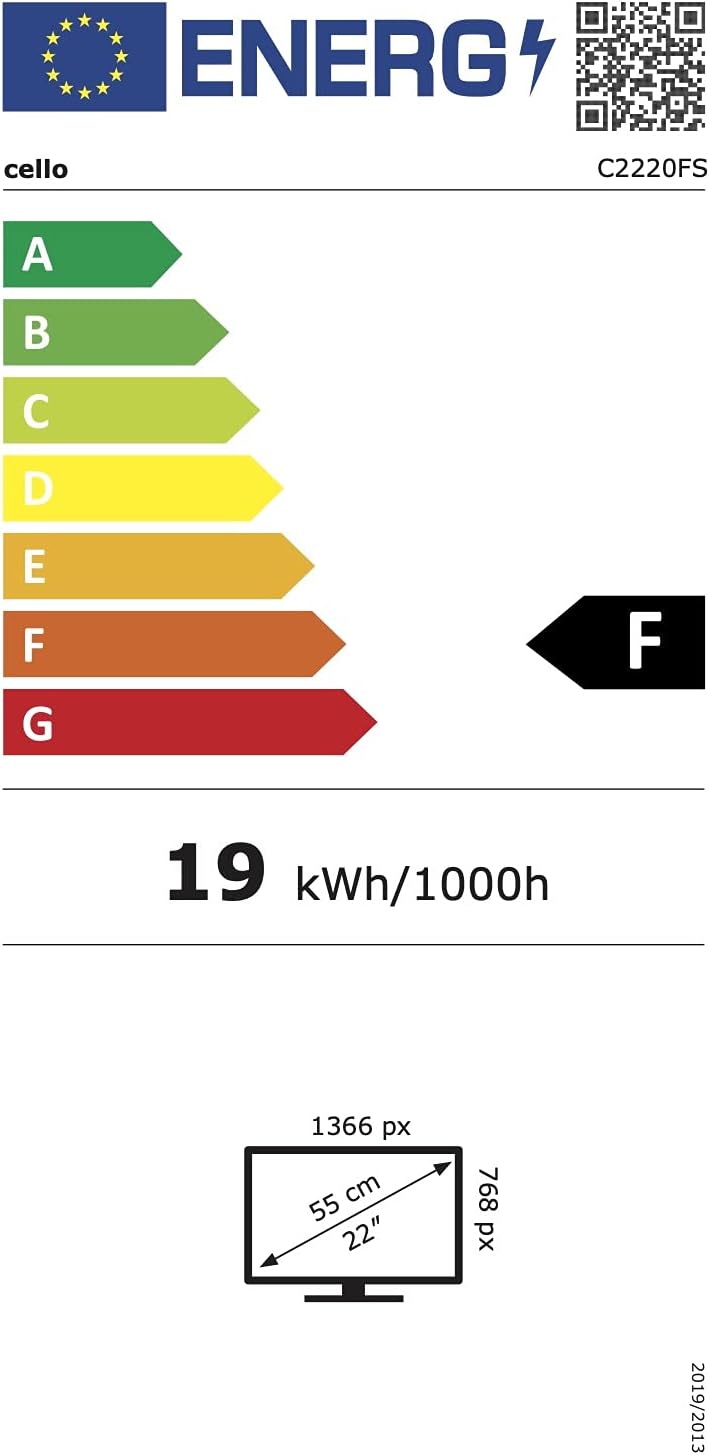
Obrázek 6.1: Energy efficiency label for the Cello C2220FSDE TV. For more details, visit Databáze EPREL.

Obrázek 6.2: Detailed product information sheet. For more details, visit Databáze EPREL.
7. Záruka a podpora
7.1 Informace o záruce
This Cello TV comes with a 1letá omezená zárukaUschovejte si prosím doklad o koupi pro případ reklamace.
7.2 Zákaznická podpora
For technical support or customer service, please contact Cello Electronics:
- Webmísto: www.celloelectronics.de
- E-mail: consumersupport@celloelectronics.com
- Telefon: 03334330312
- Adresa: Dovecot Hills, Bishop Auckland, DL14 6XW Durham, United Kingdom
You can also download the full instruction manual for your device in your preferred language from the official Cello webmísto: https://celloelectronics.de/instruction-books/.