1. Úvod
The StarTech.com DKT31CHVL USB-C Multiport Adapter is designed to expand the connectivity of your USB-C or Thunderbolt 3 enabled laptop, tablet, or smartphone. This compact and portable adapter provides essential ports for video output, data transfer, and wired network access, making it suitable for various environments, including travel and presentations.
This manual provides detailed instructions for setting up, operating, and maintaining your DKT31CHVL adapter, along with troubleshooting tips and product specifications.
2. Konec produktuview
The DKT31CHVL adapter features a variety of ports to enhance your device's capabilities. Below is an overview of the adapter and its components.

Obrázek 1: Shora dolů view of the StarTech.com DKT31CHVL USB-C Multiport Adapter, showing its compact gray casing and integrated USB-C host cable.
2.1 Komponenty
- USB-C Host Cable: Integrated 29cm (1ft) cable for connecting to your host device.
- Port HDMI: For connecting to an HDMI display, supporting resolutions up to 4K at 30Hz.
- VGA port: For connecting to a VGA display, supporting resolutions up to 1080p.
- USB-A Port (10Gbps): For connecting USB-A peripherals.
- USB-C Port (10Gbps): Pro připojení periferií USB-C.
- Gigabitový ethernetový port: Pro připojení k kabelové síti.
2.2 Rozložení portů

Obrázek 2: Strana view of the adapter showing the Gigabit Ethernet port, a USB-C data port, and a USB-A data port. These ports facilitate high-speed data transfer and network access.
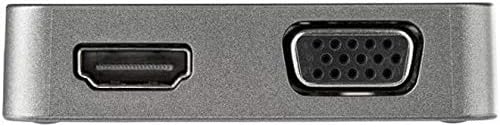
Obrázek 3: Opačná strana view of the adapter, featuring the HDMI output port and the VGA output port. These allow connection to various external displays.
3. Pokyny k nastavení
Follow these steps to set up your StarTech.com DKT31CHVL Multiport Adapter.
- Připojení k hostitelskému zařízení: Plug the integrated USB-C host cable from the DKT31CHVL adapter into an available USB-C or Thunderbolt 3 port on your laptop, tablet, or smartphone.

Obrázek 4: The USB-C Multiport Adapter with its integrated cable, ready for connection to a host device. The cable provides flexibility for various setups.
- Připojení displeje (volitelné):
- For HDMI: Connect an HDMI cable from your display to the HDMI port on the adapter.
- For VGA: Connect a VGA cable from your display to the VGA port on the adapter.
- Note: Only one video output (HDMI or VGA) can be used at a time.
- Připojení USB periferií (volitelné): Plug your USB-A or USB-C devices (e.g., mouse, keyboard, external drive) into the corresponding USB-A or USB-C data ports on the adapter.
- Připojení k síti (volitelné): Připojte ethernetový kabel z routeru nebo síťového přepínače k gigabitovému ethernetovému portu na adaptéru.
- Instalace ovladače: The DKT31CHVL adapter supports native driver installation on most operating systems, including Windows, macOS, Chrome OS, iPadOS, iOS, and Android. Drivers should install automatically upon connection.
4. Návod k obsluze
Once connected, the DKT31CHVL adapter functions as an extension of your host device's capabilities.
4.1 Video výstup
- The adapter supports a single video output at a time. If both HDMI and VGA are connected, only one will be active.
- Configure your display settings on your host device to extend or mirror your screen.
- HDMI supports up to 4K (3840x2160) at 30Hz.
- VGA supports up to 1080p (1920x1080).
4.2 Přenos dat přes USB
- The USB-A and USB-C data ports support USB 3.2 Gen 2 (10Gbps) for high-speed data transfer.
- These ports are backwards compatible with USB 3.2 Gen 1 (5Gbps) and USB 2.0 devices.
4.3 Gigabit Ethernet
- The Gigabit Ethernet port provides a stable wired network connection up to 1000 Mbps.
- Ensure your host device's network settings are configured for a wired connection if necessary.
5. Údržba
To ensure the longevity and optimal performance of your DKT31CHVL adapter, follow these maintenance guidelines:
- Čištění: K čištění vnější strany adaptéru použijte měkký, suchý hadřík. Nepoužívejte tekuté čisticí prostředky ani rozpouštědla.
- Skladování: Pokud adaptér nepoužíváte, skladujte jej na chladném a suchém místě mimo dosah přímého slunečního záření a extrémních teplot.
- Zacházení: Avoid dropping the adapter or subjecting it to strong impacts. Do not pull on the integrated cable forcefully.
- Větrání: Ensure the adapter has adequate ventilation during operation to prevent overheating.
6. Řešení problémů
If you encounter issues with your DKT31CHVL adapter, refer to the following common problems and solutions:
6.1 Žádný video výstup
- Zkontrolujte připojení: Ensure the USB-C host cable is securely connected to your device and the HDMI/VGA cable is firmly connected to both the adapter and the display.
- Single Video Output: Remember that only one video output (HDMI or VGA) can be active at a time. Disconnect the unused video cable.
- Nastavení obrazovky: Verify your host device's display settings are configured correctly (e.g., extended, mirrored, or second screen only).
- Kompatibilita rozlišení: Ensure your display supports the output resolution from the adapter.
- Kompatibilita hostitelského zařízení: Confirm your host device's USB-C port supports DisplayPort Alternate Mode (Alt Mode) for video output.
6.2 USB Devices Not Recognized
- Znovu připojit: Disconnect and reconnect the USB device to the adapter.
- Moc: For high-power USB devices, ensure they have their own power source if needed, as the adapter is bus-powered.
- Host Device USB Port: Try connecting the adapter to a different USB-C port on your host device.
6.3 Žádné síťové připojení
- Kontrola kabelu: Ensure the Ethernet cable is securely connected to both the adapter and your network router/switch.
- Nastavení sítě: Verify your host device's network settings. Ensure the wired connection is enabled and configured correctly.
- Router/Přepínač: Confirm your router or network switch is functioning correctly.
If these steps do not resolve the issue, please visit the StarTech.com support webstránky pro další pomoc.
7. Specifikace
| Funkce | Detail |
|---|---|
| Číslo modelu | DKT31CHVL |
| Značka | StarTech.com |
| Hostitelský konektor | 1x USB-C (Integrated Cable) |
| Video výstup | 1x HDMI (4K 30Hz), 1x VGA (1080p) |
| Datové porty USB | 1x USB-A (10Gbps), 1x USB-C (10Gbps) |
| Síťové rozhraní | 1x Gigabit Ethernet (RJ45) |
| Kompatibilita operačního systému | Windows, macOS, Chrome OS, iPadOS, iOS, Android |
| Zdroj napájení | Napájení ze sběrnice |
| Rozměry (DxŠxV) | 14.2 x 2.4 x 0.6 inches (Adapter body only) |
| Hmotnost položky | 1.92 unce (55 g) |
| Barva | Černý |
8. Záruka a podpora
The StarTech.com DKT31CHVL USB-C Multiport Adapter is backed by a StarTech.com warranty. For specific warranty details, please refer to the warranty information included with your product or visit the official StarTech.com webmísto.
For technical support, product documentation, and frequently asked questions, please visit the StarTech.com support page:


