
Zavedení
This manual provides essential information for the proper setup, operation, and maintenance of your NEC DTZ-12D-3 DT400 12-Button Display Phone. Please read these instructions carefully to ensure optimal performance and longevity of your device. This phone is designed for business communication environments, offering a range of features to enhance productivity.
Konec produktuview
The NEC DTZ-12D-3 DT400 is a corded 12-button display phone, featuring a clear LCD screen for call information and menu navigation. It is designed for efficient communication in a professional setting.
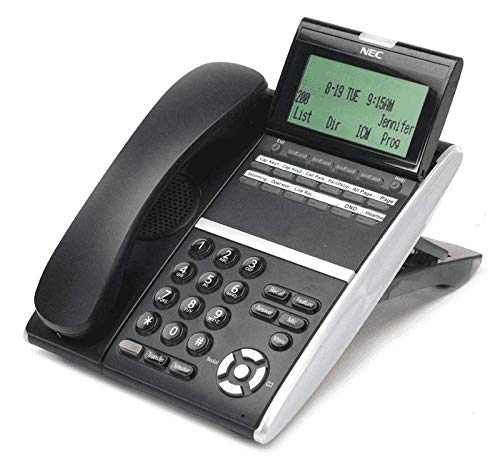
Obrázek 1: NEC DTZ-12D-3 DT400 12-Button Display Phone. This image shows the black corded desk phone with its adjustable display unit. The display shows time, date, and soft-key options. The phone features a standard dial pad, 12 programmable function keys, and dedicated buttons for speaker, transfer, redial, and navigation.
Klíčové komponenty:
- Sluchátko: Pro soukromé rozhovory.
- Displej: Shows call status, time, date, and menu options.
- Programmable Feature Keys (12): Customizable buttons for speed dials, line access, or specific functions.
- Číselník: Standardní numerické klávesy (0-9, *, #) pro vytáčení.
- Navigační klávesy: For scrolling through menus and lists.
- Tlačítko reproduktoru: Activates the speakerphone function.
- Transfer Button: Used to transfer an active call to another extension.
- Tlačítko pro opakované vytáčení: Vytočí poslední volané číslo.
- DND (Do Not Disturb) Button: Activates/deactivates the Do Not Disturb feature.
Nastavení
1. Vybalování
- Opatrně vyjměte všechny součásti z obalu.
- Verify that all items are present: phone unit, handset, coiled handset cord, and telephone line cord.
2. Připojení sluchátka
Connect one end of the coiled handset cord to the handset and the other end to the handset jack located on the side or back of the phone unit.
3. Connecting to the Telephone Line
Plug one end of the telephone line cord into the LINE jack on the phone unit and the other end into a standard telephone wall jack.
4. Připojení napájení
This phone is designed for corded electric operation. Ensure it is connected to a compatible telephone system that provides power, or use the appropriate power adapter if supplied separately (check your system's requirements).
Návod k obsluze
Uskutečnění hovoru
- Zvedněte sluchátko nebo stiskněte tlačítko Reproduktor tlačítko.
- Dial the desired telephone number using the dial pad.
- Počkejte, až se hovor spojí.
Přijetí hovoru
- Když telefon zvoní, zvedněte sluchátko nebo stiskněte Reproduktor tlačítko.
Using Programmable Feature Keys
The 12 programmable keys can be configured for various functions such as speed dialing, line access, or system features. Consult your system administrator for specific programming details and assigned functions.
Caller Identification (Caller ID)
If subscribed to Caller ID service, the incoming caller's number and name (if available) will be displayed on the screen before you answer the call.
Přepojení hovoru
- Během aktivního hovoru stiskněte Převod tlačítko.
- Dial the extension or number to which you want to transfer the call.
- Wait for the recipient to answer, then announce the call and hang up. Alternatively, you may hang up immediately for an unsupervised transfer.
Opakované vytáčení posledního čísla
Zvedněte sluchátko nebo stiskněte tlačítko Reproduktor a poté stiskněte Redial tlačítko pro vytočení naposledy volaného čísla.
Nerušit (DND)
Stiskněte tlačítko DND button to activate or deactivate the Do Not Disturb feature. When active, incoming calls may be redirected to voicemail or a busy signal, depending on system configuration.
Údržba
Čištění
- Otřete vnější povrch telefonu měkkým hadříkemamp tkanina.
- Nepoužívejte agresivní chemikálie, abrazivní čisticí prostředky ani nadměrnou vlhkost.
- Před čištěním se ujistěte, že je telefon odpojen od zdroje napájení.
Skladování
Pokud telefon delší dobu nepoužíváte, skladujte jej na chladném a suchém místě mimo dosah přímého slunečního záření a extrémních teplot.
Odstraňování problémů
Žádný oznamovací tón
- Check all cable connections, especially the telephone line cord.
- Ensure the phone system is operational.
- Test with another phone if available to rule out line issues.
Displej nefunguje
- Verify the phone is properly connected to the system and receiving power.
- Adjust the display contrast if applicable (refer to system administrator).
Nelze uskutečňovat ani přijímat hovory
- Check if the DND feature is accidentally activated.
- Ensure the telephone line is active.
- Contact your system administrator for assistance with line configuration.
Specifikace
| Funkce | Detail |
|---|---|
| Model | DTZ-12D-3 DT400 |
| Značka | NEC Co |
| Typ telefonu | Kabelové |
| Barva | Černý |
| Materiál | Plast |
| Hmotnost položky | 2.9 libry |
| Rozměry balení | 12.28 x 9.21 x 4.61 palce |
| Zdroj napájení | Elektrický kabel |
| Typ vytáčení | Single Keypad (tone dialing) |
| Typ systému odpovědí | Digitální |
| Víceřádkový provoz | Provoz na jedné lince |
| Identifikace volajícího | Ano |
| Kompatibilní zařízení | Traditional telephone networks (PSTN, ISDN), potential integration with other communication devices. |
Záruka a podpora
For warranty information and technical support, please refer to the documentation provided by your system vendor or contact your NEC authorized dealer. As this product may be a renewed item, specific warranty terms may vary from new products. Please consult your purchase agreement for details.
For further assistance, it is recommended to contact your IT department or the telecommunications system administrator responsible for your NEC phone system.