
1. Úvod
This manual provides detailed instructions for the installation, operation, and maintenance of the Hanwha Techwin XNV-8080R 5MP Outdoor Network Dome Camera. This high-performance surveillance camera is designed for outdoor use, offering 5-megapixel resolution, a 3.9-9.4mm varifocal lens, and advanced night vision capabilities to ensure reliable monitoring in various environmental conditions. Please read this manual thoroughly before using the product to ensure proper setup and functionality.
2. Konec produktuview
2.1 Klíčové vlastnosti
- Rozlišení 5 megapixelů: Poskytuje jasné a detailní videozáznamytage.
- 3.9-9.4mm Varifocal Lens: Allows for flexible adjustment of the field of view.
- Noční vidění: Equipped with IR illumination for surveillance in low-light or no-light conditions.
- Venkovní odolnost: IP66 and IP67 rated for protection against dust and water.
- Kabelové připojení: Reliable network connection via Ethernet.
- Detekce pohybu: Configurable alerts based on detected motion.
- Optický zoom: Poskytuje jasné zvětšení bez ztráty kvality obrazu.
- Montáž na stěnu: Designed for secure wall mounting.
2.2 Součásti kamery
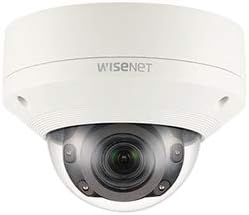
Obrázek 1: Přední view of the Hanwha Techwin XNV-8080R dome camera, showing the lens, IR illuminators, and dome casing. The Wisenet logo is visible on the top casing.

Obrázek 2: Dno view of the Hanwha Techwin XNV-8080R dome camera, illustrating the mounting screw holes and sealed cable entry points for power and network connections.

Obrázek 3: A standard blue Ethernet cable with RJ45 connectors, typically used for wired network connectivity with the camera.
3. Nastavení a instalace
3.1 Montáž fotoaparátu
- Vyberte umístění: Select a suitable outdoor wall mount location that provides the desired field of view and is within reach of power and network cables. Ensure the surface is strong enough to support the camera's weight.
- Vrtací pilotní otvory: Use the provided mounting template (if applicable) to mark and drill pilot holes for the mounting screws.
- Zajistěte základnu: Attach the camera's mounting base securely to the wall using appropriate screws and anchors.
- Správa kabelů: Route the power and network cables through the designated cable entry points on the camera base (refer to Figure 2). Ensure a watertight seal for outdoor protection.
3.2 Wiring and Network Connection
- Připojení napájení: Connect the camera to a compatible AC/DC power source. Refer to the camera's power requirements for correct voltage a ampvymazat.
- Kabelová síť: Connect an Ethernet cable (refer to Figure 3) from the camera's network port to your network switch or router. Ensure the network connection is active and configured for IP camera usage.
- Počáteční přístup: Use the Hanwha Techwin device manager software or a web browser to discover the camera on your network and perform initial configuration, including setting a strong password.
4. Ovládání fotoaparátu
4.1 Základní obsluha
- Přístup k živému vysílání View: Access the camera's live video feed through a web browser, the Hanwha Techwin mobile application (compatible with Android devices), or a Network Video Recorder (NVR) interface.
- Adjusting Lens: If the camera has a varifocal lens, adjust the zoom and focus settings via the camera's web interface or software to achieve the desired field of view a jasnost obrazu.
- Záznam: Configure recording schedules and motion-triggered recording settings through the camera's interface or connected NVR.
4.2 Pokročilé funkce
- Detekce pohybu: Set up motion detection zones and sensitivity levels to trigger alerts or recordings only when movement is detected in specific areas.
- Noční vidění: The camera automatically switches to night vision mode in low-light conditions. Ensure the area is clear of obstructions that might reflect IR light.
- Dálkové ovládání: Utilize the remote control method via the mobile app or web interface to manage camera settings and view footage odkudkoli.
5. Údržba
5.1 Čištění fotoaparátu
- Čištění objektivu: Gently wipe the camera lens and dome cover with a soft, clean, lint-free cloth. For stubborn dirt, use a mild lens cleaning solution. Avoid abrasive materials.
- CasinČištění: Clean the camera's exterior casing s reklamouamp tkanina. Nepoužívejte silné čisticí prostředky nebo rozpouštědla.
5.2 aktualizací firmwaru
Regularly check the Hanwha Techwin official website for the latest firmware updates. Firmware updates can improve performance, add new features, and enhance security. Follow the instructions provided with the firmware update package carefully.
6. Řešení problémů
| Problém | Možná příčina | Řešení |
|---|---|---|
| Žádná síla | Odpojený napájecí kabel; vadný napájecí adaptér. | Check power connections. Ensure the power adapter is functioning correctly. |
| Žádné síťové připojení | Ethernet cable disconnected; incorrect network settings; IP address conflict. | Verify Ethernet cable connection. Check network settings and ensure the camera has a valid IP address. Restart router/switch. |
| Špatná kvalita obrazu | Dirty lens; incorrect focus; low light conditions. | Clean the lens. Adjust focus via the web interface. Ensure sufficient lighting or verify night vision is active. |
| Detekce pohybu se nespouští | Nesprávné nastavení citlivosti; detekční zóna není nakonfigurována. | Adjust motion detection sensitivity. Configure detection zones correctly in the camera's settings. |
7. Specifikace
| Funkce | Detail |
|---|---|
| Značka | HANWHA |
| Model | XNV-8080R |
| Rozlišení záznamu videa | 5 MP |
| Efektivní rozlišení | 5 MP |
| Typ objektivu | 3.9-9.4mm Varifocal (Optical Zoom) |
| Technologie připojení | Kabelové (ethernet) |
| Protokol připojení | Wi-Fi (for initial setup/management, primarily wired) |
| Zdroj napájení | AC/DC |
| Vnitřní/venkovní použití | Venkovní |
| Speciální funkce | Noční vidění |
| Hodnocení mezinárodní ochrany | IP66, IP67 |
| Typ montáže | Držák na zeď |
| Snímková frekvence | 30 snímků za sekundu |
| Technologie nízkého osvětlení | Noční barva |
| Typ upozornění | Pouze pohyb |
| Kompatibilní zařízení | Smartphone (Android), NVR, PC |
| Kontrolní metoda | Remote (via app/web rozhraní) |
| Form Factor | Kupole |
| UPC | 738714010281 |
| ASIN | B08D7RQFKK |
8. Informace o záruce
Hanwha Techwin products are covered by a limited warranty. Please refer to the official Hanwha Techwin website or your purchase documentation for specific warranty terms and conditions applicable to the XNV-8080R model. Keep your proof of purchase for warranty claims.
9. Podpora
For technical assistance, product inquiries, or further support, please visit the official Hanwha Techwin support website or contact their customer service. You can typically find contact information and FAQs on their webmísto:
Hanwha Techwin Official Webmísto: www.hanwhasecurity.com
When contacting support, please have your camera model (XNV-8080R) and serial number ready.