
EONCHARM 1315
Uživatelská příručka univerzálního dálkového ovladače
Model: 1315
Brand: EONCHARM
Zavedení
This manual provides comprehensive instructions for the EONCHARM Universal Remote Control, designed to be compatible with a wide range of Samsung televisions. This remote offers a straightforward, plug-and-play experience, requiring no complex setup or programming. It is an ideal replacement for your original Samsung TV remote, restoring full functionality and convenience.
Vlastnosti produktu
- Infrared replacement remote compatible with all Samsung Smart TV, LED, LCD, HDTV, and 3D Series TVs.
- Compatible with all Samsung series TVs, including models from 2017 to 2024.
- Simple, compact, and ergonomic design for easy grip and handling.
- Není nutné žádné programování ani nastavení; připraveno k použití ihned po vybalení z krabice.
- Offers stable performance and farther transmitting distance.
- Includes dedicated shortcut buttons for NETFLIX, Prime Video, and Hulu for quick access to streaming services.
- Replaces various Samsung remote models, including BN59-01315A, BN59-01315J, BN59-01301A, BN59-01175N, BN59-01199F, AA59-00741A, AA59-00786A, AA59-00602A, BN59-01247A, AA59-00743A, BN59-01175B, AA59-00818A, AA59-00603A, BN59-01199G, and others.
Obsah balení
- 1 x EONCHARM Universal Remote Control (Model 1315)
Poznámka: Baterie AAA nejsou součástí balení a je nutné je zakoupit samostatně.
Nastavení
Instalace baterie
- Najděte přihrádku na baterie na zadní straně dálkového ovladače.
- Posuňte kryt baterie dolů nebo ve směru šipky, abyste jej otevřeli.
- Vložte dvě (2) baterie typu AAA a ujistěte se, že kladný (+) a záporný (-) pól správně odpovídají označením uvnitř přihrádky.
- Nasaďte kryt baterie zpět jeho zasunutím zpět na místo, dokud bezpečně nezacvakne.
Once batteries are installed, the remote is ready for immediate use with compatible Samsung TVs. No pairing or programming is required.

Návod k obsluze
The EONCHARM Universal Remote Control features a standard layout with clearly labeled buttons for intuitive operation. Below is a guide to the primary functions of each button.
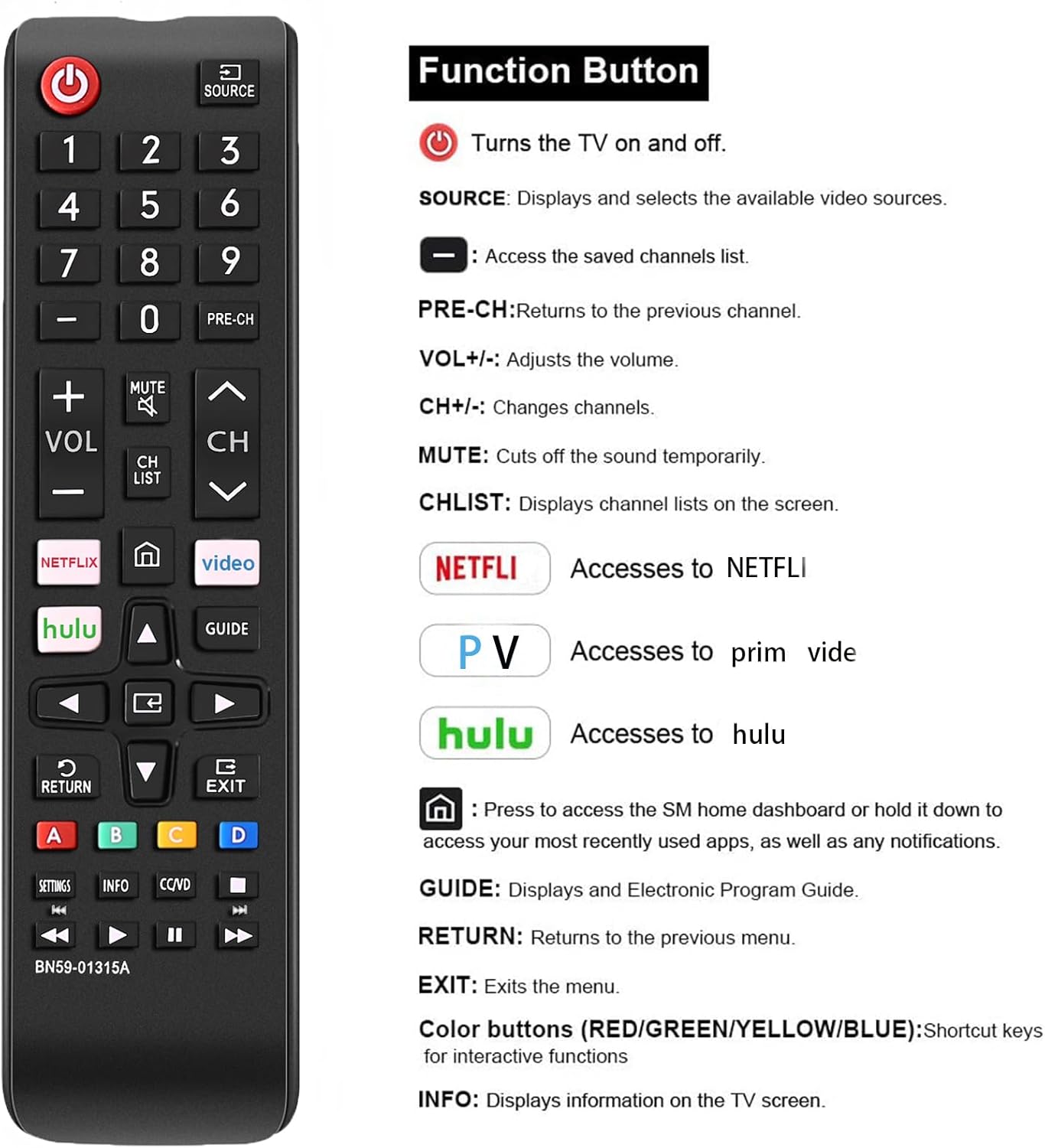
| Tlačítko | Funkce |
|---|---|
| MOC (⏻) | Zapíná a vypíná televizor. |
| ZDROJ | Displays and selects available video sources (e.g., HDMI 1, AV, TV). |
| Číselná tlačítka (0-9) | Přímé zadávání čísel kanálů. |
| PŘEDCH | Vrátí se na předchozí kanál. |
| VOL +/- | Nastavuje úroveň hlasitosti. |
| CH ^/v | Přepíná kanály nahoru nebo dolů. |
| ZTLUMIT | Cuts the sound temporarily. |
| CH LIST | Displays channel lists on the screen. |
| NETFLIX | Directly accesses the NETFLIX application. |
| Prime Video | Directly accesses the Prime Video application. |
| Hulu | Directly accesses the Hulu application. |
| Domů (⌂) | Press to access the Smart Hub home dashboard or hold it down to access your most recently used apps, as well as any notifications. |
| Navigační šipky (nahoru, dolů, vlevo, vpravo) | Procházejte nabídky a možnosti. |
| ENTER | Potvrzuje výběr. |
| PRŮVODCE | Displays the Electronic Program Guide (EPG). |
| NÁVRAT | Vrátí se do předchozí nabídky nebo obrazovky. |
| EXIT | Ukončí aktuální menu nebo aplikaci. |
| Barevná tlačítka (A, B, C, D) | Shortcut keys for interactive functions, specific to TV content or applications. |
| NASTAVENÍ | Přístup k nabídce nastavení televizoru. |
| INFO | Zobrazuje informace o aktuálním programu nebo obsahu. |
| CC/VD | Activates Closed Captions/Video Description. |
| Tlačítka pro ovládání médií (Přehrát, Pozastavit, Zastavit, Přetočit zpět, Rychle přetočit vpřed) | Ovládá přehrávání médií. |

Kompatibilita
This EONCHARM Universal Remote Control is designed for broad compatibility with Samsung televisions. It supports:
- All Samsung Smart TV models.
- Samsung LCD, LED, HDTV, and 3D Series TVs.
- Samsung TVs from various years, including 2017, 2018, 2019, 2020, 2021, 2022, 2023, and 2024 series.
- Common screen sizes such as 43, 50, 55, 58, 65, and 75 inches.
It is a direct replacement for many original Samsung remote models, ensuring seamless integration without the need for complex setup procedures.


Údržba
Výměna baterie
When the remote control's performance degrades (e.g., reduced range, unresponsive buttons), it is likely time to replace the batteries. Follow the battery installation steps outlined in the Setup section.
Čištění
K čištění dálkového ovladače použijte měkký, suchý hadřík. V případě odolných nečistot lehceampen the cloth with water or a mild, non-abrasive cleaner. Do not use harsh chemicals or abrasive materials, as these can damage the remote's surface or internal components. Avoid getting moisture into the battery compartment or any openings.
Skladování
Dálkový ovladač skladujte na chladném a suchém místě mimo dosah přímého slunečního záření, extrémních teplot a vysoké vlhkosti. Pokud dálkový ovladač nebudete delší dobu používat, doporučuje se vyjmout baterie, abyste zabránili jejich vytečení a možnému poškození.
Odstraňování problémů
- Dálkové ovládání nereaguje:
- Ujistěte se, že jsou baterie vloženy správně se správnou polaritou.
- Vyměňte staré nebo vybité baterie za nové baterie typu AAA.
- Ujistěte se, že mezi dálkovým ovladačem a infračerveným senzorem televizoru nejsou žádné překážky.
- Point the remote directly at the TV's sensor.
- Tlačítka se zasekávají nebo nereagují:
- Vyčistěte dálkový ovladač podle pokynů v části Údržba.
- If the issue persists after cleaning and battery replacement, the remote may be damaged and require replacement.
- Remote controls some functions but not others:
- Verify that your TV model is a Samsung TV. This remote is specifically designed for Samsung TVs.
- Ensure the TV's firmware is up to date, as some older TVs might have limited compatibility with newer remote features.
Specifikace
| Funkce | Detail |
|---|---|
| Rozměry produktu | 2.36 x 1.97 x 3.1 palce |
| Hmotnost položky | 2.11 unce |
| Číslo modelu | 1315 |
| Jsou vyžadovány baterie | 2 baterie AAA (nejsou součástí balení) |
| Značka | EONCHARM |
| Speciální funkce | Ergonomický design |
| Barva | Černý |
| Maximální počet podporovaných zařízení | 50 (refers to internal capability, designed for Samsung TVs) |
| Kompatibilní zařízení | Television (Samsung TVs) |
Záruka a podpora
For information regarding warranty coverage or technical support, please refer to the product packaging or contact the retailer from whom you purchased the EONCHARM Universal Remote Control. Keep your proof of purchase for any warranty claims.
Ask a question about this manual
Ask about setup, troubleshooting, compatibility, parts, safety, or missing instructions. Manuals+ will review the question and use this page’s manual context to help answer it.