
1. Úvod
The LogiLink UA0363 is a USB-C to 3.5mm audio adapter designed to provide audio output for smartphones, tablets, and laptops that lack a dedicated 3.5mm audio jack. This adapter integrates a high-quality Digital-to-Analog Converter (DAC) and a hardware equalizer to deliver enhanced audio performance. It supports standard 3.5mm headphones and headsets with microphone functionality.
2. Vlastnosti produktu
- Supports most mobile phones and laptops with a USB-C interface.
- Integrated 3-level hardware equalizer (EQ), selectable via a control button.
- Integrated microphone support.
- LED display for sampling rate and EQ modes.
- Supports most 3.5mm 3-pin headphones with 16-600 ohms impedance.
- Sluchátka Amplifier: Maxim MAX97220AA.
- DAC: BES Technik BES3100.
- Podporuje sampling frequencies of 44, 48, and 96 kHz with 24-bit resolution.
- USB powered, no external power supply required.
- Compliant with USB 2.0 specifications.
- Signal-to-Noise Ratio (SNR): Approximately 100 dB (A).
3. Nastavení
- Connect the LogiLink UA0363 adapter to the USB-C port of your smartphone, tablet, or laptop. Ensure it is fully inserted.
- Plug your 3.5mm headphones or headset into the 3.5mm jack on the adapter.
- The device is plug-and-play and should be recognized automatically by most operating systems.

Image: The LogiLink UA0363 adapter connected to a smartphone, ready for headphone use.
4. Návod k obsluze
4.1 Základní přehrávání zvuku
Once connected, audio from your device will be routed through the UA0363 adapter to your headphones. Use your connected device's volume controls to adjust the audio output level.
4.2 Funkce ekvalizéru (EQ)
The adapter features a built-in 3-level hardware equalizer. To cycle through the available EQ modes, press the control button located on the adapter. An LED display on the adapter indicates the currently active EQ mode and the sampsazba lingu.
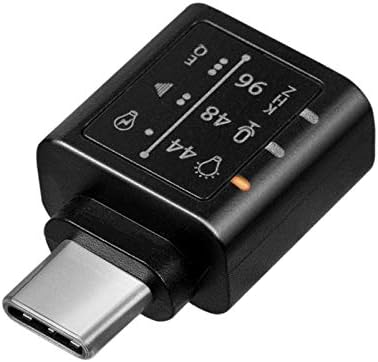
Obrázek: Podrobný view of the adapter's indicators for sampling frequency and equalizer settings.
4.3 Microphone Function
If your connected headphones or headset include a microphone, its functionality will be supported through the UA0363 adapter. Ensure your device's audio input settings are configured to use the USB audio device's microphone.
5. Údržba
- Keep the adapter clean and dry. Use a soft, dry cloth for cleaning.
- Nevystavujte adaptér extrémním teplotám, vlhkosti nebo přímému slunečnímu záření.
- Do not attempt to disassemble or modify the adapter, as this will void the warranty.
- Pokud adaptér nepoužíváte, uložte jej na bezpečném místě, abyste zabránili jeho fyzickému poškození.
6. Řešení problémů
6.1 Žádný zvukový výstup
- Ensure the UA0363 adapter is fully and securely inserted into your device's USB-C port.
- Verify that your headphones are fully plugged into the adapter's 3.5mm jack.
- Check your device's audio output settings to confirm that the USB audio device is selected as the primary output.
- Test the adapter with a different pair of headphones or another compatible USB-C device to isolate the issue.
- Ensure the volume on your connected device is not muted or set too low.
6.2 Poor Audio Quality or Distortion
- Ujistěte se, že zdroj zvuku (např. hudba) file, streamovací služba) je vysoké kvality.
- Try cycling through the different EQ settings on the adapter to see if a different profile improves the sound.
- Check for any loose connections between the adapter, device, and headphones.
- Avoid using the adapter near sources of strong electromagnetic interference.
6.3 Mikrofon nefunguje
- Confirm that your headphones or headset are equipped with a working microphone.
- Check your device's audio input settings to ensure the USB audio device's microphone is selected as the input source.
- Ensure the microphone on your headset is not muted.
7. Specifikace
| Funkce | Specifikace |
|---|---|
| Číslo modelu | UA0363 |
| Konektory | USB-C Male, 3.5mm Jack Female |
| DAC čip | BES Technik BES3100 |
| Sluchátka Ampdoživotní | Maxim MAX97220AA |
| Podporováno Sampsazby ling | 44 kHz, 48 kHz, 96 kHz |
| Rezoluce | 24bitový |
| Impedance Support | 16-600 ohmů |
| Poměr signálu k šumu (SNR) | Přibl. 100 dB (A) |
| Zdroj napájení | USB Powered |
| Shoda USB | USB 2.0 |
| Speciální funkce | Integrated Microphone Support, 3-level Hardware Equalizer, LED Indicators |
| Rozměry (D x Š x V) | 17 x 10 x 26 mm |
| Barva | Černý |
8. Záruka a podpora
For warranty information, technical support, and further assistance, please refer to the official LogiLink website or contact your authorized retailer. Keep your purchase receipt for warranty claims.