
1. Konec produktuview
The SXFJF 4K Ultra HD WiFi Action Camera is designed for capturing high-quality video and photos during various outdoor and sports activities. It features 4K video recording, a wide-angle lens, electronic image stabilization, and a waterproof design, making it suitable for adventures both on land and underwater.
Klíčové vlastnosti:
- Ultra HD Video: Records crystal clear 4K video and high-quality images with a wide-angle lens.
- Funkce proti otřesům: Built-in electronic image stabilization ensures smooth and steady footage even during fast-moving activities.
- Vodotěsný design: Equipped with a waterproof case, allowing for underwater use in sports like swimming, surfing, and diving.
- Dlouhá výdrž baterie: Rechargeable batteries provide extended recording time.
- Všestranné příslušenství: Comes with various accessories for adapting to different indoor and outdoor activities.
- Konektivita: Features Wi-Fi and HDMI output for easy sharing and viewIng.

Image 1.1: The SXFJF 4K Ultra HD WiFi Action Camera, showcasing its compact design and primary lens.
2. Začínáme: Nastavení
2.1 Vybalení a kontrola obsahu
Before using your camera, please ensure all components are present in the package:
- SXFJF 4K Ultra HD WiFi Action Camera
- Vodotěsné pouzdro
- Nabíjecí baterie
- Various Mounting Accessories
- USB kabel
- Uživatelská příručka (tento dokument)
2.2 Instalace a nabíjení baterie
- Na fotoaparátu vyhledejte přihrádku na baterie.
- Open the compartment cover and insert the rechargeable battery, ensuring the correct orientation according to the polarity indicators.
- Bezpečně zavřete kryt bateriového prostoru.
- To charge, connect the camera to a power source using the provided USB cable. The charging indicator light will illuminate.
- A full charge typically takes approximately 2-3 hours. The indicator light will change or turn off once charging is complete.
2.3 Vložení karty Micro SD
The camera requires a Micro SD card (not included) for storing photos and videos. A Class 10 or UHS-I (U1) or higher speed rating is recommended for 4K recording.
- Locate the Micro SD card slot on the side or bottom of the camera.
- Insert the Micro SD card with the gold contacts facing the front of the camera until it clicks into place.
- Chcete-li kartu vyjmout, jemně ji zatlačte dovnitř, dokud nevyskočí.
2.4 Používání vodotěsného pouzdra
The included waterproof case allows the camera to be used underwater. Before first use, perform a waterproof test without the camera inside.
- Open the waterproof case latch and carefully place the camera inside, ensuring it fits snugly.
- Pevně zavřete západku, abyste vytvořili vodotěsné utěsnění.
- Always ensure the rubber seal is clean and free of debris before closing the case.
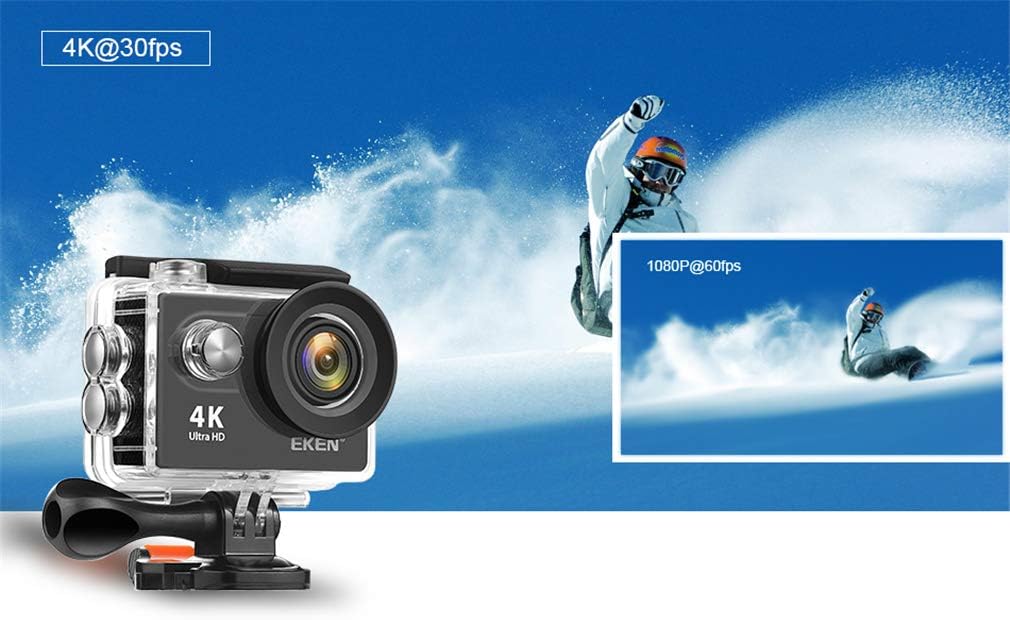
Image 2.1: The action camera enclosed in its waterproof housing, highlighting its 4K and 1080P video recording capabilities for various action shots.
2.5 Připevnění montážního příslušenství
The camera comes with various mounts for different scenarios. Refer to the accessory guide for specific attachment instructions. Generally, mounts attach to the waterproof case or directly to the camera via a standard tripod screw mount.
3. Ovládání fotoaparátu
3.1 Zapnutí/vypnutí
- Zapnutí: Stiskněte a několik sekund podržte tlačítko Napájení/Režim, dokud se obrazovka nerozsvítí.
- Vypnout: Znovu stiskněte a podržte tlačítko Napájení/Režim, dokud se obrazovka nevypne.
3.2 Výběr režimu
Press the Power/Mode button repeatedly to cycle through different modes:
- Režim videa: Pro nahrávání videa footage.
- Režim fotografie: For taking still images.
- Režim přehrávání: Pro reviewing recorded videos and photos.
- Režim nastavení: To adjust camera settings.
3.3 Nahrávání videa a pořizování fotografií
- Nahrávání videa: In Video Mode, press the Shutter/OK button to start recording. Press it again to stop. A red indicator light will usually flash during recording.
- Chcete-li pořídit fotografii: In Photo Mode, press the Shutter/OK button to capture an image.

Image 3.1: The action camera highlighting its 12-megapixel photo capability, suitable for capturing detailed images in various environments.
3.4 Wi-Fi připojení
The camera can connect to your smartphone via Wi-Fi for remote control and file převod.
- Enable Wi-Fi on the camera through the Settings menu.
- Download the dedicated camera app (refer to the camera's display or packaging for the app name) on your smartphone.
- Na smartphonu se připojte k síti Wi-Fi fotoaparátu (SSID a heslo se zobrazí na obrazovce fotoaparátu).
- Open the app to control the camera remotely, view živé footage a stáhnout files.
3.5 Používání dálkového ovladače
The 2.4G remote control allows for convenient operation from a distance.
- Ensure the remote control is paired with the camera (refer to the camera's settings for pairing instructions).
- Use the designated buttons on the remote to start/stop recording or take photos.
3.6 Stabilizace obrazu
The camera features electronic image stabilization (EIS) to reduce blur and shakiness in your videos. This feature is typically enabled by default or can be toggled in the camera's video settings menu for smoother footage.
3.7 Výstup HDMI
Connect the camera to an HDMI-compatible display (e.g., TV, monitor) using an HDMI cable (not included) to view vaše nahrávky na větší obrazovce.

Image 3.2: The action camera demonstrating its various features including 4K video, 12MP photos, waterproof capability, Wi-Fi, and remote control, shown in an active outdoor setting.
4. Údržba
4.1 Cleaning the Camera and Case
- Use a soft, lint-free cloth to clean the camera body and lens. For stubborn smudges, a slightly damp Lze použít hadřík a poté suchý.
- Clean the waterproof case, especially the rubber seal, after each use, particularly after exposure to saltwater, sand, or dirt. Rinse with fresh water and allow to air dry.
- K čištění nepoužívejte agresivní chemikálie nebo abrazivní materiály.
4.2 Péče o baterii
- Pokud baterie nepoužíváte, skladujte je na chladném a suchém místě.
- Abyste prodloužili životnost baterií, vyhněte se jejich pravidelnému úplnému vybíjení.
- Pokud skladujete baterie delší dobu, nabijte je přibližně na 50 % jejich kapacity.
4.3 Skladování
When not in use, store the camera and accessories in a protective case in a cool, dry environment, away from direct sunlight and extreme temperatures.
5. Řešení problémů
Pokud narazíte na problémy s fotoaparátem, podívejte se na následující běžná řešení:
| Problém | Možná příčina / řešení |
|---|---|
| Fotoaparát se nezapne. | Battery is depleted or not inserted correctly. Charge the battery or re-insert it. |
| Nelze nahrávat video/fotit. | Micro SD card is full, not inserted, or corrupted. Format the card (this will erase all data) or replace it. Ensure the camera is in the correct mode. |
| Špatná kvalita videa/fotek. | Lens may be dirty. Clean the lens. Ensure sufficient lighting. Check resolution settings. |
| Problémy s připojením k Wi-Fi. | Ensure Wi-Fi is enabled on the camera and smartphone. Check app permissions. Restart both devices. |
| Únik vody ve vodotěsném pouzdře. | Rubber seal is dirty, damaged, or case not closed properly. Clean the seal, inspect for damage, and ensure the latch is securely fastened. |
Pokud problém přetrvává, kontaktujte prosím zákaznickou podporu.
6. Specifikace
Detailed technical specifications for the SXFJF 4K Ultra HD WiFi Action Camera:
| Funkce | Specifikace |
|---|---|
| Značka | SXFJF |
| Rozlišení záznamu videa | 4K |
| Typ paměti Flash | Micro SD |
| Formát záznamu videa | MP4 |
| Velikost obrazovky | 2 palce |
| Technologie připojení | HDMI, Wi-Fi |
| Speciální funkce | Přenosný, Vodotěsný |
| Typ videokamery | Akční kamera |
| Zahrnuté komponenty | Baterie |
| Úroveň odolnosti proti vodě | Vodotěsný |
| Stabilizace obrazu | Elektronický |
| Form Factor | Kompaktní |
| Průměrná životnost baterie | 60 minut (přibližně) |
| Typ objektivu | Široký úhel |
| Typ zaměření | Automatické ostření |
| Maximální rozlišení displeje | 4K UHD |
| Kompatibilní zařízení | Chytrý telefon, televize |
| Rozlišení videa | 4K |
| Režimy fotografování | Časosběr |
| Poměr stran obrazu | 16:9 |
| Podporovaný formát obrázku | JPEG |
| File Formát | MP4 |
| Přiblížení | Optický |
7. Záruka a podpora
For warranty information, please refer to the documentation included with your purchase or contact the retailer. For technical support or further assistance, please reach out to SXFJF customer service through their official webwebu nebo kontaktních informací uvedených u vašeho produktu.