
1. Úvod
Děkuji za nákupasing the Tengsen M1 MP3 Player. This device is designed to provide a versatile multimedia experience, featuring Bluetooth 5.0 connectivity, a full touch screen, HD video playback, HiFi audio, FM radio, voice recording, e-book functionality, and a pedometer. This manual will guide you through the setup, operation, and maintenance of your new device.
2. Bezpečnostní informace
- Nevystavujte zařízení extrémním teplotám, přímému slunečnímu záření nebo vysoké vlhkosti.
- Zabraňte pádu zařízení nebo jeho vystavení silným nárazům.
- Udržujte zařízení mimo dosah vody a jiných kapalin.
- Používejte pouze dodaný nabíjecí kabel a kompatibilní napájecí adaptér.
- Nepokoušejte se zařízení sami rozebírat nebo opravovat. Požádejte o pomoc zákaznickou podporu.
- Listen to audio at moderate volumes to prevent hearing damage.
3. Obsah balení
Zkontrolujte prosím balení, zda neobsahuje následující položky:
- Tengsen M1 MP3 Player
- Nabíjecí kabel USB (typu C)
- Kabelová sluchátka
- Uživatelská příručka

Image: Tengsen M1 MP3 Player with USB cable and wired earphones.
4. Konec produktuview
The Tengsen M1 features a durable metal body and a 4.0-inch full touch screen for intuitive navigation. It includes a built-in speaker and supports various multimedia functions.

Obrázek: Přední strana view of the Tengsen M1 MP3 Player.
5. Nastavení
5.1 Počáteční nabíjení
Before first use, fully charge the device. Connect the USB charging cable to the player's Type-C port and the other end to a USB power adapter or computer. The battery indicator will show charging status.
5.2 Zapnutí/vypnutí
- Zapnutí: Stiskněte a podržte tlačítko napájení, dokud se nerozsvítí obrazovka.
- Vypnutí: Stiskněte a podržte tlačítko napájení a poté na obrazovce vyberte možnost „Vypnout“.
5.3 Převod Files
Connect the MP3 player to your computer using the provided USB cable. The device will appear as a removable disk. You can then drag and drop music, video, and e-book files into the respective folders on the player's internal 16GB storage.
5.4 Rozšíření úložiště
The device supports a Micro TF card up to 128GB (not included). Insert the card into the designated slot to expand storage capacity for more files.
6. Návod k obsluze
6.1 Základní navigace
The Tengsen M1 features a full touch screen. Swipe left/right or tap icons to navigate through menus and applications. Use the back arrow icon to return to the previous screen.

Image: The 4.0-inch full touch screen allows for easy operation, similar to a smartphone.
6.2 Přehrávání hudby
Tap the 'Music' icon to access your audio library. The player supports MP3, WMA, OGG, APE, FLAC, WAV, AAC-LC, ACELP, and M4A formats. You can create playlists and enjoy high-resolution audio through headphones or the built-in speaker.

Image: The device features a built-in speaker for direct audio playback.
6.3 Připojení Bluetooth
The M1 player features Bluetooth 5.0 for wireless audio. Go to 'Settings' > 'Bluetooth' to enable and pair with your Bluetooth headphones or speakers. Poznámka: This device cannot connect to mobile phones via Bluetooth.

Image: Bluetooth 5.0 provides a stable wireless connection for audio accessories.
6.4 Přehrávání videa
Tap the 'Video' icon to play video files. The player supports high-resolution 720p and 1080p video playback without format conversion. Compatible formats include AVI, MKV, MPG, MPEG, RM, RMVB, VOB, MOV, FLV, ASF, DAT, MP4, and 3GP.
Image: The device supports 1080P HD video playback.
6.5 FM rádio
Plug in the wired earphones (they act as an antenna) and select the 'Radio' application. Scan for available stations and save your favorites.
6.6 Hlasový záznamník
Open the 'Record' application to use the built-in voice recorder. You can record lectures, meetings, or personal notes.
6.7 Čtečka elektronických knih
Access the 'E-book' application to read text files. Ensure your e-book files are in a compatible format (e.g., TXT) and transferred to the device.
Krokoměr 6.8
The 'Pedometer' function tracks your steps, making it suitable for sports and fitness activities. Activate it from the main menu to monitor your activity.
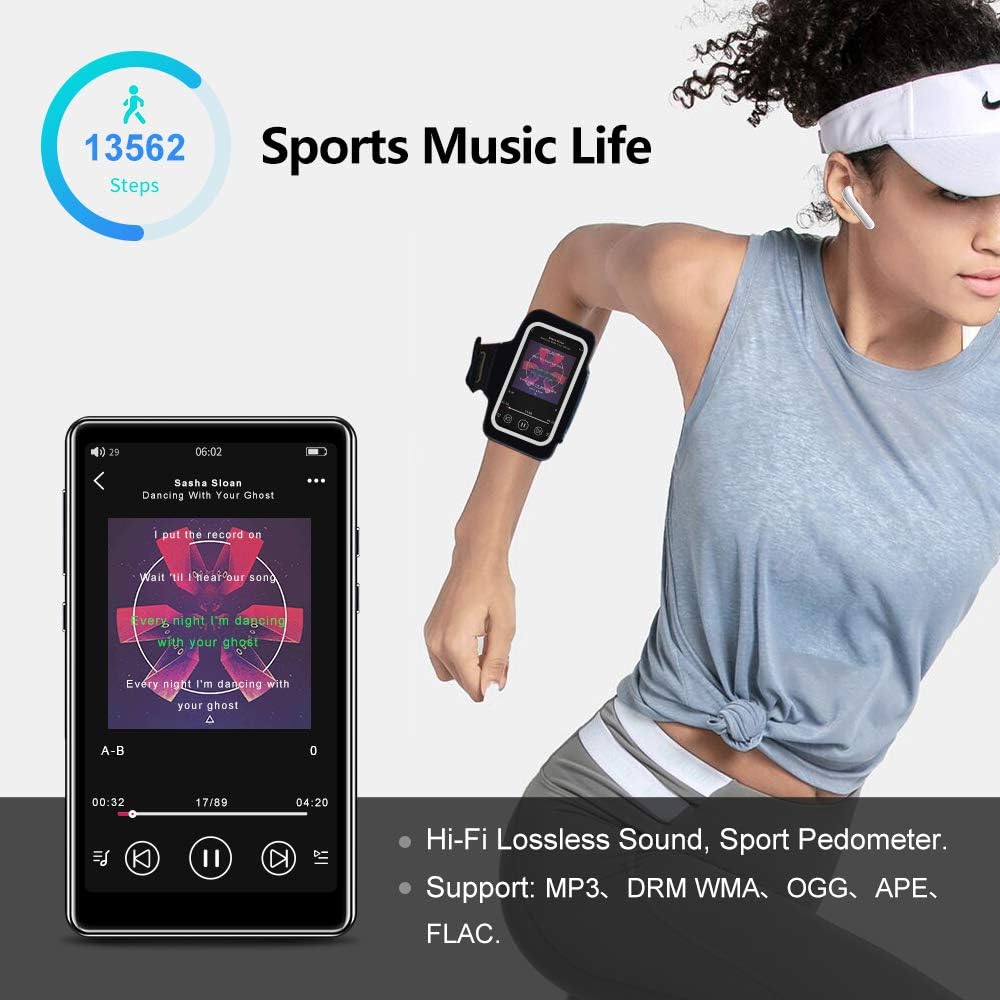
Image: The pedometer function supports tracking steps during sports activities.
7. Údržba
7.1 Čištění zařízení
Use a soft, dry, lint-free cloth to clean the screen and body of the player. Do not use abrasive cleaners or solvents.
7.2 Péče o baterii
The device has a built-in 1400mAh lithium-ion battery. To prolong battery life, avoid fully discharging it frequently and store the device in a cool, dry place when not in use for extended periods. A full charge provides over 20 hours of music playback or 8+ hours of video playback with wired earphones.

Image: The 1400mAh battery provides extended usage time.
8. Řešení problémů
- Zařízení se nezapne: Ujistěte se, že je baterie nabitá. Připojte ke zdroji napájení a zkuste to znovu.
- Problémy s připojením Bluetooth: Ensure Bluetooth is enabled on both the player and the accessory. Keep devices within range and try re-pairing.
- Žádný zvuk z reproduktoru: Check volume settings. Ensure headphones are not plugged in if you intend to use the speaker.
- Filenehraje: Ověřte, že file format is supported by the player. Ensure files nejsou poškozeny.
- Obrazovka nereaguje: Zkuste restartovat zařízení podržením tlačítka napájení. Pokud problém přetrvává, kontaktujte podporu.
9. Specifikace
| Značka | Tengsen |
| Název modelu | M1 |
| Interní úložiště | 16 GB |
| Rozšiřitelné úložiště | Up to 128 GB (Micro TF card, not included) |
| Verze Bluetooth | 5.0 |
| Velikost obrazovky | 4.0 palce |
| Kapacita baterie | 1400 mAh Lithium-ion |
| Zvukové formáty | MP3, WMA, OGG, APE, FLAC, WAV, AAC-LC, ACELP, M4A |
| Video formáty | AVI, MKV, MPG, MPEG, RM, RMVB, VOB, MOV, FLV, ASF, DAT, MP4, 3GP (supports 720p, 1080p) |
| Speciální funkce | Full Touch Screen, Built-in Speaker, FM Radio, Voice Recorder, E-book, Pedometer |
| Konektivita | Bluetooth, USB Type-C |
10. Záruka a podpora
Tento produkt je dodáván se standardní zárukou výrobce. Konkrétní podmínky naleznete v záruční kartě, která je součástí balení. Pro technickou podporu, pomoc s řešením problémů nebo reklamace se obraťte přímo na prodejce nebo výrobce.