
1. Úvod
This manual provides essential information for the installation, operation, and maintenance of your Flysky Telemetry Data Modules. These modules are designed to enhance your remote control experience by providing real-time data such as voltage, temperature, height, and RPM directly to compatible Flysky transmitters. Please read this manual thoroughly before using the modules to ensure proper function and safety.
2. Konec produktuview
The Flysky Telemetry Data Modules are a series of sensors and receivers designed to integrate with Flysky RC systems, providing valuable real-time feedback. Each module serves a specific purpose:
- Telemetrický modul FS-CPD01 RPM (magnetický): Monitors rotational speed up to 60,000 RPM/min. Power: 4.0-6.5V DC. Weight: 6.6g. Size: 31x15x8.5mm.
- Telemetrický modul FS-CPD02 RPM (fotoindukce/optika): Monitors rotational speed up to 60,000 RPM/min. Power: 4.0-6.5V DC. Weight: 6.8g. Size: 31x15x8.5mm.
- Modul pro snímání teploty FS-CTM01: Monitors temperature range from -40 to 250°C. Power: 4.0-6.5V DC. Weight: 6.8g. Size: 31x15x8.5mm.
- FS-CVT01, svazektagModul akvizice: Monitory svtage range from 0-100V DC. Power: 4.0-6.5V DC. Weight: 6g. Size: 31x15x8.5mm.
- FS-CEV04 i-BUS Serial Bus Receiver: 4 Channels, with i-BUS PORT. Weight: 8.1g. Power: 4.0-6.5V DC. Size: 30x25.6x13mm.
- Modul pro snímání výšky FS-CAT01: Provides altitude data.
These modules are compatible with iA4B (directly), iA6B (directly), and iA10 (requires conversion cable) receivers. The FS-CAT01 module is compatible with NV14, PL18, iT4S, and i10 transmitters, but not with FS-i6 or FS-i6X transmitters.
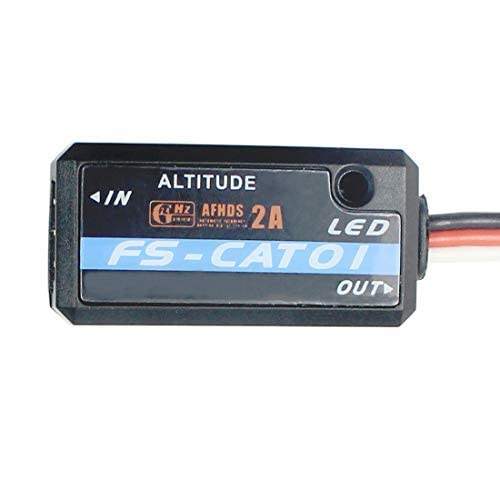
Figure 2.1: Flysky FS-CAT01 Height Acquisition Module. This image shows the compact black module with its connection wires.

Figure 2.2: Flysky FS-CAT01 Module with its standard connection cable. The module is black with a blue label indicating 'FS-CAT01' and 'ALTITUDE'.
3. Nastavení
Proper setup is crucial for accurate telemetry data. Follow these general guidelines for connecting your Flysky Telemetry Data Modules:
- Kontrola kompatibility: Ensure your receiver (e.g., iA4B, iA6B, iA10B) and transmitter (e.g., NV14, PL18, iT4S, i10) are compatible with the specific telemetry module you intend to use. Refer to the 'Product Overview' section for module-specific compatibility.
- Připojení napájení: All modules require a power input of 4.0-6.5V DC. Connect the module to a stable power source within this range.
- i-BUS Connection: Connect the telemetry module to the i-BUS port on your compatible Flysky receiver. Some receivers like the iA10 may require a conversion cable (not included with the module).
- Sensor Specific Connections:
- RPM Modules (FS-CPD01/FS-CPD02): Connect the magnetic or optical sensor to the rotating part you wish to monitor. Ensure the sensor is securely mounted and aligned for accurate readings.
- Temperature Module (FS-CTM01): Securely attach the temperature probe to the component you want to monitor (e.g., motor, ESC). Ensure good thermal contact.
- svtage Module (FS-CVT01): Připojte zvtage input wires to the battery or power source you intend to monitor, observing correct polarity.
- Height Module (FS-CAT01): This module typically connects directly to the i-BUS port and does not require additional external sensors for height measurement.
- Nastavení vysílače: Once connected, power on your receiver and transmitter. Navigate to the telemetry settings on your transmitter to enable and configure the newly connected sensors. Refer to your transmitter's manual for detailed instructions on telemetry setup.
Video 3.1: This video demonstrates the Flysky FS-i6X RC Transmitter with an FS-iA6B Receiver, showcasing the basic operation and interface of a compatible Flysky system. It provides context for how telemetry modules integrate with the transmitter.
4. Návod k obsluze
After successful setup, your telemetry data modules will transmit real-time information to your compatible Flysky transmitter. Here's how to operate and interpret the data:
- Zapnutí: Ensure your RC model and transmitter are powered on. The telemetry modules will automatically begin transmitting data once powered.
- Accessing Telemetry Data: On your Flysky transmitter, navigate to the telemetry or sensor display screen. The exact menu path varies by transmitter model (e.g., FS-i6, i10, iT4S, NV14, PL18). Consult your transmitter's user manual for specific instructions.
- Monitorovací data: The transmitter screen will display the real-time data from your connected modules:
- RPM: Displays the current rotational speed of the monitored component.
- Teplota: Shows the current temperature in degrees Celsius.
- svtage: Indicates the real-time voltage of the monitored power source.
- Výška: Provides altitude readings.
- Data Alarms: Many Flysky transmitters allow you to set custom alarms for telemetry data (e.g., low voltage, high temperature). Configure these alarms in your transmitter's settings to receive alerts during operation.
Video 4.1: This video features the GoolRC Flysky Noble NB4+ 8CH RC Transmitter, demonstrating its features and user interface. This transmitter is compatible with Flysky telemetry modules and shows how data might be displayed.
Video 4.2: This video, titled 'Smart Flashing Light', showcases an RC accessory. While not directly a telemetry module, it illustrates the type of additional components that can be integrated into an RC system, often requiring similar power and signal connections.
5. Údržba
To ensure the longevity and reliable performance of your Flysky Telemetry Data Modules, follow these maintenance guidelines:
- Udržujte v suchu: Protect all modules from moisture and humidity. Water damage can lead to malfunction.
- Čistota: Periodically clean the modules and their sensors with a soft, dry cloth. Avoid using solvents or harsh chemicals. For optical RPM sensors, ensure the lens is clear of dust and debris.
- Kontrola připojení: Regularly check all wiring and connectors for signs of wear, corrosion, or loose connections. Secure any loose connections to prevent intermittent data transmission.
- Fyzická kontrola: Inspect the module casings for any cracks or damage. Ensure sensors (e.g., temperature probe, RPM sensor) are securely mounted and not obstructed.
- Skladování: When not in use, store the modules in a cool, dry place away from direct sunlight and extreme temperatures.
6. Řešení problémů
If you encounter issues with your telemetry data modules, consider the following troubleshooting steps:
- Nezobrazují se žádná telemetrická data:
- Check all connections: Ensure the module is securely connected to the i-BUS port on the receiver and that the receiver is properly powered.
- Verify power: Confirm the module is receiving adequate power (4.0-6.5V DC).
- Transmitter settings: Ensure telemetry is enabled and the correct sensors are selected in your transmitter's menu.
- Compatibility: Double-check that your transmitter and receiver are compatible with the specific telemetry module.
- Nepřesná čtení:
- Sensor placement: Ensure the sensor (e.g., RPM, temperature) is correctly positioned and has good contact with the monitored component.
- Interference: Keep telemetry modules and wiring away from high-current wires or other sources of electromagnetic interference.
- Calibration: Some transmitters or modules may require calibration for optimal accuracy. Refer to your transmitter's manual.
- Přerušovaná data:
- Loose connections: Inspect all wiring for loose or damaged connections.
- Range: Ensure you are operating within the effective range of your RC system.
- Power fluctuations: Verify that the power supply to the module is stable.
If issues persist after following these steps, contact Flysky customer support or your retailer for further assistance.
7. Specifikace
| Funkce | Specifikace |
|---|---|
| Značka | Flysky |
| Typ materiálu | Plast |
| Vstup napájení | 4.0-6.5V DC (for all modules) |
| FS-CPD01 RPM Module (Magnetic) | |
| Monitor Range (Speed) | 60,000 ot./min |
| Hmotnost | 6.6 g |
| Velikost | 31 x 15 x 8.5 mm |
| FS-CPD02 RPM Module (Optical) | |
| Monitor Range (Speed) | 60,000 ot./min |
| Hmotnost | 6.8 g |
| Velikost | 31 x 15 x 8.5 mm |
| FS-CTM01 Temperature Module | |
| Monitor Range (Temperature) | -40 až 250 °C |
| Hmotnost | 6.8 g |
| Velikost | 31 x 15 x 8.5 mm |
| FS-CVT01, svazektage Modul | |
| Monitor Range (Voltage) | 0-100V DC |
| Hmotnost | 6g |
| Velikost | 31 x 15 x 8.5 mm |
| FS-CEV04 i-BUS Receiver | |
| Kanály | 4 |
| Hmotnost | 8.1 g |
| Velikost | 30 x 25.6 x 13 mm |
| i-BUS port | Ano |
8. Informace o záruce
Flysky products are manufactured to high-quality standards. For specific warranty terms and conditions, please refer to the warranty card included with your product or visit the official Flysky website. Warranty coverage typically includes defects in materials and workmanship under normal use. Please retain your proof of purchase for any warranty claims.
9. Podpora
For technical support, troubleshooting assistance, or inquiries regarding your Flysky Telemetry Data Modules, please contact:
- Flysky Official Support: Visit the official Flysky webweb s nejčastějšími dotazy, aktualizacemi firmwaru a kontaktními informacemi.
- Váš prodejce: Contact the store or online vendor where you purchased the product.
When contacting support, please have your product model number and purchase information readily available.