
1. Úvod
This manual provides instructions for the Powerextra D-Tap Charger, designed for V Mount, V Lock, and Gold Mount batteries. It ensures efficient and safe charging for compatible camera batteries and other devices that utilize a D-Tap port for charging.

Image 1.1: Powerextra D-Tap Charger with its integrated D-Tap cable.
2. Obsah balení
Ověřte, zda jsou v balení přítomny všechny položky:
- 1 x Powerextra D-Tap Charger
- 1 x 100cm AC Charging Cable
- 1 x Čisticí hadřík z mikrovlákna

Image 2.1: The D-Tap charger, AC power cable, and microfiber cloth included in the package.
3. Specifikace
| Funkce | Specifikace |
|---|---|
| AC vstup | 100-240V / 0.8A |
| DC výstup | 16.8V-2.0A |
| Výstupní objemtage | 16.8 voltů |
| Hmotnost položky | 8.1 unce (přibližně 230 g) |
| Rozměry balení | 6.14 x 3.58 x 1.46 palce |
| Certifikace | CE |
4. Nastavení
Follow these steps to set up your D-Tap Charger:
- Připojení napájecího kabelu: Insert the included 100cm AC charging cable into the power input port on the charger unit.
- Zapojte do elektrické zásuvky: Plug the other end of the AC charging cable into a standard wall power outlet (100-240V).
- Připojení k baterii: Insert the D-Tap connector from the charger into the D-Tap port on your compatible V Mount, V Lock, or Gold Mount battery. Ensure a secure connection.

Image 4.1: The D-Tap connector for battery connection.


Obrázek 4.2: Příkladamples of compatible V-Mount, Gold Mount, and other D-Tap port batteries.
5. Návod k obsluze
Once the charger is connected to a power source and a compatible battery, it will begin charging automatically.
- Indikátor nabíjení: The charger features an LED indicator light to show the charging status.
- Červené světlo: Indikuje, že se baterie aktuálně nabíjí.
- Zelené světlo: Indikuje, že je baterie plně nabitá.
The charger utilizes automatic constant current control to optimize charging speed and prevent overcharging.
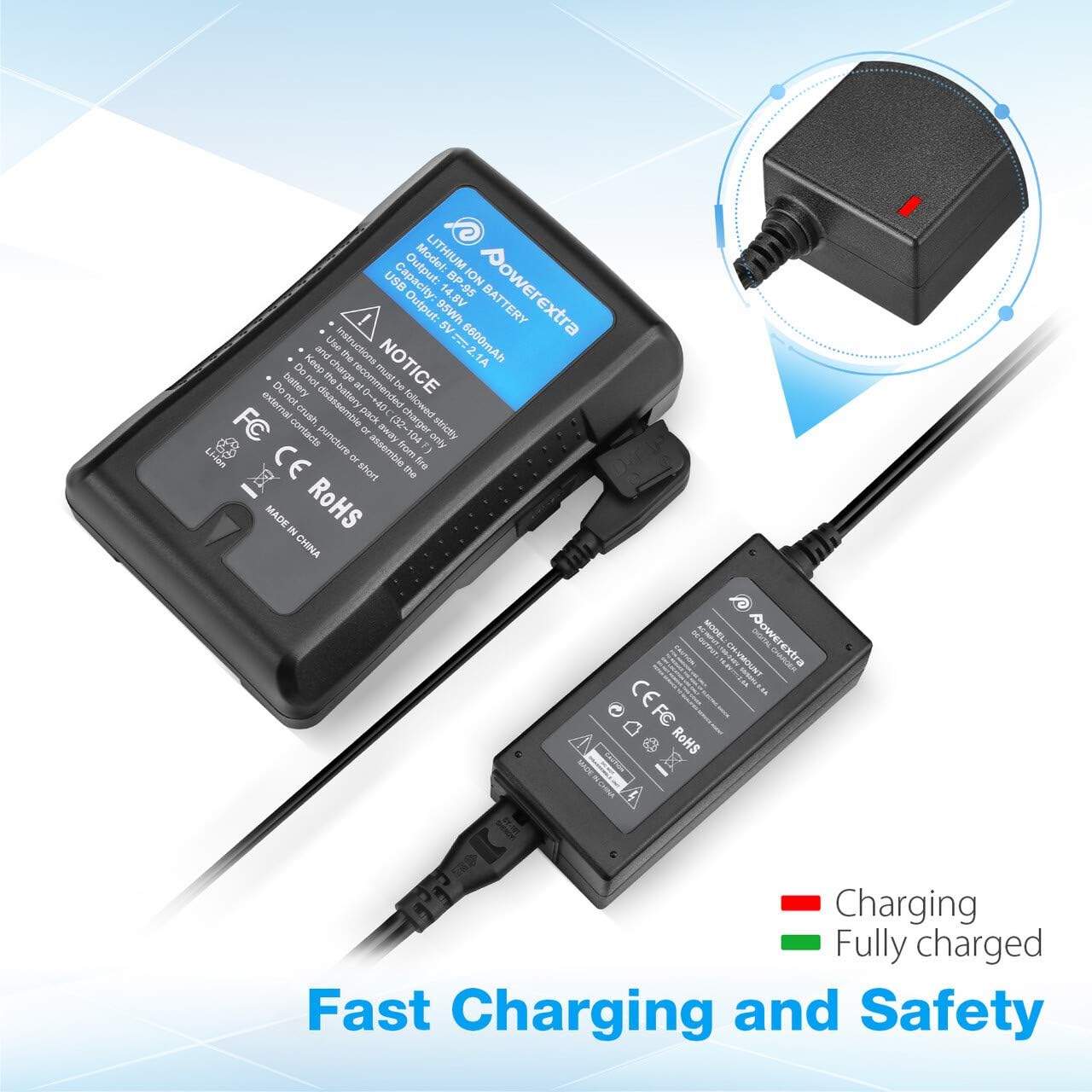
Image 5.1: Charger connected to a battery, with the red LED indicating active charging.
6. Bezpečnostní informace
To ensure safe operation and prolong the life of your charger and batteries, please observe the following safety precautions:
- Ochrana proti přebití: The charger is designed to prevent batteries from overcharging.
- Ochrana proti zkratu: Built-in mechanisms protect against short circuits.
- Nadproudová ochrana: Ochranné prvky proti nadměrnému toku proudu.
- Ochrana proti přehřátí: Prevents the charger from overheating during operation.
- Ochrana proti nadměrnému vybití: (Note: This protection is typically a feature of the battery itself, but the charger is designed to work safely with such batteries.)
- Use the charger only with compatible V Mount, V Lock, or Gold Mount batteries.
- Nevystavujte nabíječku vlhkosti, dešti ani extrémním teplotám.
- Nabíječku nerozebírejte ani neupravujte. Veškerý servis svěřte kvalifikovanému personálu.
- Uchovávejte mimo dosah dětí.

Image 6.1: Visual representation of the multi-protection features including short circuit, over discharge, over current, over charge, and over heating protection.
7. Údržba
Proper maintenance ensures optimal performance and longevity of your charger:
- Čištění: Use the provided microfiber cleaning cloth to gently wipe the charger and cables. Do not use liquid cleaners or solvents.
- Skladování: Pokud nabíječku nepoužíváte, skladujte ji na chladném a suchém místě mimo dosah přímého slunečního záření a extrémních teplot.
- Péče o kabely: Avoid bending or crimping the cables excessively. Always grasp the plug, not the cable, when disconnecting.
8. Řešení problémů
If you encounter issues with your Powerextra D-Tap Charger, refer to the following common problems and solutions:
- Nabíječka se nezapíná:
- Ensure the AC power cable is securely connected to both the charger and the wall outlet.
- Ověřte funkčnost zásuvky vyzkoušením s jiným zařízením.
- Baterie se nenabíjí:
- Check that the D-Tap connector is fully and correctly inserted into the battery's D-Tap port.
- Confirm that the battery is compatible with the charger and is not fully charged already (green LED).
- Inspect the D-Tap cable and connector for any visible damage.
- Indicator Light Not Functioning:
- If the charger is connected and the battery is not fully charged, but the light is off, contact customer support.
If the problem persists after attempting these solutions, please contact Powerextra customer support for further assistance.
9. Záruka a podpora
Powerextra provides the following for this D-Tap Charger:
- Záruka: 12-month hassle-free warranty from the date of purchase.
- Podpora: Doživotní technická podpora.
For warranty claims, technical assistance, or any product-related inquiries, please contact Powerextra customer service through their official webna webu nebo u prodejce, kde byl produkt zakoupen.