
CHEREEKI 8808
Uživatelská příručka k digitálnímu budíku CHEREEKI
Model: 8808
Zavedení
Děkuji za nákupasing the CHEREEKI Digital Alarm Clock. This manual provides detailed instructions on how to set up, operate, and maintain your new alarm clock. Please read this manual carefully before use to ensure optimal performance and longevity of the product.

Obrázek: Přední strana view of the CHEREEKI Digital Alarm Clock displaying time and temperature.
Obsah balení
Po vybalení zkontrolujte obsah balení:
- 1 x LED Digital Alarm Clock
- 1 x USB Cable (adapter not included)
- 1 x Uživatelská příručka
Note: The alarm clock contains a built-in Lithium-polymer battery.
Nastavení
Napájení zařízení
The CHEREEKI Digital Alarm Clock offers two power modes:
- Napájení přes USB (doporučeno pro nepřetržité zobrazení):
Connect the alarm clock to a USB port or a 5V/1A or 5V/2A adapter using the provided USB cable. In this mode, the LED display will remain continuously on.

Image: Illustrations demonstrating connection to a USB port and a 5V/1A or 5V/2A adapter for continuous power.
- Built-in Battery Power:
When fully charged, the alarm clock can operate on its internal battery. In this mode, the LED display will automatically turn off after 6 seconds to conserve power. The display can be reactivated by sound (above 90 dB) or by pressing any button.

Image: Visual representation of the intelligent voice control function, where the display turns off after 6 seconds in battery mode and can be awakened by sound.
Počáteční nastavení
Upon first use or after a reset, you may need to set the time and other preferences.

Obrázek: Podrobný view of the alarm clock's top and bottom panels, highlighting buttons for time setting, alarm setting, volume, and switches for alarms.
Návod k obsluze
Nastavení času
- V normálním režimu zobrazení času stiskněte "NASTAVENÍ ČASU" button located on the bottom of the clock.
- Použijte "NAHORU" a "DOLŮ" tlačítka pro nastavení hodiny.
- Stiskněte "NASTAVENÍ ČASU" again to move to minute adjustment, then use "NAHORU" a "DOLŮ".
- Stiskněte "NASTAVENÍ ČASU" one more time to confirm and exit.
- The clock supports both 12-hour (with AM/PM indicator) and 24-hour formats. To switch, press the "NAHORU" button during time setting.

Image: Illustration of the alarm clock displaying time in both 12-hour and 24-hour formats.
Nastavení alarmů (Alarm 1 a Alarm 2)
Hodiny mají dva nezávislé budíky.
- To set Alarm 1: Press the "ALARM SET" button once. The Alarm 1 icon will flash.
- Použití "NAHORU" a "DOLŮ" pro nastavení hodiny a poté stiskněte "ALARM SET" přejít na minuty.
- Opakujte několik minut a poté stiskněte "ALARM SET" potvrdit.
- To set Alarm 2: Press the "ALARM SET" button twice. The Alarm 2 icon will flash. Follow the same steps as Alarm 1.
- To activate/deactivate an alarm: In normal time display mode, press the "Alarm 1 Switch" or "Alarm 2 Switch" on the bottom of the clock. The corresponding alarm icon will appear/disappear on the display.

Image: A visual demonstrating the dual alarm functionality with different wake-up times and the snooze feature.
Funkce Snooze
- Když zazní alarm, stiskněte velké "SNOOZE / LIGHT" button on top of the clock to activate the 5-minute snooze function.
- Budík zazní znovu po 5 minutách.
- To turn off the alarm completely, press any other button on the clock.

Image: A user enjoying extra sleep thanks to the 5-minute snooze feature.
Nastavení jasu
The clock offers both automatic and manual brightness control:
- Automatic Brightness (when USB powered): The display brightness adjusts automatically based on the time of day:
- 7:00 AM - 7:00 PM: High brightness
- 7:00 PM - 12:00 AM: Medium brightness
- 12:00 AM - 7:00 AM: Low brightness
- Manuální nastavení jasu: V libovolném režimu stiskněte "SNOOZE / LIGHT" button on top of the clock to cycle through 4 levels of brightness (25%, 50%, 75%, 100%).
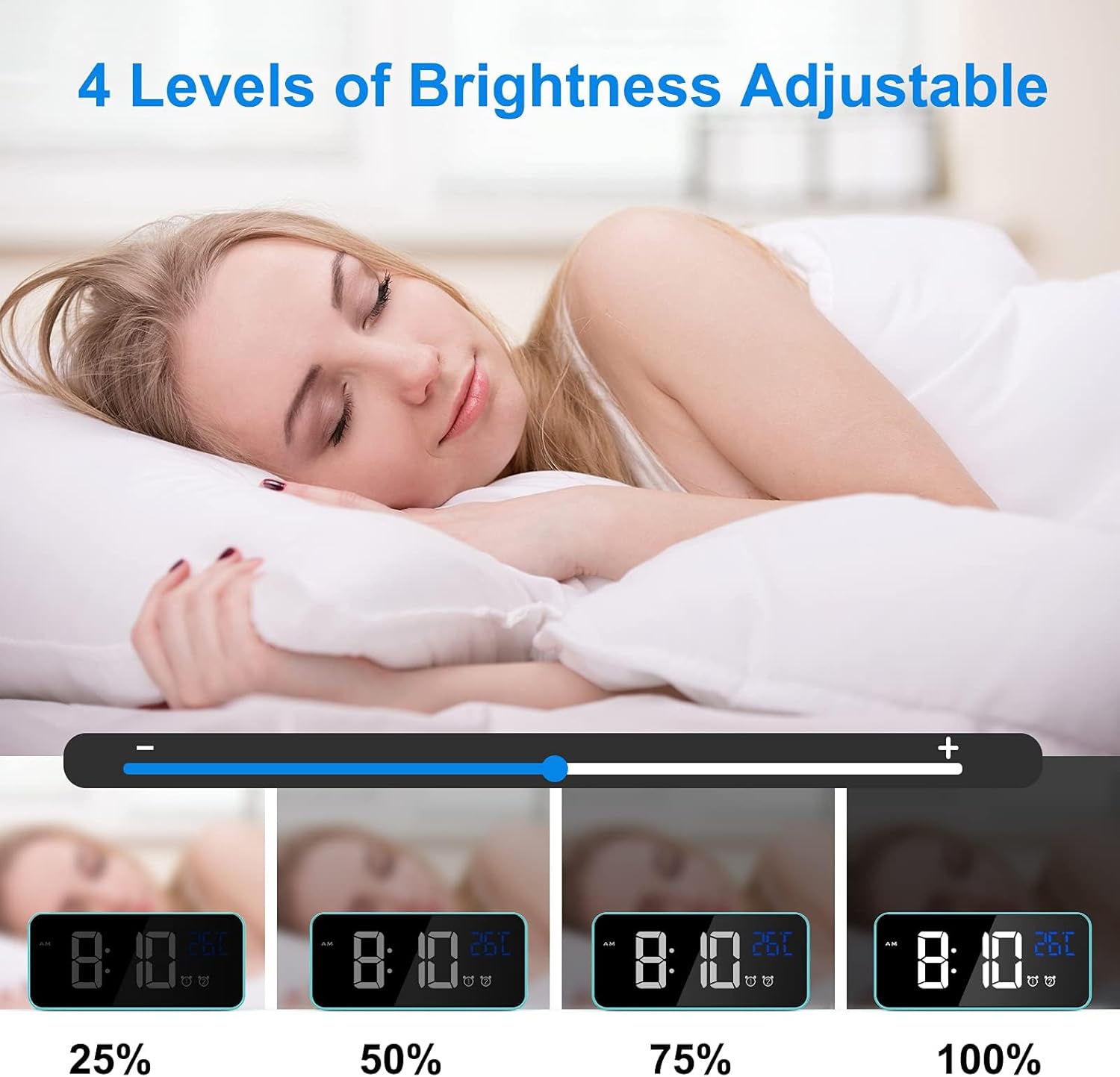
Image: Visual representation of the four adjustable brightness levels of the LED display.
Hlasitost a vyzváněcí tóny
The alarm clock features 3 volume levels and 10 different ringtones.
- To adjust volume: During alarm setting, or when an alarm is sounding, press the "Objem" button on the bottom of the clock to cycle through the 3 volume levels.
- To change ringtone: During alarm setting, press the "NAHORU" or "DOLŮ" buttons when the ringtone selection is active (after setting time and minutes for the alarm).

Image: A user waking up to one of the 10 natural sounds, with an illustration of the four selectable volume levels.
Zobrazení teploty
- The clock displays the ambient temperature in Celsius (°C) by default.
- Chcete-li přepínat mezi stupni Celsia (°C) a Fahrenheita (°F), stiskněte tlačítko "DOLŮ" tlačítko v normálním režimu zobrazení času.

Image: Illustration of the temperature display switching between Celsius and Fahrenheit.
Funkce Overview
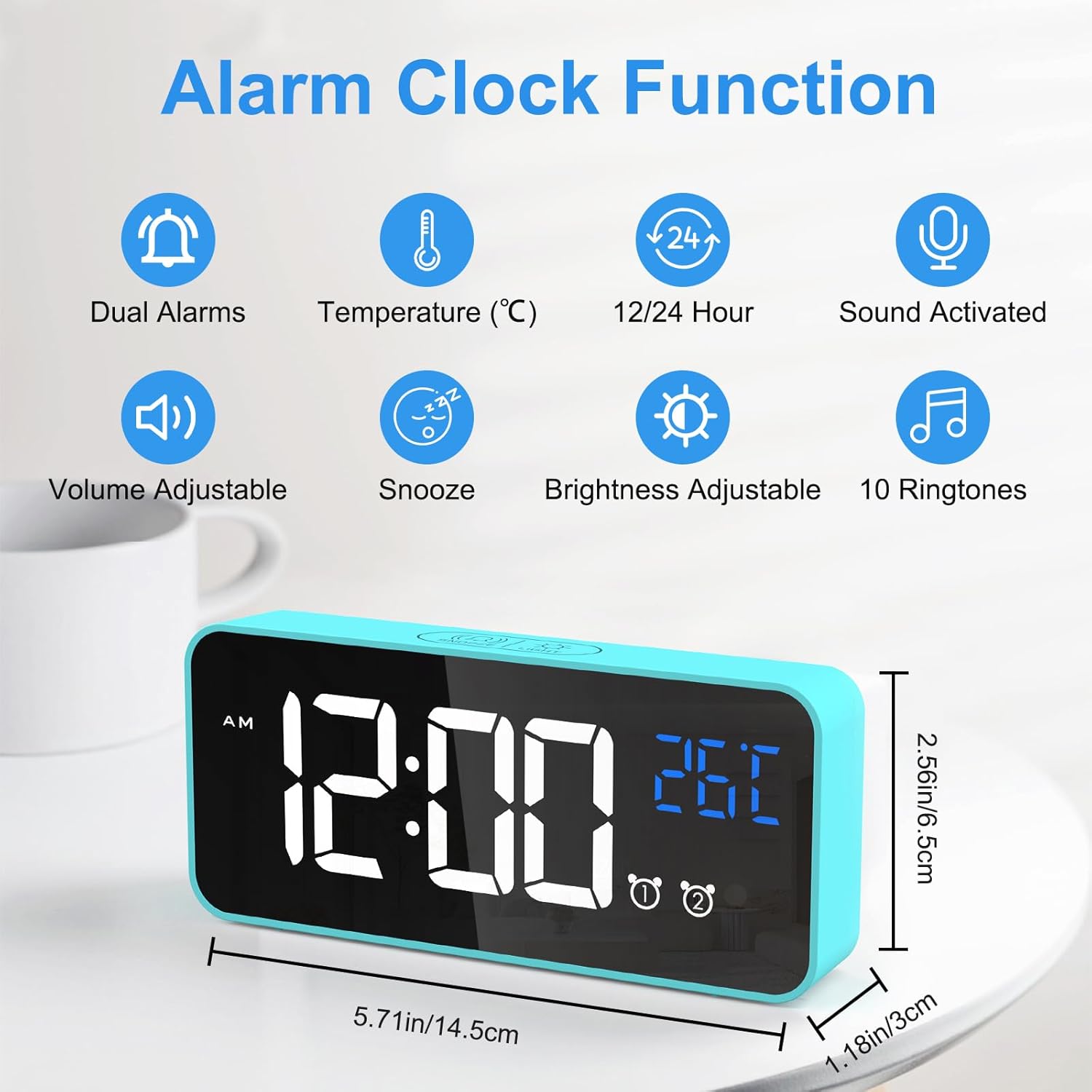
Image: An infographic highlighting the key functions of the alarm clock, including dual alarms, temperature display, 12/24 hour format, sound activation, volume adjustment, snooze, brightness adjustment, and 10 ringtones.
- Duální režimy napájení: Operates via USB for continuous display or built-in battery for portable use with voice activation.
- Nastavitelný jas: 4 manual levels and automatic adjustment when USB powered.
- Dva budíky s funkcí odložení: Set two independent alarms with a convenient 5-minute snooze function.
- Přizpůsobitelný zvuk: Choose from 3 volume levels and 10 unique ringtones.
- Hlasová aktivace: In battery mode, the display activates for 6 seconds when sound exceeds 90 dB.
- Zobrazení teploty: Shows ambient temperature in Celsius or Fahrenheit.
- Funkce paměti: Settings are retained even if power is lost or the clock is turned off and on again.

Image: A visual explanation of the memory function, showing that settings are retained even after power loss or restart.
Údržba
- Čištění: K čištění povrchu budíku používejte měkký, suchý hadřík. Nepoužívejte abrazivní čisticí prostředky ani rozpouštědla.
- Prostředí: Keep the alarm clock away from heat sources, direct sunlight, and high humidity environments.
- Skladování: If the alarm clock will not be used for an extended period, turn off the power switch to preserve battery life.
Odstraňování problémů
| Problém | Možná příčina | Řešení |
|---|---|---|
| Display is blank or scrambled. | Low battery, power issue, or internal error. | Connect to USB power. If the issue persists, use a pin to press the "RESET" button on the bottom of the clock. |
| Displej se vypne po 6 sekundách. | Clock is operating on battery power. | This is normal behavior to conserve battery. Connect to USB power for a continuously lit display. |
| Alarm se nespustí. | Budík není aktivován nebo je hlasitost příliš nízká. | Ensure the alarm switch (Alarm 1 or Alarm 2) is in the "ON" position. Check and adjust the alarm volume. |
| Time/settings are lost after power off. | This should not happen due to memory function. | Ensure the internal battery is charged. If the issue persists, perform a reset. |
Specifikace
| Funkce | Detail |
|---|---|
| Značka | CHEREEKI |
| Číslo modelu | 8808 |
| Barva | Modrý |
| Rozměry (D x Š x V) | 14.5 x 6.5 x 3 cm (5.71 x 2.56 x 1.18 palce) |
| Hmotnost | 158 gramů (0.35 lb) |
| Materiál | Plast |
| Typ zobrazení | Digitální LED |
| Zdroj napájení | USB Cable / Built-in Lithium-polymer Battery |
| Speciální funkce | Temperature Display, Snooze Function, Dual Alarms, Voice Activation, Adjustable Brightness, 10 Ringtones |
Záruka a podpora
CHEREEKI is committed to providing high-quality products and excellent customer service. If you have any questions or encounter issues with your alarm clock, please do not hesitate to contact our customer support team. We are dedicated to providing attentive after-sales service.
For support, please refer to the contact information provided with your purchase or visit the official CHEREEKI webmísto.
Ask a question about this manual
Ask about setup, troubleshooting, compatibility, parts, safety, or missing instructions. Manuals+ will review the question and use this page’s manual context to help answer it.