
1. Úvod
Welcome to your new qunyiCO Y10 Android Tablet. This manual provides essential information for setting up, operating, and maintaining your device. Please read it thoroughly to ensure optimal performance and longevity.
Bezpečnostní informace
- Nevystavujte tablet extrémním teplotám ani přímému slunečnímu záření.
- Zabraňte pádu tabletu na zem nebo jeho vystavení silným nárazům.
- Používejte pouze dodanou nabíječku a příslušenství.
- Tabletu uchovávejte mimo dosah vody a jiných tekutin.
- Do not attempt to disassemble or repair the tablet yourself.
2. Konec produktuview
Fyzické komponenty
The qunyiCO Y10 tablet features a sleek design with essential ports and buttons for ease of use.
Přední View

This image shows the front of the qunyiCO Y10 tablet, highlighting its 10.1-inch IPS HD display.
Zadní View

This image displays the back of the qunyiCO Y10 tablet, featuring the rear camera and the qunyiCO logo.
Tlačítka a porty
Familiarize yourself with the location of key controls and connections.
An illustrative diagram highlighting key features such as Android 10.0, Quad-core CPU, 5000mAh battery, 10.1-inch display, 2.4GHz Wi-Fi, Dual Camera, 2GB RAM + 32GB ROM, and 1280x800 IPS HD.
- Power/Volume Buttons: Located on the side for power on/off and volume control.
- Sluchátkový jack: Standardní 3.5mm audio výstup.
- Slot pro SD kartu: Pro rozšiřitelné úložiště až do 128 GB.
- Nabíjecí port: Micro USB port pro nabíjení.
- Kamery: 2MP front camera and 8MP rear camera.
3. Nastavení
Počáteční nabíjení
Before first use, fully charge your tablet using the provided power adapter.
Zapnutí/vypnutí
- Zapnutí: Press and hold the Power button until the qunyiCO logo appears.
- Vypnout: Stiskněte a podržte tlačítko napájení a poté z možností vyberte možnost „Vypnout“.
- Restartovat: Stiskněte a podržte tlačítko napájení a poté z možností vyberte „Restartovat“.
První-Time Setup
Postupujte podle pokynů na obrazovce a dokončete počáteční nastavení, včetně výběru jazyka, připojení k Wi-Fi a přihlášení k účtu Google.
4. Návod k obsluze
Základní navigace
Your tablet runs on Android 11, offering an intuitive user interface.
- Dotyková gesta: Klepnutím vyberete, přejetím prstem posouváte, přiblížením rozevřením prstů.
- Domovská obrazovka: Přístup k aplikacím a widgetům.
- Oznámení: Přejeďte prstem shora dolů k view oznámení a rychlé nastavení.
Wi-Fi připojení
Pro přístup k internetu se připojte k síti Wi-Fi.
- Přejít na Nastavení > Síť a internet > Wi-Fi.
- Přepnout Wi-Fi On.
- Vyberte požadovanou síť ze seznamu a v případě potřeby zadejte heslo.
Správa aplikací
Stahujte a spravujte aplikace z Obchodu Google Play.

This image illustrates the tablet's screen with various popular application icons, demonstrating its compatibility with a wide range of apps.
- Otevřete Obchod Play aplikace
- Hledat aplikace a hry.
- Klepněte Instalovat ke stažení.
Použití fotoaparátu
Capture photos and videos using the built-in cameras.

A visual comparison demonstrating the clarity and quality of images captured by the tablet's 2MP front and 8MP rear cameras.
- Otevřete Fotoaparát aplikace
- V případě potřeby přepínejte mezi přední a zadní kamerou.
- Klepnutím na tlačítko spouště pořídíte fotografii nebo spustíte/zastavíte nahrávání videa.
5. Správa úložiště
Interní úložiště
The tablet comes with 32GB of internal storage for your apps and files.
Rozšiřitelné úložiště
You can expand the storage up to 128GB using a microSD card.
This image visually represents the tablet's storage capabilities, indicating 32GB of internal ROM and the option to expand up to 128GB, suitable for storing various media and applications.
- Vložte kartu microSD do určeného slotu.
- Follow on-screen prompts to format the card if necessary.
- Note: While expandable up to 128GB, 32GB is recommended for optimal performance. Larger cards may slow down the system.
6. Informace o baterii
Životnost baterie
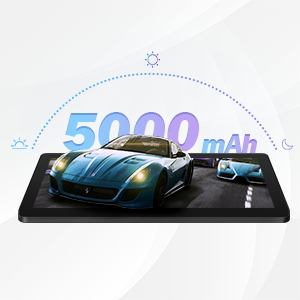
The qunyiCO Y10 is equipped with a 5000mAh battery, providing up to 8 hours of usage on a single charge, depending on usage patterns.

An image highlighting the 5000mAh battery, with icons indicating approximate usage times for video playback (6H), gaming (6H), and browsing (12H), showcasing its long-lasting capability.
Nabíjení
Use the provided charger to ensure proper charging and battery health.
- Connect the charger to the tablet's charging port and a power outlet.
- Ikona baterie na obrazovce ukazuje stav nabíjení.
7. Konektivita
Wi-Fi
Supports 2.4G Wi-Fi for stable internet connection.
Bluetooth
Connect to Bluetooth devices such as headphones or speakers.
- Přejít na Nastavení > Připojená zařízení > Bluetooth.
- Přepnout Bluetooth On.
- Vyberte ze seznamu zařízení, se kterým chcete zařízení spárovat.
8. Multimédia
Užívání obsahu
The 1280x800 IPS HD display provides clear visuals for various media.
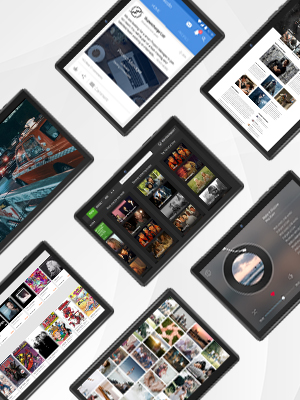
This image presents a collage of tablet screens, each showing different forms of digital content such as social media feeds, news articles, movie interfaces, and music players, emphasizing the tablet's versatility for media consumption.
You can enjoy movies, music, photos, and e-books.
Oficiální video produktu
Pro lepší představu se podívejte na toto oficiální videoview of the qunyiCO Y10 Tablet's features and capabilities.
This video, titled "qunyiCO Y10 Tablet 10 inch Android 10.0", provides a comprehensive look at the tablet's design, performance, and user experience.
9. Řešení problémů
Běžné problémy a řešení
| Problém | Potenciální příčina | Řešení |
|---|---|---|
| Tablet keeps shutting off / rebooting | Software glitch, low battery, faulty charger/port, overheating. | Ensure full charge. Perform a factory reset if software related. Check charger and port for damage. Avoid heavy usage in hot environments. |
| Dotyková obrazovka nereaguje | Software freeze, screen protector interference, physical damage. | Restart the tablet. Remove any screen protectors. If problem persists, contact support. |
| Won't charge | Damaged charging cable/adapter, dirty charging port, battery issue. | Try a different compatible charger. Clean the charging port gently. If still no charge, battery may need service. |
| Problémy s připojením Wi-Fi | Incorrect password, router issues, tablet software glitch. | Double-check password. Restart router and tablet. Forget and reconnect to the network. |
| Apps flip/rotate incorrectly | Auto-rotate setting, app compatibility, sensor issue. | Check auto-rotate settings in quick panel/settings. Some apps may not support all orientations. If persistent, sensor may be faulty. |
10. Specifikace
Technické detaily
| Funkce | Detail |
|---|---|
| Model | Y10 |
| Operační systém | Android 11 |
| Procesor | 1.6 GHz Quad-Core (Allwinner) |
| BERAN | 2 GB DDR4 SDRAM |
| Interní úložiště | 32 GB |
| Rozšiřitelné úložiště | Až 128 GB (MicroSD) |
| Velikost obrazovky | 10.1 palce |
| Rozlišení obrazovky | 1280x800 IPS HD |
| Zadní kamera | 8 MP |
| Přední kamera | 2 MP |
| Baterie | 5000mAh lithium-iontová |
| Konektivita | Wi-Fi (2.4 G), Bluetooth |
| Rozměry (DxŠxV) | 9.62 x 6.83 x 0.39 palce |
| Hmotnost položky | 1.08 libry |
11. Údržba
Čištění a péče
- K čištění obrazovky a těla tabletu použijte měkký hadřík, který nepouští vlákna.
- Nepoužívejte abrazivní čisticí prostředky nebo rozpouštědla.
- Keep the tablet in a protective case to prevent scratches and damage.
Aktualizace softwaru
Pravidelně kontrolujte aktualizace systému, abyste zajistili optimální výkon a zabezpečení.
- Přejít na Nastavení > Systém > Aktualizace systému.
- Postupujte podle pokynů na obrazovce a stáhněte a nainstalujte všechny dostupné aktualizace.
12. Záruka a podpora
Informace o záruce
Your qunyiCO Y10 tablet comes with a standard manufacturer's warranty. Please refer to the warranty card included in your product packaging for specific terms and conditions.
Zákaznická podpora
For technical assistance, troubleshooting beyond this manual, or warranty claims, please contact qunyiCO customer support through their official webwebu nebo kontaktních informací uvedených v dokumentaci k produktu.
You can also visit the official qunyiCO store on Amazon for more information: qunyiCO Store.