
1. Úvod
The ChunHee WI02 Window Speaker Intercom System is designed to facilitate clear, dual-way voice communication through glass or partition barriers. This system is ideal for environments such as banks, hospitals, offices, and service windows where direct interaction is limited. It incorporates automatic dual-way intercommunication technology, eliminating the need for manual switching during conversations. The system features adjustable volume controls for both the internal and external speakers, along with a high-sensitive microphone for clear, natural sound, enhanced by anti-interruption and noise reduction capabilities.

Image 1: ChunHee WI02 Window Speaker Intercom System components.
2. Co je v krabici
Ověřte prosím, zda jsou ve vašem balení obsaženy všechny níže uvedené položky:
- 1 x Dual-way Counter Interphone (Main Unit)
- 1 x External Speaker
- 1 x Power Supply (DC12V power adapter)
- 1 x Návod k použití
- 1 x 3M Double Sided Tape (for external speaker mounting)
- 4 x Locating pieces (for cable management)

Image 2: Package contents of the ChunHee WI02 Window Speaker Intercom System.
3. Vlastnosti produktu
- Dual-Way Intercommunication: Automatic identification of speech signals for seamless two-way conversation without manual intervention.
- Nastavitelná hlasitost: Independent knob controls for both inner and outer speaker volumes, allowing for optimal sound levels.
- High-Sensitive Microphone: Ensures clear and loud voice transmission, specifically designed for counter communication.
- Anti-Interference & Noise Reduction: Advanced microcomputer technology minimizes static and background noise for clear audio.
- Flexibilní mikrofon: The main unit features a flexible gooseneck microphone for easy positioning.
- Snadná instalace: Simple connection process for quick setup.
- Široká aplikace: Suitable for various settings including banks, hospitals, offices, ticket booths, and service windows.

Image 3: Dual-way Intercom Functionality.

Image 4: Volume Adjustable Controls.

Image 5: Clear Sound Quality.

Image 6: Flexible Microphone Design.
4. Pokyny k nastavení
Follow these steps to set up your ChunHee WI02 Window Speaker Intercom System:
- Umístění hlavní jednotky: Place the main unit (counter interphone) on the inside of the window or barrier, within easy reach of the operator.
- Position the External Speaker: Mount the external speaker on the outside of the window or barrier. Use the provided 3M double-sided tape for secure attachment. Ensure the speaker is positioned where the external party will be speaking.
- Connect the External Speaker: Plug the external speaker cable into the 'Outer' port on the back of the main unit.
- Připojte napájecí zdroj: Connect the DC12V power adapter to the 'Power' input on the back of the main unit, then plug the adapter into a standard electrical outlet.
- Zapnutí: Flip the 'ON/OFF' switch on the back of the main unit to the 'ON' position. The Power LED on the front panel should illuminate.
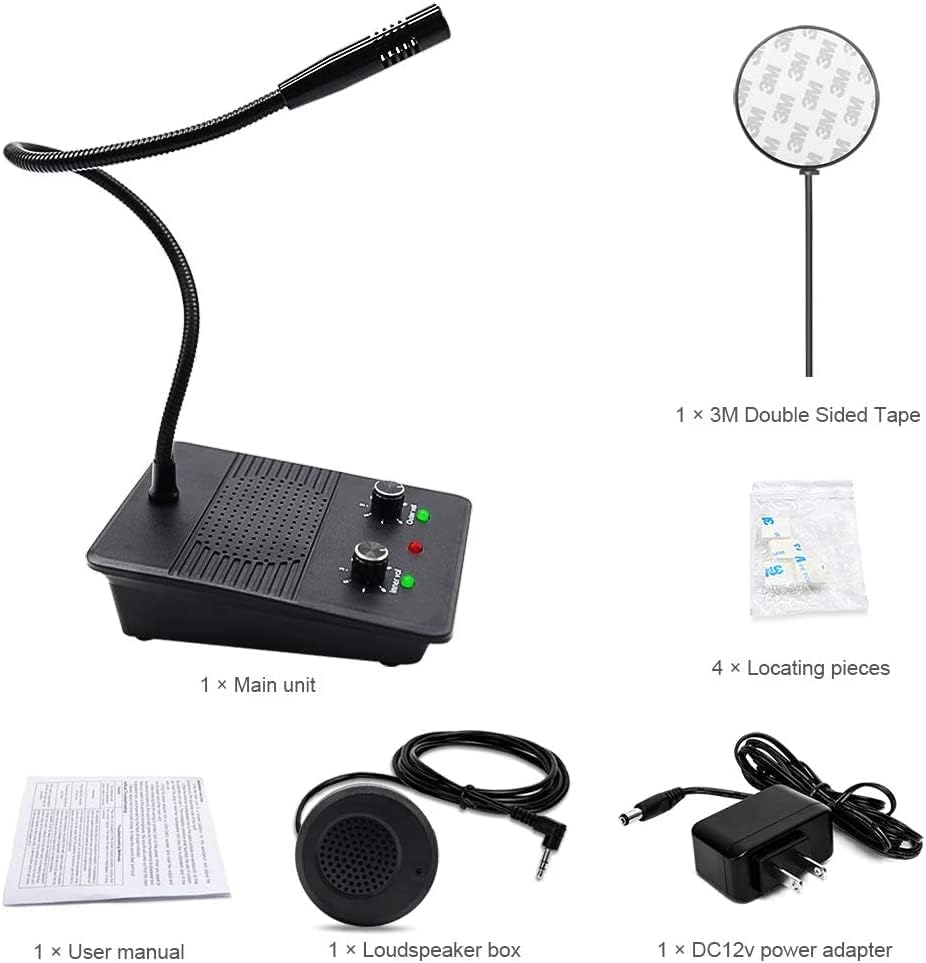
Image 7: Connection diagram and dimensions of the main unit and external speaker.
Nastavení Video průvodce
Video 1: This video demonstrates the physical components and basic setup of the ChunHee Window Speaker Intercom System, including the main unit, external speaker, and power adapter. It highlights the various ports and controls for easy identification.
5. Návod k obsluze
The ChunHee WI02 system is designed for straightforward operation:
- Automatic Dual-Way Communication: Once powered on, the system automatically enables dual-way communication. You do not need to press any buttons to speak or listen.
- Adjusting Inner Volume: Use the 'Inner Volume' knob on the front panel of the main unit to adjust the listening volume for the operator.
- Adjusting Outer Volume: Use the 'Outer Volume' knob on the front panel of the main unit to adjust the listening volume for the external party.
- Mluvení: Speak clearly into the flexible microphone on the main unit.
- Naslouchání: Listen for responses through the main unit's speaker. The external party will speak into the external speaker, and their voice will be transmitted to the main unit.
The system's advanced microcomputer technology automatically processes speech signals, ensuring clear and natural sound without requiring any action during a call.
6. Údržba
To ensure the longevity and optimal performance of your ChunHee WI02 Window Speaker Intercom System, follow these maintenance guidelines:
- Čištění: Regularly wipe the main unit and external speaker with a soft, dry cloth. Avoid using abrasive cleaners, solvents, or harsh chemicals, as these can damage the surfaces.
- Kontrola kabelů: Periodically check all cables for any signs of wear, fraying, or damage. Replace damaged cables immediately to prevent malfunction or safety hazards.
- Podmínky prostředí: Keep the system away from extreme temperatures, direct sunlight, and high humidity. Ensure it is not exposed to water or other liquids.
- Skladování: If storing the system for an extended period, disconnect the power supply and store it in a cool, dry place.
7. Řešení problémů
If you encounter issues with your ChunHee WI02 Window Speaker Intercom System, refer to the following troubleshooting steps:
| Problém | Možná příčina | Řešení |
|---|---|---|
| Žádné napájení/Systém se nezapíná | Power adapter not connected or faulty; Power switch is off. | Ensure the power adapter is securely connected to the main unit and a working power outlet. Check if the 'ON/OFF' switch is in the 'ON' position. |
| No sound from inner speaker | Inner volume knob is too low; External speaker not connected or faulty. | Increase the 'Inner Volume' knob. Verify the external speaker cable is securely plugged into the 'Outer' port. |
| No sound from outer speaker | Outer volume knob is too low; Main unit microphone not working. | Increase the 'Outer Volume' knob. Ensure the operator is speaking clearly into the main unit's microphone. |
| Zkreslený nebo nejasný zvuk | Volume levels too high; Interference; Microphone too far from speaker. | Adjust both inner and outer volume knobs to a moderate level. Ensure the microphone is positioned correctly and not obstructed. Check for strong electromagnetic interference nearby. |
| Ozývající se zvuk | Volume levels too high; Speakers too close to each other. | Reduce the volume levels. Ensure adequate separation between the main unit and the external speaker. |
8. Specifikace
| Funkce | Specifikace |
|---|---|
| Číslo modelu | WI02 |
| Rozměry položky (D x Š x V) | 5.87 x 4.09 x 5.2 palce |
| Hmotnost položky | 1.12 libry |
| Zdroj napájení | DC |
| Materiál | Plast |
| Odstup signálu od šumu | 55 dB |
| Počet kanálů | 1 |
| Frekvenční odezva | 15 kHz |
| Technologie připojení | Pomocný |
| Speciální funkce | Vestavěný mikrofon |
| Kompatibilní zařízení | Reproduktor |
| Polární vzor | Jednosměrný |
| Audio Citlivost | 55 decibelů |
| Tvarový faktor mikrofonu | Hranice |
9. Záruka a podpora
For warranty information and technical support regarding your ChunHee WI02 Window Speaker Intercom System, please refer to the documentation provided with your purchase or contact ChunHee customer service directly. Details on how to reach support are typically found on the manufacturer's official webna místě nebo v obalu produktu.