
Retro-Bit RB-SGA-048
Retro-Bit Official Sega Saturn 2.4 GHz Wireless Controller User Manual
Model: RB-SGA-048
1. Konec produktuview
This manual provides comprehensive instructions for the Retro-Bit Official Sega Saturn 2.4 GHz Wireless Controller. This controller is designed for use with Sega Saturn, Sega Genesis Mini, Nintendo Switch, PlayStation 3, PC, and Mac systems, offering a wireless gaming experience with classic control.

Image description: The Retro-Bit Official Sega Saturn 2.4 GHz Wireless Controller in white, shown with its packaging, a Sega Saturn port receiver, and a USB receiver.
2. Obsah balení
- 1x Retro-Bit Official Sega Saturn 2.4 GHz Wireless Controller (White)
- 1x Sega Saturn Port Receiver
- 1x USB Port Receiver
- 1x Úložné pouzdro
- 1x 3.3ft Charging Cable

Image description: The Retro-Bit wireless controller neatly stored within its protective case, alongside both the Sega Saturn and USB receivers.
3. Pokyny k nastavení
3.1. Nabíjení regulátoru
Connect the included 3.3ft charging cable to the controller's charging port and a USB power source. The LED indicator on the controller will show charging status. A full charge provides approximately 550 mAh of battery life.
3.2. Připojení k zařízení
- Select the appropriate receiver: Use the Sega Saturn Port Receiver for Sega Saturn consoles or the USB Port Receiver for Sega Genesis Mini, Nintendo Switch, PlayStation 3, PC, and Mac.
- Insert the receiver: Plug the chosen receiver into the corresponding port on your gaming system or computer.
- Power on the controller: Press the HOME button on the controller to power it on. The controller will automatically attempt to pair with the receiver.
- Párování (pokud je to nutné): If the controller does not connect automatically, press the pairing button on the receiver and then the HOME button on the controller simultaneously until the connection is established. The LED indicator on both the controller and receiver will become solid when successfully paired.

Popis obrázku: Detailní záběr view of the Sega Saturn port receiver, which connects the wireless controller to a Sega Saturn console.
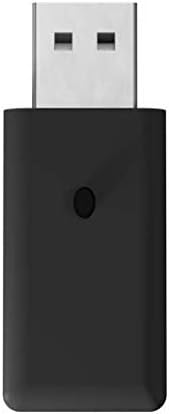
Popis obrázku: Detailní záběr view of the USB port receiver, used to connect the wireless controller to various modern systems like PC, Mac, Switch, and PS3.
4. Obsluha regulátoru
4.1. Rozložení a funkce tlačítek
The controller features a classic 6-button layout with a responsive D-Pad, HOME, SELECT, and START buttons, along with shoulder buttons (L, R, Z, Y, X, A, B, C).
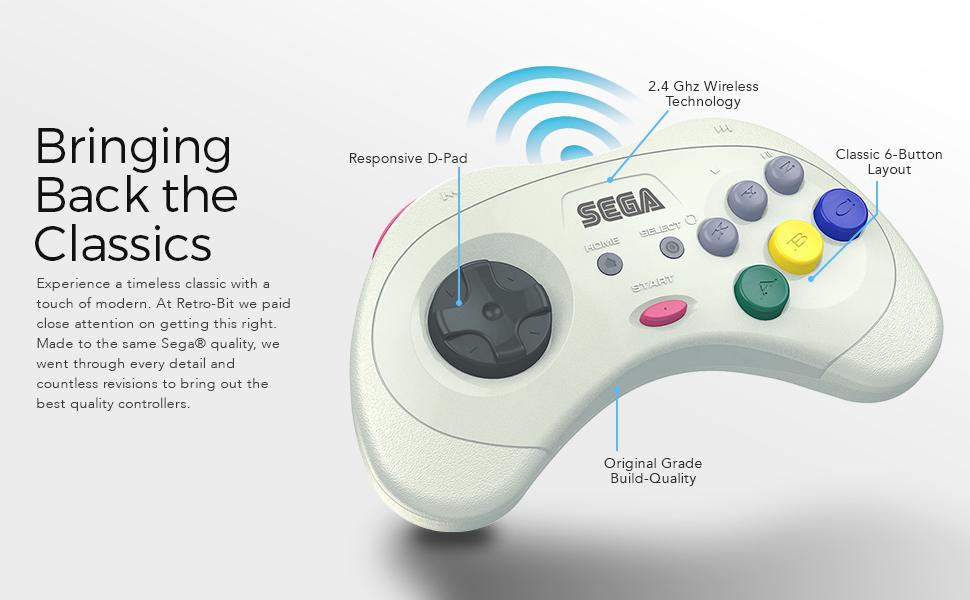
Image description: An annotated image of the Retro-Bit wireless controller highlighting its key features: Responsive D-Pad, 2.4 GHz Wireless Technology, Classic 6-Button Layout, and Original Grade Build-Quality.
4.2. Compatibility Modes
The controller automatically adapts to the connected system via the receiver.
- Sega Saturn: Full functionality for Sega Saturn games.
- Sega Genesis Mini: Compatible with the Sega Genesis Mini console.
- Nintendo Switch: Functions as a Pro Controller.
- PlayStation 3: Functions as a standard PS3 controller.
- PC/Mac: Recognized as a standard gamepad, compatible with most games supporting XInput or DirectInput.
4.3. Režim spánku
To conserve battery, the controller will enter sleep mode after 5 minutes of inactivity. Press any button to wake it up.
5. Údržba
- Čištění: K čištění ovladače používejte měkký, suchý hadřík. Nepoužívejte abrazivní čisticí prostředky ani rozpouštědla.
- Skladování: Store the controller in its included storage case when not in use to protect it from dust and damage.
- Péče o baterie: Pro optimální výdrž baterie se vyhněte častému úplnému vybíjení ovladače. Pravidelně jej nabíjejte.
6. Řešení problémů
6.1. Controller Not Responding
- Ujistěte se, že je ovladač nabitý.
- Verify the receiver is securely plugged into the device.
- Re-attempt the pairing process as described in the "Connecting to a Device" section.
- Check for interference from other 2.4 GHz wireless devices.
6.2. Problémy s připojením
- Ensure you are within the 30ft gaming range.
- Try a different USB port on your PC/Mac/PS3 if using the USB receiver.
- Ensure the correct receiver is used for your system.
6.3. Tlačítka nefungují správně
- Test the controller on a different game or system to isolate the issue.
- Ujistěte se, že se pod tlačítky nezdržují žádné nečistoty.
7. Technické specifikace
| Funkce | Detail |
|---|---|
| Číslo modelu | RB-SGA-048 |
| Konektivita | 2.4 GHz bezdrátový |
| Kompatibilita | Sega Saturn, Sega Genesis Mini, Switch, PS3, PC, Mac |
| Baterie | Dobíjecí 550 mAh |
| Nabíjecí kabel | 3.3ft USB |
| Bezdrátové Dosah | Až 30 stop |
| Režim spánku | Po 5 minutách nečinnosti |
| Rozměry balení | 7.36 x 5.83 x 2.05 palce |
| Hmotnost položky | 15.5 unce |
8. Záruka a podpora
For warranty information and technical support, please refer to the official Retro-Bit webnebo se obraťte na jejich zákaznický servis. Uschovejte si doklad o koupi pro případ reklamace.
Ask a question about this manual
Ask about setup, troubleshooting, compatibility, parts, safety, or missing instructions. Manuals+ will review the question and use this page’s manual context to help answer it.