
1. Úvod
This manual provides detailed instructions for the installation, operation, and maintenance of your FASTCABLiNG 4-Port PoE Passthrough Switch. This device is designed to expand your existing network infrastructure by providing additional Power over Ethernet (PoE) ports without requiring a separate AC power adapter. It supports IEEE802.3at/bt standards, offering a 65 Watt power budget for connected devices.

Image: FASTCABLiNG PoE Passthrough Switch with its retail packaging.
Klíčové vlastnosti:
- 65 Watt power budget with PoE++ passthrough capability.
- Expands existing network to connect up to 4 additional IP devices (both PoE and non-PoE compatible).
- No additional AC adapter required; powered by an existing PoE switch or injector.
- Managed switch features including VLAN, QoS, MAC address management, and static routing for enhanced security and convenience.
- Compact, fanless design for flexible placement and silent operation, avoiding overheating.
- Supports PoE and PoE+ for various applications such as IP cameras, VoIP phones, and Wireless Access Points (WAPs).
2. Bezpečnostní informace
Přečtěte si prosím tyto bezpečnostní pokyny a dodržujte je, abyste předešli poškození zařízení nebo zranění sebe sama.
- Ensure proper grounding of the device to prevent electrical hazards.
- Nevystavujte spínač vodě ani nadměrné vlhkosti.
- Neumisťujte zařízení do blízkosti zdrojů tepla nebo na přímé sluneční světlo.
- Use only compatible Ethernet cables (Cat5e/Cat6 or higher) for optimal performance and safety.
- Nepokoušejte se zařízení otevírat ani opravovat sami. Veškerý servis svěřte kvalifikovanému personálu.

Image: Illustration of the grounding terminal on the switch, indicating the importance of linking ground for safety.
3. Konec produktuview
The FASTCABLiNG PoE Passthrough Switch features multiple ports for network connectivity and power delivery.

Image: Front panel view of the switch, highlighting 4 PoE ports and 1 Uplink/PD port.
Popis portu:
- PoE porty (1-4): Four 10/100/1000Mbps Ethernet ports that provide both data and Power over Ethernet (PoE) to connected devices.
- Uplink/PD Port (5/6): This port serves as the Power Device (PD) input, receiving both data and power from a PoE injector or PoE switch. It also functions as an uplink port for data transmission.
LED indikátory:
- PoE LED: Indicates PoE status for the respective port.
- DATA LED (LNK/ACT): Indicates network link status and data activity for the respective port.
- PWR LED: Indicates the overall power status of the switch.
4. Nastavení a instalace
Follow these steps to set up your PoE Passthrough Switch.
- Připojte vstup napájení: Connect an Ethernet cable from a PoE injector or a PoE switch (supporting IEEE802.3at/bt) to the Uplink/PD port (Port 5/6) on the FASTCABLiNG switch. This port will receive both data and power, eliminating the need for an external AC adapter.

Image: Diagram illustrating the switch being powered by a PoE injector, eliminating the need for an AC adapter.
- Připojení síťových zařízení: Connect your IP devices (e.g., IP cameras, VoIP phones, WAPs) to the PoE Ports (1-4) using standard Ethernet cables. The switch will provide both data connectivity and power to these devices. Non-PoE devices can also be connected to these ports for data only.
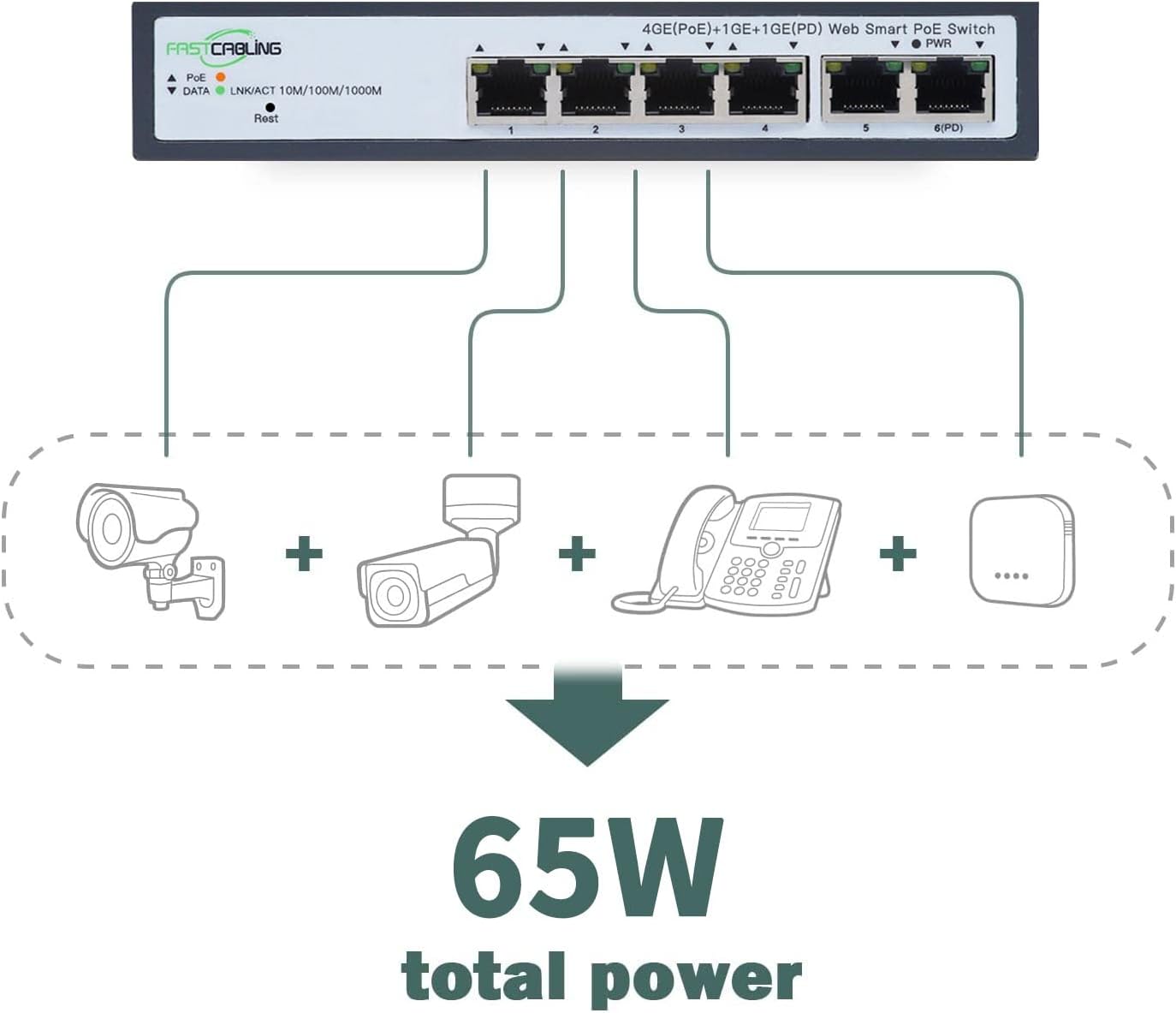
Image: Illustration of various IP devices (cameras, phones) connected to the switch, utilizing its 65W total power budget.
- Ověřte připojení: Check the LED indicators on the front panel. The PWR LED should be lit, and the LNK/ACT LEDs for connected ports should indicate active links and data transmission.
- Montáž (volitelné): The compact size allows for flexible placement. While some units may support DIN rail mounting, this specific model features slotted holes on the back for screw-head mounting on a wall or backplate. Ensure secure mounting in a well-ventilated area.

Image: Diagram illustrating how the PoE Powered Switch expands 4 network ports to connect IP devices, and how multiple switches can be applied for further expansion.
5. Návod k obsluze
Once installed, the FASTCABLiNG PoE Passthrough Switch operates automatically. As a managed switch, it offers advanced configuration options for network optimization.
Základní provoz:
- The switch automatically detects and provides power to connected PoE-compatible devices.
- Data transmission occurs at speeds up to 1000Mbps (Gigabit Ethernet) for all ports.
- The fanless design ensures silent operation, suitable for various environments.
Managed Features:
This switch includes managed features accessible via a web interface (refer to the separate management guide for detailed instructions on accessing and configuring these features).
- VLAN (virtuální lokální síť): Segment your network to improve security and performance by isolating traffic between different groups of devices.
- QoS (Quality of Service): Prioritize network traffic for critical applications (e.g., VoIP, video streaming) to ensure consistent performance.
- Správa MAC adres: Control network access based on MAC addresses for enhanced security.
- Statické směrování: Configure fixed routes for network traffic, useful in complex network topologies.
6. Údržba
Pravidelná údržba pomáhá zajistit dlouhou životnost a optimální výkon vašeho spínače.
- Čištění: K čištění vnější strany spínače použijte měkký, suchý hadřík. Nepoužívejte tekuté ani aerosolové čisticí prostředky.
- Větrání: Ensure that the ventilation holes on the sides of the switch are not obstructed to prevent overheating.
- Aktualizace firmwaru: Periodically check the FASTCABLiNG official webweb s dostupnými aktualizacemi firmwaru. Aktualizace firmwaru může zlepšit výkon, přidat nové funkce nebo opravit chyby.
- Správa kabelů: Udržujte síťové kabely uspořádané a bez zauzlení nebo nadměrného ohybu, aby byla zachována integrita signálu.
7. Řešení problémů
If you encounter issues with your FASTCABLiNG PoE Passthrough Switch, refer to the following common troubleshooting steps.
- Bez napájení (LED dioda PWR nesvítí):
- Ensure the upstream PoE injector or switch is powered on and functioning correctly.
- Verify the Ethernet cable connecting the upstream PoE source to the switch's Uplink/PD port is securely connected and not damaged.
- Confirm the upstream PoE source supports IEEE802.3at/bt and provides sufficient power.
- Device Not Receiving Power (PoE LED Off):
- Check if the connected device is PoE-compatible.
- Ensure the Ethernet cable between the switch and the device is securely connected and functional.
- Verify the total power consumption of all connected PoE devices does not exceed the switch's 65W power budget.
- No Network Connectivity (LNK/ACT LED Off or Flashing Incorrectly):
- Check the Ethernet cables for secure connections and damage.
- Ensure the connected device is powered on and its network interface is active.
- If using managed features, verify VLAN or other configurations are not inadvertently blocking traffic.
- DHCP Issues:
- If experiencing issues with DHCP, consider assigning static IP addresses to devices or consult your network administrator for DHCP server configuration.
If problems persist, contact FASTCABLiNG customer support for further assistance.
8. Specifikace
| Funkce | Specifikace |
|---|---|
| Značka | FASTCABLiNG |
| Model | 4 port|65W |
| Počet portů | 4 (PoE) + 1 (Uplink/PD) |
| Typ rozhraní | PoE (Power over Ethernet) |
| Maximum Power Budget | 65 Watts (PoE++ Passthrough) |
| PoE standardy | IEEE802.3at/bt |
| Přepínací kapacita | 10 Gbps |
| Síťová rozhraní | 10/100/1000 Mbps |
| Kompatibilní zařízení | IP Cameras, VoIP Phones, WAPs, etc. |
| Materiál pouzdra | Kov |
| Barva | Šedá |
| Rozměry produktu | 6.61 x 3.66 x 1.26 palce (168 x 93 x 32 mm) |
| Hmotnost položky | 1.27 libry |
| Hodnocení vyšší teploty | 70 stupňů Celsia |

Image: Technical drawing with dimensions of the FASTCABLiNG PoE Passthrough Switch.
9. Záruka a podpora
FASTCABLiNG products are designed for reliability and performance. For warranty information and technical support, please refer to the official FASTCABLiNG webnebo kontaktujte jejich zákaznický servis.
- Online podpora: Navštivte FASTCABLiNG Store on Amazon pro informace o produktech a zdroje podpory.
- Kontaktujte zákaznický servis: For specific inquiries or troubleshooting assistance, please reach out to FASTCABLiNG customer support through their official channels.