
1. Úvod
This manual provides detailed instructions for the safe and effective use of the Walfront PM6508 Digital Temperature Humidity Meter. This device is designed for high-precision measurement of ambient temperature and relative humidity, offering features such as data hold, backlight display, and wet bulb/dew point temperature calculations. It is suitable for various applications including home, office, industrial settings, and environmental monitoring.
2. Bezpečnostní informace
Please read and understand all safety warnings and operating instructions before using this instrument. Failure to follow these instructions may result in electric shock, fire, or injury.
- Nepoužívejte měřič, pokud se jeví poškozený nebo pokud kryt baterie není správně uzavřen.
- Avoid exposing the meter to extreme temperatures, direct sunlight, or high humidity for prolonged periods.
- Nepokoušejte se opravovat ani upravovat měřič. Veškerý servis svěřte kvalifikovanému personálu.
- Pokud se glukometr delší dobu nepoužívá, vyjměte baterie, abyste zabránili jejich vytečení.
- Keep the sensor area clean and free from obstructions to ensure accurate readings.
3. Konec produktuview
The Walfront PM6508 is a compact and portable digital meter designed for accurate environmental measurements. It features an easy-to-read LCD display with backlight and intuitive button controls.

Obrázek 3.1: Přední view of the Walfront PM6508 meter with key components labeled. This includes the temperature and humidity sensor at the top, the HD display, various control buttons (Power, Max/Min, Data Hold, Data Storage, Unit Switch, Backlight), and an anti-fall protective sleeve.
3.1 Klíčové vlastnosti
- Vysoce přesný senzor: Poskytuje přesné údaje o teplotě a vlhkosti.
- LCD displej s podsvícením: Zajišťuje jasnou čitelnost za různých světelných podmínek.
- Funkce uchování dat: Zmrazí aktuální údaj na displeji.
- Úložiště dat: Ukládá až 100 skupin naměřených dat.
- Wet Bulb & Dew Point Temperature: Calculates and displays these critical environmental parameters.
- Přepínání jednotek: Snadné přepínání mezi stupni Celsia (°C) a Fahrenheita (°F).
- Automatické vypnutí: Šetří výdrž baterie.
- Indikátor nízké spotřeby: Upozorní, když je třeba vyměnit baterie.
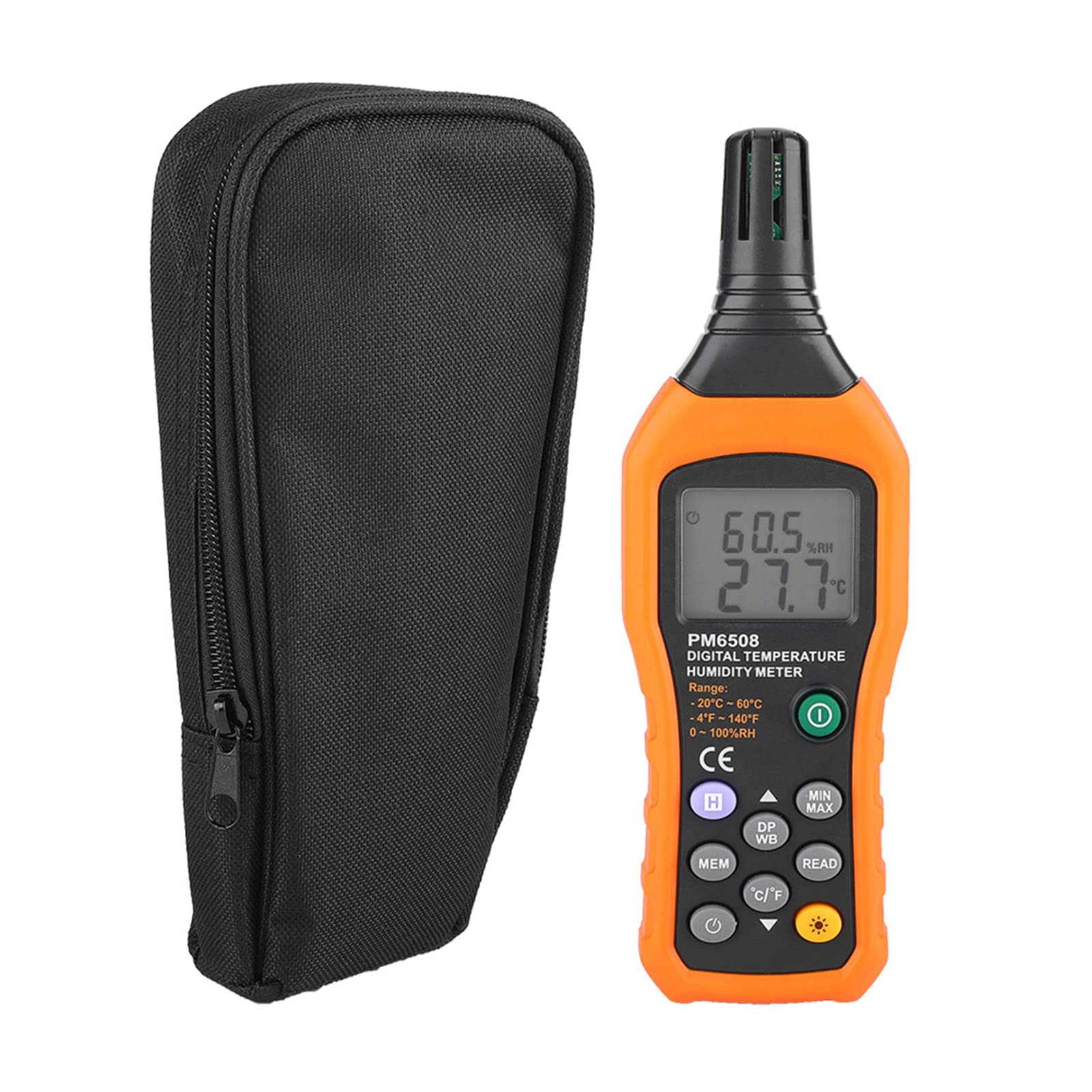
3.2 Obsah balení

Obrázek 3.2: The Walfront PM6508 meter shown alongside its portable storage bag, indicating typical package contents.
- Walfront PM6508 Digital Temperature Humidity Meter
- Přenosný úložný vak
- Uživatelská příručka
4. Nastavení
4.1 Instalace baterie
The PM6508 meter requires 4 x 1.5V AAA batteries (not included) for operation.
- Najděte kryt přihrádky na baterie na zadní straně měřiče.
- Posuňte kryt baterie dolů a otevřete jej.
- Insert four AAA batteries, ensuring correct polarity (+ and -) as indicated inside the compartment.
- Nasaďte kryt baterie zpět jeho zasunutím zpět na místo, dokud bezpečně nezacvakne.
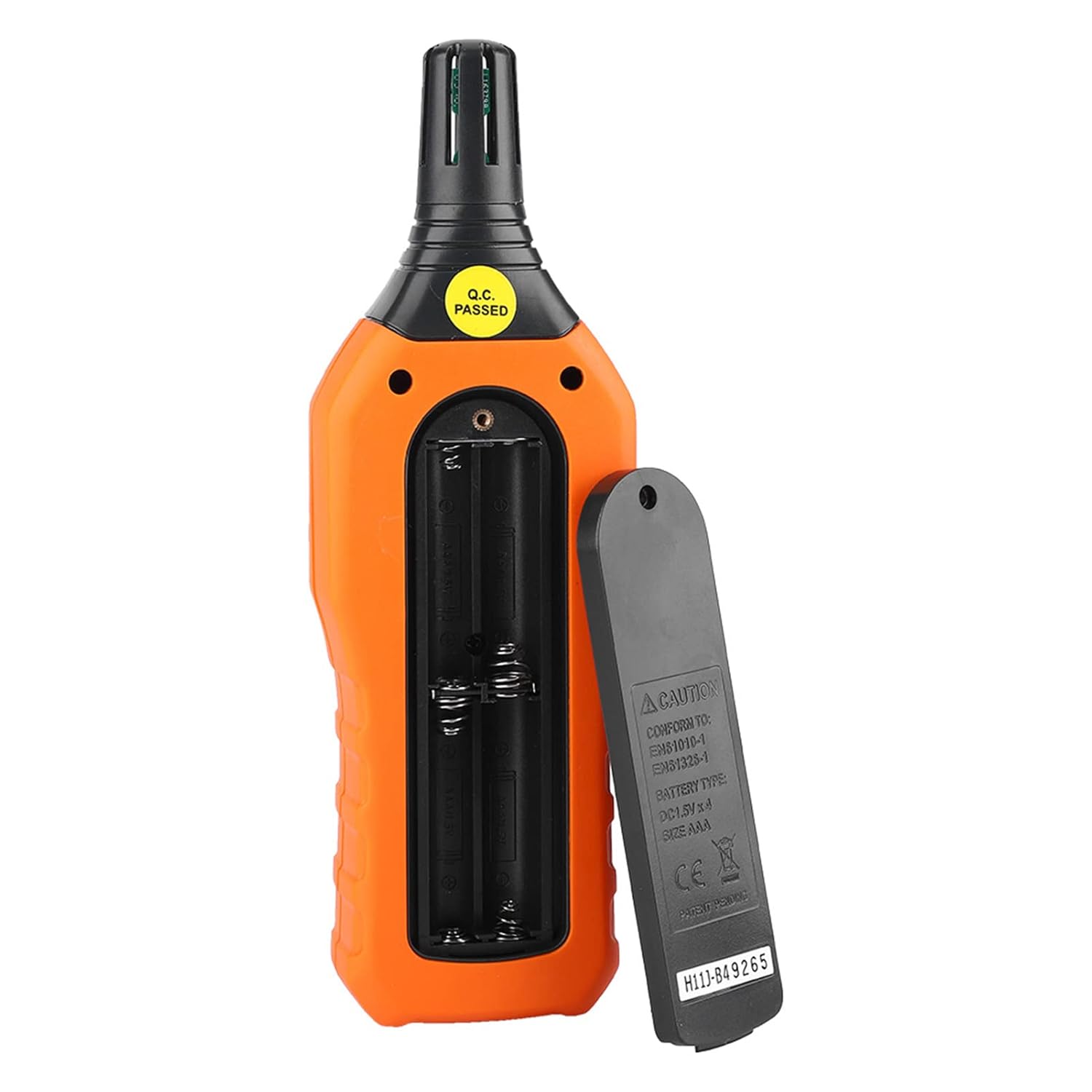
Obrázek 4.1: Zadní view of the meter showing the open battery compartment for AAA battery installation.
5. Návod k obsluze
5.1 Zapnutí/vypnutí
- Stiskněte tlačítko green power button (
 ) to turn the meter on.
 - Stiskněte a podržte gray power button () for approximately 2 seconds to turn the meter off. The meter also features an automatic shut-down function to conserve battery life.
5.2 Provádění měření
Once powered on, the meter will immediately begin displaying real-time temperature and humidity readings on the LCD screen. Ensure the sensor at the top of the device is exposed to the environment you wish to measure.

Obrázek 5.1: The meter in use, displaying temperature and humidity readings on its LCD screen.
5.3 Přepínání jednotek (°C/°F)
Přepínání mezi jednotkami teploty Celsia (°C) a Fahrenheita (°F):
- Stiskněte tlačítko Tlačítko °C/°F () located on the keypad. The display will update to show readings in the selected unit.
5.4 Funkce podsvícení
Aktivace nebo deaktivace podsvícení displeje:
- Stiskněte tlačítko tlačítko podsvícení () to toggle the backlight on or off. This is useful for reading in low-light conditions.
5.5 Uchování dat (H)
Zmrazení aktuálních hodnot na displeji:
- Stiskněte tlačítko Tlačítko H (). The "H" icon will appear on the display, indicating that the data is held.
- Stiskněte tlačítko Tlačítko H again to release the data hold and resume real-time measurements.
5.6 Maximum/Minimum (MIN/MAX) Measurement
Na view the maximum or minimum recorded values:
- Stiskněte tlačítko Tlačítko MIN/MAX () once to display the maximum temperature and humidity recorded since the meter was powered on or the function was reset.
- Stiskněte tlačítko Tlačítko MIN/MAX again to display the minimum temperature and humidity.
- Stiskněte tlačítko Tlačítko MIN/MAX a third time to exit the MIN/MAX mode and return to real-time readings.
5.7 Data Storage (MEM) and Retrieval (READ)
The meter can store up to 100 groups of measurement data.
- To Store Data: Stiskněte tlačítko Tlačítko MEM () to save the current temperature and humidity readings. The display will briefly show a memory location number.
- To Retrieve Data: Stiskněte tlačítko tlačítko READ () to enter data retrieval mode. Use the Tlačítko MEM to scroll through stored data records.
- To Exit Retrieval: Stiskněte tlačítko tlačítko READ again to exit data retrieval mode.
5.8 Wet Bulb (WB) and Dew Point (DP) Temperature
To display Wet Bulb or Dew Point temperatures:
- Stiskněte tlačítko DP/WB button () once to display the Dew Point temperature.
- Stiskněte tlačítko DP/WB button again to display the Wet Bulb temperature.
- Stiskněte tlačítko DP/WB button a third time to return to standard temperature and humidity display.
6. Údržba
6.1 Čištění
- Otřete c měřičeasing s měkkým, damp tkanina. Nepoužívejte abrazivní čisticí prostředky nebo rozpouštědla.
- Keep the sensor area clean and free from dust or debris to ensure accurate readings. Do not insert any objects into the sensor opening.
6.2 Skladování
- When not in use for extended periods, remove the batteries to prevent leakage and damage to the device.
- Měřič skladujte na chladném a suchém místě, mimo dosah přímého slunečního záření a extrémních teplot.
- Utilize the provided portable storage bag for protection during storage and transport.
7. Řešení problémů
| Problém | Možná příčina | Řešení |
|---|---|---|
| Měřič se nezapne. |
|
|
| Nepřesné údaje. |
|
|
| Displej je tlumený nebo bliká. |
|
|
| Cannot store or retrieve data. |
|
|
8. Specifikace
The following table outlines the technical specifications for the Walfront PM6508 Digital Temperature Humidity Meter.


Obrázek 8.1: Detailed technical specifications including ranges, resolution, and precision for temperature, humidity, wet bulb, and dew point measurements, along with general parameters.
| Parametr | Hodnota |
|---|---|
| Model | PM6508 |
| Rozsah okolní teploty | -20 až 60 °C (-4 až 140 °F) |
| Ambient Temperature Precision | ±1.5 °C (-20 to 0 °C, 45 to 60 °C), ±0.5 °C (0 to 45 °C) |
| Rozsah relativní vlhkosti | 0 % - 100 % relativní vlhkosti |
| Relative Humidity Precision | ±4.0% (0-20%, 80-100%), ±3.0% (20-80%) |
| Rozsah teplot mokrého teploměru | -20 až 60 °C (4 až 140 °F) |
| Wet Bulb Temperature Precision | ±1.5 °C (-20 to 0 °C, 45 to 60 °C), ±0.5 °C (0 to 45 °C) |
| Teplotní rozsah rosného bodu | -50 až 60 °C (-58 až 140 °F) |
| Dew Point Temperature Precision | ±1.5 °C (-50 to 0 °C, 45 to 60 °C), ±0.5 °C (0 to 45 °C) |
| Rezoluce | 0.1 °C / °F / %RH |
| Ukládání dat | 100 skupiny |
| Napájení | 4 x 1.5V AAA baterie (nejsou součástí balení) |
| Rozměry (D x Š x V) | 180 x 60 x 29 mm (7.1 x 2.4 x 1.1 palce) |
| Hmotnost | 254 g (9 oz) |
| Provozní vlhkost | 0 % - 100 % (bez kondenzace) |
9. Aplikace
The Walfront PM6508 is suitable for a wide range of applications requiring accurate temperature and humidity monitoring.

Obrázek 9.1: Examples of environments where the PM6508 meter can be effectively used for temperature and humidity monitoring.
- Residential and Office Environments: Monitoring indoor climate for comfort and health.
- Industrial Production: Ensuring optimal conditions for manufacturing processes.
- Warehousing and Storage: Protecting goods sensitive to temperature and humidity, such as in wine cellars or general storage.
- Zemědělství: Monitoring conditions in planting sheds, greenhouses, and aquaculture.
- Research and Development Laboratories: Maintaining precise environmental controls for experiments.
- Systémy HVAC: Assisting in the evaluation and maintenance of heating, ventilation, and air conditioning systems.
10. Záruka a podpora
Walfront products are designed for reliability and performance. For warranty information, technical support, or service inquiries, please refer to the contact information provided with your purchase or visit the official Walfront webstránky. Uschovejte si prosím doklad o koupi pro případ reklamace.