
WisFox RH204RH
Uživatelská příručka k bezdrátové myši WisFox 2.4G
Model: RH204RH
Zavedení
Thank you for choosing the WisFox 2.4G Wireless Mouse. This manual provides detailed instructions for the setup, operation, and maintenance of your new device to ensure optimal performance and a comfortable user experience. Please read this manual thoroughly before using the mouse.

Image: The WisFox 2.4G Wireless Mouse, shown with its USB-A and USB-C receivers.
Obsah balení
- 1 x WisFox 2.4G Wireless Mouse
- 1 x USB-A Receiver (stored in the mouse battery compartment)
- 1 x USB-C adaptér
- 1 x Uživatelská příručka
Konec produktuview
Familiarize yourself with the various components and buttons of your WisFox wireless mouse:
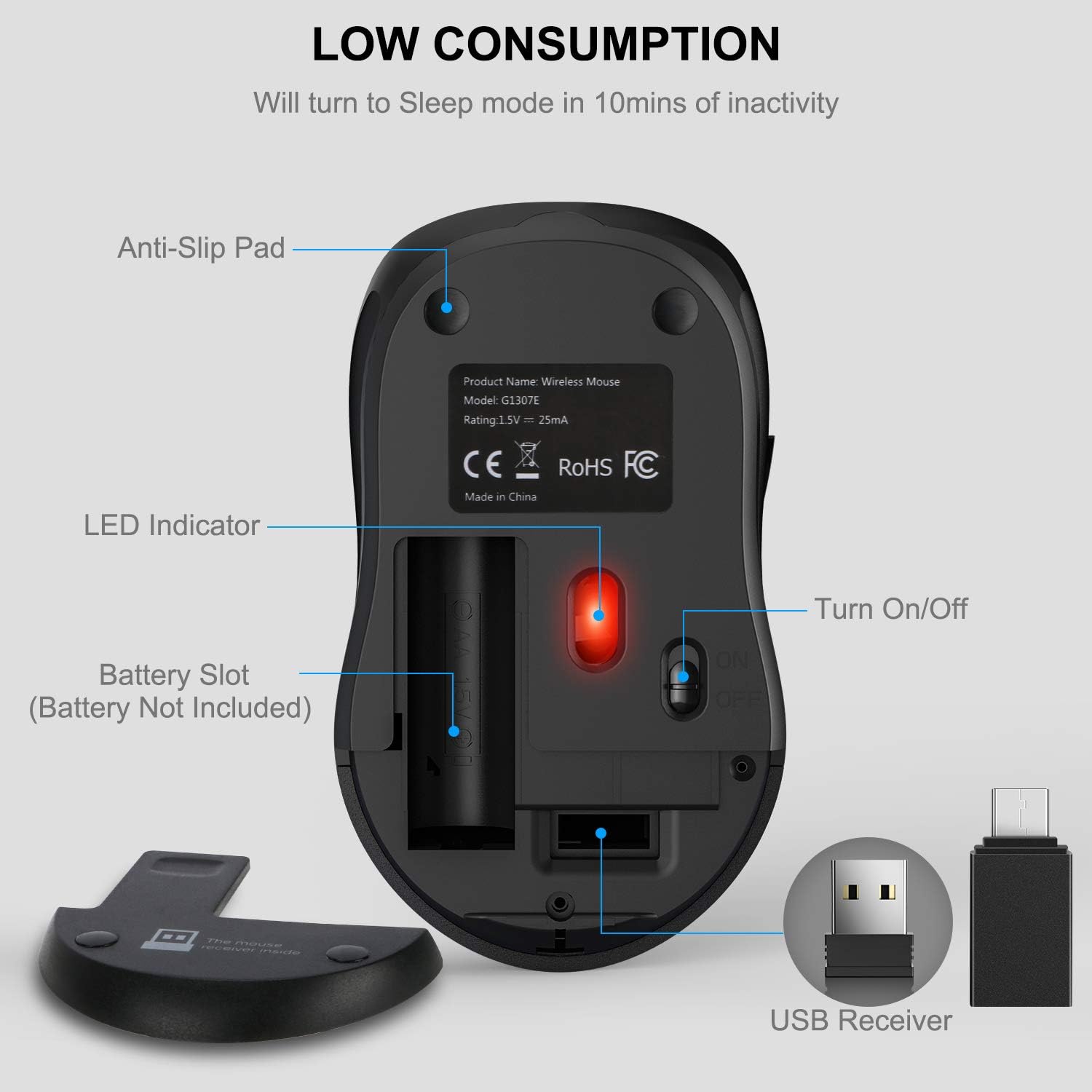
Image: A diagram illustrating the six buttons on the WisFox wireless mouse: Left Button, Right Button, Scroll Wheel, DPI Switch Button, Page Up Button, and Page Down Button.
- Levé tlačítko: Standardní funkce kliknutí.
- Pravé tlačítko: Standardní funkce kliknutí pravým tlačítkem myši.
- Rolovací kolečko: Pro vertikální rolování a funkci kliknutí prostředním tlačítkem myši.
- Tlačítko přepínání DPI: Upravuje citlivost kurzoru (úrovně DPI).
- Tlačítko Page Up: Navigates to the previous page in web browsers or documents.
- Tlačítko Page Down: Navigates to the next page in web browsers or documents.

Image: The underside of the WisFox wireless mouse, highlighting the battery slot (for 1 AA battery, not included), the storage compartment for the USB receiver, the LED indicator, and the On/Off switch.
Pokyny pro nastavení
- Nainstalujte baterii: Open the battery compartment cover on the bottom of the mouse. Insert one AA battery (not included), ensuring correct polarity (+/-). Close the cover.
- Retrieve Receiver: The USB-A receiver is stored inside the battery compartment for convenience. Remove it carefully.
- Připojení přijímače:
- For devices with a standard USB-A port: Plug the USB-A receiver directly into an available USB-A port on your computer.
- For devices with a USB-C port: Attach the provided USB-C adapter to the USB-A receiver, then plug the combined unit into an available USB-C port on your computer.
- Zapnutí: Slide the On/Off switch located on the bottom of the mouse to the "ON" position.
- Automatické připojení: The mouse will automatically connect to your computer. No additional drivers are required for installation.

Image: The WisFox wireless mouse connected to a laptop via its 2.4G receiver, illustrating its wireless capability and effective range of 33 feet.
Návod k obsluze
Nastavení DPI (rychlost kurzoru)
The WisFox wireless mouse features three adjustable DPI levels, allowing you to customize the cursor sensitivity to your preference. Press the DPI Switch Button (located behind the scroll wheel) to cycle through the settings:
- 800 DPI: Pomalejší pohyb kurzoru, ideální pro přesné úkoly.
- 1200 DPI: Standard cursor movement (default setting).
- 1600 DPI: Faster cursor movement, suitable for quick navigation.

Image: A visual representation of the three adjustable DPI settings (800, 1200, 1600) available on the mouse, with 1200 DPI indicated as the default.
Automatický režim spánku
To conserve battery life, the mouse is designed with an automatic power-saving feature:
- The mouse will enter auto power-saving mode after 1 minute of inactivity.
- It will enter deep sleep mode after 8 minutes of inactivity.
- To wake the mouse, simply double-click any button.
Kompatibilita
The WisFox 2.4G Wireless Mouse offers broad compatibility with various operating systems and devices:

Image: The WisFox mouse in an office environment, with logos indicating compatibility with Windows, Mac OS, and Linux operating systems.
- Operační systémy: Windows 7/8/10/XP, Vista 7/8, Linux, Mac OS (V10.4 or higher).
- Zařízení: Laptops, Desktop PCs, MacBooks, and other devices with a compatible USB-A or USB-C port.
Údržba
- Čištění: K čištění myši použijte měkký, suchý hadřík. V případě odolných nečistot lehceampOtřete hadřík vodou nebo jemným čisticím roztokem. Vyhněte se agresivním chemikáliím.
- Výměna baterie: When the mouse performance degrades or it stops responding, replace the AA battery. Ensure the On/Off switch is in the "OFF" position before replacing the battery.
- Skladování: When not in use for extended periods, turn off the mouse and store the USB receiver in its designated slot within the battery compartment to prevent loss.
Odstraňování problémů
| Problém | Řešení |
|---|---|
| Myš neodpovídá |
|
| Cursor lagging or erratic movement |
|
| Side buttons (Page Up/Down) not working |
|
Specifikace
- Model: RH204RH
- Konektivita: 2.4GHz Wireless (Radio Frequency)
- Provozní rozsah: Až 33 stop (10 metrů)
- Úrovně DPI: 800 / 1200 (Default) / 1600
- tlačítka: 6 (Left, Right, Scroll Wheel, DPI Switch, Page Up, Page Down)
- Detekce pohybu: Optický
- Zdroj napájení: 1 x AA baterie (není součástí balení)
- Automatické uspání: After 1 minute (power-saving), after 8 minutes (deep sleep)
- Trvanlivost: Test 5 milionů úhozů
- Rozměry produktu: 4.09 x 2.4 x 1.57 palce (10.39 x 6.1 x 3.99 cm)
- Hmotnost položky: 2.4 unce (68 gramů)
Záruka a podpora
WisFox provides a Záruka 24 měsíců for this product, along with a 90denní lhůta pro vrácení zboží bez otázek. Our customer service team is available 24/7 to assist you with any questions or concerns.
For support, please contact WisFox customer service through the platform where you purchased the product or visit the official WisFox webstránky pro kontaktní informace.
Ask a question about this manual
Ask about setup, troubleshooting, compatibility, parts, safety, or missing instructions. Manuals+ will review the question and use this page’s manual context to help answer it.