
HoldPeak HP-890CN
HoldPeak HP-890CN Digital Multimeter User Manual
Model: HP-890CN
1. Úvod
Thank you for choosing the HoldPeak HP-890CN Digital Multimeter. This device is designed for stable and reliable performance, featuring an anti-drop design and a clear 25mm high LCD display. It is capable of measuring various electrical parameters including DC/AC voltage, diode, resistance, capacitance, frequency, duty cycle, temperature, and hFE, along with a non-contact voltage (NCV) detection function. Please read this manual thoroughly before use to ensure safe and proper operation.
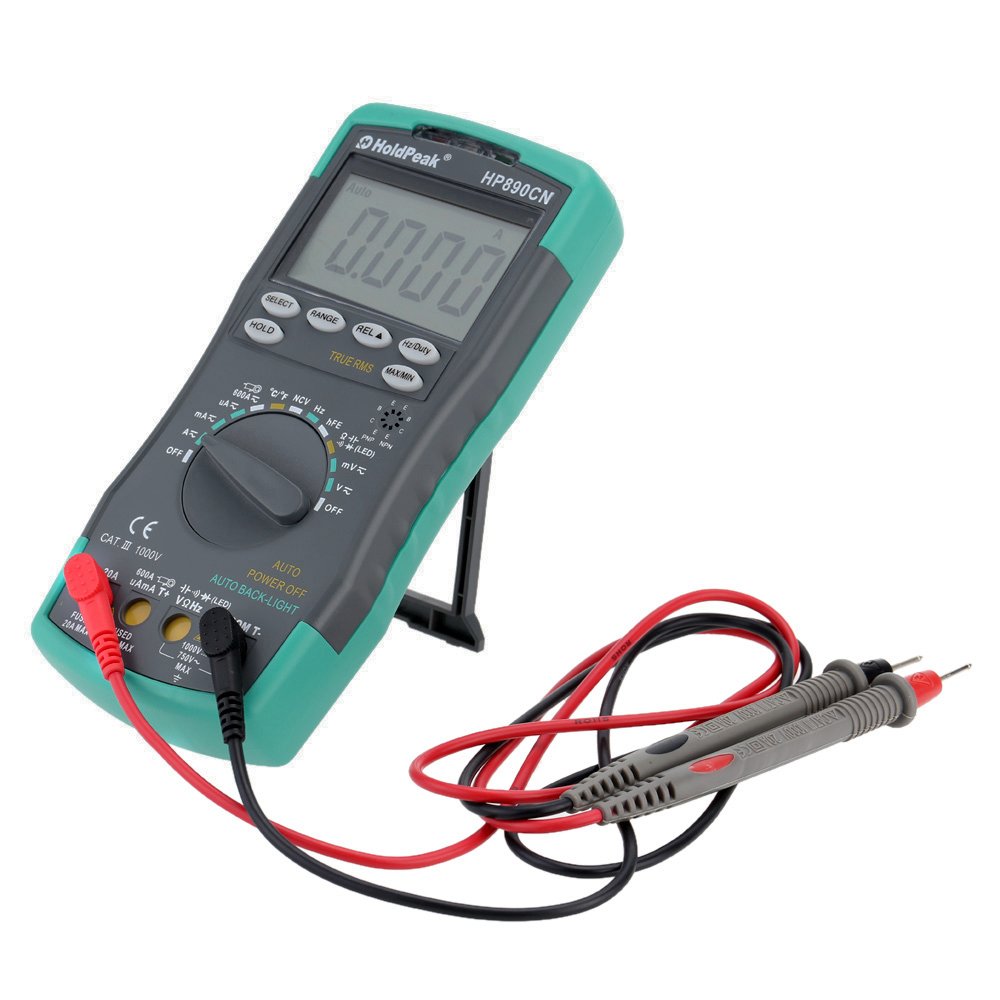
Figure 1: HoldPeak HP-890CN Digital Multimeter
2. Bezpečnostní informace
WARNING: To avoid electrical shock or damage to the meter, please observe the following safety precautions:
- Always remove test leads from the circuit before opening the case or battery cover.
- Do not operate the meter with the case or battery cover open.
- To prevent damage or injury, ensure quick-acting fuses with the specified amp and volt ratings are installed.
- This device complies with IEC 1010-1 1000V CAT III, Pollution Degree 2 standards.
- Pro měření vždy používejte správnou funkci a rozsah.
- Nikdy neaplikujte objemtage nebo proud, který překračuje maximální specifikované limity.
- Při práci s objemem buďte opatrnítagnad 30 V AC RMS, 42 V peak nebo 60 V DC. Tyto objemytages představují nebezpečí úrazu elektrickým proudem.
- Během měření držte prsty za bariérami sondy.

Obrázek 2: Zadní view of the multimeter showing safety warnings and battery compartment.
3. Konec produktuview
The HoldPeak HP-890CN Digital Multimeter features a large LCD display and intuitive controls for ease of use. Below is a diagram illustrating the main components and their functions.

Figure 3: Labeled diagram of the HP-890CN Multimeter.
Klíčové komponenty:
- LCD displej: Shows measurement readings, units, and function indicators. Features smart backlight.
- Přepínač funkcí: Otočný přepínač pro výběr funkcí měření (objemtage, proud, odpor atd.).
- Vstupní konektory:
- COM: Společný vstupní konektor pro černý měřicí vodič.
- VΩHz: Vstup pro svtage, resistance, frequency, capacitance, diode, and temperature measurements (red test lead).
- mAµA: Input for current measurements up to 600mA (red test lead).
- 20A: Input for current measurements up to 20A (red test lead).
- tlačítka:
- VYBRAT: Toggles between functions within a single rotary switch position (e.g., AC/DC, Diode/Continuity).
- ROZSAH: Manually selects measurement range (auto-ranging is default).
- REL (Relativní hodnota): Measures relative changes.
- Hz/střída: Selects frequency or duty cycle measurement.
- DRŽET: Zmrazí aktuální údaj na displeji.
- TRUE RMS: Indicates True RMS measurement capability for AC.
- MAX/MIN: Zaznamenává maximální a minimální hodnoty.
- Indukční oblast NCV: Pro bezkontaktní zvtage detekce.
- hFE Testing Interface: Socket for transistor testing.
- Stojan: Integrovaný stojan pro pohodlné viewing (rotates 180 degrees).
4. Nastavení
4.1 Instalace baterie
The multimeter requires either two 1.5V AAA batteries or one 9V 6F22 battery (not included). The specific battery type included with your product may vary. To install or replace batteries:
- Ujistěte se, že je multimetr VYPNUTÝ a všechny měřicí vodiče jsou odpojené.
- Vyhledejte přihrádku na baterie na zadní straně měřiče.
- Pomocí šroubováku povolte šroub, který zajišťuje kryt baterie.
- Odstraňte kryt baterie.
- Insert the new batteries, observing the correct polarity (+ and -).
- Nasaďte kryt baterie a pevně utáhněte šroub.

Obrázek 4: Vnitřní view of the multimeter, showing the battery compartment.
4.2 Připojení měřicích kabelů
Černý měřicí vodič vždy připojte do zdířky COM. Červený měřicí vodič připojte do příslušné vstupní zdířky v závislosti na měření, které chcete provést:
- Pro svtage, Resistance, Capacitance, Frequency, Diode, and Temperature: Connect the red lead to the VΩHz zvedák.
- For Current up to 600mA: Connect the red lead to the mAµA zvedák.
- For Current up to 20A: Connect the red lead to the 20A zvedák.
5. Návod k obsluze
Before taking any measurements, ensure the test leads are correctly connected and the function switch is set to the desired measurement type.
5.1 Zapnutí/vypnutí
Rotate the function switch from the OFF position to any desired measurement function to turn the meter ON. Rotate it back to OFF to power it down. The meter features an auto power-off function to conserve battery life.
5.2 Měření DC Voltage (V=)
- Set the function switch to the V= position.
- Připojte černý měřicí vodič do zdířky COM a červený měřicí vodič do zdířky VΩHz.
- Connect the test probes across the component or circuit to be measured, in parallel.
- Přečtěte si svtage hodnota na LCD displeji.
5.3 Měření AC Voltage (V~)
- Nastavte přepínač funkcí do polohy V~.
- Připojte černý měřicí vodič do zdířky COM a červený měřicí vodič do zdířky VΩHz.
- Connect the test probes across the component or circuit to be measured, in parallel.
- Přečtěte si svtage value on the LCD display. This meter provides True RMS readings for AC voltage.

Obrázek 5: Měření objemu střídavého proudutagze zásuvky.
5.4 Measuring DC/AC Current (A= / A~)
CAUTION: Always connect the meter in series with the circuit when measuring current. Ensure the circuit is de-energized before connecting the meter.
- Set the function switch to the A= or A~ position. Use the SELECT button to toggle between DC and AC if necessary.
- Připojte černý testovací kabel ke konektoru COM.
- Pro proudy do 600 mA připojte červený měřicí vodič k mAµA zdířky. Pro proudy do 20 A připojte červený měřicí vodič k 20A zvedák.
- Break the circuit and connect the test probes in series with the circuit.
- Zapněte obvod a odečtěte hodnotu proudu na LCD displeji.
5.5 Měření odporu (Ω)
- Nastavte přepínač funkcí do polohy Ω.
- Připojte černý měřicí vodič do zdířky COM a červený měřicí vodič do zdířky VΩHz.
- Připojte měřicí sondy k měřené součástce. Ujistěte se, že součástka je bez napětí.
- Odečtěte hodnotu odporu na LCD displeji.
5.6 Měření kapacity (F)
- Set the function switch to the capacitance (F) position.
- Připojte černý měřicí vodič do zdířky COM a červený měřicí vodič do zdířky VΩHz.
- Connect the test probes across the capacitor. Ensure the capacitor is fully discharged before measurement.
- Odečtěte hodnotu kapacity na LCD displeji.
5.7 Measuring Frequency (Hz) / Duty Cycle (%)
- Set the function switch to the Hz/% position.
- Připojte černý měřicí vodič do zdířky COM a červený měřicí vodič do zdířky VΩHz.
- Připojte měřicí sondy ke zdroji signálu.
- Press the Hz/Duty button to toggle between frequency and duty cycle measurements.
- Odečtěte hodnotu na LCD displeji.
5.8 Test diod
- Set the function switch to the Diode/Continuity position. Press SELECT to choose Diode Test.
- Připojte černý měřicí vodič do zdířky COM a červený měřicí vodič do zdířky VΩHz.
- Připojte červenou sondu k anodě a černou sondu ke katodě diody.
- Přečtěte si dopředu svtage drop on the LCD display. Reverse the probes to check for open circuit (OL).
5.9 Test kontinuity
- Set the function switch to the Diode/Continuity position. Press SELECT to choose Continuity Test.
- Připojte černý měřicí vodič do zdířky COM a červený měřicí vodič do zdířky VΩHz.
- Připojte měřicí sondy k obvodu nebo součástce.
- Pokud je odpor nižší než přibližně 50 Ω, ozve se bzučák, který signalizuje přerušení obvodu.
5.10 Měření teploty (°C/°F)
- Nastavte přepínač funkcí do polohy °C/°F.
- Connect the K-type thermocouple probe to the VΩHz and COM jacks, observing polarity.
- Umístěte hrot termočlánku na předmět, jehož teplotu chcete měřit, nebo do jeho blízkosti.
- Read the temperature on the LCD display. Use the SELECT button to switch between Celsius and Fahrenheit.
5.11 hFE Test (Transistor Test)
- Nastavte přepínač funkcí do polohy hFE.
- Insert the transistor's Emitter, Base, and Collector leads into the corresponding holes in the hFE socket, ensuring correct NPN or PNP type.
- Read the hFE value (DC current gain) on the LCD display.
5.12 Nekontaktní svtage (NCV) Detekce
- Set the function switch to the NCV position.
- Move the NCV induction area of the meter close to the conductor being tested.
- Pokud AC svtage is detected (90V to 1000V AC RMS), the NCV red indicator will light up, and the buzzer will sound. The intensity of the sound and light indicates the strength of the detected voltage.
5.13 Speciální funkce
- DRŽET: Stisknutím zmrazíte aktuální údaj na displeji. Dalším stisknutím tlačítko uvolníte.
- REL (Relativní hodnota): Press to store the current reading as a reference. Subsequent measurements will show the difference from this reference.
- MAX/MIN: Press to enter MAX/MIN mode. The meter will display the maximum or minimum reading recorded since entering this mode. Press again to cycle between MAX, MIN, and current reading.
6. Údržba
6.1 Čištění
Otřete měřič reklamouamp cloth and mild detergent. Do not use abrasives or solvents. Keep the contacts of the input jacks clean.
6.2 Výměna baterie
When the battery symbol appears on the LCD, the batteries need to be replaced. Refer to section 4.1 for battery installation instructions.
6.3 Výměna pojistky
WARNING: To avoid electrical shock, disconnect the test leads before opening the case. Replace fuses only with quick-acting fuses of the specified type and rating.
The meter is protected by two fuses:
- F1: 600mA/250V fast-blow fuse for the mAµA input.
- F2: 20A/250V fast-blow fuse for the 20A input.
Výměna pojistky:
- Turn the meter OFF and disconnect all test leads.
- Sejměte kryt baterií a baterie.
- Unscrew the screws holding the back case and carefully open the meter.
- Carefully remove the old fuse by gently prying it from its clips.
- Nainstalujte novou pojistku správného typu a jmenovité hodnoty.
- Znovu sestavte měřič a ujistěte se, že jsou všechny šrouby utažené.
7. Řešení problémů
- Random values in mV mode: It is normal for the display to show random values in mV mode when the input terminals are open (not connected to a circuit). Simply short the input terminals to zero the reading. This will not affect measurement results.
- Žádný displej nebo tlumený displej: Zkontrolujte stav baterie. Pokud je baterie vybitá, vyměňte ji.
- No reading in current mode: Check if the fuse is blown. Replace if necessary (refer to section 6.3). Ensure test leads are connected to the correct current input jack (mAµA or 20A) and in series with the circuit.
- Zobrazuje se „OL“: Indicates an overload (measurement exceeds the selected range) or an open circuit.
8. Specifikace
| Parametr | Specifikace |
|---|---|
| Značka | HoldPeak |
| Model | HP-890CN |
| Barva | Gray + Blue-Green |
| Materiál | Plast |
| Maximální zobrazení | 6000 počítá |
| Ovládání rozsahu | Automatický rozsah |
| Velikost obrazovky | 60 × 35 mm |
| DC svtage | 60mV/600mV/6V/60V/600V/1000V |
| AC svtage (True RMS) | 60mV/600mV/6V/60V/600V/750V |
| Stejnosměrný proud | 600µA/6000µA/60mA/600mA/6A/20A |
| Střídavý proud (True RMS) | 600µA/6000µA/60mA/600mA/6A/20A |
| Odpor | 600Ω/6KΩ/60KΩ/600KΩ/6MΩ/60MΩ |
| Kapacita | 9.999nF/99.99nF/999.9nF/9.999µF/99.99µF/999.9µF/9.99mF/99.99mF |
| Frekvence | 9.999Hz/99.99Hz/999.9Hz/9.999KHz/99.99KHz/999.9KHz/9.999MHz |
| Pracovní cyklus | 0.1 % až 99.9 % |
| Teplota | -20 ~ 1000 ° C / -4 ~ 2222 ° F |
| Test diod | Ano |
| Bzučák spojitosti | Ano |
| Test hFE tranzistoru | 0-1000 |
| Detekce NCV | 90V ~ 1000V AC rms |
| Napájení | 2 * 1.5V AAA batteries / 1 * 9V 6F22 battery (not included) |
| Provozní prostředí | 0-40 °C (32-104 °F) |
| Skladovací prostředí | -20-60 ° C (-4-140 ° F) |
| Velikost produktu (D׊×V) | Approx. 19 × 8.5 × 3.5 cm (7.67 × 3.35 × 1.37 inches) |
| Hmotnost produktu | 300 gramů (10.58 unce) |
| Výrobce | MIS-E0833 |
| UPC | 783950206936, 791592905193 |
9. Obsah balení
Balíček obsahuje následující položky:
- 1 * HoldPeak HP-890CN Digital Multimeter
- 1 * Úložný sáček
- 1 * Pair of Test Leads (Red and Black)
- 1 * K-Type Thermocouple Probe
- 1 * Uživatelská příručka v angličtině

Obrázek 6: Multimetr a dodané příslušenství.

Figure 7: Included storage bag for the multimeter.
10. Záruka a podpora
Informace o záruce nebo technickou podporu naleznete v dokumentaci dodané s vaším nákupem nebo se obraťte přímo na prodejce/výrobce. Uschovejte si účtenku jako doklad o koupi.
Související dokumenty - HP-890CN
 |
Uživatelská příručka k digitálnímu multimetru HOLDPEAK 770HC Návod k obsluze digitálního multimetru HOLDPEAK 770HC s podrobným popisem jeho funkcí, specifikací, provozních pokynů, bezpečnostních opatření a údržby. |
 |
HoldPeak 7200B DC/AC True-RMS Clamp Návod k obsluze multimetru Comprehensive operation manual for the HoldPeak 7200B 6000 Counts DC/AC True-RMS Clamp Multimeter, covering safety instructions, technical specifications, and operating procedures. |
 |
IR-DMM Thermal Imaging Multimeter Quick Start User Manual This document provides a quick start guide for the IR-DMM Thermal Imaging Multimeter, detailing its features, safety precautions, operating instructions for both thermal imaging and multimeter modes, system setup, and technical specifications. |
 |
FNIRSI DMC-100 Inteligentní barevná obrazovka třamp Návod k použití digitálního multimetru Komplexní uživatelská příručka pro inteligentní barevnou obrazovku FNIRSI DMC-100amp digitální multimetr s podrobným popisem jeho funkcí, provozu, specifikací a bezpečnostních opatření pro elektrické testování. |
 |
6000counts Pocket Digital Multimeter User's Manual: Features, Specs, Operation Comprehensive user manual for the 6000counts pocket digital multimeter. Learn about its specifications, safety guidelines, operation, and troubleshooting for accurate electrical measurements. |
 |
Uživatelská příručka k multimetru Futech MM6500 Tato uživatelská příručka obsahuje podrobné pokyny k obsluze multimetru Futech MM6500, včetně funkcí, bezpečnostních opatření, postupů měření a technických specifikací. Zahrnuje objemtagFunkce měření e, proudu, odporu, kapacity, frekvence, teploty, propojení, testování diod a NCV. |
Ask a question about this manual
Ask about setup, troubleshooting, compatibility, parts, safety, or missing instructions. Manuals+ will review the question and use this page’s manual context to help answer it.