
1. Konec produktuview
The AMD Ryzen 5 3600XT is a high-performance 6-core, 12-thread desktop processor designed for the AM4 platform. It features a base clock speed of 3.8 GHz and a maximum boost clock of 4.5 GHz. This processor is unlocked for overclocking and supports PCIe 4.0 on compatible X570 and B550 motherboards. It also includes 35 MB of GameCache and supports DDR4-3200 memory.
The AMD Ryzen 5 3600XT comes bundled with the AMD Wraith Spire cooler, an air cooling solution designed to maintain optimal operating temperatures under typical workloads.

Obrázek 1.1: Retail packaging for the AMD Ryzen 5 3600XT processor. The box displays the Ryzen logo and processor series.
2. Nastavení a instalace
Proper installation is crucial for the functionality and longevity of your processor. Ensure your motherboard is compatible with the AM4 socket and supports Ryzen 3000 series processors. For optimal performance, X570 or B550 chipsets are recommended to utilize PCIe 4.0 capabilities.
2.1. Kompatibilita základních desek
The AMD Ryzen 5 3600XT processor requires a motherboard with an AM4 socket. It is compatible with various chipsets, including X570, B550, X470, B450, X370, B350, and A320. For full feature support, including PCIe 4.0, X570 or B550 motherboards are recommended. Ensure your motherboard's BIOS is updated to support Ryzen 3000 series processors.
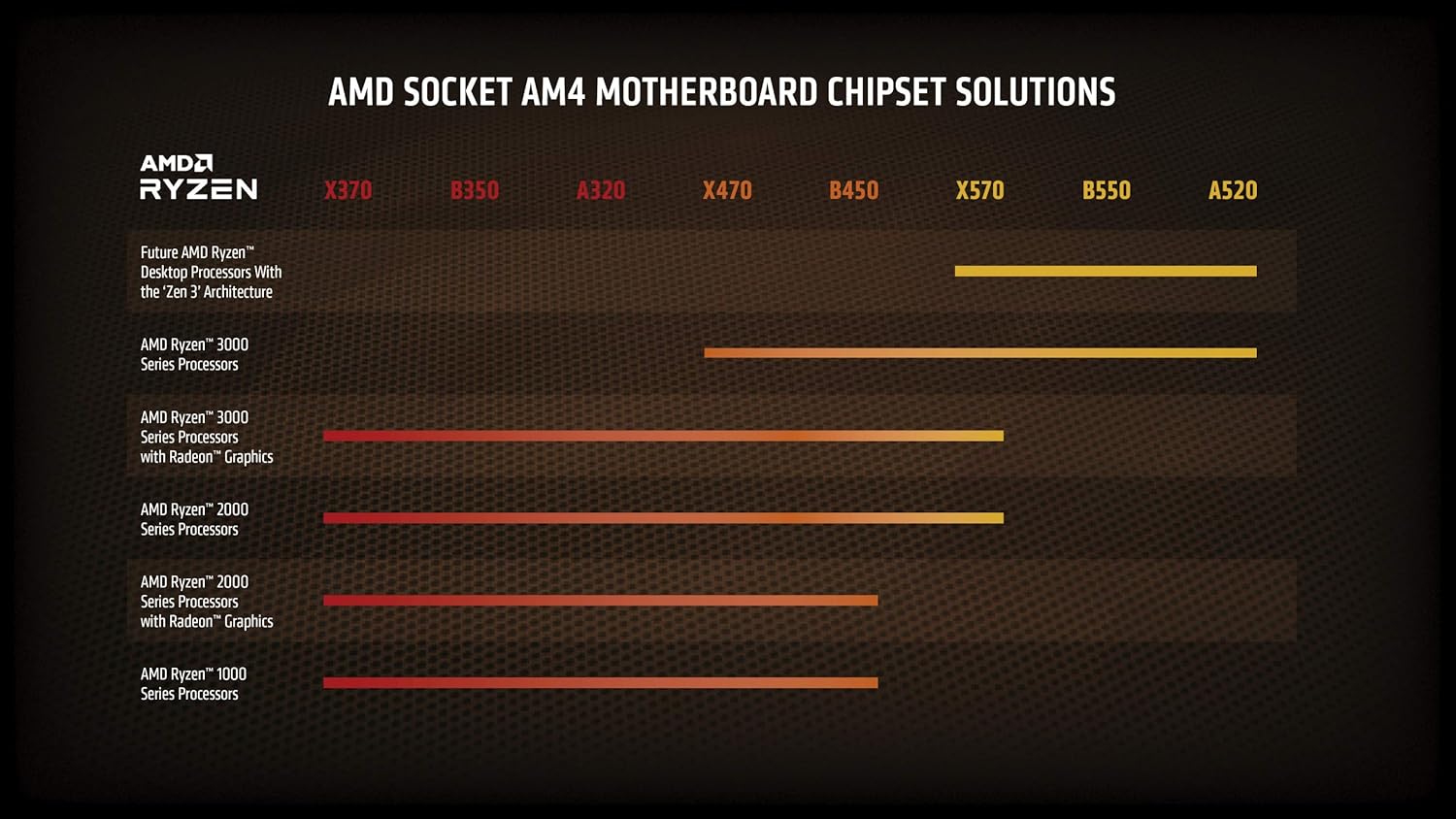
Obrázek 2.1: Chart illustrating AMD Socket AM4 motherboard chipset compatibility with different Ryzen processor generations. The Ryzen 3000 series is compatible with a wide range of chipsets.
2.2. Instalace procesoru
- Příprava základní desky: Ujistěte se, že je páčka patice procesoru otevřená.
- Zarovnání procesoru: Carefully align the gold triangle on the corner of the processor with the corresponding triangle on the motherboard's AM4 socket.
- Vložte procesor: Opatrně spusťte procesor rovně dolů do patice. Netlačte na něj silou. Pokud se snadno neusadí, znovu zkontrolujte zarovnání.
- Zabezpečení procesoru: Zavřete páčku patice, abyste zajistili procesor na místě.

Obrázek 2.2: Nahoru view of the AMD Ryzen processor, showing the integrated heat spreader (IHS) and branding.

Obrázek 2.3: Úhlové view of the AMD Ryzen processor, highlighting its physical form factor and pin grid array (PGA) design.
2.3. Cooler Installation (Wraith Spire)
The AMD Ryzen 5 3600XT includes a Wraith Spire cooler. This cooler comes with pre-applied thermal paste. If you are reusing a cooler or applying new thermal paste, ensure the CPU surface is clean before application.
- Remove Motherboard Brackets: For AM4 sockets, remove the plastic retention brackets on either side of the CPU socket. Keep the backplate installed.
- Umístění chladiče: Place the Wraith Spire cooler onto the CPU, aligning the four spring-loaded screws with the holes on the motherboard's backplate.
- Zajistěte chladič: Šrouby utahujte diagonálně (např. vlevo nahoře, vpravo dole, vpravo nahoře, vlevo dole), dokud nebudou pevně utaženy prsty. Nepřetahujte je.
- Připojení kabelu ventilátoru: Připojte 4pinový kabel ventilátoru chladiče ke konektoru „CPU_FAN“ na základní desce.

Obrázek 2.4: The AMD Wraith Spire CPU cooler, included with the Ryzen 5 3600XT processor, featuring a fan and heatsink assembly.
3. Návod k obsluze
Once installed, the AMD Ryzen 5 3600XT processor operates automatically within your system. Ensure your operating system and drivers are up to date for optimal performance.
3.1. Instalace ovladače
After installing your operating system, download and install the latest chipset drivers from the AMD official webmísto. These drivers ensure proper communication between the processor and the motherboard, optimizing performance and stability.
3.2. Monitorování výkonu
You can monitor your processor's temperature, clock speeds, and utilization using various software tools. AMD provides the Ryzen Master utility for advanced monitoring and configuration, including overclocking.
3.3. Přetaktování (pokročilí uživatelé)
The Ryzen 5 3600XT processor is unlocked for overclocking, allowing experienced users to potentially achieve higher clock speeds. Overclocking can increase performance but also increases power consumption and heat output. It may also void your warranty if not performed correctly. Refer to advanced guides and ensure adequate cooling before attempting to overclock.
4. Údržba
Pravidelná údržba pomáhá zajistit dlouhou životnost a optimální výkon vašeho procesoru a chladicího systému.
- Odstranění prachu: Periodically clean dust from the Wraith Spire cooler's heatsink fins and fan blades using compressed air. Ensure the system is powered off and unplugged before cleaning.
- Teplovodní pasta: The thermal paste applied between the CPU and cooler may degrade over several years. If you notice consistently high temperatures, consider reapplying fresh thermal paste. This requires carefully removing the cooler, cleaning both surfaces, and applying a new layer of thermal paste before reinstallation.
- Aktualizace softwaru: Keep your motherboard BIOS and chipset drivers updated to benefit from performance improvements and bug fixes.
5. Řešení problémů
Tato část se zabývá běžnými problémy, se kterými se můžete setkat.
5.1. Systém se nespustí / Žádné zobrazení
- Zkontrolujte připojení napájení: Ujistěte se, že všechny napájecí kabely (24pinový ATX, 8pinový CPU) jsou bezpečně připojeny k základní desce a zdroji napájení.
- Znovu usaďte komponenty: Carefully reseat the CPU, RAM modules, and graphics card.
- Ověření instalace chladiče: Ensure the CPU cooler is properly installed and its fan cable is connected to the CPU_FAN header.
- BIOS/UEFI: Confirm your motherboard's BIOS/UEFI version supports the Ryzen 3000 series processor. An outdated BIOS can prevent booting.
5.2. Problémy s přehřátím
- Check Cooler Contact: Ensure the CPU cooler is making proper contact with the CPU's integrated heat spreader (IHS). Verify screws are tightened correctly.
- Teplovodní pasta: Confirm thermal paste was applied correctly and is not dried out.
- Proud vzduchu: Ensure adequate airflow within your PC case. Clean any dust buildup from the cooler and case fans.
- Rychlost ventilátoru: Check fan speed settings in your motherboard's BIOS/UEFI or using monitoring software.
5.3. Zhoršení výkonu
- Drivers and BIOS: Ensure all chipset drivers and motherboard BIOS are up to date.
- Procesy na pozadí: Zkontrolujte, zda aplikace na pozadí nespotřebovávají nadměrné množství zdrojů CPU.
- Tepelné škrcení: Monitor CPU temperatures. High temperatures can cause the CPU to reduce its clock speed to prevent damage.
- Nastavení napájení: Verify your operating system's power plan is set to "High Performance" or a similar setting that allows the CPU to boost.
6. Specifikace
| Funkce | Detail |
|---|---|
| Model CPU | AMD Ryzen 5 3600XT |
| Jádra / vlákna CPU | 6 jader / 12 vláken |
| Základní taktovací frekvence | 3.8 GHz |
| Max Boost Clock | Až 4.5 GHz |
| Zásuvka CPU | AM4 |
| Celková mezipaměť L3 | 32 MB |
| Celková mezipaměť L2 | 3 MB |
| Výchozí TDP | 95W |
| Odemčeno pro přetaktování | Ano |
| Verze PCIe | PCIe 4.0 |
| Typ systémové paměti | DDR4 |
| Paměťový kanál | 2 |
| Maximální rychlost paměti | 3200 MHz |
| Součástí balení je chladič | AMD Wraith Spire |
| Product Dimensions (Processor) | 1.57 x 0.24 x 5.28 palce |
| Item Weight (Processor) | 1.1 libry |

Obrázek 6.1: Performance comparison chart for the AMD Ryzen 5 3600XT, illustrating its capabilities in various computing tasks such as 3D rendering, video rendering, gaming, and single-thread performance.
7. Informace o záruce
AMD processors typically come with a limited manufacturer's warranty. The duration and terms of the warranty may vary by region and retailer. Please retain your proof of purchase for warranty claims.
For detailed warranty information, including terms and conditions, please visit the official AMD webwebu nebo se podívejte do záruční dokumentace dodané s vaším produktem.
8. Podpora
For further assistance, technical support, driver downloads, and additional product information, please visit the official AMD support resources:
- Podpora AMD Webmísto: Access drivers, software, and troubleshooting guides.
- Nástroj AMD Ryzen Master Utility: For advanced processor control and monitoring.
- AMD Community Forums: Engage with other users and AMD experts.