
1. Úvod
This manual provides detailed instructions for the setup, operation, and maintenance of your BMW Multi-Function Clock, Alarm, and Weather Station. This device combines a digital clock, an alarm with a snooze function, and a weather station that displays temperature. Please read this manual carefully before use to ensure proper functionality and to maximize your experience with the product.
2. Obsah balení
Po vybalení zkontrolujte obsah balení. Pokud některé položky chybí nebo jsou poškozené, kontaktujte svého prodejce.
- BMW Multi-Function Clock, Alarm, and Weather Station Unit
- Uživatelská příručka (tento dokument)
3. Nastavení
3.1. Instalace baterie
Zařízení vyžaduje 2 AAA baterie (nejsou součástí balení) pro provoz. Pro instalaci baterií postupujte podle těchto kroků:
- Vyhledejte kryt přihrádky na baterie na zadní straně jednotky.
- Jemně posuňte nebo zvedněte kryt a otevřete přihrádku.
- Vložte dvě baterie typu AAA a dbejte na správnou polaritu (+ a -) vyznačenou uvnitř přihrádky.
- Bezpečně nasaďte kryt prostoru pro baterie.
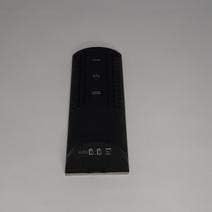
Obrázek 3.1: Zadní view of the device, illustrating the battery compartment and control buttons for setup.
3.2. Počáteční zapnutí
After battery installation, the device display will illuminate, and it will typically show a default time or begin searching for a signal (if applicable for weather functions). Proceed to the operating instructions to set the time and other functions.
4. Návod k obsluze
4.1. Nastavení času a data
Nastavení aktuálního času a data:
- Stiskněte a podržte MODE button (usually located on the back or side) for a few seconds until the time display starts flashing.
- Použijte UP or DOLŮ buttons (often labeled '+' or '-') to adjust the hour.
- Stiskněte MODE again to confirm the hour and move to the minutes.
- Upravte minuty pomocí UP or DOLŮ tlačítka.
- Pokračujte v stisknutí MODE and adjusting with NAHORU/DOLŮ for year, month, and day settings.
- Stiskněte MODE naposledy pro ukončení režimu nastavení.
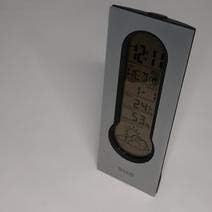
Obrázek 4.1: Front display of the device, showing the digital clock, temperature, and weather forecast icons.
4.2. Nastavení budíku
Chcete-li nastavit čas budíku:
- V normálním režimu zobrazení času stiskněte POPLACH tlačítko (resp MODE repeatedly until 'AL' or an alarm icon appears).
- Stiskněte a podržte POPLACH tlačítko , dokud nezačne blikat čas budíku.
- Použijte UP or DOLŮ tlačítky nastavte požadovanou hodinu buzení.
- Stiskněte POPLACH again to confirm the hour and move to the minutes.
- Upravte minuty pomocí UP or DOLŮ tlačítka.
- Stiskněte POPLACH one last time to save the alarm setting. An alarm icon will typically appear on the display to indicate the alarm is active.
4.3. Using Snooze Function
Když zazní alarm, stiskněte PODŘIMOVAT button (usually a large button on the top of the unit) to temporarily silence the alarm. The alarm will sound again after a few minutes (typically 5-10 minutes, depending on the model). To turn off the alarm completely, press any other button or let it ring until it automatically stops.

Obrázek 4.2: Nahoru view of the device, highlighting the prominent SNOOZE button.
4.4. Zobrazení teploty
The device continuously displays the ambient temperature. The temperature unit (Celsius or Fahrenheit) can usually be switched by pressing a dedicated button (e.g., 'C/F' or 'TEMP') or by holding down one of the adjustment buttons during time setting.
4.5. Weather Station Function
The integrated weather station provides a basic weather forecast using graphical icons (e.g., sun, clouds, rain). This forecast is based on internal barometric pressure changes and is an estimation for the local area. It is not connected to external weather services.
5. Údržba
5.1. Čištění
To clean the device, use a soft, dry cloth. Do not use abrasive cleaners, solvents, or chemical sprays, as these can damage the surface and electronic components. Avoid getting moisture into the device.
5.2. Výměna baterie
When the display dims or functions become erratic, it is time to replace the batteries. Follow the battery installation steps in Section 3.1. Always replace both batteries at the same time with new AAA batteries.
6. Řešení problémů
Pokud se se zařízením setkáte s problémy, podívejte se na následující běžné problémy a jejich řešení:
- Displej je prázdný nebo tmavý:
Check if batteries are installed correctly. Replace with fresh AAA batteries. - Čas nebo datum je nesprávné:
Refer to Section 4.1 to reset the time and date. Ensure you confirm each setting step. - Alarm se nespustí:
Verify that the alarm is set and activated (look for an alarm icon on the display). Ensure the volume is not set to zero if adjustable. - Temperature reading seems inaccurate:
Ensure the device is not placed in direct sunlight, near heat sources, or in drafts, which can affect readings. Allow some time for the sensor to stabilize after placement. - Weather forecast icons are not changing:
The weather forecast is based on local barometric pressure changes and may take time to update. It provides a general trend, not a precise forecast.
7. Specifikace
| Funkce | Detail |
|---|---|
| Značka | BMW |
| Číslo modelu | 06017443015007 |
| Speciální funkce | Alarm, Snooze, Temperature Display |
| Zdroj napájení | Baterie |
| Typ baterie | 2 x AAA baterie (nejsou součástí balení) |
| ASIN | B089QGJ9VR |
8. Záruka a podpora
This product is covered by a standard manufacturer's warranty. For specific warranty terms and conditions, please refer to the documentation provided at the time of purchase or contact your retailer. For technical support or service inquiries, please reach out to the point of purchase or the manufacturer's customer service department.