
BESDER ZX-X2-W/200W
BESDER Smart Home Security FULL HD 1080P IP WiFi Camera User Manual
Model: ZX-X2-W/200W
Zavedení
Thank you for choosing the BESDER Smart Home Security Camera. This manual provides detailed instructions for setting up, operating, and maintaining your camera. Please read this manual carefully before use to ensure proper functionality and safety.
This camera offers Full HD 1080P resolution, Pan/Tilt functionality, Two-Way Audio, and IR Night Vision for comprehensive home surveillance. It supports both wired and WiFi connections, mobile monitoring via iOS and Android apps, and cloud services.
Obsah balení
Po otevření zkontrolujte obsah balení. Pokud některé položky chybí nebo jsou poškozené, kontaktujte zákaznickou podporu.
- 1 x BESDER IP Camera 1080P
- 1 x Uživatelská příručka
- 1 x DC 5V napájecí zdroj
- 1 x Small Bracket
- Montážní šrouby a hmoždinky
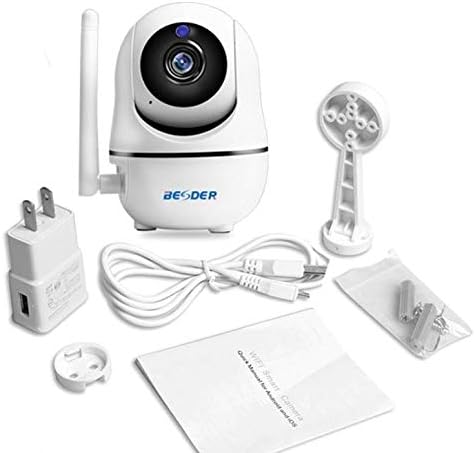
Obrázek 1: Package contents of the BESDER Smart Home Security Camera, showing the camera unit, power adapter, USB cable, mounting bracket, screws, and the user manual.
Konec produktuview
Familiarize yourself with the various components of your BESDER Smart Home Security Camera.
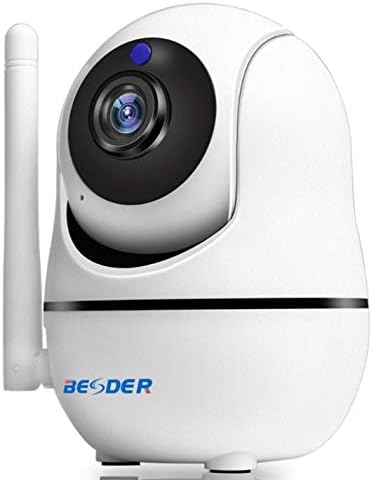
Obrázek 2: Přední view of the BESDER Smart Home Security Camera, highlighting the camera lens, infrared LEDs for night vision, and the status indicator light.

Obrázek 3: Zadní view of the BESDER Smart Home Security Camera, detailing the memory card slot (for microSD up to 128GB), reset button, built-in speaker, DC 5V power input, and the Ethernet network port for wired connection.
Klíčové komponenty:
- Objektiv fotoaparátu: Zachytí video footage.
- IR LED: Zajistěte infračervené osvětlení pro noční vidění.
- Kontrolka stavu: Indicates camera status (e.g., power on, network connection).
- Mikrofon: For audio input and two-way audio communication.
- Reproduktor: For audio output and two-way audio communication.
- Slot pro paměťovou kartu: Supports microSD cards up to 128GB for local storage.
- Resetovací tlačítko: Používá se k obnovení továrního nastavení.
- Vstup DC 5V: Připojuje se k dodanému napájecímu adaptéru.
- Síťový port (RJ45): Pro kabelové ethernetové připojení.
Nastavení
1. Zapnutí
- Connect the DC 5V power adapter to the camera's power input port.
- Zapojte napájecí adaptér do elektrické zásuvky.
- The camera will power on, and the status indicator light will illuminate. Wait for the camera to complete its self-test (it may pan and tilt).
2. Network Connection (Wired or Wireless)
The camera supports both wired (Ethernet) and wireless (Wi-Fi) connections.
Kabelové připojení:
- Connect one end of an Ethernet cable (not included) to the camera's network port.
- Připojte druhý konec ethernetového kabelu k routeru nebo síťovému přepínači.
- Kamera se automaticky připojí k síti.
Bezdrátové (Wi-Fi) připojení:
- Download the recommended mobile application (e.g., XMEYE or iCsee) from your device's app store (iOS or Android).
- Zaregistrujte si účet a přihlaste se.
- Follow the in-app instructions to add your camera. This typically involves scanning a QR code on the camera or using a Wi-Fi configuration method (e.g., AP mode, SmartLink).
- Ensure your mobile device is connected to the 2.4GHz Wi-Fi network you intend to connect the camera to.
- Enter your Wi-Fi password when prompted by the app.
- The camera will attempt to connect to your Wi-Fi network. Once connected, the status indicator light will change (refer to app or camera manual for specific light indications).
3. Instalace karty MicroSD (volitelné)
- Ensure the camera is powered off before inserting or removing the microSD card.
- Locate the microSD card slot (refer to Figure 3).
- Opatrně vložte kartu microSD do slotu zlatými kontakty směrem dolů, dokud nezacvakne na místo.
- Power on the camera. You may need to format the SD card via the mobile app settings for optimal performance.
Návod k obsluze
1. Mobile Monitoring (iOS/Android)
- Open the XMEYE or iCsee app on your smartphone.
- Vyberte fotoaparát ze seznamu zařízení, view živé vysílání.
- Use the on-screen controls to pan (horizontal rotation) and tilt (vertical rotation) the camera lens.
- Access playback of recorded footage stored on the microSD card or cloud service.
2. Obousměrný zvuk
- Zatímco viewing the live feed in the app, tap the microphone icon to speak through the camera's speaker.
- Klepnutím na ikonu reproduktoru si můžete poslechnout zvuk z mikrofonu fotoaparátu.
3. Infračervené noční vidění
- The camera automatically switches to IR night vision mode in low-light conditions.
- The IR LEDs will illuminate, providing clear black and white video up to 15 meters.
4. Detekce pohybu a alarmy
- Povolte detekci pohybu v nastavení aplikace.
- Configure sensitivity levels and detection zones as needed.
- When motion is detected, the camera can send push notifications to your phone and/or record footage.
5. Cloud Service
- The camera supports cloud storage services (subscription may be required).
- Refer to the mobile app for details on activating and managing cloud storage.
Údržba
- Čištění: K čištění objektivu a těla fotoaparátu používejte měkký, suchý hadřík. Nepoužívejte tekuté čisticí prostředky ani aerosoly.
- Aktualizace firmwaru: Regularly check for firmware updates via the mobile app to ensure optimal performance and security.
- Umístění: Ensure the camera is placed in a location where it is protected from direct water exposure and extreme temperatures.
- Správa SD karet: Periodically check the status of your microSD card. If it becomes full, older recordings may be overwritten, or recording may stop.
Odstraňování problémů
| Problém | Možná příčina | Řešení |
|---|---|---|
| Fotoaparát je offline/Nelze se připojit k Wi-Fi | Nesprávné heslo k Wi-Fi; Kamera je příliš daleko od routeru; Problémy s routerem; Síť Wi-Fi 5 GHz. |
|
| No image/Black screen | Power issue; Network issue; Lens obstruction. |
|
| Nefunguje obousměrný zvuk | Microphone/speaker disabled in app; Volume too low; Network latency. |
|
| Detekce pohybu se nespouští | Motion detection disabled; Sensitivity too low; Incorrect detection zone. |
|
| SD karta nenahrává | SD card full/corrupted; Incorrect format; SD card not inserted properly. |
|
Specifikace
| Funkce | Detail |
|---|---|
| Název modelu | BESDER Smart Home Security |
| Reference výrobce | ZX-X2-W/200W |
| Rozlišení videa | Full HD 1080P (1920x1080) |
| Senzor | 1/2.8'' F22 CMOS sensor (for 1080P) |
| Komprese videa | H.264, supports dual stream, 0.1 – 6 Mpbs |
| Čočka | 3.6 mm G7 (default) |
| Vzdálenost IR nočního vidění | Max 15 meters (6 IR LEDs) |
| Konektivita | Wi-Fi (2.4GHz), Wired Ethernet |
| Skladování | MicroSD card up to 128GB (not included), Cloud Service |
| Zvuk | Obousměrný zvuk (vestavěný mikrofon a reproduktor) |
| Mobilní monitorování | iOS, Android (APP: XMEYE or iCsee) |
| Napájení | DC 5V 2A |
| Pracovní teplota | -5 až 60 °C (23 až 140 °F) |
| Rozměry | 6.39 x 4.33 x 3.11 cm (přibližné rozměry balení) |
Záruka a podpora
For warranty information and technical support, please refer to the contact details provided with your purchase or visit the official BESDER webwebu. Uschovejte si účtenku jako doklad o koupi.
Výrobce: NEJLEPŠÍ