
Anet ET5X
Anet ET5X DIY 3D Printer Instruction Manual
Model: ET5X
Značka: Anet
1. Konec produktuview
The Anet ET5X is a DIY 3D printer designed for enthusiasts and professionals, featuring auto-leveling, resume printing functionality, and a large build volume. Its robust metal frame ensures stable and precise printing.

Figure 1.1: Anet ET5X 3D Printer with example tisky.
Klíčové vlastnosti:
- Auto Leveling with Resume Printing Function
- 3.5 Inch LCD Color Touch Screen
- Upgraded Over-Current Protection Mainboard
- Large Build Size: 11.8 x 11.8 x 15.7 inches (300x300x400mm)
- Metal Frame & Quick Assembly
Video 1.1: Anet ET5X 3D printer overview, showcasinjeho vlastnosti a možnosti.
Video 1.2: Anet ET5X DIY 3D Printer features, including auto-leveling and filament assignment.
2. Bezpečnostní pokyny
Please read and understand all safety instructions before operating the Anet ET5X 3D printer. Failure to follow these instructions may result in injury, property damage, or poor print quality.
- Horké povrchy: The print nozzle and heated bed can reach high temperatures. Avoid touching these components during operation or immediately after printing. Allow them to cool completely before handling.
- Pohyblivé části: The printer contains moving parts that can cause injury. Keep hands, hair, and loose clothing clear of the print head, bed, and gantry during operation.
- Větrání: Operate the printer in a well-ventilated area. Some filaments may produce fumes during printing.
- Elektrická bezpečnost: Ensure the printer is connected to a properly grounded power outlet. Do not operate with damaged power cords or plugs.
- Manipulace s filamentem: Use appropriate filament types for your printer. Store filament in a dry environment to prevent moisture absorption.
- Dozor: Do not leave the printer unattended during operation, especially during long prints.
3. Nastavení
3.1 Vybalení a úvodní kontrola
Carefully remove all components from the packaging. Inspect for any visible damage that may have occurred during transit. The packaging includes foam inserts to protect the printer components.
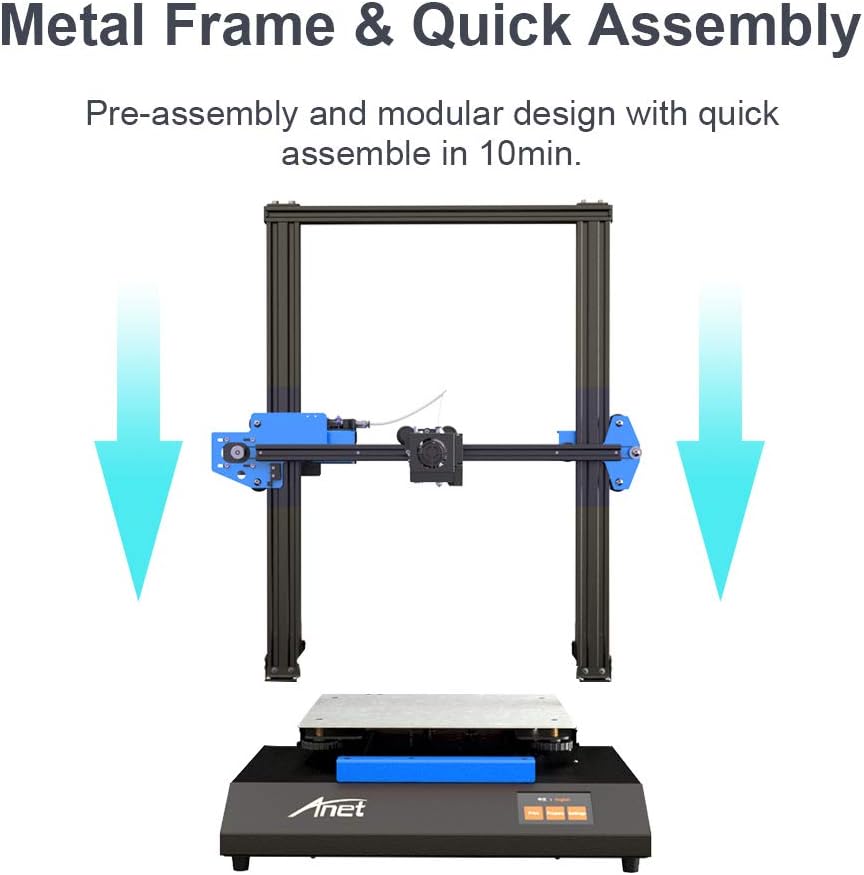
Figure 3.1: Anet ET5X components as packaged, showing the main frame and base.
3.2 Montáž
The Anet ET5X is designed for quick assembly. The main gantry comes pre-assembled and simply needs to be attached to the base unit. Follow these general steps:
- Place the base unit on a stable, level surface.
- Carefully align the gantry with the designated mounting points on the base.
- Secure the gantry to the base using the provided screws and tools.
- Connect the motor cables and other necessary wiring as indicated in the manual.
- Attach the filament spool holder to the top of the gantry.
3.3 Initial Power On and Touchscreen Interface
Connect the power cable and turn on the printer. The 3.5-inch LCD color touchscreen provides an intuitive user interface for controlling the printer's functions.

Figure 3.2: The intuitive touchscreen interface of the Anet ET5X.
3.4 Automatické vyrovnání postele
The ET5X features matrix automatic leveling, which measures 25 points across the print platform to ensure a perfectly level print surface. This significantly simplifies the setup process and improves print adhesion.

Figure 3.3: Matrix automatic leveling system in action.
3.5 Zatížení vlákna
The printer supports automatic filament assignment, allowing for easy loading and unloading of filament with just a click. Ensure the filament is properly fed into the extruder mechanism.

Figure 3.4: Automatic filament loading mechanism.
4. Provoz
4.1 Proces tisku
Once the printer is assembled, leveled, and filament is loaded, you can begin printing. Prepare your 3D models using compatible slicing software (not included) and transfer the G-code files to the printer via SD card or USB connection.

Figure 4.1: The Anet ET5X printing a large model.
4.2 Resume Printing Function
The Anet ET5X is equipped with a resume printing function, allowing it to recover and continue printing from the exact point it left off in case of an unexpected power outage. This feature helps prevent failed prints and saves material.

Figure 4.2: Power Outage Recovery feature.
4.3 Ultra Large Print Volume
The printer boasts an ultra-large print volume of 300x300x400mm (11.8x11.8x15.7 inches), enabling the creation of significantly larger models compared to standard desktop 3D printers.
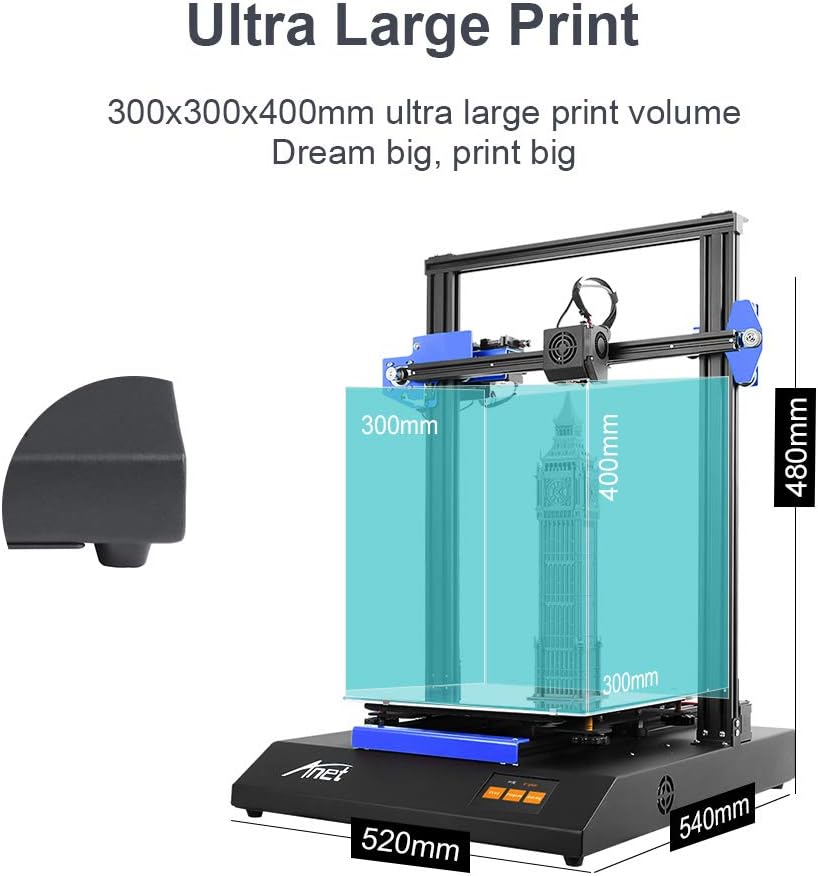
Figure 4.3: Ultra Large Print Volume capabilities.
5. Údržba
Regular maintenance ensures optimal performance and longevity of your Anet ET5X 3D printer.
- Čištění: Regularly clean the print bed, nozzle, and gantry rails to prevent debris buildup. Use a soft cloth and appropriate cleaning solutions.
- Údržba trysek: Periodically check the nozzle for wear or clogs. Replace the nozzle if print quality degrades significantly. The printer comes with an extra 0.4mm nozzle.
- Napnutí řemene: Ensure the X and Y axis belts are properly tensioned. Overly loose or tight belts can affect print accuracy. Adjust using the eccentric nuts if necessary.
- Mazání: Apply a small amount of lubricant to the Z-axis lead screws periodically to ensure smooth movement.
6. Řešení problémů
This section addresses common issues you might encounter with your Anet ET5X 3D printer.
6.1 Common Print Issues
- Špatná přilnavost k lůžku: Ensure the print bed is clean and level. Adjust Z-offset if the first layer is not sticking or is too squished. Consider using an adhesive like glue stick or hairspray.
- Zanášení filamentu: This can be caused by heat creep, incorrect temperature settings, or dirty nozzles. Ensure proper cooling of the hotend and try a cold pull to clear clogs.
- Posun vrstev: Often caused by loose belts, motor issues, or physical obstructions. Check belt tension and ensure smooth movement of all axes.
6.2 Z-Axis Homing Issues
Some users have reported Z-axis homing issues where the printer does not home correctly. This can sometimes be related to firmware bugs or sensor calibration. Anet has indicated plans to release open-source firmware to address such issues.
6.3 aktualizací firmwaru
Anet is actively working on firmware updates to improve functionality and address known bugs. Check the official Anet website or support channels for the latest firmware versions and installation instructions.
7. Specifikace
| Atribut | Hodnota |
|---|---|
| Značka | Anet |
| Rozměry produktu | 11.8"H x 11.8"Š x 15.7"V |
| Hmotnost položky | 21.3 liber (9.7 kilogramů) |
| Barva | Černý |
| Kompatibilní zařízení | Notebook, Smartphone |
| Datum první dostupnosti | 20. dubna 2020 |

Figure 7.1: Anet ET5X 3D Printer dimensions.
8. Záruka a podpora
For warranty details, please refer to your purchase documentation or contact the retailer where you purchased the Anet ET5X 3D Printer.
For additional support, including troubleshooting tips, FAQs, and firmware updates, please visit the official Anet webweb nebo jejich stránka v obchodě na Amazonu:
- Anet Official Store on Amazon
- Můžete se také odkázat na Uživatelská příručka (PDF) or Uživatelská příručka (PDF) dodávané s produktem.
Ask a question about this manual
Ask about setup, troubleshooting, compatibility, parts, safety, or missing instructions. Manuals+ will review the question and use this page’s manual context to help answer it.