
1. Úvod
The Maxcom MM38D is a portable senior phone designed for ease of use, featuring large backlit keys, a clear 2.2-inch display, and essential communication functions. This manual provides comprehensive instructions for setting up, operating, and maintaining your device, ensuring you can utilize all its features effectively, including the dedicated SOS button, FM radio, and camera.
2. Bezpečnostní informace
- Nevystavujte telefon extrémním teplotám, přímému slunečnímu záření ani vlhkosti.
- Používejte pouze originální nebo schválené baterie a nabíječky, abyste předešli poškození a zajistili bezpečnost.
- Avoid dropping or subjecting the phone to severe impacts.
- Nepokoušejte se zařízení rozebírat ani opravovat sami. Obraťte se na autorizovaný servisní personál.
- Dispose of batteries and the device responsibly according to local regulations.
3. Obsah balení
Before using your Maxcom MM38D, please verify that all the following items are included in the package:
- Maxcom MM38D Phone
- Baterie
- Nabíječka
- Uživatelská příručka
4. Uspořádání zařízení
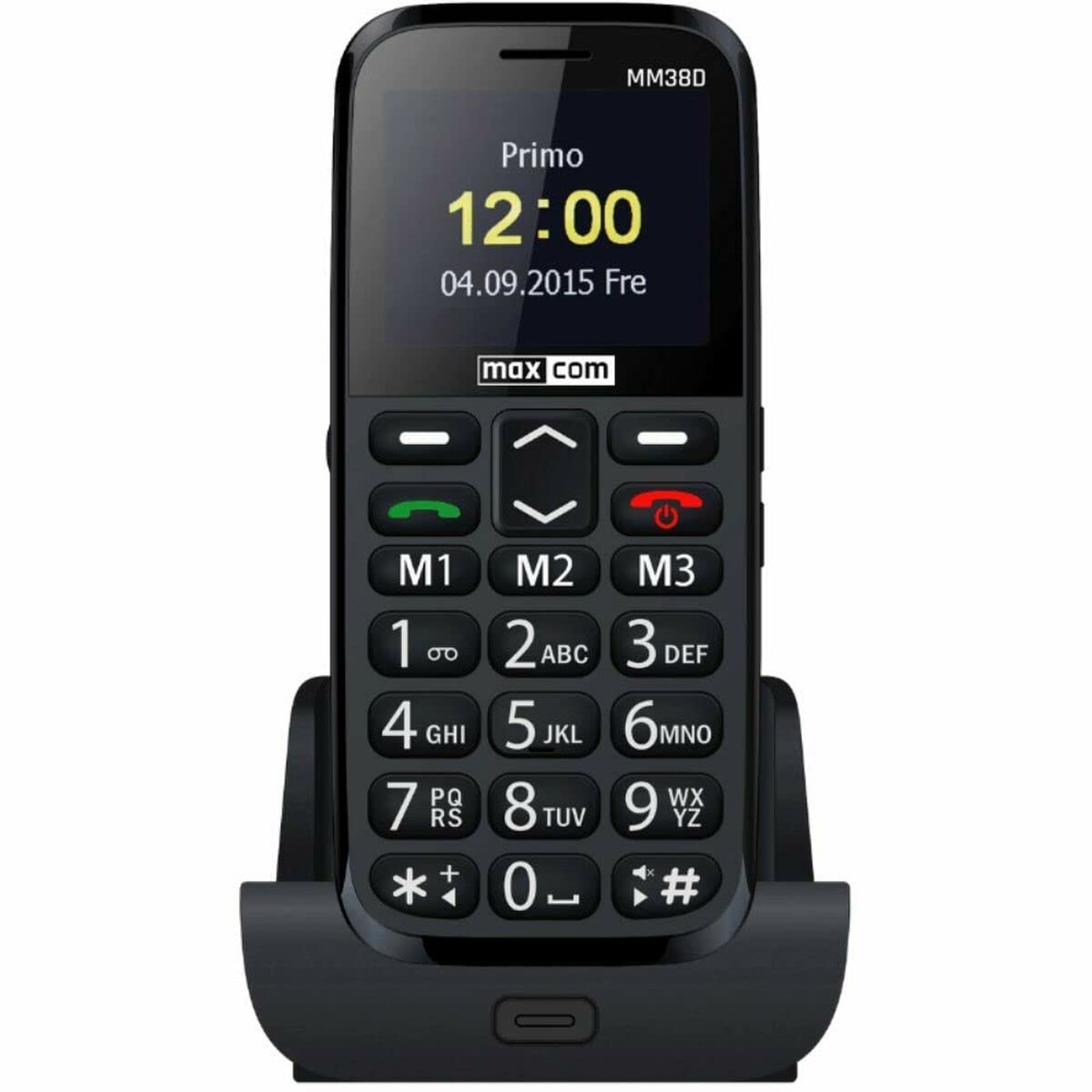
Familiarize yourself with the physical components of your Maxcom MM38D phone.
This image displays the rear panel of the Maxcom MM38D phone. Visible components include the camera lens in the upper left, a circular SOS button to its right, and a speaker grille with a grid pattern further to the right. The 'max com' logo is printed at the bottom.
Klíčové komponenty:
- Displej: 2.2-inch color display for menus and information.
- Alfanumerická klávesnice: Large, backlit keys for dialing and text input.
- Navigační klávesy: For scrolling through menus and options.
- Tlačítka pro volání/ukončení hovoru: Pro zahájení a ukončení hovorů.
- SOS tlačítko: Located on the back for emergency calls and messages.
- Fotoaparát: 2-megapixel camera on the rear.
- Svítilna: Integrovaný zdroj světla.
- Nabíjecí port: Pro připojení nabíječky.
- Sluchátkový jack: For connecting headphones (may also serve as FM antenna).
5. Nastavení
5.1. Instalace SIM karty
- Odstraňte zadní kryt telefonu.
- Opatrně vyjměte baterii.
- Locate the SIM card slot. Insert your 2G compatible SIM card into the slot, ensuring the gold contacts face downwards and the cut corner aligns with the slot's orientation.
- Jemně zatlačte SIM kartu, dokud nezacvakne na místo.
5.2. Instalace baterie
- Align the battery's metal contacts with the contacts in the phone's battery compartment.
- Press the battery down gently until it fits securely.
- Nasaďte zpět zadní kryt a ujistěte se, že pevně zacvakne na své místo.
5.3. Nabíjení baterie
- Připojte nabíjecí kabel k nabíjecímu portu na telefonu.
- Zapojte nabíječku do standardní elektrické zásuvky.
- Indikátor baterie na obrazovce bude zobrazovat stav nabíjení. Před prvním použitím nechte telefon plně nabít.
5.4. Zapnutí/vypnutí
- Zapnutí: Stiskněte a podržte Napájení/Ukončení hovoru dokud se obrazovka nerozsvítí.
- Vypnutí: Stiskněte a podržte Napájení/Ukončení hovoru tlačítko, dokud se nezobrazí možnosti vypnutí, a poté potvrďte.
6. Návod k obsluze
6.1. Základní navigace
Použijte Navigační klávesy (up, down, left, right) to move through menus and options. Press the central OK/Vybrat tlačítko pro potvrzení výběru.
6.2. Uskutečňování a přijímání hovorů
- Chcete-li zavolat: Zadejte telefonní číslo pomocí klávesnice a stiskněte Volání tlačítko.
- Chcete-li přijmout hovor: Když telefon zvoní, stiskněte Volání tlačítko.
- Ukončení hovoru: Stiskněte tlačítko Ukončit hovor tlačítko.
- Funkce handsfree: Activate the hands-free speaker during a call via the on-screen option.
6.3. Odesílání a přijímání zpráv (SMS)
- Přejděte na Zprávy menu.
- Vybrat Napište zprávu or Nová SMS.
- Napište zprávu pomocí alfanumerické klávesnice.
- Zadejte číslo příjemce nebo jej vyberte z kontaktů.
- Stiskněte Poslat.
6.4. Použití tlačítka SOS
The SOS button is a critical safety feature. To use it:
- Ensure emergency contacts are pre-programmed in the phone's settings (usually under SOS settings).
- V případě nouze stiskněte a podržte SOS tlačítko na zadní straně telefonu na několik sekund.
- The phone will automatically call and send a pre-set emergency message to your designated contacts.
6.5. Další funkce
- FM rádio: Access the 'FM Radio' application from the main menu. Connect headphones to serve as an antenna for better reception.
- Svítilna: Activate the flashlight function through the menu or a dedicated shortcut key (refer to your phone's specific key assignments).
- Fotoaparát: Open the 'Camera' application to take photos. The phone is equipped with a 2-megapixel camera.
- Kontakty: Store up to 300 contacts. Access the 'Contacts' menu to add, edit, or search for entries.
- Kalendář a budík: Set reminders and multiple alarms through the 'Calendar' and 'Alarm' applications.
- Bluetooth: Enable Bluetooth in the 'Settings' menu to connect to compatible wireless headsets or other devices.
- Audio/Video Player: Přehrávání zvuku a videa files stored on the phone or a Micro SD card.
7. Údržba
- Čištění: Use a soft, dry, lint-free cloth to clean the phone's screen and body. Avoid using liquid cleaners or aerosols.
- Péče o baterie: To prolong battery life, avoid fully discharging the battery frequently. Do not leave the phone connected to the charger for extended periods after it is fully charged.
- Skladování: Store the phone in a cool, dry place when not in use. Avoid dusty environments.
- Voděodolnost: The Maxcom MM38D is not water-resistant. Keep it away from liquids.
8. Řešení problémů
If you encounter issues with your Maxcom MM38D, refer to the following common problems and solutions:
| Problém | Řešení |
|---|---|
| Telefon se nezapne | Ujistěte se, že je baterie nabitá a správně vložená. Zkuste telefon nabíjet alespoň 30 minut. |
| Nelze uskutečňovat ani přijímat hovory | Check if the SIM card is properly inserted and activated. Verify network signal strength. Ensure you have sufficient credit or an active plan. |
| Tlačítko SOS nefunguje | Confirm that emergency contacts are set up in the SOS settings menu. Ensure the phone has network coverage. |
| Špatná kvalita zvuku během hovorů | Check the call volume settings. Ensure the speaker and microphone are not obstructed. Move to an area with better network reception. |
| Baterie se rychle vybíjí | Snižte jas obrazovky. Zavřete nepoužívané aplikace. Omezte využití dat na pozadí. Zvažte výměnu staré baterie. |
9. Specifikace
| Funkce | Specifikace |
|---|---|
| Značka | Maxcom |
| Model | MM38D |
| Operační systém | Android 10.0 |
| Velikost obrazovky | 2.2 palce |
| Rozlišení fotoaparátu | 2 megapixelů |
| Konektivita | Bluetooth, 2G GSM |
| Paměťové úložiště | 1 GB |
| Barva | Černý |
| Speciální funkce | SOS button, FM Radio, Flashlight, Calendar, Audio/Video Player, Alarm, Hands-free function, Large backlit keys, 300-contact directory, Micro SD support |
10. Záruka a podpora
For detailed warranty information, terms, and conditions, please refer to the warranty card or documentation included with your purchase. For technical support, product inquiries, or service requests, please visit the official Maxcom webnebo kontaktujte jejich oddělení zákaznických služeb pomocí kontaktních údajů uvedených na obalu produktu.