
1. Úvod
This manual provides essential information for the proper setup, operation, and maintenance of your GreenTouch 18.5-inch Industrial Open-Frame Capacitive Touch Monitor. Please read this manual thoroughly before using the product and keep it for future reference.
Klíčové vlastnosti
- Advanced Touch Technology: Features projected capacitive (G+G) 10-point multi-touch for excellent optical clarity and durability.
- Robustní design: Equipped with 3mm thick reinforced cover glass, offering front IK08 impact resistance and front IP65 waterproof sealing against dirt, dust, and liquids.
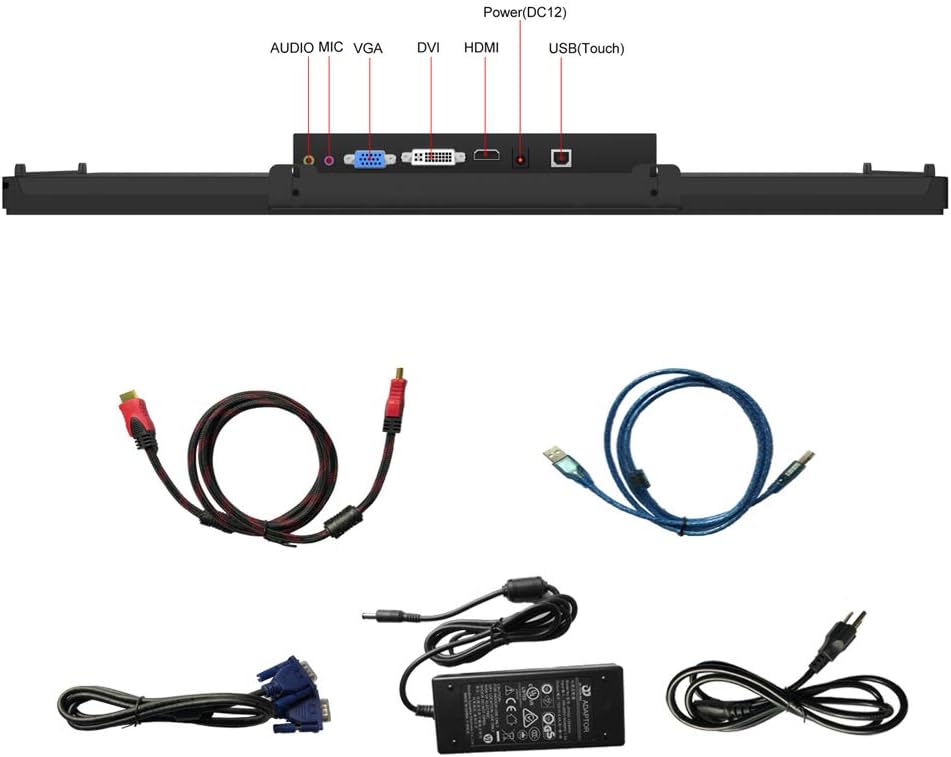
- Všestranná konektivita: Includes HDMI, VGA, DVI, and Audio interfaces to support a wide range of professional display applications.
- Commercial Grade Reliability: Engineered for quality and reliability, with an integrated touch solution designed, built, and supported by GreenTouch.
- Vylepšená stabilita: Proprietary touch screen and technology are designed to work seamlessly together, undergoing over 20 strict reliability tests to achieve 50,000 MTBF (Mean Time Between Failures).
2. Co je v krabici
Po vybalení se prosím ujistěte, že jsou všechny následující položky součástí balení a v dobrém stavu:
- GreenTouch 18.5-inch Touch Monitor
- Napájecí adaptér (DC 12V)
- HDMI kabel
- USB-C Cable (for touch functionality and signal/power for compatible devices)
- VGA kabel
- DVI kabel
- Mounting Screws for VESA
- Uživatelská příručka (tento dokument)
3. Nastavení
3.1 Připojení monitoru
- Připojení napájení: Connect the provided power adapter to the DC12V port on the monitor and then to a power outlet.
- Připojení videa: Vyberte jednu z následujících možností:
- HDMI: Connect the HDMI cable from your source device to the HDMI port on the monitor.
- VGA: Connect the VGA cable from your source device to the VGA port on the monitor.
- DVI: Connect the DVI cable from your source device to the DVI port on the monitor.
- USB-C (plná funkce): For compatible devices (supporting DisplayPort Alternate Mode and power delivery), connect a full-function USB-C cable from your device to the designated USB-C port on the monitor. This single cable can transmit video, touch signals, and power.
- Dotyková funkce: If using HDMI, VGA, or DVI for video, connect the USB(Touch) port on the monitor to a USB port on your source device using the appropriate USB cable to enable touch input.
- Audio připojení: If your source device supports audio output via the selected video connection, the monitor's built-in speakers will function. For external audio, connect speakers or headphones to the audio output port.
3.2 Možnosti montáže
The monitor supports both flush mounting and VESA mounting for flexible installation.

3.2.1 Montáž VESA
The monitor is equipped with VESA mounting holes, allowing it to be attached to a VESA-compatible stand or wall mount (not always included). The VESA pattern is 75x75mm and 100x100mm.

- Align the VESA mount bracket with the screw holes on the back of the monitor.
- Secure the bracket using the provided VESA mounting screws.
- Attach the monitor to your VESA-compatible stand or wall mount.
3.2.2 Integrovaný stojan
The monitor features an integrated adjustable stand that allows for angle adjustments up to 45 degrees for optimal viewIng.
4. Návod k obsluze
4.1 Zapnutí/vypnutí
Press the power button located on the side of the monitor to turn it on or off. The LED indicator will show the power status.
4.2 Touch Functionality
The 10-point capacitive touch screen allows for intuitive interaction. Use gestures such as tap, drag, pinch-to-zoom, and swipe for navigation and control, similar to a smartphone or tablet.
4.3 Režimy zobrazení
The monitor supports various display modes when connected to a compatible device, catering to different needs for work, gaming, or video editing:
- Duplicitní režim: Zrcadlí obsah vašeho primárního displeje.
- Rozšířený režim: Extends your desktop workspace, allowing for multi-tasking across two screens.
- Režim pouze druhé obrazovky: Displays content only on the monitor, turning off the primary display.
4.4 Nabídka na obrazovce (OSD)
Use the control buttons on the side of the monitor to navigate and adjust settings via the OSD menu. These controls typically include:
- Zapnutí/vypnutí
- Zvýšení/snížení hlasitosti
- Menu Navigation (Up/Down/Select)
- Nastavení jasu a kontrastu
- Výběr zdroje vstupu
- Nastavení barev
5. Údržba
To ensure the longevity and optimal performance of your GreenTouch monitor, follow these maintenance guidelines:
- Čištění obrazovky: Lehce používejte měkký hadřík, který nepouští vlákna dampened with water or a non-abrasive screen cleaner. Avoid harsh chemicals, alcohol, or ammonia-based cleaners.
- Čištění Casing: Otřete monitor casinměkkým, suchým hadříkem.
- Větrání: Zajistěte dostatečné větrání kolem monitoru. Neblokujte žádné větrací otvory.
- Skladování: Pokud monitor delší dobu nepoužíváte, skladujte jej na chladném a suchém místě, mimo dosah přímého slunečního záření a extrémních teplot.
- Zacházení: S monitorem zacházejte opatrně. Zabraňte jeho pádu nebo silným nárazům.
6. Řešení problémů
Pokud narazíte na problémy s monitorem, postupujte podle následujících běžných kroků pro řešení problémů:
| Problém | Možná příčina | Řešení |
|---|---|---|
| Žádný displej/LED indikátor napájení nesvítí | Žádné napájení | Check if the power adapter is securely connected to the monitor and a working power outlet. Press the power button. |
| Žádný signál | Incorrect input source or loose cable | Verify video cable connections (HDMI, VGA, DVI, USB-C). Select the correct input source via the OSD menu. |
| Dotyková funkce nefunguje | USB touch cable not connected or driver issue | Ensure the USB(Touch) cable is connected from the monitor to your device. For Windows, check device manager for touch screen drivers. For USB-C, ensure it's a full-function cable and your device supports touch over USB-C. |
| Blikající nebo zkreslený obraz | Faulty cable or resolution mismatch | Try a different video cable. Adjust the display resolution on your source device to match the monitor's native resolution (1366x768). |
| Monitor is unstable on a surface | Stand not properly deployed or surface is uneven | Ensure the integrated stand is fully extended and locked into position, or that the VESA mount is securely fastened. Place the monitor on a flat, stable surface. |
If the problem persists after trying these steps, please contact GreenTouch customer support.
7. Specifikace
| Funkce | Detail |
|---|---|
| Značka | GreenTouch |
| Číslo modelu | GT-TM-1852C-CTW-HD |
| Velikost obrazovky | 18.5 palců |
| Rezoluce | 1366 x 768 pixels (XGA Wide) |
| Poměr stran | 16:9 |
| Povrch obrazovky | Lesklý |
| Kontrastní poměr | 1000:1 |
| Obnovovací frekvence | 60 Hz |
| Typ zobrazení | LCD, LED |
| Jas | 250 svíčka |
| Doba odezvy | 10 ms |
| Dotyková technologie | Projected Capacitive (G+G) 10-point touch |
| Odolnost proti nárazu | Front IK08 |
| Hodnocení voděodolnosti | Přední IP65 |
| Video vstupy | HDMI, VGA, DVI, USB-C (Full Function) |
| Zvuk | Built-in Speakers, Audio Output |
| svtage | 12 V (DC) |
| Rozměry položky (D x Š x V) | 4.7 x 45.7 x 28.2 cm |
| Hmotnost položky | 4.5 kg |
| VESA Mount | 75x75mm, 100x100mm |
8. Záruka a podpora
8.1 Informace o záruce
This GreenTouch monitor comes with a 2letá záruka výrobce od data nákupu. Tato záruka se vztahuje na vady materiálu a zpracování při běžném používání. Nevztahuje se na škody způsobené nesprávným použitím, nehodami, neoprávněnými úpravami nebo vnějšími vlivy.
Uschovejte si prosím doklad o koupi pro uplatnění záruky.
8.2 Zákaznická podpora
For technical assistance, troubleshooting beyond this manual, or warranty inquiries, please contact GreenTouch customer support through the official website or your retailer. Provide your product model number (GT-TM-1852C-CTW-HD) and purchase details when contacting support.