
EARISE T26 Pro
Uživatelská příručka k karaoke systému EARISE T26 PRO
Model: T26 Pro
Zavedení
Thank you for choosing the EARISE T26 PRO Karaoke Machine. This portable Bluetooth PA speaker system is designed to provide high-quality audio and versatile entertainment options. It features two wireless microphones, vibrant LED lights, FM radio, audio recording capabilities, and supports multiple input sources including TF card, USB, and AUX. This manual provides detailed instructions for setting up, operating, and maintaining your device to ensure optimal performance and longevity.

Figure 1: EARISE T26 PRO Karaoke Machine, showing the main speaker unit, two wireless microphones, and the remote control.
Obsah balení
Pečlivě zkontrolujte balíček, abyste se ujistili, že jsou všechny položky přítomny a v dobrém stavu:
- EARISE T26 PRO Karaoke Machine (Main Unit)
- 2 x bezdrátové mikrofony
- 1 x Dálkové ovládání
- 1 x USB nabíjecí kabel
- Kabel 1 x AUX
- Uživatelská příručka (tento dokument)
Vlastnosti produktu
- Přenosný PA systém: Kompaktní a lehký design pro snadnou přepravu.
- Duální bezdrátové mikrofony: Enjoy singing with friends or for presentations.
- Připojení Bluetooth 5.0: Seamless wireless streaming from compatible devices.
- Přehrávání z více zdrojů: Supports TF Card, USB flash drive, and AUX input.
- FM rádio: Vestavěný FM tuner pro poslech vašich oblíbených stanic.
- Záznam zvuku: Record your performances directly to a USB drive or TF card.
- Dynamická LED světla: Colorful lights that sync with the music for an enhanced experience.
- Nastavitelné ovládací prvky: Independent volume controls for microphone and master output, plus bass and echo adjustments.
- Dlouhá výdrž baterie: Vestavěná baterie s kapacitou 4400 mAh pro delší používání.
- Dálkové ovládání: Pohodlné ovládání na dálku.
Ovládací prvky a rozhraní
Familiarize yourself with the control panel and ports on your EARISE T26 PRO:

Figure 2: Top panel controls and rear ports diagram.
- Vstup mikrofonu: 6.35mm jack for wired microphone input (if desired).
- Slot na kartu TF: Insert a TF (MicroSD) card for music playback or recording.
- Slot pro USB flash disk: Insert a USB flash drive for music playback or recording.
- Aux In: 3.5mm audio vstup pro připojení externích zařízení.
- USB 5V Charging Port: Vstupní napětí pro nabíjení jednotky.
- Zapnutí/vypnutí: Hlavní vypínač pro jednotku.
- EQ: Equalizer button to cycle through preset sound modes.
- Přehrát/pozastavit: Play or pause current audio track.
- Záznam: Start or stop audio recording.
- Repeat/Light: Repeat current track or toggle LED lights.
- Echo: Adjust the echo effect for microphones.
- režim: Přepínání mezi režimy Bluetooth, FM, AUX, USB a TF karta.
- Předchozí skladba: Go to the previous audio track.
- Další skladba: Go to the next audio track.
- Hlasitost mikrofonu: Adjust the volume of the connected microphones.
- Bas: Adjust the bass level of the audio output.
- Hlavní hlasitost: Adjust the overall master volume of the speaker.
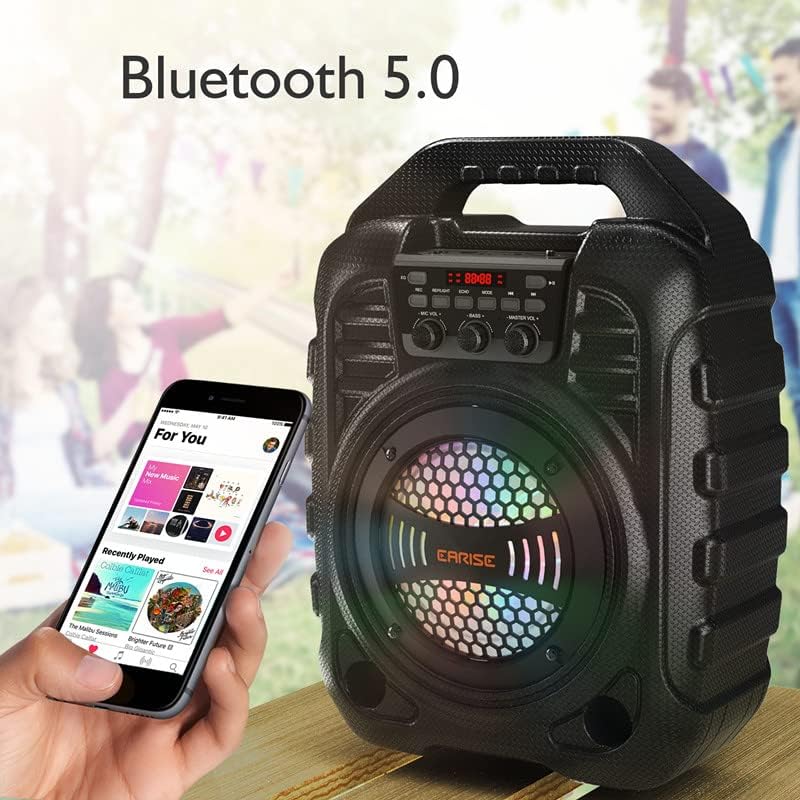
Obrázek 3: Detailní view of the main control knobs and buttons.
Průvodce nastavením
1. Nabíjení jednotky
Before first use, fully charge the karaoke machine. Connect the provided USB charging cable to the USB 5V Charging Port (5) on the unit and the other end to a standard USB power adapter (not included) or a computer USB port. The charging indicator will show the charging status. A full charge takes approximately 6 hours.

Figure 4: Battery capacity and charging time information.
2. Inserting Microphone Batteries
Each wireless microphone requires 2 x AA batteries (not included). Open the battery compartment at the bottom of the microphone and insert the batteries, ensuring correct polarity. Close the compartment securely.
3. Zapnutí
Flip the Power On/Off switch (6) to the "ON" position. The digital display will light up, indicating the unit is powered on.
Návod k obsluze
Režim Bluetooth
- Turn on the EARISE T26 PRO. It will automatically enter Bluetooth pairing mode, indicated by a flashing "BLUE" on the display.
- Na svém mobilním zařízení (chytrém telefonu, tabletu atd.) povolte Bluetooth a vyhledejte dostupná zařízení.
- Select "EARISE T26 PRO" from the list. Once paired, the unit will emit a confirmation sound, and "BLUE" will stop flashing.
- You can now play audio from your device through the karaoke machine. Use the Play/Pause (8), Previous Track (13), and Next Track (14) buttons on the unit or remote, or control playback directly from your device.

Figure 5: Bluetooth 5.0 connectivity in action.
Režim rádia FM
- Press the Mode button (12) repeatedly until "FM" appears on the display.
- Press and hold the Play/Pause button (8) to initiate an automatic scan for FM stations. The unit will save all found stations.
- Use the Previous Track (13) and Next Track (14) buttons to navigate between saved FM stations.
Přehrávání USB/TF karty
- Insert a USB flash drive into the USB Flash Drive Slot (3) or a TF card into the TF Card Slot (2).
- The unit will automatically switch to USB or TF card mode and begin playing audio files (MP3, WAV, etc.). If it doesn't, press the Mode button (12) to select the correct input.
- Use the Play/Pause (8), Previous Track (13), and Next Track (14) buttons to control playback.
Režim vstupu AUX
- Connect one end of the provided AUX cable to the Aux In port (4) on the karaoke machine and the other end to the audio output of your external device (e.g., laptop, MP3 player).
- Press the Mode button (12) until "AUX" appears on the display.
- Control audio playback directly from your external device.
Použití mikrofonů
- Ensure batteries are inserted into the wireless microphones and they are powered on. They will automatically connect to the main unit.
- Adjust the Microphone Volume knob (15) to control the microphone's output level.
- Use the Echo knob (11) to add or reduce echo effect to your voice.
- For optimal sound, speak or sing directly into the microphone grille.

Figure 6: Enjoying karaoke with the wireless microphones.
Záznam zvuku
You can record your microphone input along with any background music playing from USB/TF card or AUX input.
- Ensure a USB flash drive or TF card is inserted into the unit.
- Press the Record button (9) to start recording. The display will indicate recording is active.
- Press the Record button (9) again to stop recording. The recorded file budou uloženy na USB disk nebo TF kartu.
Ovládání LED světel
The speaker features dynamic LED lights that enhance the party atmosphere.
- Press the Repeat/Light button (10) to toggle the LED lights on or off.
- The lights will typically react to the rhythm of the music.

Figure 7: Colorful LED lights in operation.
Pomocí dálkového ovládání
The included remote control allows for convenient operation from a distance. Ensure the remote has batteries and point it towards the front of the karaoke machine.

Figure 8: Remote control and its storage feature.
Údržba
- Čištění: K čištění povrchu jednotky používejte měkký, suchý hadřík. Nepoužívejte abrazivní čisticí prostředky ani rozpouštědla.
- Skladování: Pokud přístroj delší dobu nepoužíváte, skladujte jej na chladném a suchém místě mimo dosah přímého slunečního záření a extrémních teplot.
- Péče o baterie: If storing for a long time, it is recommended to charge the unit every 3 months to maintain battery health. Remove batteries from microphones if not used for extended periods to prevent leakage.
- Vyhněte se vodě: Keep the unit away from water and moisture to prevent damage.
Odstraňování problémů
| Problém | Možná příčina | Řešení |
|---|---|---|
| Jednotka se nezapne. | Baterie je vybitá. | Charge the unit using the USB charging cable. |
| Z reproduktoru není slyšet žádný zvuk. | Master volume is too low; incorrect mode selected; device not connected properly. | Increase Master Volume (17). Press Mode (12) to select correct input. Reconnect Bluetooth/AUX cable. |
| Mikrofony nefungují. | Microphone batteries are low or inserted incorrectly; Microphone Volume (15) is too low. | Replace microphone batteries, ensuring correct polarity. Increase Microphone Volume (15). |
| Párování Bluetooth se nezdařilo. | Unit is not in pairing mode; device is too far; interference. | Ensure unit is in Bluetooth mode (flashing "BLUE"). Move device closer. Turn off other Bluetooth devices. |
| USB/TF karta nepřehrává. | Nepodporováno file formát; karta/mechanika nebyla správně vložena; poškozeno files. | Zajistit files are MP3/WAV format. Reinsert card/drive. Try a different card/drive. |
Specifikace
| Funkce | Detail |
|---|---|
| Číslo modelu | T26 Pro |
| Značka | EARISE |
| Typ montáže | Stojící na podlaze |
| Zdroj napájení | Napájení z baterie |
| Typ konektoru | Aux |
| Hmotnost položky | 2 kilogramů (4.4 liber) |
| Výstupní Wattage | 12 wattů |
| Počet kanálů | 2 |
| Zvukový vstup | Bluetooth, AUX-in, USB, TF Card |
| Rozměry produktu (D x Š x V) | 10.1 x 5.6 x 13.4 palce |
| Baterie | 2 Lithium Metal batteries (included, for unit) |
| Technologie připojení | Bluetooth, USB, AUX |
| Barva | Černý |
| Kompatibilní zařízení | Bluetooth devices, AUX-compatible devices, TF card/USB-compatible devices |
Záruka a podpora
EARISE products are designed and manufactured to the highest quality standards. For information regarding warranty coverage, please refer to the warranty card included with your purchase or visit the official EARISE webmísto.
If you encounter any issues or have questions about your EARISE T26 PRO Karaoke Machine, please contact our customer support team:
- Online podpora: Visit the EARISE official webweb s nejčastějšími dotazy a zdroji podpory.
- E-mailová podpora: Kontaktní e-mailovou adresu naleznete na obalu produktu nebo v záručním listu.
Uschovejte si prosím doklad o koupi pro uplatnění záruky.
Ask a question about this manual
Ask about setup, troubleshooting, compatibility, parts, safety, or missing instructions. Manuals+ will review the question and use this page’s manual context to help answer it.