
1. Úvod
Thank you for choosing the ANMEATE SM935E Video Baby Monitor. This device is designed to provide a secure and reliable way to monitor your baby. It features a remote pan-tilt-zoom camera, infrared night vision, two-way audio communication, room temperature display, and built-in lullabies. This manual will guide you through the setup, operation, and maintenance of your new baby monitor.
2. Důležité bezpečnostní informace
- Nebezpečí uškrcení: Keep all cords out of reach of children (at least 3 feet / 0.9 meters away). Never place the camera or monitor within reach of the baby.
- Nebezpečí udušení: This product contains small parts. Keep them away from children.
- Přehřívání: Do not cover the monitor or camera with clothing, blankets, or any other material. Ensure proper ventilation.
- Voda a vlhkost: Do not expose the product to water or moisture. Do not use near sinks, bathtubs, or wet areas.
- Zdroje energie: Use only the AC power adapters provided with the product. Using other adapters may damage the device and void the warranty.
- Rušení: Udržujte výrobek mimo dosah jiných elektronických zařízení, která mohou způsobovat rušení, jako jsou mikrovlnné trouby nebo Wi-Fi routery.
- Dohled dospělých: This product is intended to be an aid. It is not a substitute for responsible adult supervision.
3. Obsah balení
Ověřte, zda jsou v balení přítomny všechny komponenty:
- rodičovská jednotka (monitor)
- Dětská jednotka (kamera)
- Napájecí adaptér pro rodičovskou jednotku
- Napájecí adaptér pro dětskou jednotku
- Uživatelská příručka (tento dokument)
- Wall Mount Kit (screws and drywall anchors)

Image: ANMEATE SM935E Baby Monitor and Camera units.
4. Nastavení
4.1 Napájení dětské jednotky (kamery)
- Umístěte dětskou jednotku na místo, které poskytuje volný view of your baby, ensuring it is at least 3 feet (0.9 meters) away from the baby's crib or bed.
- Connect the small plug of the Baby Unit power adapter to the DC-IN jack on the back of the Baby Unit.
- Zapojte větší konec napájecího adaptéru do standardní elektrické zásuvky.
- The Baby Unit will automatically power on and begin transmitting.
4.2 Powering the Parent Unit (Monitor)
- Connect the small plug of the Parent Unit power adapter to the DC-IN jack on the side of the Parent Unit.
- Zapojte větší konec napájecího adaptéru do standardní elektrické zásuvky.
- Stiskněte a podržte tlačítko napájení (⏻) on the Parent Unit for a few seconds to turn it on.
- The Parent Unit will automatically connect to the Baby Unit. If connection is not established, refer to the Troubleshooting section.
4.3 Wall Mounting the Camera (Optional)
The camera can be wall-mounted for optimal viewing angles. Use the provided wall mount kit.
- Choose a suitable location on the wall, ensuring it is out of reach of children and provides a good view z postýlky.
- Mark the positions for drilling using the wall mount bracket as a template.
- Drill pilot holes and insert the drywall anchors if necessary.
- Připevněte nástěnný držák ke zdi pomocí dodaných šroubů.
- Attach the Baby Unit to the wall mount bracket.

Image: Illustration of the camera's 355° pan and 120° tilt capabilities.
5. Návod k obsluze
5.1 Základní monitorování
Once both units are powered on and connected, the Parent Unit will display live video from the Baby Unit. The screen shows the video feed, signal strength, battery level, and room temperature.
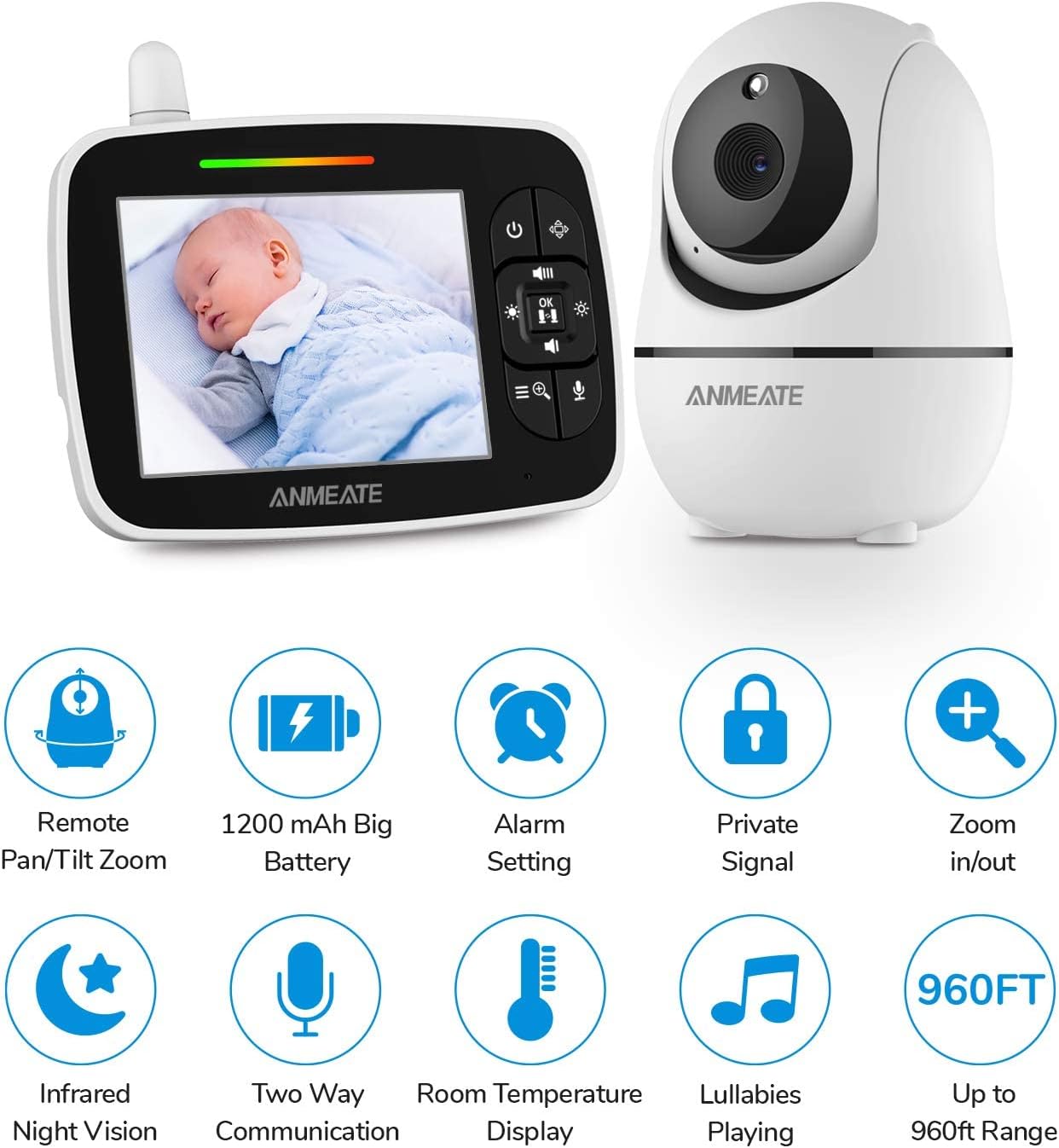
Obrázek: Overview of the ANMEATE SM935E monitor and camera, highlighting key features like pan-tilt-zoom, battery, alarm, private signal, zoom, night vision, two-way communication, room temperature, lullabies, and range.
5.2 Remote Pan-Tilt-Zoom
Pomocí směrových tlačítek na rodičovské jednotce můžete dálkově upravit nastavení kamery. viewúhel:
- Stiskněte tlačítko Nahoru/dolů arrows to tilt the camera vertically (up to 120°).
- Stiskněte tlačítko Vlevo/vpravo arrows to pan the camera horizontally (up to 355°).
- Stiskněte tlačítko Přiblížení button (magnifying glass icon) to zoom in or out on the video feed.
5.3 Obousměrná komunikace
To speak to your baby through the camera's speaker:
- Stiskněte a podržte Mikrofon button on the Parent Unit.
- Mluvte jasně do mikrofonu na rodičovské jednotce.
- Po domluvení tlačítko uvolněte.

Image: A parent holding the monitor, demonstrating the two-way talk feature with speech bubbles indicating communication with the baby.
5.4 ukolébavky
Jak přehrát ukolébavky svému dítěti:
- Stiskněte tlačítko Menu button on the Parent Unit.
- Navigate to the Lullaby icon (musical note) and select it.
- Choose from the available lullabies to play.

Image: The baby monitor camera in a nursery setting, with musical notes indicating the lullaby feature.
5.5 Monitorování pokojové teploty
The Baby Unit has a built-in temperature sensor that displays the room temperature on the Parent Unit. You can set alerts for high or low temperatures through the menu settings to ensure your baby's comfort.

Image: The baby monitor displaying a temperature alert, with an illustration of the temperature sensor on the camera and temperature fluctuations.
5.6 Infračervené noční vidění
The Baby Unit automatically switches to infrared night vision in low-light conditions, providing a clear black-and-white image of your baby even in a dark room.
Video: A user demonstrating the night vision feature of the ANMEATE baby monitor, showing a clear view of a baby sleeping in a dark room. The monitor displays the temperature and connection status.
5.7 Range Connectivity
The ANMEATE SM935E offers a wireless range of up to 960 feet (292 meters) in open areas, allowing you to monitor your baby from different rooms or even from your yard.

Image: An illustration depicting the monitor and camera maintaining connection over a long distance, up to 960 feet.
5.8 Adding Multiple Cameras
The system supports up to 4 camera units per monitor unit. To add additional cameras, refer to the pairing instructions in the menu settings of your Parent Unit.
6. Údržba
- Čištění: Clean the surfaces of the Baby Unit and Parent Unit with a soft, dry cloth. Do not use cleaning sprays or liquid cleaners.
- Péče o baterie: The Parent Unit contains a rechargeable Li-ion battery. For optimal battery life, avoid fully discharging the battery frequently. Charge the unit regularly.
- Skladování: If storing the unit for an extended period, ensure both units are powered off and stored in a cool, dry place.
7. Řešení problémů
| Problém | Možná příčina | Řešení |
|---|---|---|
| Žádný obraz/zvuk na rodičovské jednotce | Units are not powered on or connected. | Ensure both units are plugged in and powered on. Check power adapters. |
| Špatná kvalita obrazu | Slabé osvětlení, znečištěný objektiv fotoaparátu nebo mimo dosah. | Ensure adequate lighting or allow night vision to activate. Clean camera lens. Move units closer together. |
| No connection / Connection lost | Units are too far apart or experiencing interference. | Move Parent Unit closer to Baby Unit. Avoid placing near other wireless devices. Re-pair units if necessary (refer to manual for pairing steps). |
| Sound feedback (static/echo) | Units are too close to each other. | Move the Parent Unit further away from the Baby Unit. |
| Baterie rodičovské jednotky se rychle vybíjí | Baterie je stará nebo není plně nabitá. | Ensure the Parent Unit is fully charged before use. If battery life remains poor, consider replacing the battery if possible or contacting support. |
Video: A user demonstrating a 'Waiting for connection' message on the monitor, followed by successful reconnection and display of the baby in night vision mode. This highlights a common connection issue and its resolution.
8. Specifikace
- Číslo modelu: SM935E
- Velikost obrazovky: 3.5palcový LCD
- Konektivita: Wireless FHSS (2.4GHz)
- Rozsah: Až 960 metrů (otevřený prostor)
- Camera Pan: 355 stupňů
- Naklonění fotoaparátu: 120 stupňů
- Noční vidění: Infračervený
- Obousměrný rozhovor: Ano
- Teplotní senzor: Ano
- Ukolébavky: Ano
- Rozšiřitelnost: Až 4 kamer
- Baterie rodičovské jednotky: 1200 mAh Li-ion (included)
- Zdroj napájení: Corded Electric (DC5V/700mA)
- Rozměry produktu: 2 x 3 x 4.98 palce
- Hmotnost položky: 1.39 libry
9. Záruka a podpora
ANMEATE products are designed for reliability and performance. For warranty information or technical support, please refer to the contact details provided in your product packaging or visit the official ANMEATE webstránky. Uschovejte si prosím doklad o koupi pro případ reklamace.