
1. Konec produktuview
The JSAUX USB to 3.5mm Jack Audio Adapter provides a solution for connecting 3.5mm audio devices to your computer or other compatible devices via a USB interface. This external sound card supports both stereo sound listening and speaking functions, making it ideal for headsets with a TRRS 4-pole 3.5mm connector. It serves as a convenient replacement for a damaged or non-existent internal sound card.
Důležitá poznámka:
- This adapter is designed for headphones with a 3.5mm TRRS interface. It does not support TS or TRS microphones.
- Microphone functionality of Apple EarPods Headphones with a 3.5mm Plug is not supported.
- Audio transmission is unidirectional: audio transfers from the USB port to the 3.5mm port only.

Figure 1: JSAUX USB to 3.5mm Jack Audio Adapter.
2. Nastavení a instalace
The JSAUX USB to 3.5mm Jack Audio Adapter is designed for plug-and-play operation, requiring no additional drivers or software installation.
- Připojte adaptér: Insert the USB-A connector of the adapter into an available USB port on your computer, laptop, PS4, or other compatible device.
- Connect Your Audio Device: Plug your 3.5mm TRRS headset, microphone, or speaker into the 3.5mm female jack of the adapter.
- Rozpoznávání systému: The adapter will be automatically recognized by your operating system within seconds.
Specifické aspekty:
- For PS4 Pro, plug the adapter into a USB port on the back of the console for optimal performance.
- The USB interface on PS3 does not carry audio signals; therefore, this adapter is not compatible with PS3.
- If connecting to a monitor's USB interface, ensure the monitor is connected to the host computer.

Figure 2: Connection diagram for various devices.
3. Návod k obsluze
Once connected, your operating system should automatically route audio through the JSAUX USB Audio Adapter. You can typically verify and adjust audio settings through your device's sound control panel.
3.1. Adjusting Audio Settings (Windows Example)
- Přístup k nastavení zvuku: Right-click the sound icon in the system tray (bottom right of the screen) and select "Sound settings" or "Open Sound settings".
- Vyberte výstupní zařízení: In the sound settings, locate the "Output" section and select "USB Audio Device" (or similar name) as your default output device.
- Select Input Device (for microphones): In the "Input" section, select "USB Audio Device" as your default input device if you are using a TRRS microphone.
- Advanced Settings (Optional): For some systems, you may access advanced settings to set a higher sampling rate. This can usually be found by navigating to the properties of the "USB Audio Device" in the sound control panel and selecting the "Advanced" tab. The adapter supports a DAC Sampling Rate of 48KHz@16bit.
3.2. Hi-Fi Sound Quality
The adapter features a smart sound chip designed for high-speed audio signal decoding, providing a full and delicate tone with highly restored sound quality. It ensures low noise and high interference suppression, maintaining the original audio quality with a DAC sampling rate of 48KHz/16bit and a THD (Total Harmonic Distortion) of ≤0.006%.

Figure 3: Hi-Fi Sound Effect comparison.
4. Kompatibilita
The JSAUX USB to 3.5mm Jack Audio Adapter offers broad compatibility with various operating systems and devices:
- Operační systémy: Windows 10/8.1/8/7/Vista/XP, Mac OS X 10.2 or above, Linux, Google Chromebook.
- Zařízení: PC, Laptops, Desktops, Windows Surface 3 Pro, Raspberry Pi, PlayStation 4 (PS4).
- Zvukové standardy: Supports CTIA standards jack and Android earphones.
Compatibility Limitations:
- Not compatible with PS3 due to its USB interface not carrying audio signals.
- Does not work with headsets that have separate headphone and microphone 3.5mm audio ports (requires TRRS 4-pole).
- Microphone functionality of Apple EarPods with a 3.5mm plug is not supported.

Figure 4: Adapter in use for gaming on PS4.
5. Vlastnosti a design produktu
The JSAUX USB to 3.5mm Jack Audio Adapter is built with durability and portability in mind.
- Odolná konstrukce: Equipped with an aluminum housing and a nylon braided jacket, offering enhanced durability compared to plastic casing and PVC cables. It is designed to withstand over 10,000 bending tests.
- Kompaktní a přenosné: Its small form factor and 18cm (0.6FT) cable length make it easy to carry and use in various settings, such as the office, conference room, or home. The short cable also helps save space for other USB ports.

Figure 5: Durable and Flexible Design details.
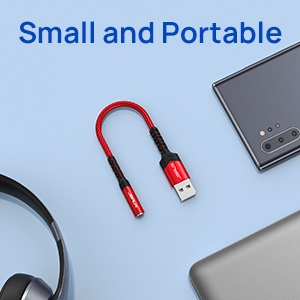
Figure 6: Small and Portable design.
6. Řešení problémů
- Žádný zvukový výstup:
- Ensure the adapter is firmly plugged into a working USB port.
- Verify that your 3.5mm audio device is correctly connected to the adapter.
- Check your device's sound settings (as described in Section 3.1) to ensure "USB Audio Device" is selected as the default output.
- Confirm your headset uses a TRRS 4-pole connector. TS or TRS microphones and headsets with separated headphone/microphone jacks are not supported.
- Mikrofon nefunguje:
- Ensure "USB Audio Device" is selected as the default input device in your sound settings.
- Confirm your microphone is a TRRS type. TS or TRS microphones are not supported.
- Note that microphone functionality for Apple EarPods with a 3.5mm plug is not supported.
- Problémy s kompatibilitou:
- If using with PS3, note that this adapter is not compatible.
- For PS4 Pro, ensure the adapter is plugged into a rear USB port.
- If connecting via a monitor's USB port, ensure the monitor is properly connected to the host computer.
7. Specifikace
| Funkce | Detail |
|---|---|
| Rozměry produktu | 11 x 0.15 x 0.15 palce |
| Hmotnost položky | 0.352 unce |
| Číslo modelu položky | JSAUX_xxxx |
| Značka | JSAUX |
| Hardwarové rozhraní | Headphone, USB |
| Režim zvukového výstupu | Stereo |
| Kompatibilní platformy | Android, Linux, Mac OS X, PlayStation 4, Windows 10 |
| DAC Sampsazba ling | 48KHz@16bit |
| THD | ≤ 0.006 % |
| Délka kabelu | 18cm (0.6FT) |
8. Záruka a podpora
For information regarding warranty coverage and customer support for your JSAUX USB to 3.5mm Jack Audio Adapter, please refer to the official JSAUX webnebo se obraťte přímo na jejich zákaznický servis. Konkrétní podrobnosti o záruce nejsou v této příručce uvedeny.