
1. Úvod
Děkuji za nákupasing the MOTPK 55-inch Gaming Desk. This desk is designed to provide a stable, durable, and ergonomic workspace for gaming, office tasks, and general computer use. It features a carbon fiber textured desktop, an integrated monitor stand, a convenient cup holder, and a headphone hook. Please read this manual carefully before assembly and use to ensure proper setup and long-lasting enjoyment of your new desk.
2. Bezpečnostní informace
- Stůl vždy sestavujte na měkkém a čistém povrchu, abyste zabránili poškrábání.
- Ensure all screws and bolts are tightened securely before use. Periodically check and re-tighten as necessary.
- Do not overload the desk or shelves beyond the recommended weight capacity.
- Během montáže udržujte malé části mimo dosah dětí.
- Avoid using power tools for assembly, as they may overtighten screws and damage the desk. Use the provided Allen wrench.
- Place the desk on a level surface to prevent wobbling. Use the adjustable feet to stabilize if needed.
3. Obsah balení
Před zahájením montáže ověřte, zda jsou všechny součásti přítomny. Pokud některé součásti chybí nebo jsou poškozené, kontaktujte zákaznickou podporu.
- Desktop panels (main desk, monitor stand)
- Ocelové rámové komponenty (nohy, podpěrné tyče)
- 2-tier side storage rack components
- Držák na pohár
- Háček na sluchátka
- Nastavitelné nožičky
- Montážní materiál (šrouby, matice, imbusový klíč)
- Návod k použití
4. Nastavení a montáž
Assembly is required for this product. We recommend two people for easier and safer assembly. Please follow the steps below:
- Připravte si pracovní prostor: Ukliďte si prostorný prostor a rozložte na něj deku nebo karton, abyste ochránili součásti stolu a podlahu.
- Sestavte hlavní rám: Attach the steel legs and support bars to form the main desk frame. Ensure all connections are finger-tightened first, then fully tighten with the Allen wrench once the frame is stable.
- Připojení panelů plochy: Carefully place the main desktop panel onto the assembled frame. Secure it using the provided screws.
- Assemble Side Storage Rack: Construct the 2-tier side storage rack according to the diagrams. Attach it to the main desk frame. This rack provides convenient storage for your PC tower, books, or other accessories.
- Instalace stojanu na monitor: Position the monitor stand on the main desktop. It can be secured with screws or left unfastened for mobility, allowing you to adjust its position as needed to maximize your workspace.
- Připojit příslušenství: Install the cup holder and headphone hook to your preferred locations on the desk frame. These are designed to be easily movable for optimal convenience.
- Nastavení vyrovnávacích nožiček: Once the desk is fully assembled and in its desired location, adjust the leveling feet at the bottom of the legs to ensure stability and prevent wobbling on uneven floors.

Figure 1: Desk Dimensions (55 inches wide, 24 inches deep, 29.9 inches high)

Figure 2: Sturdy Metal Frame Construction
5. Návod k obsluze
Your MOTPK Gaming Desk is designed for versatility and convenience. Here's how to make the most of its features:
- Stojan na monitor: Use the integrated monitor stand to elevate your screen to an ergonomic height, reducing neck and eye strain. The space beneath can be used for soundbars, game consoles, or other peripherals.
- Držák poháru: The movable cup holder can be attached to either side of the desk, keeping your beverages secure and preventing spills on your equipment.
- Háček na sluchátka: The headphone hook provides a convenient storage solution for your headset, keeping it off the desktop and easily accessible.
- Side Storage Rack: Utilize the two-tier side rack for your PC tower, books, or other items, helping to keep your main desktop clear and organized.
- Správa kabelů: The desk design allows for easy cable routing to maintain a tidy setup.
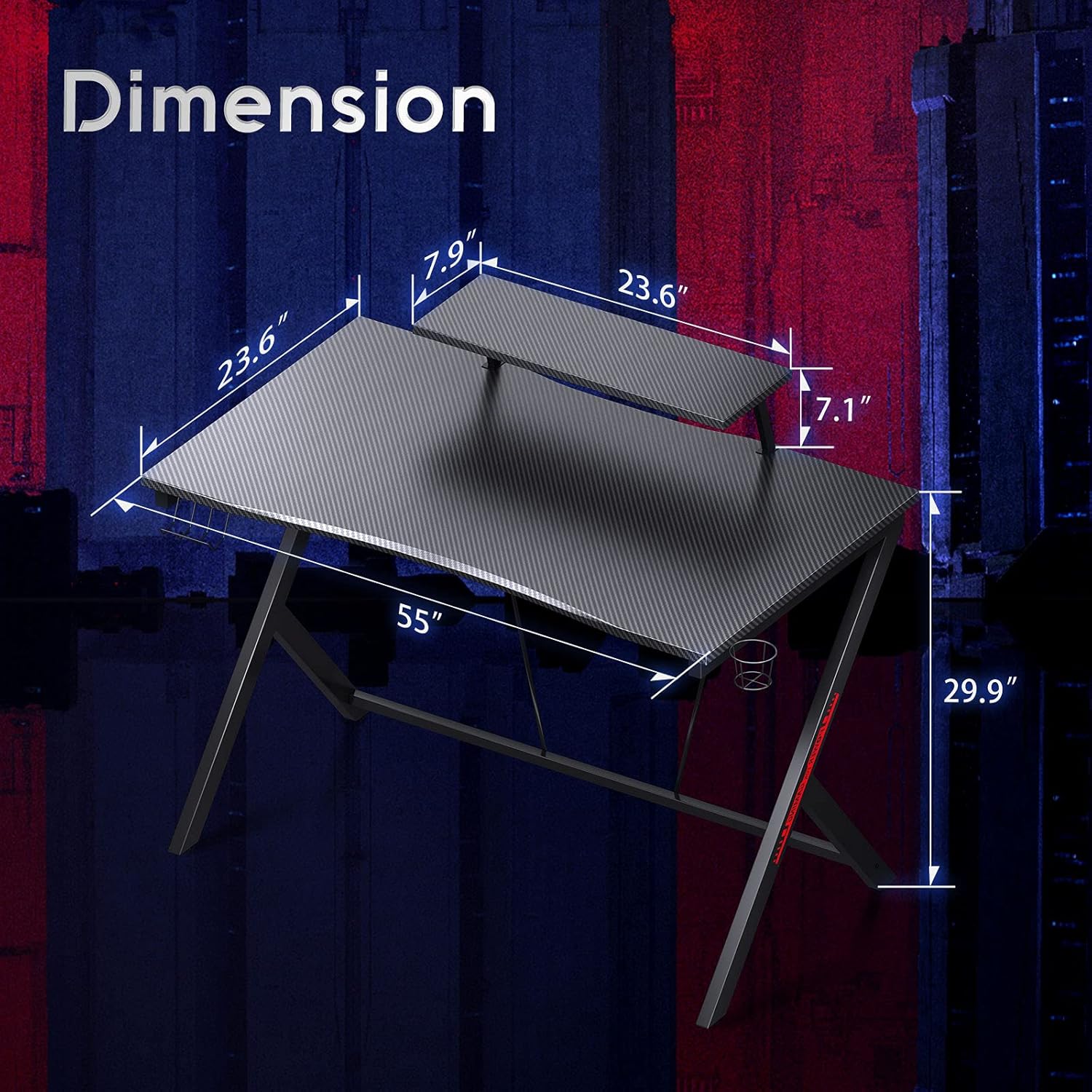
Figure 3: Key Features - Cup Holder, Headphone Hook, Monitor Stand, and Adjustable Feet

Figure 4: Large Desktop Space for an Ergonomic Setup
6. Údržba
To keep your MOTPK Gaming Desk in excellent condition, follow these simple maintenance guidelines:
- Čištění: Wipe the carbon fiber textured desktop and steel frame with a soft, damp hadříkem. Nepoužívejte abrazivní čisticí prostředky ani agresivní chemikálie, které by mohly poškodit povrchovou úpravu.
- Rozlití: Immediately wipe up any spills to prevent staining or damage to the desktop material.
- Železářské zboží: Pravidelně kontrolujte všechny šrouby a vruty, zda jsou pevně utažené. V případě potřeby je dotáhněte pro zachování stability.
- Vyhněte se přímému slunečnímu záření: Prolonged exposure to direct sunlight may cause fading or damage to the desktop finish.
7. Řešení problémů
Pokud narazíte na nějaké problémy se stolem, podívejte se na následující běžná řešení:
- kolísání: Ensure the desk is on a level surface. Adjust the leveling feet at the bottom of each leg until the desk is stable. Check that all assembly screws are securely tightened.
- Chybějící části: If any parts were missing upon arrival, please contact customer support immediately for assistance.
- Obtížnost sestavení: Review the assembly instructions carefully. Ensure all components are oriented correctly. Do not force parts together. If issues persist, contact customer support.
8. Specifikace
| Funkce | Detail |
|---|---|
| Značka | MOTPK |
| Číslo modelu | MKB0101940JP-1 |
| Rozměry (Š x H x V) | 140 cm x 60 cm x 76 cm (55 palce x 24 palce x 29.9 palce) |
| Barva | Černý |
| Materiál pro stolní počítače | Engineered Wood with Carbon Fiber Texture |
| Materiál rámu | Legovaná ocel |
| Hmotnostní kapacita | Přibl. 30 kg (66 lb) |
| Speciální funkce | Integrated Monitor Stand, Cup Holder, Headphone Hook, 2-Tier Side Storage Rack, Adjustable Feet |
| Montáž Vyžadována | Ano (doporučeno 2 osoby) |
9. Záruka a podpora
MOTPK is committed to customer satisfaction. If you experience any issues with the product's quality or during its use, please do not hesitate to contact our customer service team. We offer prompt assistance and guarantee easy and quick exchanges for eligible concerns.
For support, please refer to the contact information provided with your purchase or visit the official MOTPK store on Amazon: MOTPK Amazon Store