
1. Úvod a konecview
This manual provides detailed instructions for the setup, operation, and maintenance of your Crosley Momento Vintage Bluetooth 3-Speed Suitcase Turntable, Model CR8018A-MN. The Momento turntable features a unique two-tone asymmetrical design, built-in stereo speakers, and supports three playback speeds for vinyl records. It also includes Bluetooth connectivity for wireless audio streaming, RCA outputs for external speakers, and a headphone jack for private listening.
Mezi klíčové vlastnosti patří:
- Portable belt-driven turntable plays 3 speeds: 33 1/3, 45, and 78 RPM records.
- Built-in Bluetooth receiver for wireless music streaming to the turntable's dynamic full-range speakers.
- Pre-mounted moving magnet cartridge and NP6 needle.
- RCA output for connecting to an existing stereo system or external speakers.
- Konektor pro sluchátka pro soukromý poslech.
2. Co je v krabici
Pečlivě vybalte všechny komponenty a ujistěte se, že jsou přítomny následující položky:
- Crosley Momento Turntable
- Uživatelská příručka (tento dokument)
- Napájecí adaptér
- Adaptér 45 RPM
- Záruční list
3. Nastavení
Follow these steps to set up your Crosley Momento turntable:
- Umístěte otočný talíř na rovný a stabilní povrch.
- Otevřete víko otočného talíře.
- Connect the power adapter to the DC IN jack on the back of the turntable and then to a wall outlet.
- Remove the protective stylus guard from the needle.
- If playing 45 RPM records, place the included 45 RPM adapter over the spindle.

Image: A person carefully placing a vinyl record onto the turntable platter, demonstrating the initial setup for playback.
4. Návod k obsluze
4.1 Přehrávání desek
- Umístěte desku na talíř gramofonu.
- Select the appropriate speed (33 1/3, 45, or 78 RPM) using the speed selector switch located on the turntable's control panel.
- Move the tonearm to the desired position over the record. The turntable will begin to spin.
- Gently lower the tonearm onto the record using the cueing lever.
- Nastavte hlasitost pomocí knoflíku Volume.
- Use the Pitch Control knob to fine-tune the playback speed if necessary.

Obrázek: Pohled shora dolů view of the turntable's control panel, highlighting the platter, tonearm, speed selector, volume, and pitch control for record playback.
4.2 Provoz Bluetooth
The turntable features a built-in Bluetooth receiver, allowing you to stream audio wirelessly from a compatible device through its speakers.
- Switch the function selector to the Bluetooth position. The Bluetooth indicator light will begin to flash.
- Enable Bluetooth on your external device (e.g., smartphone, tablet) and search for 'Crosley Momento'.
- Select 'Crosley Momento' to pair. Once paired, the indicator light will stop flashing and remain solid.
- You can now stream audio from your device to the turntable.
4.3 Externí připojení
The Crosley Momento offers several options for connecting to other audio equipment:
- RCA výstup: Use the RCA output jacks on the back of the unit to connect to an external amplifier or powered speakers. Ensure correct left (white) and right (red) channel connections.
- Sluchátkový jack: For private listening, plug standard 3.5mm headphones into the headphone jack on the control panel.
- Pomocný vstup: Connect an external audio source (e.g., MP3 player) to the AUX IN jack using a 3.5mm audio cable.
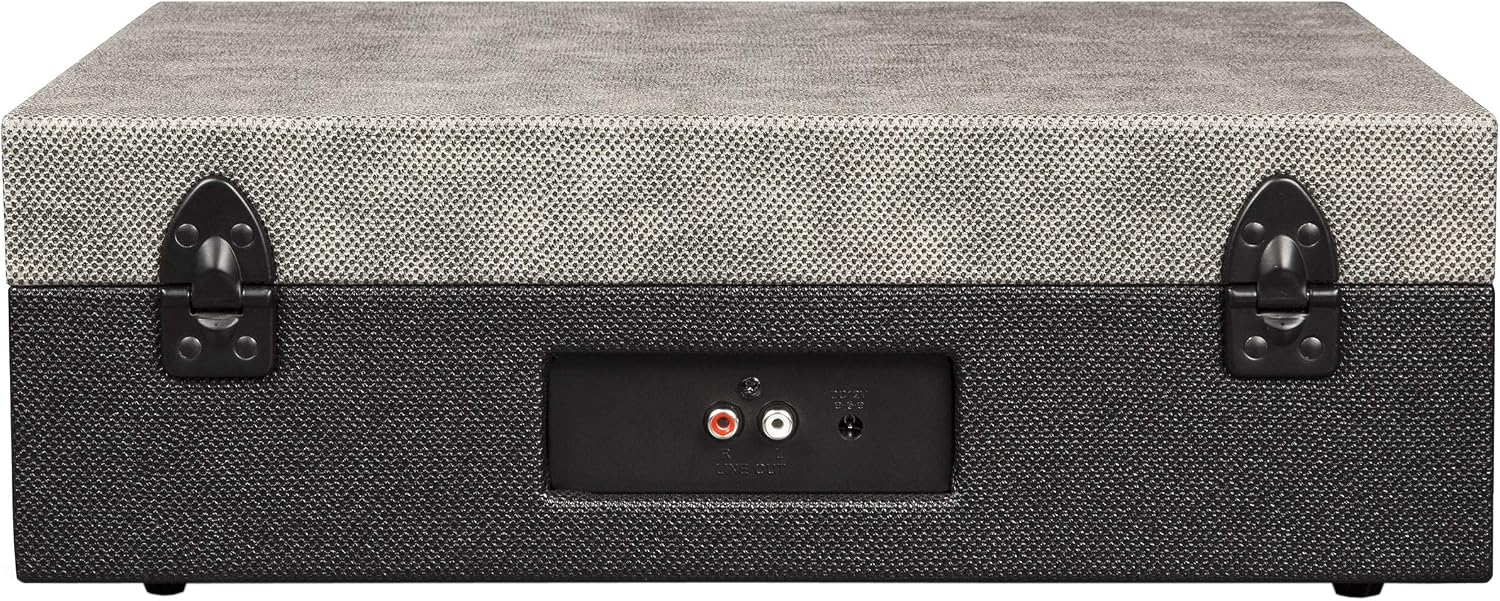
Image: The rear panel of the turntable, illustrating the RCA output ports for connecting to external audio systems.
Video: This video demonstrates the key features and operational steps of the Crosley Momento turntable, including record playback, Bluetooth pairing, and connecting external devices via RCA and headphone jacks.
5. Údržba
Proper maintenance ensures the longevity and optimal performance of your turntable:
- Čištění stylusu: Gently clean the stylus regularly with a soft brush designed for turntable styli. Brush from back to front.
- Čištění gramofonu: Wipe the surface of the turntable with a soft, dry cloth. Avoid using harsh chemicals or abrasive cleaners.
- Péče o záznamy: Udržujte své desky čisté a ukládejte je svisle v obalech, abyste zabránili hromadění prachu a deformaci.
- Péče o víko: Keep the lid closed when not in use to protect the platter and tonearm from dust.
6. Řešení problémů
Pokud narazíte na problémy s gramofonem, podívejte se na následující běžné problémy a jejich řešení:
| Problém | Možná příčina | Řešení |
|---|---|---|
| Žádná síla | Napájecí adaptér není připojen nebo zásuvka nefunguje. | Ensure the power adapter is securely connected to the turntable and a working wall outlet. |
| Žádný zvuk | Volume too low, function selector incorrect, or external speakers not connected properly. | Increase volume. Ensure function selector is set to PHONO for records or Bluetooth for streaming. Check RCA connections if using external speakers. |
| Přeskakování záznamu | Dirty record, damaged stylus, or unstable surface. | Clean the record. Inspect the stylus for damage and replace if necessary. Place the turntable on a stable, level surface. |
| Bluetooth není párování | Turntable not in pairing mode or device too far. | Ensure the function selector is set to Bluetooth and the indicator is flashing. Move your device closer to the turntable. |
7. Specifikace
- Značka: Crosley
- Název modelu: CR8018A-MN
- Technologie připojení: Bluetooth
- Zdroj napájení: Elektrický kabel
- Materiál: Hliník
- Hmotnost položky: 7 libry
- Rychlosti přehrávání: 33 1/3, 45, 78 ot./min
- Speciální funkce: Přenosný
- Zahrnuté komponenty: Crosley Momento, User Manual, Power Adapter, 45 RPM Adapter, Warranty Card
8. Záruka a podpora
Your Crosley Momento Vintage Bluetooth 3-Speed Suitcase Turntable is covered by a One Year Limited Manufacturer's Warranty. Please refer to the included Warranty Card for full details regarding coverage and terms.
For technical support, troubleshooting assistance beyond this manual, or warranty claims, please contact Crosley customer service. Contact information can typically be found on the manufacturer's webna webu nebo na záručním listu.